
advwin nail table 1600
Manicure Table User Manual
Model: nail table 1600 | Brand: advwin
1. Introduction
Thank you for choosing the advwin Manicure Table. This all-in-one station is designed to enhance your nail studio with its spacious layout, integrated LED display cabinet, and efficient dust collector. This manual provides essential information for assembly, operation, maintenance, and troubleshooting to ensure you get the most out of your new manicure table.
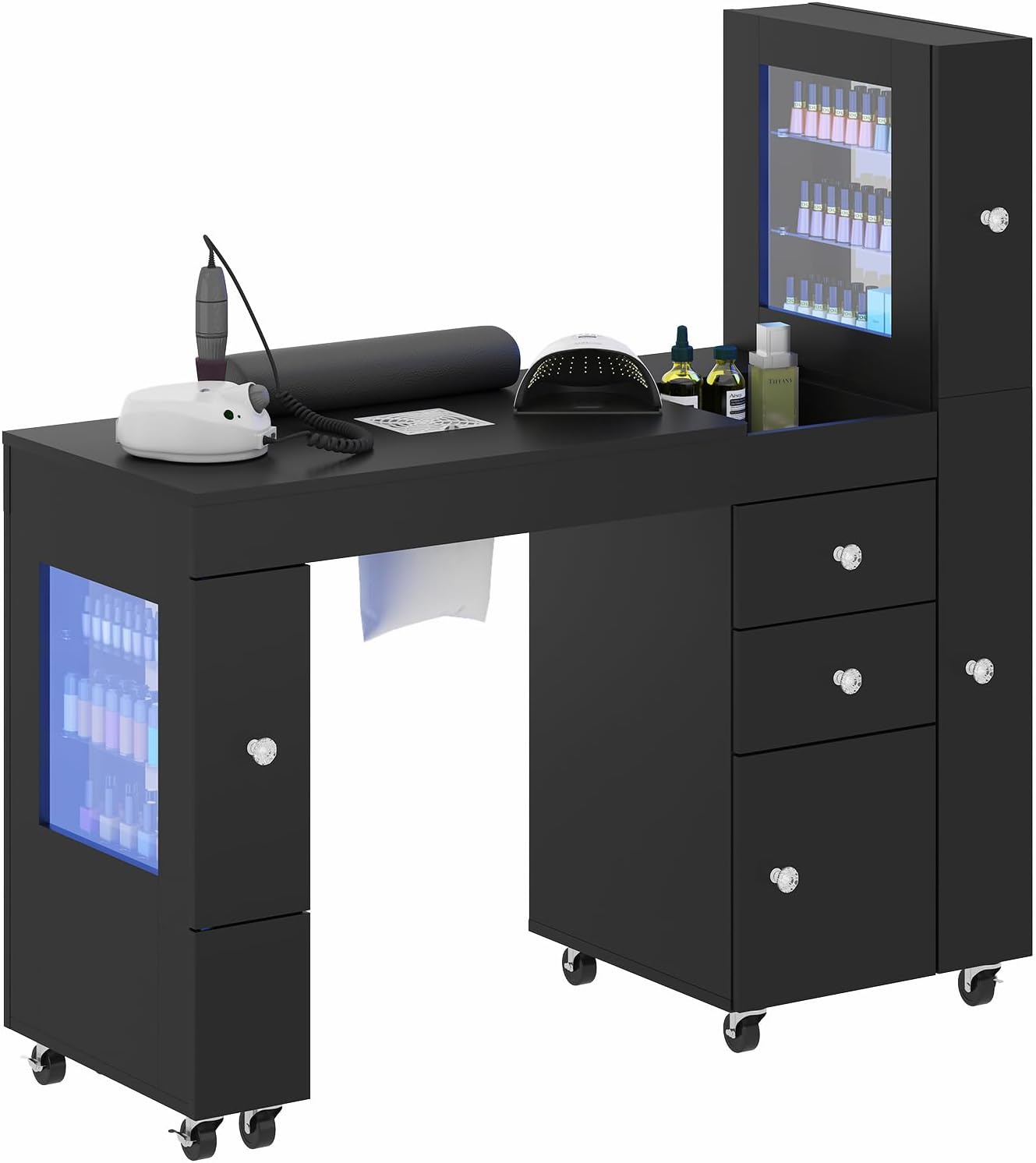
Figure 1: Advwin Manicure Table - Front View
This image shows the complete advwin Manicure Table from the front, highlighting its sleek black design, the illuminated LED display cabinet, and the overall spacious work surface. It provides a visual reference for the assembled product.
2. Safety Information
Please read all safety instructions carefully before assembly and use. Keep this manual for future reference.
- Always assemble the table on a clean, flat, and soft surface to prevent scratches.
- It is recommended that two people assemble this product for safety and ease.
- Ensure all screws and fasteners are securely tightened before use. Do not overtighten.
- Keep electrical components (LED lights, dust collector) away from water and other liquids.
- Unplug the unit from the power source before cleaning or performing any maintenance.
- Do not allow children to climb on or play with the table.
- Use only the provided or recommended power adapters for electrical components.
3. Package Contents
Before beginning assembly, please verify that all parts listed below are present and undamaged:
- Manicure Table Components (MDF panels, hardware)
- Wrist Rest (1)
- Built-in Dust Collector Unit (1)
- Reusable Dust Bags (4)
- LED Light Strips (for display cabinet)
- Caster Wheels (8, lockable)
- Drawers and Cabinet Doors (pre-assembled or requiring assembly)
- Assembly Hardware (screws, dowels, cam locks, etc.)
- Assembly Tools (basic wrench/screwdriver, if included)
4. Assembly Instructions
Follow these steps carefully to assemble your manicure table. Refer to the included assembly diagram for visual guidance.
- Unpack and Identify: Lay out all components on a soft, clean surface. Identify each part using the provided parts list and diagrams.
- Attach Caster Wheels: Securely attach the 8 lockable caster wheels to the bottom panels of the table's base units using the provided screws. Ensure they are firmly attached.
- Assemble Main Table Frame: Connect the main tabletop panel to the side support panels using the designated hardware (e.g., cam locks and dowels). Follow the numerical sequence in the assembly diagram.
- Install Drawers and Cabinet Doors: Assemble the drawers according to the instructions and slide them into their respective runners. Attach cabinet doors to their hinges and secure them to the table frame.
- Mount LED Display Cabinet: Attach the LED display cabinet to the designated side of the table. Ensure all connections are secure.
- Install LED Light Strips: Adhere the LED light strips inside the display cabinet as indicated in the diagram. Connect the wiring to the power source.
- Integrate Dust Collector: Insert the dust collector unit into its designated opening on the tabletop. Ensure it fits snugly and is properly aligned.
- Final Touches: Place the cushioned wrist rest on the tabletop. Check all connections and ensure the table is stable.

Figure 2: Manicure Table Dimensions and Component Layout
This diagram provides detailed measurements for each section of the manicure table, including the main work surface, the LED display cabinet, and the various storage compartments. It is useful for understanding the spatial arrangement during assembly and setup.
5. Setup
Once assembled, follow these steps for initial setup:
- Placement: Choose a flat, stable surface for your manicure table. Ensure there is sufficient space around it for comfortable use and access to all compartments.
- Locking Wheels: Engage the locks on all 8 caster wheels to prevent the table from moving during use. To move the table, disengage the locks.
- Power Connection: Plug the power cord for the LED lights and dust collector into a suitable electrical outlet.
6. Operating Instructions
6.1. LED Display Cabinet
The LED display cabinet allows you to showcase nail designs or polish collections with customizable lighting.
- Power On/Off: Use the designated switch or remote control (if included) to turn the LED lights on or off.
- App Control: Download the specified mobile application (refer to packaging or a separate QR code for app details) to control the LED light colors, brightness, and modes. Follow the app's instructions for pairing and operation.
6.2. Dust Collector
The built-in dust collector helps maintain a clean and healthy workspace by capturing nail dust.
- Operation: The dust collector features one-touch operation. Press the power button to turn it on, and press again to turn it off.
- Dust Bags: Ensure one of the reusable dust bags is properly installed inside the collector unit before operation. The bags collect the dust and should be emptied regularly.
6.3. Storage and Wrist Rest
Utilize the multiple drawers, cabinets, and open shelving for organizing your tools, polishes, and supplies. The cushioned wrist rest provides comfort for clients during longer sessions; simply place it on the main work surface as needed.

Figure 3: Manicure Table with Open Storage and Wrist Rest
This image provides an angled view of the manicure table, showcasing the practical open shelving on the left side, ideal for storing bags or larger items. It also highlights the main work area with the comfortable wrist rest and the illuminated LED display cabinet.
7. Maintenance
- Cleaning the Surface: The table surface is acetone-resistant. Wipe spills immediately with a soft cloth. For general cleaning, use a damp cloth and mild detergent. Avoid abrasive cleaners.
- Dust Collector Bags: Regularly check and empty the reusable dust bags. A full bag will reduce suction efficiency. Wash the bags as needed and ensure they are completely dry before reinserting.
- Caster Wheels: Periodically check the wheels for any hair or debris that might hinder their movement. Clean as necessary.
- Hardware: Occasionally check all screws and fasteners to ensure they remain tight. Retighten if necessary.
8. Troubleshooting
- LED Lights Not Working:
- Check if the power cord is securely plugged into the outlet and the table.
- Ensure the power switch for the LED lights is in the 'ON' position.
- If using the app, ensure your device is properly paired and the app is functioning correctly.
- Dust Collector Has Weak Suction or Not Working:
- Verify the power cord is connected.
- Check if the dust bag is full and needs emptying or cleaning.
- Ensure the dust collector unit is properly seated in its opening.
- Check for any obstructions in the suction area.
- Drawers or Cabinets Sticking:
- Ensure the drawer slides are clean and free of debris.
- Check if the drawers or doors are properly aligned on their runners/hinges.
- Do not overload drawers, as this can cause sticking.
- Table is Unstable/Wobbly:
- Ensure all assembly hardware (screws, cam locks) are fully tightened.
- Verify that all 8 caster wheels are locked when the table is in a stationary position.
- Ensure the table is placed on a flat, even surface.
9. Specifications
| Feature | Detail |
|---|---|
| Model Name | nail table 1600 |
| Brand | advwin |
| Dimensions (L x W x H) | 47.24" L x 17.72" W x 30.31" H |
| Color | Black |
| Materials | MDF board with acetone-resistant finish |
| Item Weight | 67.6 Pounds |
| Included Components | Nail table, wrist rest, dust collector, 4 dust bags, LED light strips (app-controlled), drawers & cabinets, caster wheels |
| Assembly Required | Yes |
10. Warranty and Support
For warranty information and customer support, please refer to the documentation provided with your purchase or visit the official advwin website. If you encounter any issues not covered in this manual, please contact advwin customer service for assistance.
You can often find support contact details on the product's packaging or the retailer's website where you purchased the item.
Related documentsnail table 1600

Ask a question about this manual
Ask about setup, troubleshooting, compatibility, parts, safety, or missing instructions. Manuals+ will review the question and use this page’s manual context to help answer it.