Introduction
Thank you for choosing the Vexilar Original Battery for your V12 Cordless Vacuum Cleaner. This manual provides essential information for the safe and efficient use, installation, charging, and maintenance of your battery. Please read these instructions carefully before use and retain them for future reference.
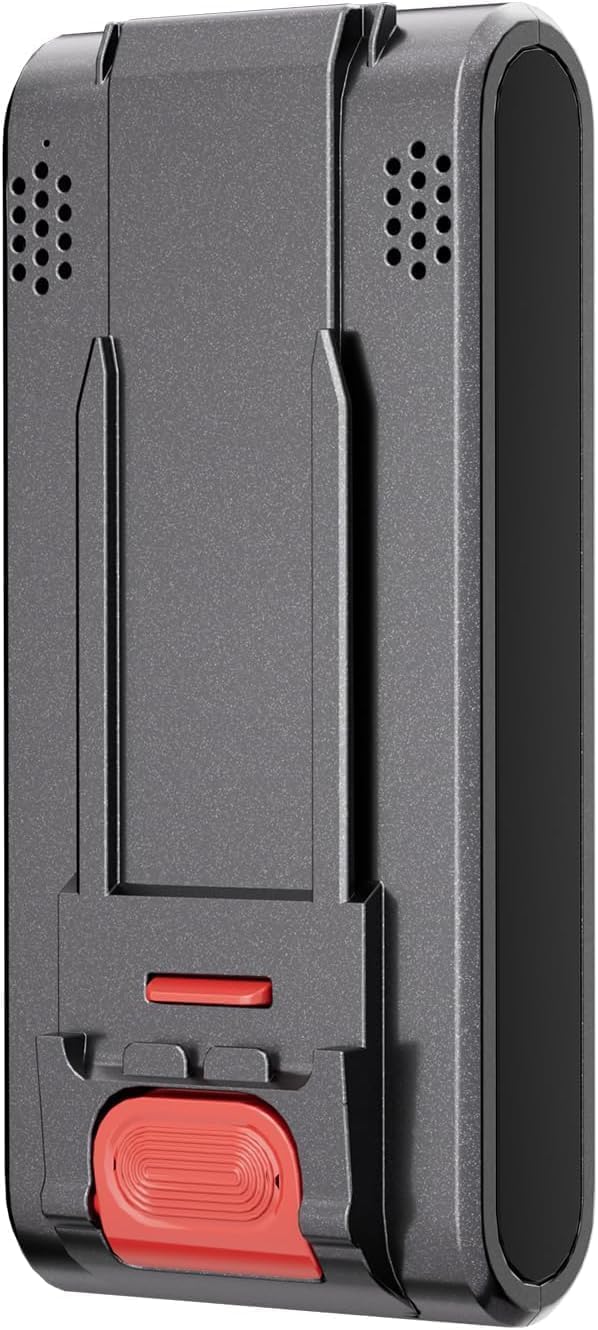
Image: The Vexilar V12 Original Battery, a black rectangular unit with connection points.
Safety Information
Always follow basic safety precautions when using electrical appliances to reduce the risk of fire, electric shock, or injury.
- Use only the original Vexilar charger designed for the V12 vacuum cleaner to charge this battery.
- Do not disassemble, modify, or attempt to repair the battery pack.
- Do not expose the battery to water, moisture, or extreme temperatures (above 45°C or below 0°C).
- Keep the battery away from children and pets.
- If the battery is damaged, leaking, or overheating, discontinue use immediately and dispose of it properly according to local regulations.
- Avoid short-circuiting the battery terminals.
Setup and Installation
This battery pack is exclusively compatible with Vexilar V12 cordless vacuum cleaners.
Installing the Battery
- Ensure the Vexilar V12 vacuum cleaner is turned off and unplugged from any power source.
- Locate the battery compartment on your Vexilar V12 vacuum cleaner. Refer to your vacuum cleaner's manual for specific instructions on accessing the battery compartment.
- Align the battery pack with the compartment, ensuring the connectors match.
- Gently push the battery into place until it clicks securely. Do not force the battery.
- Close the battery compartment cover, if applicable.

Image: A person operating a Vexilar V12 stick vacuum cleaner on a wooden floor, demonstrating its use.
Operating: Charging the Battery
To ensure optimal performance and longevity of your Vexilar V12 battery, follow these charging instructions.
Charging Process
- Connect the Vexilar V12 vacuum cleaner (with the battery installed) to its original charging adapter.
- Plug the charging adapter into a standard wall outlet.
- The charging indicator on your vacuum cleaner will illuminate, indicating that charging has begun. Refer to your vacuum cleaner's manual for specific indicator light patterns.
- A full charge takes approximately 5 hours.
- Once fully charged, the indicator light will change (e.g., turn solid green or turn off). Unplug the charger from the wall outlet and the vacuum cleaner.
A fully charged battery provides up to 60 minutes of cordless cleaning time, depending on the power mode used.

Image: A woman connecting the charging cable to a Vexilar V12 stick vacuum cleaner, preparing it for charging.
Maintenance and Storage
Proper maintenance and storage will extend the life of your Vexilar V12 battery.
- Regular Charging: For optimal battery health, avoid completely draining the battery before recharging. Recharge it after each use or when the power level is low.
- Storage: If storing the battery for an extended period, charge it to approximately 50-60% and store it in a cool, dry place away from direct sunlight and extreme temperatures. Recharge every 3-6 months to prevent deep discharge.
- Cleaning: Keep the battery terminals clean and free of dust or debris. Use a dry cloth to wipe them if necessary.
- Replacement: The battery is designed to be removable and rechargeable. If you notice a significant decrease in run time or charging capacity, consider replacing the battery with another original Vexilar V12 battery pack.
Troubleshooting
If you encounter issues with your Vexilar V12 battery, refer to the following common troubleshooting steps.
- Battery Not Charging:
- Ensure the charger is properly connected to both the vacuum and the wall outlet.
- Verify that the wall outlet is functional.
- Check for any visible damage to the charger cable or battery.
- Ensure the battery is correctly installed in the vacuum cleaner.
- Short Run Time:
- Ensure the battery is fully charged (approximately 5 hours).
- Battery capacity naturally degrades over time. If the run time has significantly decreased after many charge cycles, the battery may need replacement.
- Operating the vacuum in high-power modes will reduce the overall run time.
- Battery Overheating:
- Stop using the vacuum and disconnect the charger immediately.
- Allow the battery to cool down in a well-ventilated area.
- If overheating persists, discontinue use and contact Vexilar customer support.
Specifications
| Brand | Vexilar |
| Model Number | V12 |
| Battery Composition | Lithium-ion |
| Battery Capacity | 2200 mAh |
| Color | Black |
| Recommended Use | Vacuum Cleaner |
| Reusability | Rechargeable |
| Approximate Charging Time | 5 hours |
| Approximate Run Time | Up to 60 minutes |
| Dimensions (L x W x H) | 17.8 x 8 x 4.3 cm |
Warranty and Support
Information regarding specific warranty terms for the Vexilar V12 Original Battery is not provided in the product details. For warranty claims or technical support, please refer to the documentation included with your Vexilar V12 vacuum cleaner or contact Vexilar customer service directly.
Spare parts availability information is also not available in the provided product details.

Image: The Vexilar brand logo, a stylized text logo.


