1. Introduction
This manual provides essential instructions for the safe and efficient operation of your Global Industrial LED Sign Projector, Model 641651. This 100-watt projector is designed for displaying safety and warning signs in industrial environments such as warehouses. It offers clear projection in various lighting conditions and can be mounted on ceilings or walls for stationary or rotational display.
2. Safety Information
WARNING: Read all safety instructions before installation and operation.
- This projector is designed for indoor use in high-traffic areas or damp environments. It is not suitable for outdoor use.
- Ensure the power supply is disconnected before any installation, maintenance, or cleaning procedures.
- Do not look directly into the projector lens when the unit is powered on, as this may cause eye damage.
- Keep the projector away from flammable materials.
- Ensure proper ventilation to prevent overheating. The unit features air cooling technology.
- Only use the provided power cord and accessories.
- Installation should be performed by qualified personnel if electrical wiring is involved.
3. Package Contents
Verify that all items listed below are included in your package:
- LED Sign Projector unit
- Remote control
- 5-foot power cord
- Expansion screws for mounting
- Assembly Guide (this manual)

Image 3.1: Global Industrial LED Sign Projector with its power supply unit and connecting cables.
4. Setup
4.1 Mounting the Projector
The projector can be easily mounted to ceilings or walls using the provided expansion screws. Choose a location that allows for optimal projection distance and visibility, considering the desired projection size.
- Identify a suitable mounting surface (ceiling or wall) that can support the projector's weight.
- Use the projector's mounting bracket as a template to mark drilling points.
- Drill pilot holes and insert the expansion screws.
- Securely attach the projector's mounting bracket to the surface.
- Adjust the angle of the projector using the adjustable knob on the bracket to achieve the desired projection direction.

Image 4.1: The LED Sign Projector shown mounted on its adjustable stand.
4.2 Power Connection
Connect the 5-foot power cord to the projector and then to a standard electrical outlet. Ensure the connection is secure.
5. Operating Instructions
5.1 Powering On/Off
Use the remote control to power the projector on or off. Point the remote control directly at the projector's receiver.
5.2 Adjusting Focus
Rotate the lens ring on the front of the projector to adjust the focus of the projected image until it appears clear and sharp.

Image 5.1: Close-up of the projector's adjustable lens for focusing the image.
5.3 Projection Modes (Stationary/Rotational)
The projector offers options for both stationary and rotational projection. Refer to the remote control's instructions for switching between these modes and adjusting rotation speed, if applicable.
5.4 Projection Distance and Brightness
The projector can brightly display signs up to 82 feet in dark areas and up to 40 feet in brighter areas. Optimal clarity and brightness depend on ambient light conditions and projection surface.
6. Maintenance
6.1 Cleaning
Ensure the projector is powered off and unplugged before cleaning.
- Wipe the exterior of the projector with a soft, dry cloth.
- For the lens, use a lens cleaning cloth and a specialized lens cleaning solution to avoid scratches.
- Do not use abrasive cleaners or solvents.
6.2 Ventilation
The projector utilizes air cooling technology to prevent overheating. Ensure that the ventilation fins at the rear of the unit are not obstructed. Regularly check for dust buildup and gently clean with compressed air if necessary.

Image 6.1: Rear view of the projector highlighting the cooling fins for heat dissipation.
7. Troubleshooting
If you encounter issues with your projector, refer to the following common problems and solutions:
| Problem | Possible Cause | Solution |
|---|---|---|
| Projector does not power on. | No power supply; remote control battery low. | Check power cord connection; ensure outlet is functional. Replace remote control batteries. |
| Image is blurry. | Focus not adjusted; lens dirty. | Rotate the lens ring to adjust focus. Clean the lens as per maintenance instructions. |
| Image is dim or unclear. | Too much ambient light; projector too far from surface. | Reduce ambient light if possible. Move projector closer to the projection surface (within 82 ft in dark, 40 ft in bright areas). |
| Projector overheats. | Obstructed ventilation. | Ensure ventilation fins are clear of obstructions. Clean dust from fins. |
8. Specifications
| Feature | Detail |
|---|---|
| Model Number | 641651 |
| Brand | Global Industrial |
| Power | 100 Watt |
| Color | Black |
| Item Weight | 4.18 Pounds (1.9 kg) |
| Product Dimensions (L x W x H) | 9.44" x 5.13" x 7.88" (23.98 cm x 13.03 cm x 20.02 cm) |
| Style | Industrial |
| UPC | 707022514460 |
| Projection Distance (Dark Areas) | Up to 82 feet |
| Projection Distance (Brighter Areas) | Up to 40 feet |
| Cooling Technology | Air cooling |
| Material | Heavy-duty aluminum |
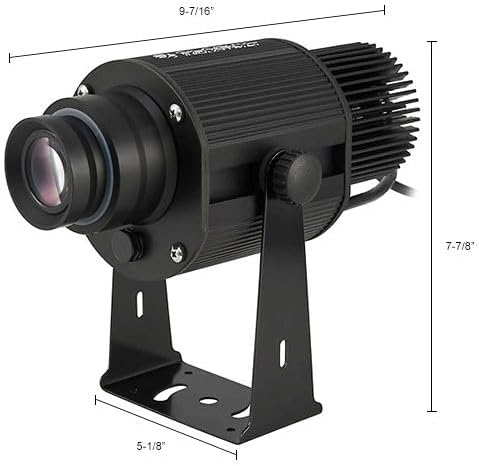
Image 8.1: Dimensional drawing of the LED Sign Projector.
9. Warranty Information
Global Industrial products are manufactured to high-quality standards. For specific warranty terms and conditions, please refer to the warranty card included with your product or visit the official Global Industrial website. Keep your purchase receipt as proof of purchase for any warranty claims.
10. Support
If you require further assistance or have questions not covered in this manual, please contact Global Industrial customer support. You can find contact information on the Global Industrial website or through your purchase documentation.
For more information, visit the Global Industrial Store.