
Introduction
The Zildjian FX Stack is a modular cymbal system designed to expand the sonic capabilities of any drum kit or percussion setup. This 12-inch model consists of multiple cymbals and a specialized mount, allowing for a wide range of sound articulations from bright and splashy to raw and cutting. This manual provides essential information for the proper setup, operation, and care of your FX Stack.
What's in the Box
Please verify that all components are present before proceeding with setup.
- Zildjian FX Stack Cymbals (multiple pieces)
- Zildjian Cymbolt mount

Image: All components of the Zildjian FX Stack, including the cymbals and the Cymbolt mount.
Setup Instructions
Follow these steps to properly set up your Zildjian FX Stack.
- Prepare your cymbal stand: Ensure your cymbal stand is stable and positioned correctly for your drumming setup.
- Attach the Cymbolt mount: The Zildjian Cymbolt mount is designed for easy attachment to most standard cymbal stands. Secure it firmly.
- Stack the cymbals: The FX Stack consists of multiple cymbals. These can be stacked in any desired order to achieve different sonic characteristics. Experiment with various configurations.
- Secure the stack: Place the stacked cymbals onto the Cymbolt mount. Use the quick-release function of the Cymbolt to adjust tension.
- Adjust tension for articulation: The Cymbolt mount allows for quick and easy tension adjustments. Tighter tension will result in a shorter, more cutting sound, while looser tension will produce a brighter, more splashy wash.

Image: An assembled Zildjian FX Stack, demonstrating how the cymbals are mounted and secured.
Operating Instructions
The Zildjian FX Stack is designed for creative sound exploration. Here are guidelines for optimal use:
- Experiment with stacking order: Different arrangements of the cymbals will yield unique sounds.
- Adjust Cymbolt tension: Fine-tune the tension of the Cymbolt mount to achieve your desired articulation, from a bright wash to a raw, quick, and cutting sound.
- Combine with other cymbals: The modular design allows for integration with other non-Stack cymbal models, such as splashes, chinas, or EFX cymbals, for expanded sonic possibilities.
- Playing techniques: Use various stick types and playing areas on the cymbals to further diversify the sound.
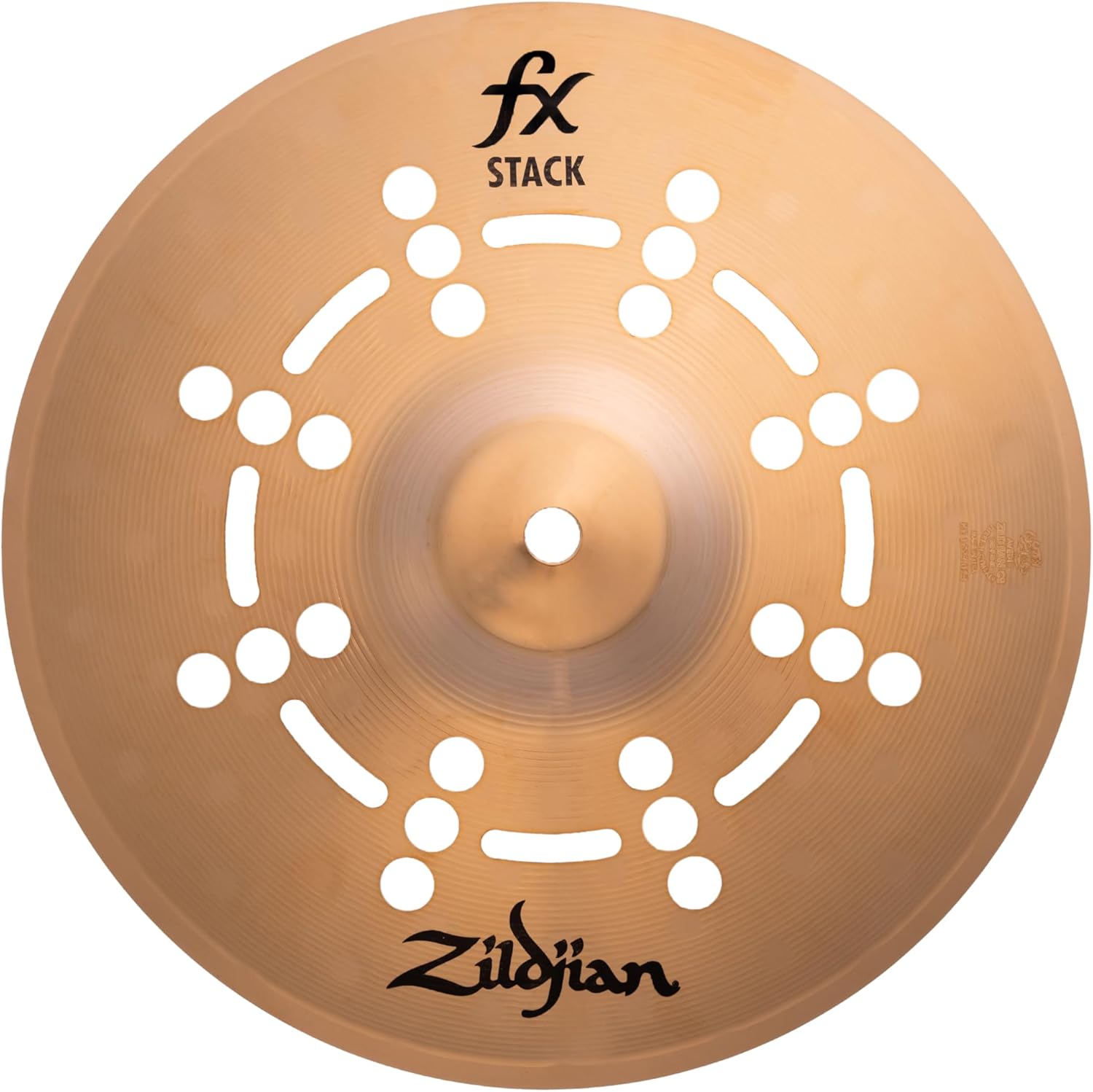
Image: A single Zildjian FX Stack cymbal, showcasing its unique perforated design which contributes to its distinct sound.
Maintenance
Proper maintenance will ensure the longevity and optimal performance of your Zildjian FX Stack.
- Cleaning: Wipe cymbals with a soft, dry cloth after each use to remove fingerprints and dust. For deeper cleaning, use a specialized cymbal cleaner designed for bronze cymbals, following the product's instructions carefully. Avoid abrasive cleaners.
- Storage: Store cymbals in a cymbal bag or case when not in use to protect them from scratches, dents, and environmental factors.
- Inspection: Periodically inspect the cymbals and the Cymbolt mount for any signs of wear, cracks, or damage. Ensure all parts of the Cymbolt mount are functioning correctly.
- Handling: Always handle cymbals by the edges to avoid leaving fingerprints on the playing surface and to prevent accidental damage.
Troubleshooting
This section addresses common issues you might encounter with your Zildjian FX Stack.
| Problem | Possible Cause | Solution |
|---|---|---|
| Sound is too short/dry. | Cymbolt tension is too tight. | Loosen the Cymbolt mount to allow more cymbal movement and sustain. |
| Sound is too bright/washy. | Cymbolt tension is too loose. | Tighten the Cymbolt mount to reduce cymbal movement and shorten sustain. |
| Cymbals rattle or move excessively. | Improper stacking or loose Cymbolt. | Ensure cymbals are stacked evenly. Tighten the Cymbolt mount as needed. Check for any foreign objects between cymbals. |
| Unwanted overtones. | Cymbal stacking order or tension. | Experiment with different stacking orders. Adjust Cymbolt tension. Consider adding a small piece of felt between cymbals if necessary. |
Specifications
- Model Name: FX Stack
- Model Number: FXSTK12
- Size: 12 Inch
- Material: Bronze (Zildjian I Series Bronze)
- Color: Metallic Silver
- Item Dimensions (L x W x H): 12 x 12 x 2 inches
- Item Weight: 1.4 Pounds
- Included Components: Zildjian Cymbolt mount
- Manufacturer: Zildjian
- UPC: 642388332368
Warranty and Support
The Zildjian FX Stack (Model FXSTK12) comes with a 2-year warranty from the date of purchase, covering manufacturing defects. This warranty does not cover damage resulting from misuse, abuse, accident, modification, or normal wear and tear.
For warranty claims, technical support, or further assistance, please contact Zildjian customer service through their official website or authorized dealers. Keep your proof of purchase for warranty validation.
Official Zildjian Website: www.zildjian.com