
1. Introduction
This manual provides comprehensive instructions for the installation and proper use of the Bestycar 16pin Car Radio Stereo Power Retrofit Wiring Harness Adapter. This adapter is designed to facilitate the installation of an aftermarket Android stereo in compatible Subaru vehicles, ensuring seamless integration with the vehicle's factory harness and supporting features like the Harman Kardon Amplifier and CANbus system.
The harness connects directly to the factory car connectors, eliminating the need to cut original wiring. It features standard color-coded wires for a simplified installation process.

Image 1.1: Overview of the Bestycar 16pin Wiring Harness and CANbus box.
2. Compatibility
This wiring harness is compatible with the following Subaru car models:
- SUBARU LEGACY / OUTBACK: 2015-2018
- Subaru Forester: 2017-2019
- Subaru XV / Crosstrek GT: 2017 and newer
Important Note: This harness set is specifically designed for high-trim models that support the Harman Kardon Amplifier and OEM rearview camera. The CANbus box model included is Simplesoft RP5-SU-001.
Compatibility Restrictions:
- This car radio power harness is not suitable for Pioneer, Sony, or Keenwood radios due to differing wiring diagrams.
- It is only suitable for aftermarket Android radios that feature a universal 16pin power socket, as depicted in the installation diagrams.

Image 2.1: Important compatibility notice. If unsure, contact the seller with a picture of your factory CD player's backside connector.
3. Package Contents
The package includes the following item:
- 1 x 16 PIN Wiring Harness (including CANbus box and necessary connectors)
4. Setup and Installation Guide
Follow these steps for proper installation of the wiring harness:
- Preparation: Ensure your vehicle's ignition is off and the battery is disconnected before beginning any electrical work.
- Access Stereo Area: Carefully remove your factory car radio to access the existing wiring harness connectors. Refer to your vehicle's service manual for specific instructions on removing the radio.
- Connect Harness: Connect the Bestycar 16pin wiring harness to the vehicle's factory harness. The design is plug-and-play, meaning the connectors should match directly without the need for cutting or splicing original wires.
- Connect to Aftermarket Stereo: Plug the 16pin connector of the Bestycar harness into the universal 16pin power socket of your aftermarket Android stereo. Ensure all other necessary connections (e.g., RCA for audio/video, antenna, USB, GPS) are made as per your stereo's instructions.
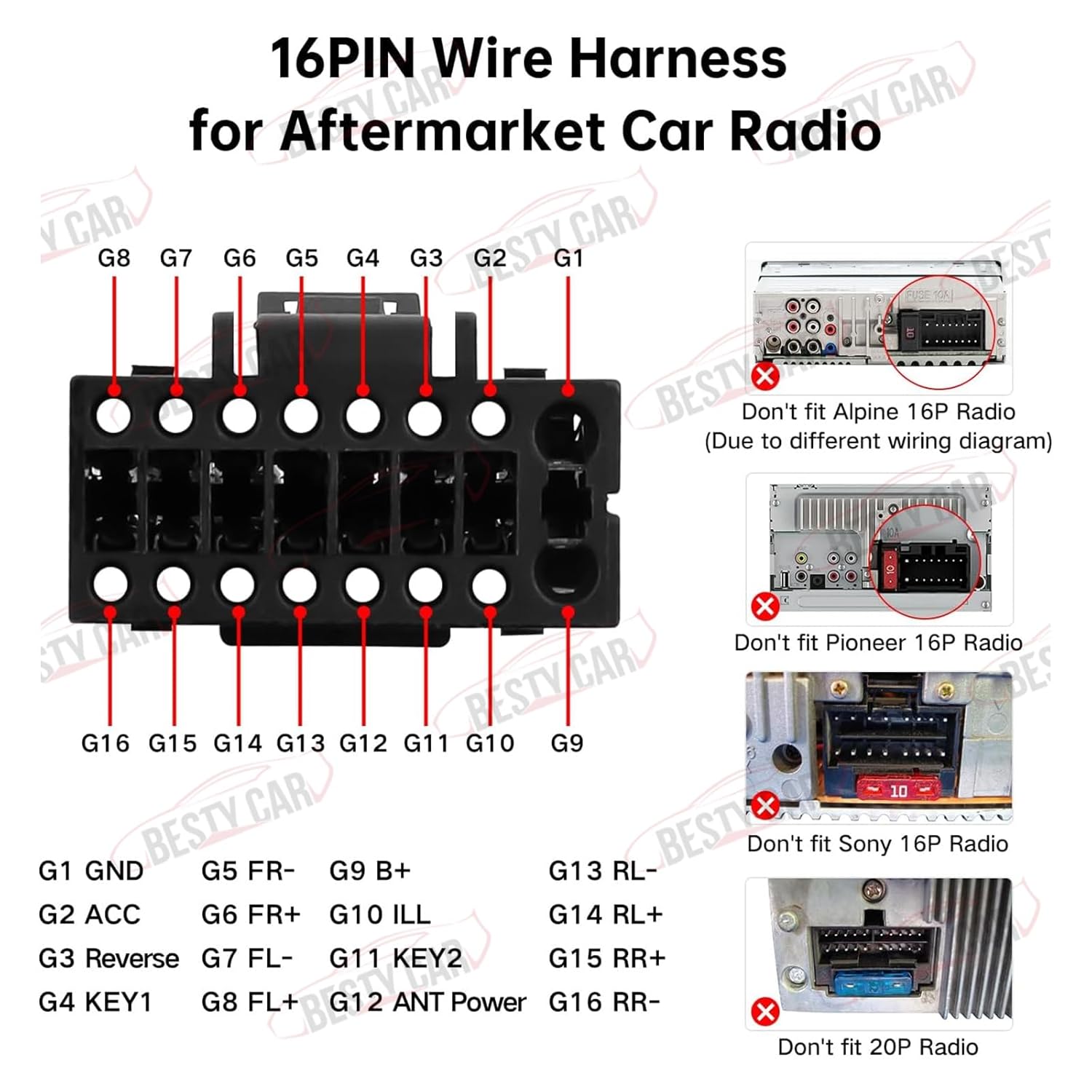
Image 4.1: Pinout diagram of the 16PIN wire harness for aftermarket car radios.

Image 4.2: General connection diagram for an aftermarket Android head unit, illustrating various input/output ports and the main power line connection.
4.1. CANbus Settings Configuration
If your power harness includes a CANbus decoder, it is crucial to configure the CANbus settings within your aftermarket stereo. Follow these steps:
- Locate the 8-pin CAN plug on the wiring harness and connect it to the corresponding 8-pin CAN socket on your stereo head unit.
- Access the stereo's settings menu. Navigate to Setting, then Factory Settings. You will need to enter a factory password; if you do not know it, please contact your stereo seller for assistance.
- Within the Factory Settings, find CANBUS Setting or Model Settings.
- Select the correct CANBUS brand: "XP (simple or XINPU)".
- Choose your specific Car Brand (Subaru) and then select the Car Model (Legacy, Outback, Forester, XV/Crosstrek GT).
- Select the specific Configuration or year that matches your vehicle.
- Save the settings and reboot your stereo for the changes to take effect.
5. Operating Instructions
Once the Bestycar wiring harness is correctly installed and the CANbus settings are configured (if applicable), the aftermarket stereo should function as intended, integrating with your vehicle's electrical system and supported features. The harness itself is a passive component that facilitates communication and power delivery.
Ensure all connections are secure and test all stereo functions, including audio, steering wheel controls (if supported by CANbus), and rearview camera input, to confirm proper operation.
6. Maintenance
The Bestycar wiring harness is designed for durability and requires minimal maintenance. To ensure long-term performance:
- Ensure all connections remain secure and free from moisture or excessive vibration.
- Avoid pulling or straining the wires, which could damage the connectors or internal wiring.
- Periodically check for any signs of wear or damage, especially if the stereo unit is frequently removed or reinstalled.
7. Troubleshooting
If you encounter issues after installing the wiring harness, consider the following:
- No Power to Stereo:
- Verify all harness connections are fully seated and secure.
- Check the vehicle's fuse box for any blown fuses related to the stereo or accessory power.
- Ensure the aftermarket stereo itself is functional by testing it with a known good power source if possible.
- No Sound or Incorrect Audio Channels:
- Confirm that the audio output connections from the stereo to the harness are correct.
- If your vehicle has a factory amplifier (e.g., Harman Kardon), ensure the amplifier turn-on wire from the harness is correctly connected and receiving power.
- Steering Wheel Controls Not Working:
- Ensure the 8-pin CAN plug is securely connected to the stereo.
- Re-check the CANbus settings in your stereo's factory settings menu as described in Section 4.1. Incorrect CANbus brand, car model, or configuration will prevent proper communication.
- Some aftermarket stereos require additional software configuration or learning for steering wheel controls. Consult your stereo's manual.
- Rearview Camera Not Displaying:
- Verify the rearview camera input (RCA) is correctly connected to the stereo.
- Ensure the reverse trigger wire from the harness is connected to the stereo's reverse input and is receiving a signal when the vehicle is in reverse.
- Incompatibility Issues:
- Remember this harness is not compatible with Pioneer, Sony, or Keenwood radios.
- Ensure your aftermarket stereo has a universal 16pin power socket.
8. Specifications
- Product Type: 16pin Car Radio Stereo Power Retrofit Wiring Harness Adapter
- Brand: Bestycar
- CANbus Box Brand: Simplesoft
- CANbus Box Model: RP5-SU-001
- Compatibility: Subaru Legacy/Outback (2015-2018), Forester (2017-2019), XV/Crosstrek GT (2017+)
- Features: Supports Harman Kardon Amplifier, OEM rearview camera (for high trim models)
- Connection Type: Plug and Play to factory car connectors
- Dimensions: 8 x 4 x 3 inches (approximate package dimensions)
- Weight: 4.8 ounces (approximate package weight)
9. Warranty Information
Specific warranty details for the Bestycar 16pin Car Radio Stereo Power Retrofit Wiring Harness Adapter are not provided within this instruction manual. For information regarding product warranty, please refer to the product packaging, the seller's website, or contact the seller directly.
10. Support
For technical assistance, compatibility verification, or any questions not covered in this manual, please contact the seller directly. If you are unsure whether this harness fits your car, it is recommended to take a picture of your factory CD player's backside connector and send it to the seller for verification.
If you require the factory password for your aftermarket stereo's settings, please contact your stereo's manufacturer or seller.