1. Introduction
This manual provides essential information for the safe and efficient operation of your PowMr 3000W 24V to 110/120V AC Off-Grid Pure Sine Wave Solar Inverter. Please read this manual thoroughly before installation and use, and retain it for future reference.
1.1 Package Contents
Upon unpacking, please verify that all items listed below are present and undamaged:
- PowMr Solar Inverter (Model: POW-LVM3K-24V-H)
- User Manual
- Installation Guide Card
- Warranty Card
- Screw Accessories Set
- 2 x Terminals
Text Description: The package includes the main inverter unit, a user manual, an installation guide, a warranty card, a set of screws for mounting, and two electrical terminals for connections.
Video Description: This video demonstrates the unboxing of the PowMr Solar Inverter, showing the main unit and all included accessories such as the user manual, terminals, and screws.
1.2 Product Overview
The PowMr POW-LVM3K-24V-H is an all-in-one solar inverter designed for off-grid applications. It integrates an inverter, an 80A MPPT solar charger, and a battery charger into a single unit. Key features include:
- Pure Sine Wave AC Output: Provides stable 110V/120V AC power up to 3000W.
- 24V Battery Compatibility: Supports both lead-acid (sealed, AGM, Gel, Flooded) and lithium batteries.
- Wide PV Input Range: Accepts photovoltaic input voltage from 120V to 450V DC, with a maximum PV input power of 4000W. A starting voltage greater than 150V is required.
- 80A MPPT Charge Controller: Maximizes solar power harvesting efficiency.
- Multiple Operating Modes: Features four charging modes (PV Priority, Utility Priority, Hybrid, Solar-Only) and three load output working modes (PV Priority, Utility Priority, Inverter Mode).
- Lithium Battery Activation: Includes a built-in function for activating lithium batteries.
- Comprehensive Protection: Equipped with short-circuit, over/under voltage, overload, and reverse polarity protection to ensure system safety and stability.
- User Interface: LCD display and three LED indicators provide dynamic system data and operating status.

Text Description: An image highlighting the key features of the PowMr 3000W Off-Grid Solar Inverter, including its 24V DC to 110/120V AC output, built-in 80A MPPT controller, maximum PV open circuit voltage of 450V, maximum PV input of 4000W, starting voltage requirement, 4 charging modes, 2 output modes, and support for utility, generator, and solar charging.
2. Safety Information
Please observe the following safety precautions to prevent injury and damage to the inverter or connected equipment:
- Qualified Personnel: Installation and maintenance should only be performed by qualified personnel.
- Power Disconnection: Always disconnect all power sources (AC, DC, and battery) before performing any wiring or maintenance.
- Ventilation: Ensure adequate ventilation around the inverter to prevent overheating.
- Environment: Install the inverter in a dry, cool, and dust-free environment, away from flammable materials.
- Grounding: Proper grounding is essential for safety. Ensure the inverter is correctly grounded.
- Battery Safety: Work with batteries carefully. Wear eye protection and avoid contact with battery acid. Ensure batteries are properly sized and connected.
- Voltage Hazards: The inverter operates at high voltages. Do not touch uninsulated terminals or components.
3. Setup and Installation
Careful installation is crucial for the performance and safety of your solar inverter. Refer to the included Installation Guide Card for detailed, step-by-step instructions.
3.1 Component Identification
Familiarize yourself with the inverter's ports and indicators:
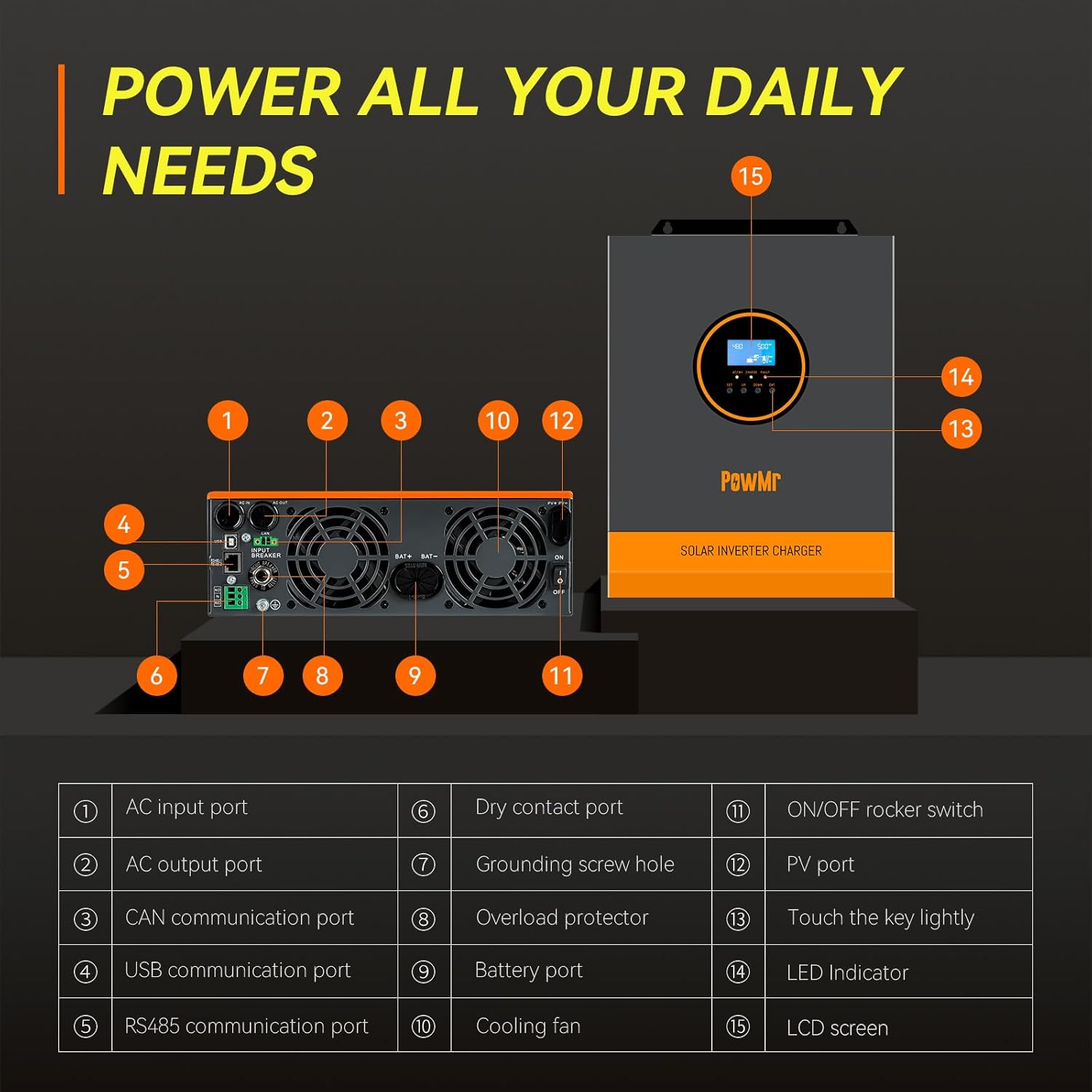
Text Description: An image illustrating the various ports and indicators on the PowMr Solar Inverter. Key components include AC input/output ports, CAN/USB/RS485 communication ports, dry contact port, grounding screw hole, overload protector, battery port, cooling fan, ON/OFF rocker switch, PV port, touch keys, LED indicators, and LCD screen.
- AC Input Port
- AC Output Port
- CAN Communication Port
- USB Communication Port
- RS485 Communication Port
- Dry Contact Port
- Grounding Screw Hole
- Overload Protector
- Battery Port
- Cooling Fan
- ON/OFF Rocker Switch
- PV Port
- Touch Keys (SET, UP, DOWN, ENT)
- LED Indicators
- LCD Screen
3.2 Wiring Diagram
The following diagram illustrates the typical wiring connections for the inverter. Ensure all connections are secure and follow local electrical codes.

Text Description: A detailed wiring diagram for the PowMr Solar Inverter, showing connections for solar panels (PV input), battery, AC input (from generator or utility), and AC output (to household loads). It specifies wire gauges, voltage requirements, and emphasizes connecting the PE protective conductor to ground first.
3.2.1 Solar Panel Connection
- Connect solar panels in series to achieve a total open circuit voltage between 120V and 450V DC. The starting voltage must be greater than 150V.
- A minimum of 4-6 solar panels are typically needed to initiate inverter operation, depending on individual panel specifications.
- Ensure the maximum PV input power does not exceed 4000W and the maximum input current is 13A.
- Use 12AWG wire for PV connections.
3.2.2 Battery Connection
- Connect a 24V battery bank (lithium or lead-acid) to the battery terminals.
- A recommended battery capacity is 200Ah.
- Use 2AWG wire for battery connections.
- Ensure correct polarity (+ to + and - to -).

Text Description: An image showing the compatibility of the PowMr Solar Inverter with various 24V battery types, including AGM, GEL, FLD (Flooded), LI (Lithium), and SLD (Sealed Lead-Acid).
3.2.3 AC Input/Output Connection
- Connect the AC input from a utility grid or generator (120Vac, 50/60Hz) to the AC input port.
- Connect your AC loads (e.g., refrigerators, lamps, TVs) to the AC output port. The rated output power is 3000W at 120Vac.
- Use 10AWG wire for AC connections.
- Always connect the PE (Protective Earth) conductor to ground first.
4. Operating Instructions
The inverter features an LCD display and LED indicators for monitoring, and touch keys for configuration.
4.1 Powering On/Off
- Ensure all wiring connections are correct and secure.
- Turn on the battery breaker.
- Turn on the PV input breaker (if applicable).
- Flip the ON/OFF rocker switch on the inverter to the 'ON' position.
- The LCD display will illuminate, and the inverter will begin its startup sequence.
- To power off, reverse the sequence: turn off the inverter, then PV, then battery.
4.2 LCD Display and LED Indicators
The LCD screen provides real-time system data, while the three LED indicators (AC/INV, CHARGE, FAULT) show the operational status.
- AC/INV LED: Indicates AC input status or inverter output.
- CHARGE LED: Indicates battery charging status.
- FAULT LED: Illuminates in case of system errors or faults.
4.3 Charging Modes
The inverter supports four distinct charging modes:

Text Description: An image detailing the four charging modes (Solar Charging, Electricity Utility Priority, Solar Priority, Hybrid Charging) and three load output working modes (PV Priority, Utility Priority, Inverter Mode) available on the PowMr Solar Inverter.
- Solar Charging: Prioritizes solar power for battery charging.
- Electricity Utility Priority: Prioritizes utility power for battery charging.
- Solar Priority: Uses solar power first, then utility if solar is insufficient.
- Hybrid Charging: Combines solar and utility power for charging.
4.4 Load Output Working Modes
The inverter offers three load output working modes:
- PV Priority: Loads are powered by solar first, then battery, then utility.
- Utility Priority: Loads are powered by utility first, then battery, then solar.
- Inverter Mode: Loads are powered by the inverter (from battery/solar).
These modes can be configured via the LCD display using the touch keys (SET, UP, DOWN, ENT).
5. Maintenance
Regular maintenance ensures optimal performance and longevity of your inverter.
- Cleaning: Periodically clean the inverter's exterior and ventilation openings to prevent dust accumulation. Use a dry cloth.
- Connections: Annually inspect all electrical connections for tightness and corrosion. Tighten any loose connections.
- Environment: Ensure the installation environment remains within specified temperature and humidity ranges.
- Battery Inspection: Regularly check battery terminals for corrosion and ensure proper electrolyte levels for flooded batteries.
6. Troubleshooting
If the inverter is not operating as expected, refer to the following common issues. For complex problems or error codes not listed, consult the full user manual or contact customer support.
- No Power Output: Check battery connections, DC input voltage from solar panels, and AC input from utility/generator. Ensure the inverter is switched ON.
- Charging Issues: Verify PV input voltage and current. Check battery type settings on the inverter. Ensure the charging mode is correctly selected.
- Overload Warning: Reduce the connected load. The inverter has an overload protector that may trip.
- Fault Indicator On: Note any error codes displayed on the LCD and refer to the detailed troubleshooting section in the complete user manual.
7. Specifications
| Feature | Specification |
|---|---|
| Rated Output Power | 3000W |
| Peak Power | 6000VA |
| Rated Output Voltage | 120Vac |
| Rated Battery Input Voltage | 24V |
| Max. PV Open-Circuit Voltage | 450Vdc |
| PV Starting Voltage | >150V |
| Max. PV Input Power | 4000W |
| Max. PV Input Current | 13A |
| Max. Hybrid Charging Current (AC + PV) | 80A |
| Product Dimensions | 14 x 5 x 11 inches |
| Item Weight | 19.14 pounds |
| Model Name | POW-LVM3K-24V-H |
| Power Source | Solar Powered |
8. Warranty and Support
Your PowMr Solar Inverter comes with a warranty. Please refer to the included Warranty Card for specific terms and conditions, including warranty duration and coverage details. For technical support, troubleshooting assistance, or warranty claims, please contact PowMr customer service through their official channels or the retailer where the product was purchased.


