
Introduction
Thank you for choosing the NEEWER Basics TP15 Camera Tripod Monopod. This versatile and portable aluminum tripod is designed to provide stable support for your DSLR cameras, mirrorless cameras, and cell phones, making it ideal for various photography and videography needs. This manual provides detailed instructions for assembly, operation, maintenance, and troubleshooting to ensure optimal performance and longevity of your equipment.
Product Overview
The NEEWER Basics TP15 is engineered for durability and ease of use, featuring a robust aluminum alloy construction and a compact design for travel. It includes a 360° ball head for flexible positioning and a detachable leg that converts into a monopod.
Key Features:
- Heavy-Duty Aluminum Construction: Supports up to 17.6 lb (8 kg) while weighing only 3.1 lb (1.4 kg).
- Adjustable Height: Extends from a minimum of 17 inches (43 cm) to a maximum of 71 inches (180 cm) with a two-section center column.
- 360° Ball Head: Features a 36mm ball head that rotates 360° and tilts 90° for versatile shooting angles. Includes a quick-release plate and bubble level.
- Monopod Conversion: One leg detaches and extends from 31.5 inches (80 cm) to 74.4 inches (189 cm) for use as a monopod.
- Adjustable Leg Angles: Legs can be set at 24°, 57°, and 86° for stability on uneven terrain or low-angle shots.
- Reversible Legs: Allows for compact storage, folding down to 17.3 inches (44 cm).
- Convertible Feet: Equipped with non-slip rubber feet and metal spikes for various surfaces.
- Phone Holder: Includes a mount compatible with most smartphones.
Package Contents:
- 1 x TP15 Camera Tripod with Ball Head
- 1 x Phone Holder
- 1 x L Shaped Hex Key

Image: NEEWER Basics TP15 Tripod showing package contents and detailed specifications.
Setup Instructions
1. Unpacking and Initial Inspection
Carefully remove all components from the packaging. Inspect the tripod and accessories for any signs of damage. Ensure all listed package contents are present.
2. Deploying the Tripod
- Unfold Legs: Release the leg locks and extend the tripod legs outwards. The legs can be reversed for compact storage; unfold them fully until they click into place.
- Adjust Leg Angles: Push and hold the red angle adjustment buttons located at the top of each leg to select one of the three preset angles (24°, 57°, or 86°). Release the button to lock the leg in position.
- Extend Legs: Use the flip locks on each leg section to extend the legs to your desired height. Ensure all flip locks are securely fastened before mounting any equipment.

Image: Diagram illustrating the adjustable height range of the NEEWER Basics TP15 Tripod from 17.3 inches to 71.2 inches.

Image: Close-up of the tripod leg showing the angle adjustment button and the three available leg angles (24°, 57°, 86°).
3. Attaching the Ball Head and Quick Release Plate
- The 360° ball head is pre-attached to the tripod.
- To attach your camera or phone holder, first remove the quick-release plate from the ball head by loosening the quick-release plate locking knob and sliding the plate out.
- Securely screw the quick-release plate onto the bottom of your camera or phone holder using the 1/4" screw.
- Slide the quick-release plate with your device back into the ball head and tighten the quick-release plate locking knob to secure it.
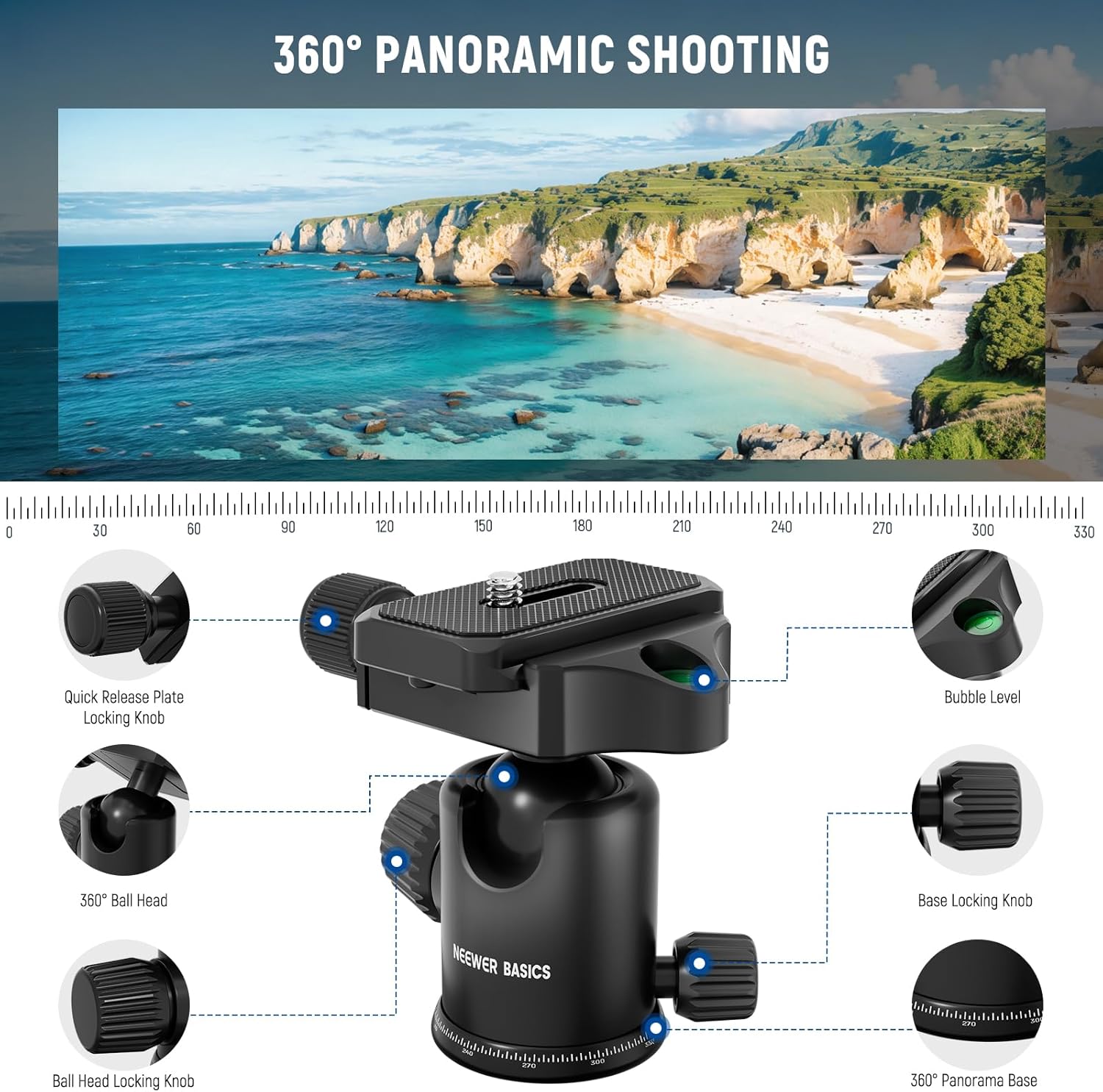
Image: Detailed view of the 360° ball head with labels for the quick release plate locking knob, 360° ball head, ball head locking knob, bubble level, base locking knob, and 360° panorama base.
4. Monopod Conversion
One of the tripod legs can be detached and converted into a monopod for increased portability and flexibility.
- Identify the leg with the foam grip. This is the detachable monopod leg.
- Unscrew the monopod leg from the tripod body.
- Unscrew the center column from the tripod body.
- Attach the ball head (or just the quick release plate mount) to the top of the detached monopod leg.
- Extend the monopod leg to your desired height using the flip locks. The monopod can extend from 31.5 inches (80 cm) to 74.4 inches (189 cm).

Image: Visual guide demonstrating how to detach a tripod leg and convert it into a monopod, showing the adjustable height range.
5. Using the Phone Holder
The included phone holder allows you to mount your smartphone securely to the tripod or monopod.
- Attach the phone holder to the quick-release plate.
- Expand the spring clips of the phone holder to fit your smartphone. It is compatible with phones up to 3.1 inches (8 cm) in width.
- Ensure your phone is securely gripped by the holder before use.

Image: Illustration of the included phone holder and its compatibility with various smartphone sizes.
Operating Instructions
1. Adjusting Tripod Height
To adjust the height of the tripod, open the flip locks on each leg section, extend the legs to the desired length, and then firmly close the flip locks. For additional height, loosen the center column locking knob and extend the two-section center column upwards. Tighten the knob to secure the column.
2. Adjusting Leg Angles
Each leg has an angle adjustment button. Press and hold this button to change the leg's angle. Release the button to lock the leg into one of the three preset positions (24°, 57°, 86°). This allows for stable setup on uneven surfaces or for achieving very low shooting angles.
3. Panoramic Shooting
The 360° ball head allows for smooth panoramic movements. Loosen the base locking knob to rotate the entire ball head assembly 360 degrees. Use the degree markings on the base for precise panoramic shots. Tighten the base locking knob to secure the position.
4. Ball Head Adjustment
The ball head allows for flexible camera positioning. Loosen the ball head locking knob to adjust the camera's angle and tilt (up to 90°). Use the integrated bubble level on the quick-release plate to ensure your camera is perfectly level. Tighten the ball head locking knob to fix the camera's position.
Video: Official NEEWER Basics Camera Tripod Monopod demonstration, showcasing its features and ease of use.
Maintenance
- Cleaning: Wipe the tripod with a soft, dry cloth after each use to remove dust and dirt. For stubborn grime, use a slightly damp cloth and mild soap, then dry thoroughly.
- Lubrication: Periodically check the moving parts, such as leg locks and ball head mechanisms. If movement becomes stiff, apply a small amount of silicone-based lubricant. Avoid oil-based lubricants as they can attract dust.
- Storage: Store the tripod in its carrying bag in a cool, dry place away from direct sunlight and extreme temperatures. Ensure all parts are clean and dry before storage.
- Inspection: Regularly inspect all screws, bolts, and moving parts for tightness and wear. Use the provided L-shaped hex key to tighten any loose screws.
Troubleshooting
- Tripod Instability: Ensure all leg sections are fully extended and their flip locks are securely fastened. Verify that the leg angle adjustment buttons are properly engaged. For very heavy lenses, ensure the camera is balanced over the center of the tripod as much as possible and all locking knobs are tightened to their maximum.
- Stiff Leg Locks/Ball Head: Refer to the 'Lubrication' section under Maintenance. Ensure no sand or debris is obstructing the mechanisms.
- Camera Not Level: Use the bubble level on the quick-release plate to adjust the ball head until the bubble is centered. Ensure the ball head locking knob is tightened.
- Monopod Leg Slipping: Ensure all flip locks on the monopod leg are fully engaged and tightened.
Specifications
| Model | TP15 w/Ball Head |
| Brand | NEEWER |
| Material | Aluminum Alloy |
| Item Weight | 51 Ounces (1.4 kg) |
| Weight Limit | 17.6 Pounds (8 kg) |
| Maximum Height (Tripod) | 71 Inches (180 cm) |
| Minimum Height (Tripod) | 17 Inches (43 cm) |
| Monopod Height Range | 31.5" - 74.4" (80 cm - 189 cm) |
| Tripod Head Type | Ball Head (36mm) |
| Compatible Devices | DSLR Cameras, Mirrorless Cameras, Cell Phones |
| UPC | 191073112667 |
Warranty and Support
The NEEWER Basics TP15 Camera Tripod Monopod comes with a 1-Year Manufacturer's Warranty. This warranty covers defects in materials and workmanship under normal use. For warranty claims, technical support, or any inquiries, please contact NEEWER customer service through their official website or the retailer where the product was purchased. Please retain your proof of purchase for warranty validation.