
DUMOS C-2892-1B-WT
DUMOS Office Chair User Manual
Model: C-2892-1B-WT
Introduction
Thank you for choosing the DUMOS Office Chair. This ergonomic executive computer desk chair is designed to provide superior comfort and support for long hours of work or gaming. Featuring adjustable flip-up armrests, robust lumbar support, and a strong metal base, this chair combines functionality with a sophisticated design. Please read this manual thoroughly before assembly and use to ensure proper operation and longevity of your chair.
Important Safety Information
- Weight Limit: Do not exceed the maximum weight recommendation of 300 pounds (136 kg). Exceeding this limit may cause damage to the chair and potential injury.
- Assembly: Ensure the chair is properly assembled according to the instructions provided to maintain stability and prevent accidents. Verify all screws and bolts are tightened securely before use.
- Maintenance: Regularly inspect all components for wear or damage. Do not use the chair if any parts are loose, damaged, or missing.
- Usage: Use the chair only for its intended purpose as an office or desk chair. Avoid standing on the chair or using it as a step stool.
- Children: Keep children away from the chair during assembly. Small parts may pose a choking hazard.
Package Contents
Before beginning assembly, please ensure all parts listed below are present and undamaged. If any parts are missing or damaged, contact DUMOS customer support.
- 1 x Backrest
- 1 x Seat Cushion
- 2 x Armrests (Left & Right)
- 1 x Gas Lift Cylinder
- 1 x Base (Five-legged metal base)
- 5 x Casters (Wheels)
- 1 x Mechanism Plate
- Hardware Pack (Screws, Washers, Allen Wrench)
- 1 x User Manual

Image: All components of the DUMOS Office Chair laid out, including the backrest, seat, armrests, base, and wheels.
Assembly Instructions
Assembly is straightforward and typically takes less than 20 minutes. Follow these steps carefully:
- Attach Casters to Base: Insert each of the five casters into the holes at the end of each leg of the metal base. Push firmly until they click into place.
- Insert Gas Lift: Place the gas lift cylinder into the center hole of the assembled base.
- Attach Mechanism to Seat: Align the mechanism plate with the pre-drilled holes on the underside of the seat cushion. Ensure the front of the mechanism faces the front of the seat. Secure with the provided screws using the Allen wrench.
- Attach Armrests to Seat: Attach the armrests to the sides of the seat cushion using the designated screws. Do not fully tighten yet.
- Attach Backrest to Seat and Armrests: Align the backrest with the seat and the armrests. Secure the backrest to the seat and armrests using the remaining screws. Once all screws are in place, fully tighten all screws on the armrests and backrest.
- Connect Seat Assembly to Gas Lift: Carefully place the assembled seat and backrest onto the gas lift cylinder, ensuring the center hole of the mechanism plate aligns with the top of the gas lift. Press down firmly to secure.

Image: Front view of the fully assembled DUMOS Office Chair, showcasing its design.

Image: Side view of the fully assembled DUMOS Office Chair, highlighting its profile.
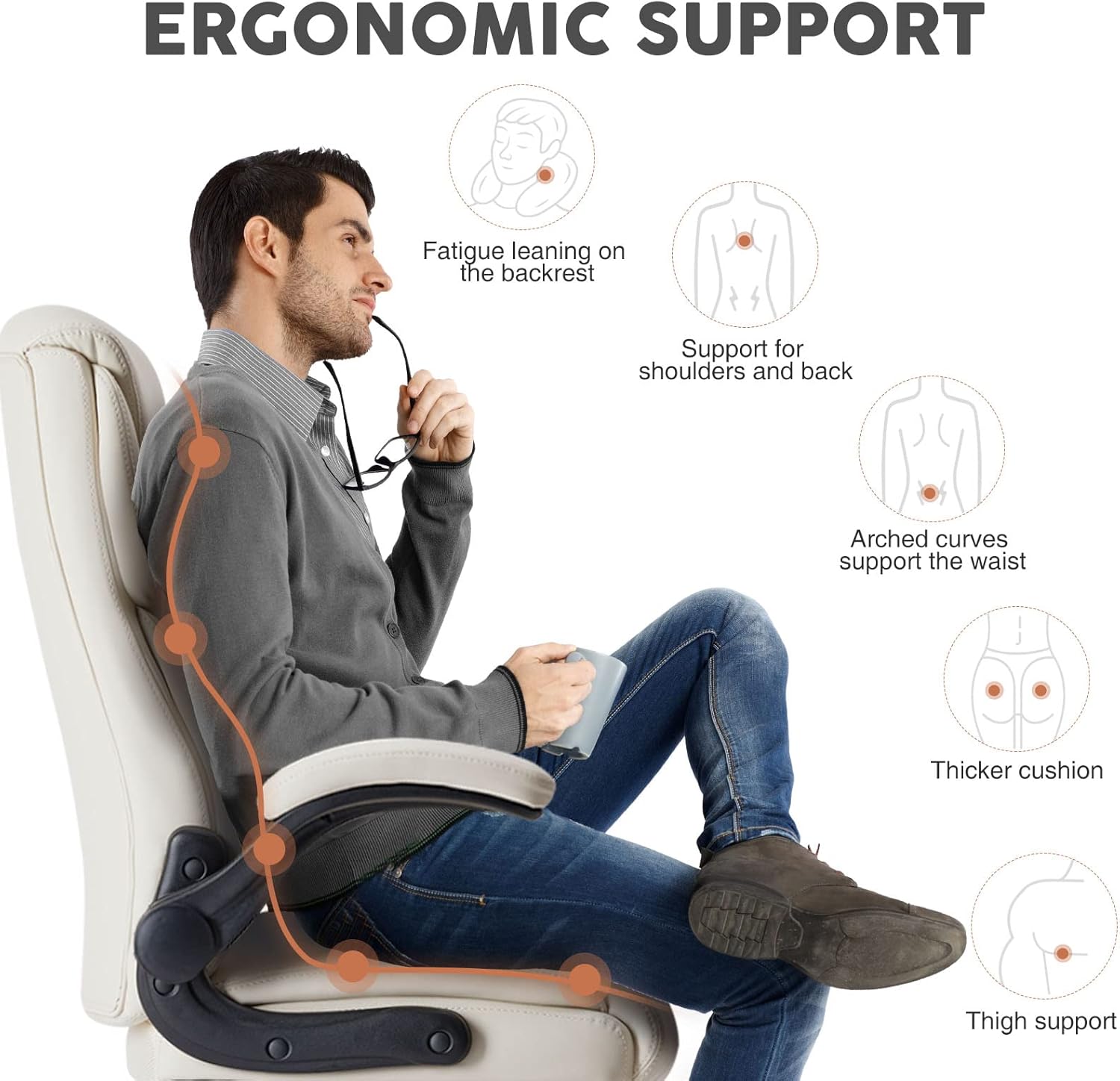
Image: Back view of the fully assembled DUMOS Office Chair, showing the high back design.
Operating Instructions
Your DUMOS Office Chair offers several adjustment features to customize your seating experience for optimal comfort and support.
1. Height Adjustment
To adjust the chair's height, locate the lever on the right side, beneath the seat.
- To Raise: While seated, lift the lever. The chair will rise. Release the lever at the desired height.
- To Lower: While seated, lift the lever and apply slight pressure downwards. The chair will lower. Release the lever at the desired height.
2. Rocking Function (Tilt)
The chair features a rocking function for added comfort and flexibility.
- To Enable/Disable Rocking: Locate the knob beneath the seat. Turn the knob to enable or disable the rocking function.
- Adjust Tilt Tension: Rotate the tension knob to control the resistance of the rocking motion. Turn clockwise to increase tension (less rocking), and counter-clockwise to decrease tension (more rocking).
3. Flip-up Armrests
The armrests are designed to flip up, allowing you to push the chair closer to your desk or save space when not in use.
- Simply lift the armrests upwards until they lock into their vertical position.
- To return them to the horizontal position, gently pull them down.

Image: Visual representation of the chair's adjustable features, including flip-up armrests, height lift adjustment, and rocking function.

Image: Diagram highlighting the ergonomic support areas of the chair, including lumbar, shoulder, and thigh support.

Image: A person seated at a desk, demonstrating the comfortable and functional use of the DUMOS Office Chair.
Maintenance and Care
Proper care will extend the life and appearance of your DUMOS Office Chair.
- Cleaning: The PU+PVC imitation leather material is waterproof and resistant to stains. To clean, simply wipe with a damp cloth. For tougher stains, use a mild soap solution and wipe dry immediately. Avoid harsh chemicals or abrasive cleaners.
- Regular Inspection: Periodically check all screws and bolts to ensure they remain tight. Re-tighten if necessary to maintain stability.
- Caster Care: Keep the casters clean from hair, dust, and debris to ensure smooth gliding.
- Avoid Direct Sunlight: Prolonged exposure to direct sunlight can cause the material to fade or crack. Position the chair away from direct sunlight if possible.
Troubleshooting
| Problem | Possible Cause | Solution |
|---|---|---|
| Chair wobbles or feels unstable. | Loose screws or uneven assembly. | Check and tighten all assembly screws, especially those connecting the backrest, seat, and armrests. Ensure the base is flat on the floor. |
| Chair does not adjust height. | Gas lift cylinder issue or lever malfunction. | Ensure the height adjustment lever is fully engaged. If the issue persists, the gas lift cylinder may need replacement. Contact customer support. |
| Casters do not roll smoothly. | Debris (hair, dust) caught in casters. | Turn the chair over and remove any debris from the caster wheels. Lubricate if necessary. |
| Rocking function is too stiff or too loose. | Tilt tension knob needs adjustment. | Adjust the tilt tension knob located under the seat. Turn clockwise to increase tension, counter-clockwise to decrease. |
| Armrests do not flip up or down smoothly. | Mechanism obstruction or damage. | Check for any obstructions around the armrest pivot points. If damaged, contact customer support. |
Specifications
| Brand | DUMOS |
| Model Number | C-2892-1B-WT |
| Color | Off-white |
| Product Dimensions (D x W x H) | 21.65"D x 21.85"W x 44.48"H |
| Maximum Weight Recommendation | 300 Pounds (136 kg) |
| Material | PU+PVC Imitation Leather, High-Density Sponge, Titanium Metal Base |
| Special Features | Adjustable Height, Flip-up Armrests, Swivel, Lumbar Support, Rocking Function |
| Assembly Required | Yes |
| Item Weight | 36.8 pounds (16.7 kg) |
| UPC | 718025779381 |
Warranty and Support
DUMOS stands behind the quality of its products. For information regarding warranty coverage, technical support, or to order replacement parts, please contact our customer service team.
Please have your model number (C-2892-1B-WT) and purchase date ready when contacting support.
Contact Information:
- Website: Visit the DUMOS Store on Amazon
- Email: [Insert DUMOS Customer Service Email Here - if available]
- Phone: [Insert DUMOS Customer Service Phone Number Here - if available]
Ask a question about this manual
Ask about setup, troubleshooting, compatibility, parts, safety, or missing instructions. Manuals+ will review the question and use this page’s manual context to help answer it.