
1. Introduction
Thank you for choosing the MIRASTON Slushie Machine. This appliance is designed to create a variety of frozen beverages, including slushies, ice cream, frappés, and milkshakes, without the need for pre-chilling or ice. Please read this manual thoroughly before operation to ensure safe and efficient use of your machine. Keep this manual for future reference.

Image 1: The MIRASTON Slushie Machine displaying its versatility with different frozen beverages.
2. Safety Information
To prevent injury or damage, always follow basic safety precautions when using electrical appliances. This includes, but is not limited to:
- Read all instructions before use.
- Do not immerse the appliance, cord, or plug in water or other liquids.
- Close supervision is necessary when any appliance is used by or near children.
- Unplug from outlet when not in use, before assembling or disassembling parts, and before cleaning.
- Avoid contact with moving parts.
- Do not operate any appliance with a damaged cord or plug, or after the appliance malfunctions or has been damaged in any manner.
- The use of attachments not recommended or sold by the manufacturer may cause fire, electric shock, or injury.
- Do not use outdoors.
- Do not let cord hang over edge of table or counter, or touch hot surfaces.
- Do not place on or near a hot gas or electric burner, or in a heated oven.
- Always attach plug to appliance first, then plug cord into the wall outlet. To disconnect, turn any control to 'off', then remove plug from wall outlet.
- Do not use appliance for other than intended household use.
- Ensure the mixture contains sugar for ideal slushing results.
- Do not add ice, solid ingredients, or hot liquids directly into the machine.
- Keep the machine running while dispensing to maintain consistency.
- Stir the mixture before pouring for even texture.
3. Product Overview and Components
The MIRASTON Slushie Machine features a durable stainless steel exterior and an intuitive control panel. Key components include the main unit, transparent vessel, dispensing tap, and control interface.

Image 2: Detailed view of the machine's dispensing area, highlighting the drip tray, export design, and easy locking mechanism.
Main Components:
- Vessel: Transparent container for mixing and freezing ingredients. Capacity: 88 fluid ounces.
- Control Panel: Digital display and touchpad controls for selecting programs and setting the timer.
- Dispensing Tap: Mechanism for pouring out the frozen beverage.
- Drip Tray: Collects any drips or spills from the dispensing tap.
- Compressor: Internal component responsible for the freezing process.
4. Setup
- Unpack: Carefully remove all components from the packaging.
- Clean: Before first use, wash all detachable parts (vessel, lid, dispensing tap components) with warm, soapy water. Rinse thoroughly and dry. The detachable parts are dishwasher safe.
- Assemble: Ensure all parts are correctly assembled and securely locked into place.
- Placement: Place the machine on a stable, flat, and dry surface. Ensure adequate ventilation around the unit.
- Power Connection: Plug the power cord into a grounded electrical outlet.
5. Operation
Operating your MIRASTON Slushie Machine is straightforward with its intuitive controls and preset programs.
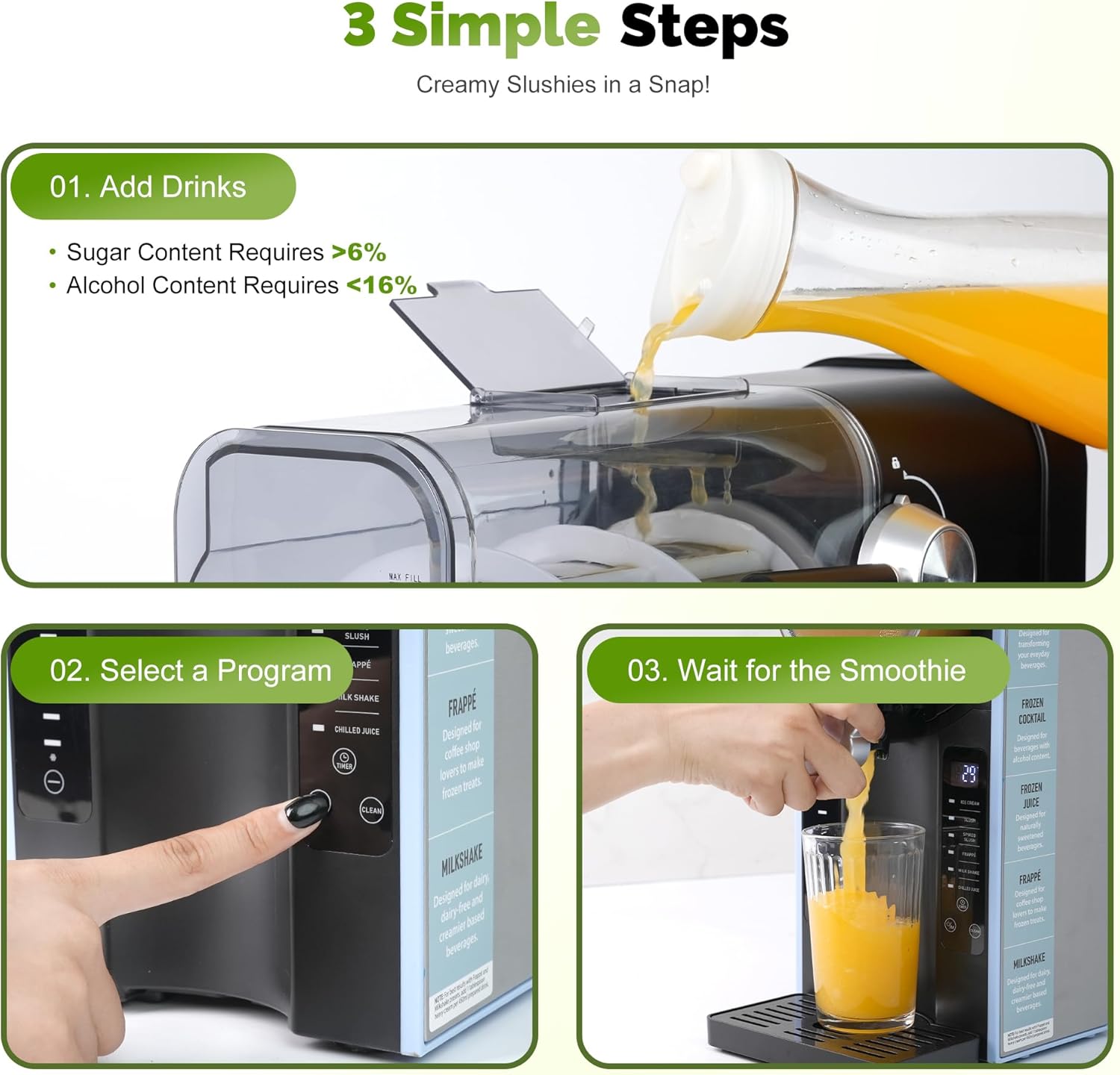
Image 3: Visual guide to the three simple steps for preparing frozen beverages.
Basic Steps:
- Add Ingredients: Pour your desired liquid mixture into the vessel. Ensure the liquid contains sugar for optimal freezing consistency (sugar content > 6%). For alcoholic beverages, ensure alcohol content is between 2.8% and 16%. Do not exceed the MAX FILL line.
- Select Program: Use the touchpad control panel to select one of the 6 preset programs.
- Start: Press the start button. The machine will begin the freezing process. The digital display will show the remaining time.
- Dispense: Once the program is complete, turn the dispensing tap to pour your frozen beverage. Keep the machine running while dispensing.

Image 4: The control panel with options for ICE CREAM, SLUSH, SPIKED SLUSH, FRAPPÉ, MILK SHAKE, and CHILLED JUICE.
Preset Programs:
- ICE CREAM: For creamy frozen desserts.
- SLUSH: For classic icy slush beverages.
- SPIKED SLUSH: Optimized for alcoholic slush drinks.
- FRAPPÉ: For coffee-based or similar blended iced drinks.
- MILK SHAKE: For thick, creamy milkshakes.
- CHILLED JUICE: For lightly chilled, non-frozen beverages.

Image 5: Examples of beverages that can be created using the machine's multi-function programs.
Timer Function:
The built-in timer allows you to schedule your treats up to 12 hours in advance. Set the desired program and time, and the machine will automatically start and prepare your beverage.
Add-Mid-Blend Function:
This feature allows you to add additional ingredients during the blending process without interrupting the cycle, useful for customizing flavors or adding garnishes.
6. Tips for Best Results
- Sugar Content: For ideal slushing, ensure your mixture contains at least 6% sugar. Sugar is essential for achieving the perfect icy texture. Sugar substitutes can be used, but results may vary.
- Alcohol Content: If making spiked slush, the alcohol content should be between 2.8% and 16%. Higher alcohol content may prevent proper freezing.
- Avoid Solids: Do not add solid ingredients (like whole fruits or large ice cubes) directly into the vessel as this can damage the machine. Blend them separately if needed.
- Avoid Hot Liquids: Only add room temperature or chilled liquids to the machine. Hot liquids can affect the freezing process and potentially damage components.
- Stir Before Pouring: For a consistent texture, gently stir the mixture in the vessel before dispensing, especially if it has been sitting for a while.
7. Cleaning and Maintenance
Regular cleaning ensures the longevity and hygiene of your MIRASTON Slushie Machine.
Automatic Cleaning Cycle:
The machine features an automatic cleaning cycle. After use, add water to the vessel and select the 'CLEAN' program on the control panel. This will help rinse the internal components.
Manual Cleaning:
- Disassembly: Unplug the machine. Carefully disassemble the vessel, lid, and dispensing tap components.
- Washing: Wash all detachable parts with warm, soapy water. Rinse thoroughly. These parts are also dishwasher safe.
- Main Unit: Wipe the main unit and control panel with a damp cloth. Do not immerse the main unit in water.
- Drying: Ensure all parts are completely dry before reassembling and storing.
8. Troubleshooting
If you encounter issues with your MIRASTON Slushie Machine, please refer to the following common problems and solutions:
- Machine does not turn on: Ensure the power cord is securely plugged into a working outlet. Check if the power switch is in the 'ON' position.
- Mixture is not freezing: Verify that the liquid contains sufficient sugar (at least 6%). High alcohol content (above 16%) can also inhibit freezing. Ensure the ambient temperature is not excessively high.
- Machine is noisy: Some operational noise is normal during the freezing process. If the noise is excessive or unusual, ensure all parts are correctly assembled and nothing is obstructing the internal mechanisms.
- Dispensing tap is blocked: Ensure no solid particles are blocking the tap. Clean the tap thoroughly.
- Error code on display: Refer to the specific error code in a more detailed troubleshooting guide (if available) or contact customer support.
9. Specifications
Detailed specifications for the MIRASTON MS-BL2408C Slushie Machine:
| Feature | Detail |
|---|---|
| Brand | MIRASTON |
| Model Name | MS-BL2408C |
| Color | Silver |
| Capacity | 88 Fluid Ounces |
| Special Features | Automatic Clean, Automatic Shut-Off, Built-In Compressor, Digital Display, Touchpad Control |
| Material | Plastic, Stainless Steel |
| Item Weight | 23.8 Pounds |
| Operation Mode | Automatic |
| Product Dimensions | 6.93 x 16.02 x 16.1 inches |
| Recommended Use | Residential |
| Care Instructions | Dishwasher Safe (detachable parts), Hand Wash |

Image 6: Visual representation of the machine's dimensions and capacity.
10. Warranty and Support
For warranty information or technical support, please refer to the warranty card included with your product or contact MIRASTON customer service. Keep your purchase receipt as proof of purchase.
Customer Service Contact: Please visit the official MIRASTON website or refer to the contact details provided in your product packaging for support.
