
Introduction
Thank you for choosing ZOHAN Electronic Shooting Earmuffs and EP02 Bluetooth Shooting Earbuds. This manual provides essential information for the safe and effective use of your hearing protection devices. These products are designed to offer superior hearing protection, sound amplification, and communication capabilities in noisy environments such as shooting ranges, hunting grounds, and industrial settings.

Image: ZOHAN Electronic Shooting Earmuffs and EP02 Bluetooth Earbuds shown with charging case and various ear tip sizes.
Safety Information
Please read all safety warnings and instructions before using this product to prevent injury and ensure optimal performance.
- Always wear hearing protection in environments with hazardous noise levels.
- Ensure earmuffs and earbuds are properly fitted to achieve the stated Noise Reduction Rating (NRR).
- Do not modify the devices. Unauthorized modifications may compromise hearing protection and void the warranty.
- Keep out of reach of children. Small parts may pose a choking hazard.
- Avoid exposing the devices to extreme temperatures, moisture, or corrosive substances.
Package Contents
Verify that all items are present in your package:
- 1x ZOHAN Electronic Shooting Earmuffs (EM054)
- 1x Pair of ZOHAN EP02 Bluetooth Shooting Earbuds
- 1x EP02 Charging Case
- 1x USB-C Charging Cable
- 3x Pairs of Foam Ear Tips (Small, Medium, Large) for EP02 Earbuds
- User Manual
Product Overview & Features
ZOHAN Electronic Shooting Earmuffs (EM054)
- Active Noise Reduction: Automatically suppresses impulse noise above 82dB within 0.01 seconds. NRR: 22 dB.
- Sound Amplification: Two high-gain omnidirectional microphones amplify ambient sounds for improved situational awareness and communication.
- Adjustable Volume: Manual knob for precise control over amplified sounds.
- Comfortable Design: Features a waterproof padded headband, adjustable fit, and soft, replaceable ear cushions for extended wear.
- Durable Construction: Built with a durable ABS shell.

Image: Features of the ZOHAN earmuffs, highlighting comfort elements and battery compartment.
ZOHAN EP02 Bluetooth Shooting Earbuds
- 4-in-1 Versatility: Combines Bluetooth 5.3 connectivity, active noise cancellation, TSC (Tactical Sound Control) environmental awareness, and clear communication.
- Bluetooth 5.3: Provides a wider range (up to 35ft), faster speed, solid connection, and supports music playback and hands-free calling.
- Active Noise Suppression: Automatically reduces noise above 82dB with a 0.01-second response time.
- 4X Sound Amplification: Enhances ambient sounds for improved situational awareness, with adjustable levels (300Hz, 500Hz, 700Hz, 1.0kHz) for different environments.
- Long Battery Life: Up to 60 hours of TSC runtime with the charging case. Provides 13-15 hours on a single charge.
- Comfortable & Lightweight: Weighing only 9g, designed for extended wear with ultra-thick foam ear tips (3 sizes included).
- USB-C Rechargeable: Convenient charging via USB-C.

Image: Overview of ZOHAN EP02 Earbuds features, emphasizing connectivity and protection.
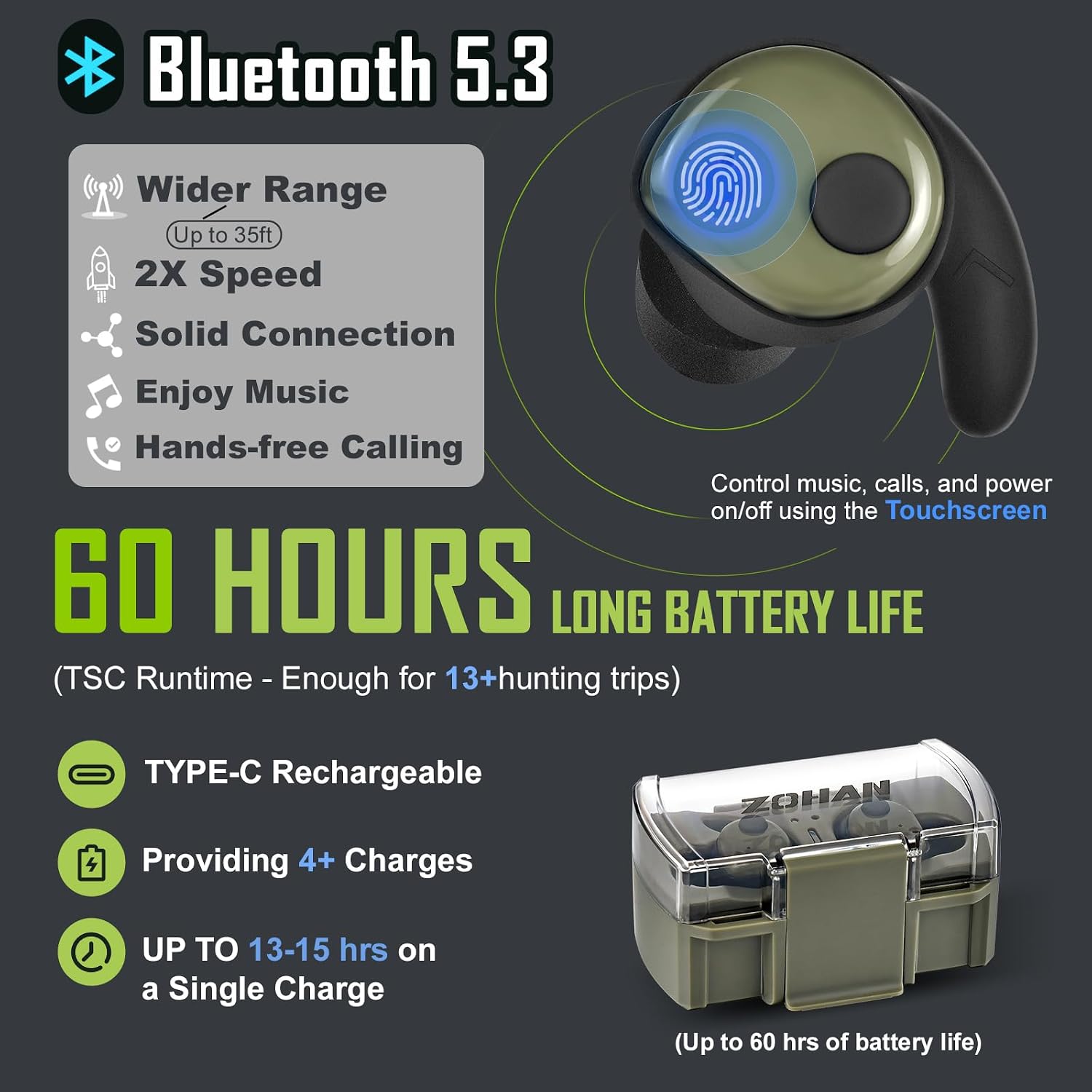
Image: Explanation of the 4-level sound amplification feature for the earbuds.
Setup
ZOHAN Electronic Shooting Earmuffs (EM054)
- Battery Installation: Open the battery compartment cover, typically located on one of the earcups (refer to image for exact location). Insert 2 AAA batteries (not included) according to the polarity markings. Close the cover securely.
- Adjusting Fit: Extend or retract the headband to ensure a snug and comfortable fit over your ears. The ear cushions should fully seal around your ears to provide effective noise reduction.
ZOHAN EP02 Bluetooth Shooting Earbuds
- Charging the Earbuds and Case: Place the earbuds into the charging case. Connect the USB-C charging cable to the charging port on the case and to a power source. The indicator lights on the case will show charging status. Ensure the earbuds are fully charged before first use.
- Selecting Ear Tips: Choose the ear tip size (S, M, L) that provides the best seal and comfort for your ears. A proper seal is crucial for effective noise blocking and sound quality. Gently twist the earbud into your ear canal until it feels secure and comfortable.

Image: Details on EP02 Earbuds' Bluetooth, battery, and charging features.
Operating Instructions
ZOHAN Electronic Shooting Earmuffs (EM054)
- Power On/Off: Locate the power/volume knob on one of the earcups. Rotate the knob clockwise to turn on the earmuffs and increase the volume of amplified sounds. Rotate counter-clockwise to decrease volume and turn off.
- Volume Adjustment: Adjust the knob to your desired amplification level. Ensure that the amplified sounds are clear but not uncomfortably loud.
ZOHAN EP02 Bluetooth Shooting Earbuds
- Power On/Off: The earbuds typically power on automatically when removed from the charging case and power off when placed back in the case. Manual power control may be available via touch controls (refer to specific touch control guide for details).
- Bluetooth Pairing:
- Remove both earbuds from the charging case. They will automatically enter pairing mode (indicated by flashing LED lights).
- On your device (smartphone, tablet), enable Bluetooth and search for "ZOHAN EP02" in the list of available devices.
- Select "ZOHAN EP02" to connect. Once paired, the LED indicators will stop flashing.
- The earbuds support dual-device pairing, allowing seamless switching between two connected devices.
- Touch Controls: The EP02 earbuds feature touch-sensitive controls for managing music playback, answering/ending calls, and switching between modes (Noise Cancellation, TSC, Bluetooth audio). Refer to the detailed touch control guide included with your product for specific gestures and functions.
- TSC (Tactical Sound Control) Modes: The earbuds offer different levels of sound amplification. Use the touch controls to cycle through the amplification levels (e.g., Level 1 for low-frequency environments, Level 4 for precision shooting).

Image: Illustrates the rapid noise suppression feature of the ZOHAN devices.
Maintenance
- Cleaning: Wipe the earmuffs and earbuds with a soft, damp cloth. Do not use harsh chemicals or abrasive cleaners. Ensure devices are dry before storage.
- Ear Cushion Replacement (Earmuffs): Periodically inspect ear cushions for wear and tear. Replace them if they become cracked or lose their seal to maintain optimal hearing protection.
- Ear Tip Care (Earbuds): Clean ear tips regularly with a mild soap and water solution. Ensure they are completely dry before reattaching to the earbuds. Replace ear tips if they become damaged or lose their elasticity.
- Storage: Store the devices in a cool, dry place away from direct sunlight and extreme temperatures. For earmuffs, remove AAA batteries if storing for extended periods. Keep earbuds in their charging case.
Troubleshooting
If you encounter issues, refer to the following common solutions:
| Problem | Possible Cause | Solution |
|---|---|---|
| No sound/power (Earmuffs) | Dead or incorrectly installed batteries. | Replace AAA batteries, ensuring correct polarity. |
| Poor noise reduction (Earmuffs/Earbuds) | Improper fit; worn ear cushions/tips. | Adjust fit for a tight seal. Replace worn ear cushions/tips. |
| Earbuds not charging | Charging cable/port issue; earbuds not seated correctly. | Check cable and power source. Ensure earbuds are properly seated in the case. |
| Earbuds not pairing | Bluetooth off on device; earbuds not in pairing mode. | Ensure Bluetooth is enabled. Remove earbuds from case to enter pairing mode. Forget device and re-pair. |
| Intermittent sound/connection (Earbuds) | Distance from device; interference. | Move closer to the paired device. Avoid strong electromagnetic interference. |
Specifications
ZOHAN Electronic Shooting Earmuffs (EM054)
- Noise Reduction Rating (NRR): 22 dB
- Noise Suppression Response Time: 0.01 seconds
- Microphones: 2 Omnidirectional
- Power Source: 2 x AAA Batteries (not included)
- Material: Durable ABS Shell
ZOHAN EP02 Bluetooth Shooting Earbuds
- Bluetooth Version: 5.3
- Wireless Range: Up to 35 feet
- Weight: Approximately 9g per earbud
- Battery Life (Earbuds): 13-15 hours on a single charge
- Total Battery Life (with Charging Case): Up to 60 hours (TSC runtime)
- Charging Port: USB-C
- Sound Amplification Levels: 4 levels (300Hz, 500Hz, 700Hz, 1.0kHz)
Warranty and Support
ZOHAN products undergo strict quality control. We offer satisfaction service for our products. If you have any questions or require assistance, please do not hesitate to contact us. Our customer support team is available to provide you with the best solution and service 24 hours a day.
For support, please visit the ZOHAN store on Amazon or contact us through the platform where you purchased the product.