
1. Introduction
This manual provides essential information for the safe and efficient operation of your Windmill 5,000 BTU Lite Window Air Conditioner (Model 05W11). This unit is designed to cool spaces up to 150 sq ft, such as bedrooms, home offices, or small apartments. Please read these instructions thoroughly before installation and use, and retain them for future reference.
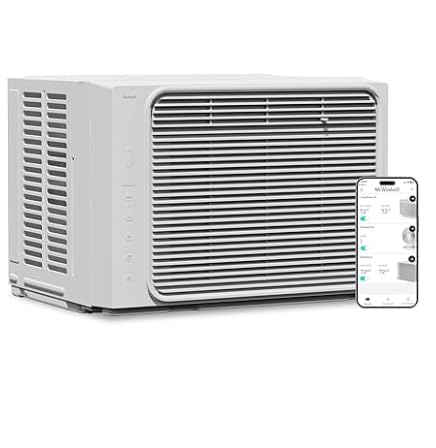
Image 1.1: Windmill 5,000 BTU Lite Window Air Conditioner unit.
2. Safety Information
Always follow basic safety precautions when using electrical appliances to reduce the risk of fire, electric shock, and injury to persons.
- Read all instructions before using this appliance.
- Plug into a grounded 3-prong outlet. Do not remove the grounding prong. Do not use an adapter. Do not use an extension cord.
- Disconnect power before servicing.
- Do not operate any air conditioner with a damaged cord or plug.
- Do not block air openings.
- Use only for its intended purpose as described in this manual.
- Keep packaging materials out of reach of children.
3. Setup and Installation
The Windmill 5,000 BTU Lite is designed for installation in standard single and double-hung windows. The window opening must meet the following dimensions:
- Minimum Window Opening Height: 14.5 inches
- Window Opening Width: 23 to 34 inches
3.1. Included Components
The following components are included in the installation kit:
- Double-sided insulation
- Mesh filter
- Activated carbon filter
- Remote control
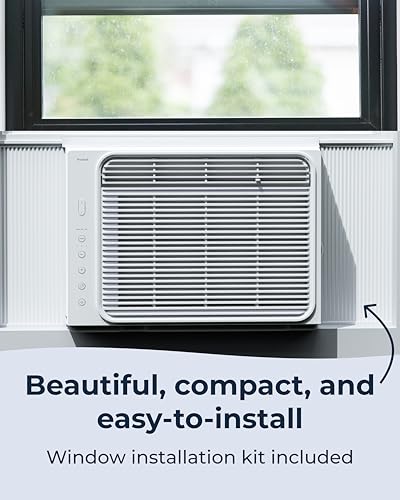
Image 3.1: Air conditioner unit and included installation kit components.
3.2. Installation Steps (Overview)
A complete installation guide is provided with your unit. The general steps involve:
- Prepare the window opening by cleaning and ensuring it meets the required dimensions.
- Install the provided insulation and side panels into the window frame.
- Carefully place the air conditioner unit into the prepared window opening.
- Secure the unit using the provided brackets and screws.
- Ensure all gaps are sealed to maximize cooling efficiency.
- Plug the unit into a grounded electrical outlet.
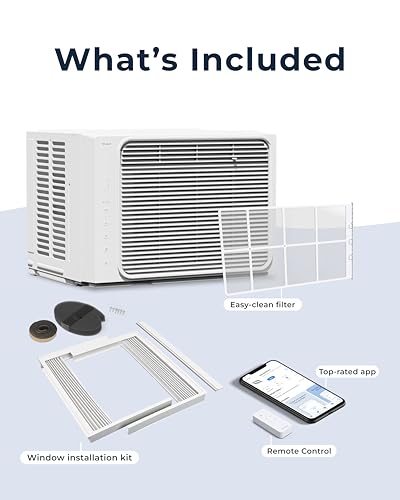
Image 3.2: Windmill Air Conditioner properly installed in a window.
4. Operating Instructions
Your Windmill air conditioner offers multiple control options and operating modes for customized comfort.
4.1. Control Panel
The unit features a sleek digital control panel with auto-dimming LEDs. Use the buttons on the panel to adjust settings directly.
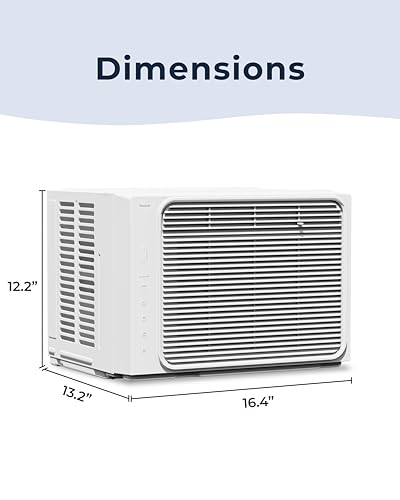
Image 4.1: Digital control panel with auto-dimming LEDs.
4.2. Remote Control
A remote control is included for convenient operation from a distance.
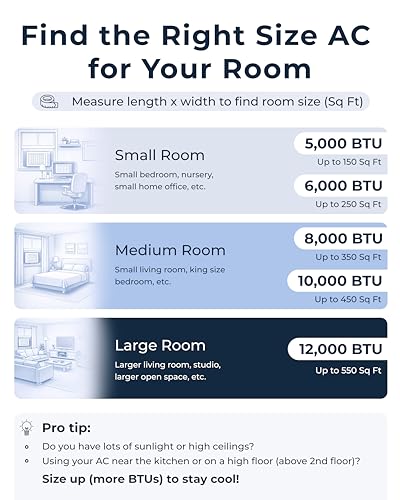
Image 4.2: Remote control for the air conditioner.
4.3. App and Voice Control
The air conditioner can be controlled remotely via the Windmill Air app, available for iOS and Android devices. It is also compatible with smart home voice control systems for hands-free operation.

Image 4.3: Control the unit using the Windmill Air mobile application.
4.4. Operating Modes
Select from the following operating modes:
- Cool Mode: Provides active cooling to reach the set temperature.
- Eco Mode: Optimizes energy consumption by cycling the compressor and fan to maintain the set temperature.
- Fan Mode: Circulates air without engaging the compressor for cooling.
4.5. Fan Speeds
The unit offers three fan speeds to adjust airflow intensity.
5. Maintenance
Regular maintenance ensures optimal performance and longevity of your air conditioner.
5.1. Filter Cleaning
The air conditioner is equipped with an easy-access washable filter. It is recommended to clean the filter regularly, typically every two weeks, or more often depending on usage and air quality.
- Turn off and unplug the unit before attempting to clean the filter.
- Locate the filter access panel, usually on the front or side of the unit.
- Remove the mesh filter and activated carbon filter.
- Wash the mesh filter with warm, soapy water. Rinse thoroughly and allow it to air dry completely before reinstallation.
- Replace the activated carbon filter as needed (refer to product packaging for replacement frequency).
- Reinstall both filters and close the access panel.

Image 5.1: Easy filter access for routine cleaning.
6. Troubleshooting
If you encounter issues with your air conditioner, refer to the following common troubleshooting steps:
| Problem | Possible Cause | Solution |
|---|---|---|
| Unit does not turn on | No power, tripped circuit breaker, unit unplugged | Check power connection, reset circuit breaker, ensure plug is fully inserted. |
| Insufficient cooling | Dirty air filter, blocked air vents, room size exceeds capacity, window not sealed | Clean air filter, clear obstructions, ensure unit is appropriate for room size, check window seals. |
| Unit is noisy | Loose parts, unit not level, normal operating sounds | Ensure unit is securely installed and level. Some operational sounds are normal. If unusual, contact support. |
| Remote control not working | Dead batteries, obstruction between remote and unit | Replace batteries, ensure clear line of sight to the unit's receiver. |
If the problem persists after attempting these solutions, please contact customer support.
7. Specifications
Detailed technical specifications for the Windmill 5,000 BTU Lite Window Air Conditioner (Model 05W11).
| Feature | Detail |
|---|---|
| Brand | Windmill |
| Model Name | 5000 BTU Lite |
| Model Number | 05W11 |
| Cooling Power | 5,000 BTU |
| Coverage Area | Up to 150 sq ft |
| Product Dimensions (D x W x H) | 14.8"D x 17.8"W x 15.1"H |
| Item Weight | 42 pounds |
| Noise Level | 51 dB |
| Refrigerant | R-32 |
| Power Source | Corded Electric |
| Installation Type | Window |
| Window Opening Minimum Width | 23 inches |
| Window Opening Maximum Width | 34 inches |
| Window Opening Minimum Height | 14.5 inches |
| Control Method | App, Remote, Voice |
| Operating Modes | Cool, Eco, Fan |
| Included Components | Double-sided insulation, Mesh filter, Activated carbon filter, Remote control |
8. Warranty Information
Your Windmill 5,000 BTU Lite Window Air Conditioner is covered by a limited warranty. Please refer to the warranty card included with your product packaging for specific terms, conditions, and duration of coverage. Keep your proof of purchase for warranty claims.
9. Customer Support
For technical assistance, troubleshooting beyond this manual, or to inquire about replacement parts, please contact Windmill customer support. Contact information can be found on the official Windmill website or in your product packaging.


