
Introduction
This manual provides essential information for the setup, operation, maintenance, and troubleshooting of your ASUS ROG Strix G16 G615JH-DS54 Gaming Laptop. The ROG Strix G16 is designed for a high-performance gaming experience, featuring a 16-inch FHD+ 165Hz display, an Intel Core i5-13450HX processor, and an NVIDIA GeForce RTX 5050 Laptop GPU. It includes 16GB DDR5 RAM, a 1TB PCIe Gen 4 SSD, and advanced ROG Intelligent Cooling for sustained performance. The laptop also boasts an esports-ready keyboard, Dolby Atmos audio, and a customizable RGB Aura Light Bar.
1. Setup
1.1 Unboxing and Initial Inspection
Carefully remove all components from the packaging. Verify that all items listed in the 'What's in the Box' section are present and undamaged. The package should contain the G615JH-DS54 laptop, power cord, power adapter, and this user guide.

Figure 1: Front view of the ASUS ROG Strix G16 Gaming Laptop.
1.2 Connecting the Power Adapter
Connect the power cord to the power adapter, then plug the adapter into the laptop's power input port. Finally, plug the power cord into a wall outlet. Ensure a stable power connection before proceeding.
1.3 Initial Power-On and Operating System Setup
Open the laptop lid and press the power button. The laptop will initiate the boot sequence. Follow the on-screen instructions to complete the Windows 11 Home operating system setup, including language selection, network connection, and user account creation.
2. Operating Your Laptop
2.1 Keyboard and Touchpad
The laptop features an esports-ready keyboard with customizable RGB backlighting. The touchpad supports multi-touch gestures for navigation. Refer to the Windows 11 documentation for detailed gesture controls.
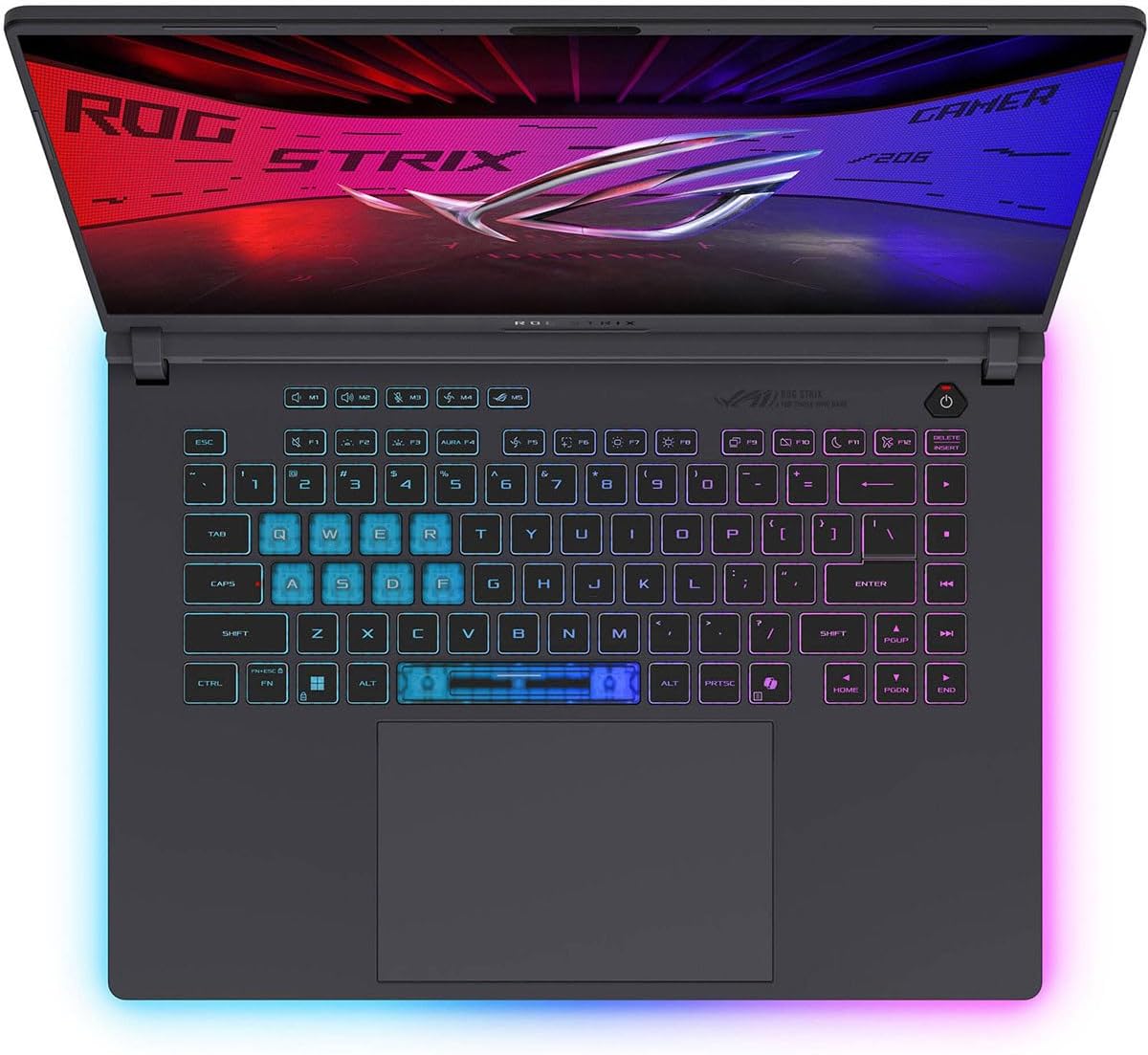
Figure 2: Top-down view of the keyboard and touchpad with RGB lighting.
2.2 Display and Audio
The 16-inch FHD+ display offers a 165Hz refresh rate and 3ms response time for smooth visuals. Audio is enhanced with Dolby Atmos technology. Adjust display brightness and audio volume using the dedicated function keys or Windows settings.
2.3 Connectivity
The ROG Strix G16 supports Wi-Fi 7 for high-speed wireless connectivity. It includes multiple ports for external devices:
- USB 3.0 Ports: 3
- HDMI Port: 1
- Ethernet Port: 1
- USB Type-C Ports: 2 (Thunderbolt 4 compatible)
- 3.5mm Audio Jack: 1

Figure 3: Overview of laptop connectivity features.
3. Maintenance
3.1 General Care
To ensure the longevity of your laptop, keep it clean and free from dust. Use a soft, dry cloth for cleaning the screen and chassis. Avoid exposing the laptop to extreme temperatures, direct sunlight, or liquids.
3.2 Cooling System
The ROG Strix G16 features an advanced ROG Intelligent Cooling system with an end-to-end vapor chamber and tri-fan technology. Ensure that the ventilation grilles are not obstructed to maintain optimal airflow and prevent overheating. Regularly clean dust from the vents using compressed air.

Figure 4: Illustration of the ROG Intelligent Cooling system.
3.3 Software Updates
Regularly update your operating system, drivers, and applications to ensure optimal performance and security. ASUS provides utility software to manage system updates and settings.
4. Troubleshooting
If you encounter issues with your ASUS ROG Strix G16, refer to the following common troubleshooting steps:
- No Power: Ensure the power adapter is securely connected to both the laptop and a working power outlet. Verify the power outlet is functional.
- Display Issues: If the screen is blank, try connecting an external monitor to check if the issue is with the laptop's display. Adjust display settings in Windows.
- Performance Slowdown: Close unnecessary applications, check for background processes, and ensure sufficient free storage space. Overheating can also cause performance issues; ensure vents are clear.
- Connectivity Problems: For Wi-Fi issues, restart your router and the laptop. For wired connections, check the Ethernet cable.
For more complex issues or technical support, please visit the official ASUS support website or contact their customer service.
5. Specifications
| Feature | Detail |
|---|---|
| Standing screen display size | 16 Inches |
| Screen Resolution | 1920 x 1200 pixels |
| Max Screen Resolution | 1920x1200 Pixels |
| Processor | 4.6 GHz core_i5 (Intel Core i5-13450HX) |
| RAM | 16 GB DDR5 |
| Hard Drive | 1 TB SSD (PCIe Gen 4) |
| Graphics Coprocessor | NVIDIA GeForce RTX 5050 |
| Chipset Brand | Intel |
| Card Description | Dedicated |
| Graphics Card Ram Size | 8 GB |
| Wireless Type | 802.11n (Wi-Fi 7) |
| Number of USB 3.0 Ports | 3 |
| Series | Strix G16 |
| Item model number | G615JH-DS54 |
| Hardware Platform | PC |
| Operating System | Windows 11 Home |
| Item Weight | 10.1 pounds |
| Product Dimensions | 13.94 x 0.9 x 10.55 inches |
| Color | Eclipse Gray |
| Number of Processors | 10 |
| Computer Memory Type | DDR5 RAM |
| Flash Memory Size | 1 TB |
| Hard Drive Interface | Solid State |
| Special Feature | Backlit Keyboard |
5.1 What's in the Box
- ASUS ROG Strix G16 G615JH-DS54 Laptop
- Powercord and Adapter
- User Guide
6. Warranty and Support
Every ASUS ROG laptop includes a 12-month warranty as standard, offering expert support, thorough diagnostics, and genuine parts if a repair is needed. Additionally, ASUS provides one year of free Accidental Damage Protection (ADP) against liquid spills, drops, and electrical surges on new laptops registered within 60 days of purchase. A 90-day warranty is also provided on all warranty replacement parts.
For further assistance, product registration, or to access detailed support resources, please visit the official ASUS support website.