Product Overview
The HWWR TX06 is a versatile portable Bluetooth karaoke machine designed for various entertainment needs, from home gatherings to outdoor events. It features a powerful subwoofer for rich audio, intuitive controls, and ultra-low latency wireless microphones for a seamless singing experience. The system supports multiple audio input methods and offers TWS (True Wireless Stereo) connectivity for enhanced sound.

Figure 1: HWWR TX06 Portable Bluetooth Karaoke Machine and Accessories
This image displays the main unit of the HWWR TX06 karaoke machine, featuring a large speaker with multi-color LED lights on the front. To the right, two wireless microphones are shown, along with a USB charging cable and an AUX audio cable. The top of the unit has a slot for holding a tablet or smartphone, and various control knobs and ports are visible.
Key Features:
- Powerful Audio Output: Equipped with a subwoofer for deep bass and clear treble, providing a full-range sound experience.
- User-Friendly Controls: Clearly marked buttons and knobs for easy adjustment of volume, bass, treble, and echo.
- Low-Latency Wireless Microphones: Includes two upgraded Bluetooth wireless microphones with ultra-low 10ms latency for natural vocal performance.
- True Wireless Stereo (TWS) Mode: Allows wireless connection of two TX06 speakers for expanded stereo sound.
- Multiple Connectivity Options: Supports Bluetooth 5.3, USB drives, TF cards, AUX input, and musical instruments.
- Long Battery Life: Provides up to 12 hours of playtime on a single charge.
- Dynamic RGB Lights: Built-in lights sync with music to enhance party atmosphere.
- Portable Design: Lightweight and compact with a comfortable shoulder strap for easy transport.
What's in the Box
Please check the package contents upon unboxing to ensure all items are present and in good condition.
- 1 x HWWR TX06 Karaoke Machine
- 2 x Wireless Microphones
- 1 x USB Charging Cable
- 1 x AUX Cable
Setup Guide
1. Charging the Device
Before first use, fully charge the karaoke machine. Connect the provided USB charging cable to the DC 5V port on the unit and to a compatible USB power adapter (not included). The charging indicator light will show the charging status.
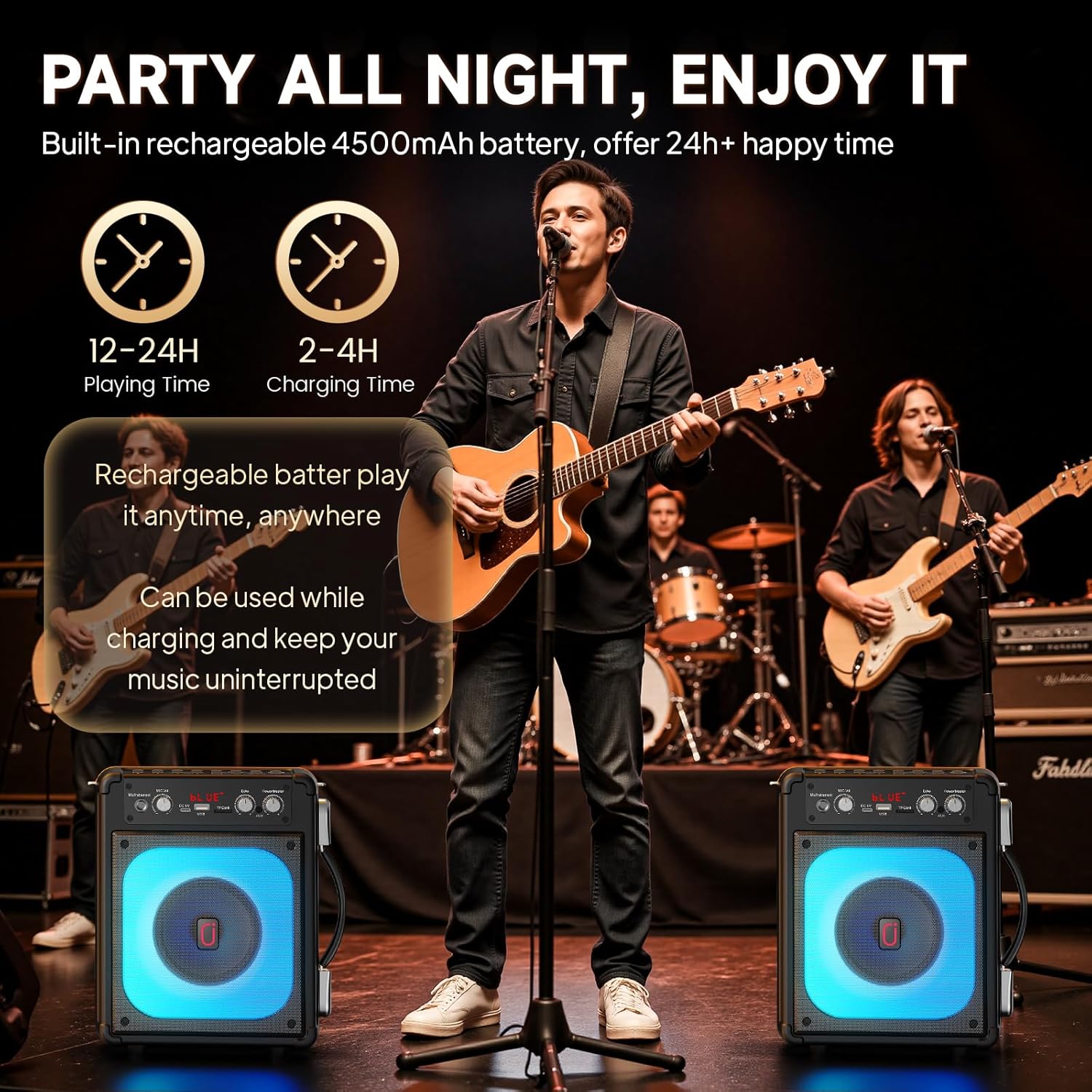
Figure 2: Battery and Charging Information
This image illustrates the long battery life of the HWWR TX06, indicating 12-24 hours of playing time and 2-4 hours of charging time. It also shows that the device can be used while charging, ensuring uninterrupted music.
2. Powering On/Off
Locate the Power/Master knob on the control panel. Rotate it clockwise to turn the unit on and increase the master volume. Rotate counter-clockwise until it clicks to turn the unit off.
3. Microphone Pairing
The wireless microphones are typically pre-paired with the karaoke machine. If pairing is required, turn on both the karaoke machine and the microphones. The microphones should automatically connect. If not, refer to the troubleshooting section.
4. Connecting Audio Sources
The TX06 offers multiple ways to connect your audio source:
- Bluetooth Connection:
- Turn on the karaoke machine. The display will show "BLUE" indicating Bluetooth mode.
- Enable Bluetooth on your smartphone, tablet, or other device.
- Search for "TX06" in the list of available Bluetooth devices and select it to pair.
- Once connected, you will hear a confirmation sound, and the display will indicate a successful connection.
- USB Drive Playback:
- Insert a USB flash drive containing MP3 audio files into the USB port.
- The machine will automatically switch to USB mode and begin playing music.
- TF Card Playback:
- Insert a TF (MicroSD) card containing MP3 audio files into the TF Card slot.
- The machine will automatically switch to TF Card mode and begin playing music.
- AUX Input:
- Use the provided AUX cable to connect the AUX port on the karaoke machine to the audio output of your device (e.g., TV, computer, MP3 player).
- The machine will automatically switch to AUX mode.
- Instrument Connection:
- Connect a musical instrument (e.g., guitar) to the "Mic/Instrument" input jack.
- Adjust the "Mic/Instrument Vol" knob to control the instrument's volume.

Figure 3: Multiple Connection Modes
This image highlights the various connectivity options of the HWWR TX06, including Bluetooth, USB, TF Card, and AUX cable. It shows the main unit with its colorful LED speaker and examples of its use in different settings, such as playing guitar, a family gathering, and a relaxed outdoor setting.
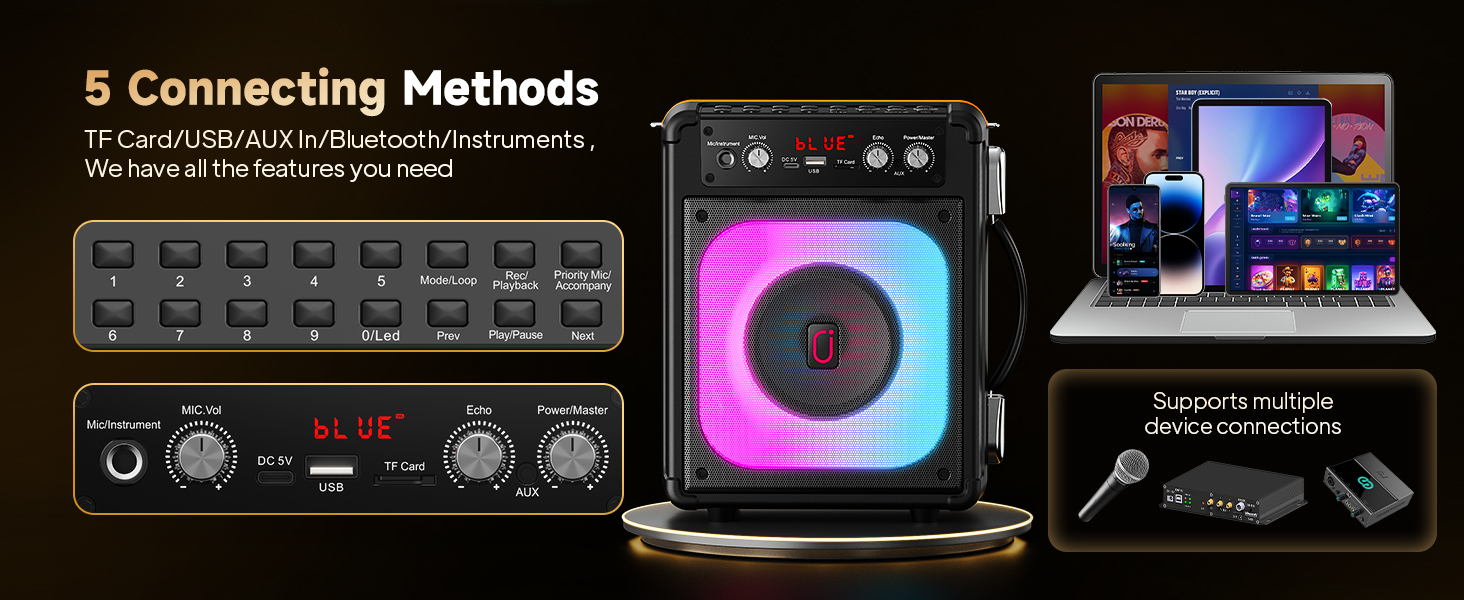
Figure 4: Control Panel and Connectivity
This image provides a close-up of the TX06's control panel, detailing the various buttons and knobs for playback control, volume, echo, and power. It also visually demonstrates connections to smartphones, tablets, laptops, and external microphones, emphasizing the five different connection methods available.
5. TWS (True Wireless Stereo) Connection
To achieve a wider stereo sound, you can connect two TX06 karaoke machines wirelessly:
- Ensure both TX06 units are powered on and not connected to any Bluetooth device.
- On one of the speakers, long press the "MODE" button. You will hear a prompt indicating TWS pairing mode.
- The two speakers will automatically search for and connect to each other. Once connected, you will hear a confirmation sound.
- Now, connect your Bluetooth device to one of the paired TX06 speakers. Audio will play through both units in stereo.
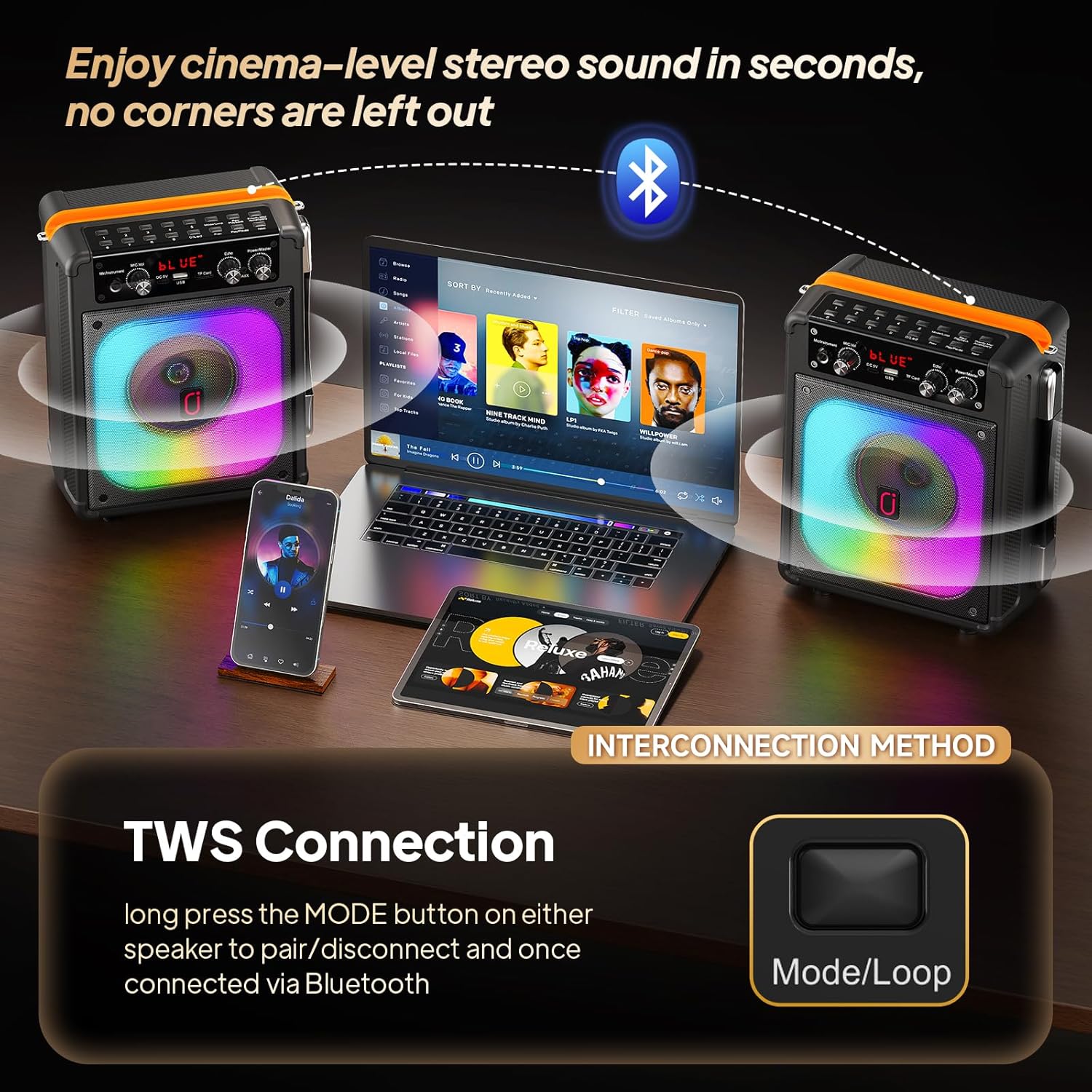
Figure 5: TWS Connection Method
This image illustrates the True Wireless Stereo (TWS) connection feature, showing two TX06 speakers wirelessly linked to a laptop and smartphone. It highlights the "Mode/Loop" button used to initiate the TWS pairing process, enabling a cinema-level stereo sound experience.
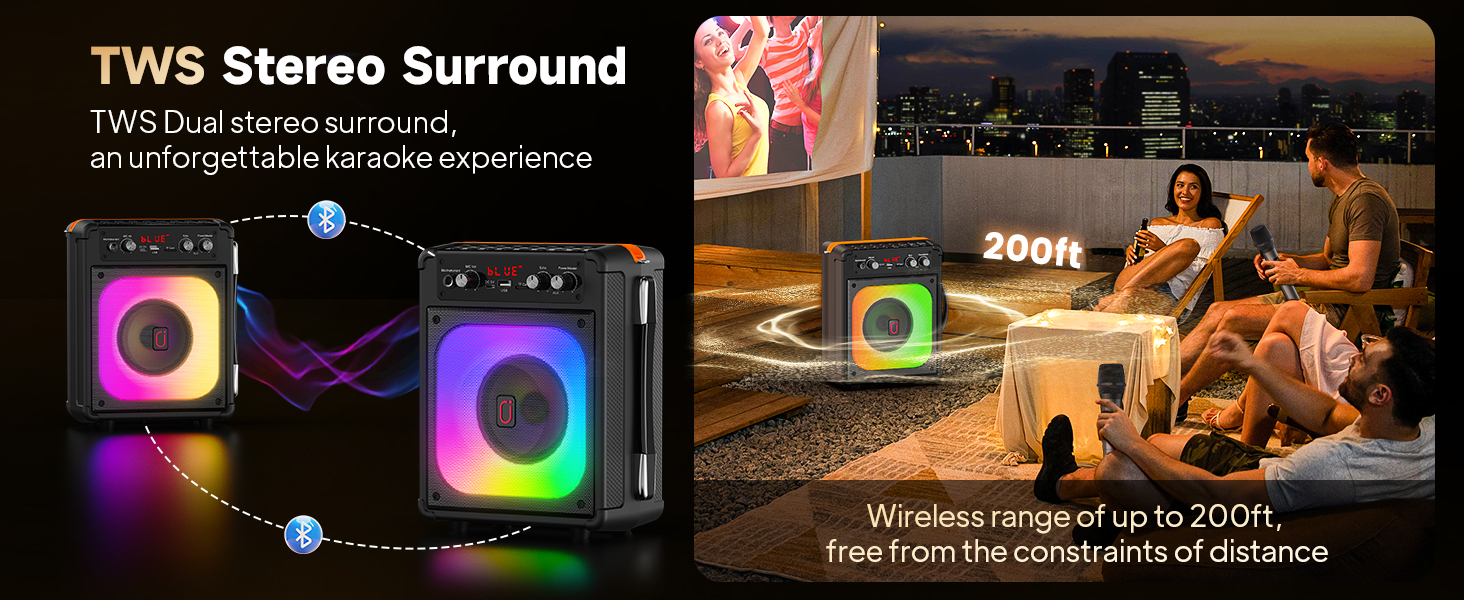
Figure 6: TWS Stereo Surround in Use
This image depicts two TX06 speakers set up outdoors, wirelessly connected to provide TWS stereo surround sound. People are shown enjoying the music, emphasizing the wireless range of up to 200 feet and the immersive karaoke experience.
Operating Instructions
1. Adjusting Sound
Use the dedicated knobs on the control panel to fine-tune your audio:
- Power/Master: Controls the overall volume of the machine.
- Mic/Instrument Vol: Adjusts the volume of the connected microphones or instruments.
- Echo: Adds an echo effect to the microphone vocals.
- Bass: Adjusts the low-frequency sound output.
- Treble: Adjusts the high-frequency sound output.

Figure 7: 3D Stereo Sound Components
This diagram illustrates the internal components responsible for the 3D stereo sound, highlighting the superior speaker and independent bass. It also notes key specifications like Bluetooth 5.3 with almost zero latency, a microphone distance of up to 200 ft, and sound coverage of 2000 sq. ft.
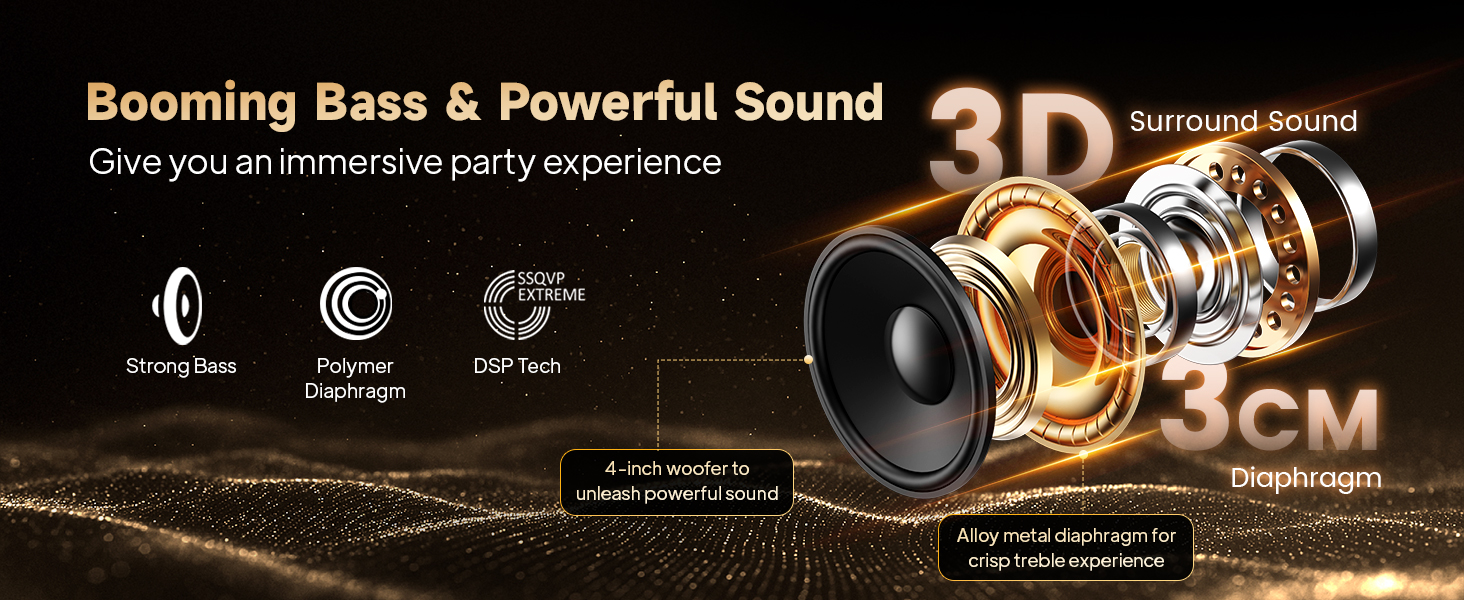
Figure 8: Booming Bass & Powerful Sound Technology
This image provides an exploded view of the speaker's internal structure, detailing components like the 4-inch woofer, polymer diaphragm, and alloy metal diaphragm for crisp treble. It emphasizes the "Booming Bass & Powerful Sound" features, including Strong Bass, Polymer Diaphragm, and DSP Tech, designed to deliver an immersive party experience.
2. Using the Microphones
Turn on the wireless microphones using their power buttons. Speak into the microphone, adjusting the "Mic/Instrument Vol" and "Echo" knobs on the main unit to achieve your desired vocal effect. Ensure the microphones are within range of the karaoke machine for optimal performance.
3. Light Modes
The TX06 features built-in RGB lights that sync with your music. Use the dedicated light mode button (if available, otherwise it's automatic) to cycle through different light patterns and colors, enhancing the party atmosphere.

Figure 9: Multiple Light Modes
This image showcases the various light modes of the HWWR TX06, featuring 7 monochrome light modes and multiple mixing color modes. The speaker's front panel illuminates with a vibrant rainbow of colors, designed to enhance the light show while singing.
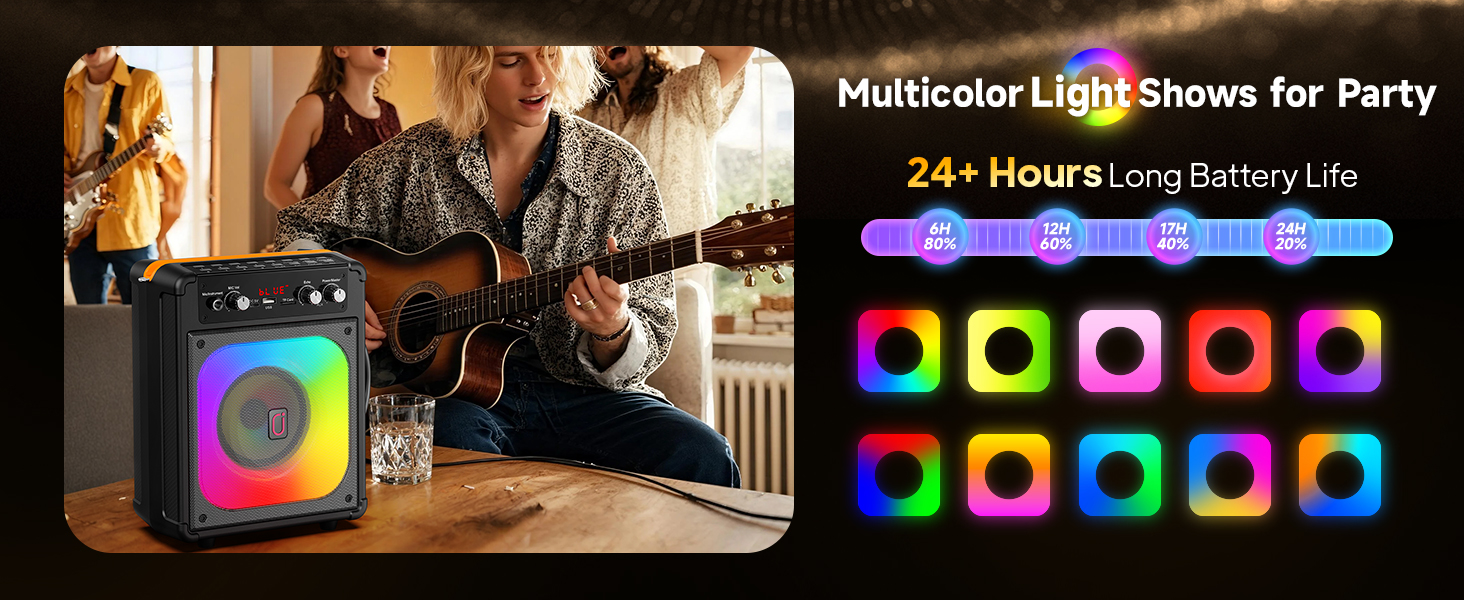
Figure 10: Multicolor Light Shows
This image highlights the multicolor light shows feature, showing the TX06 speaker with its vibrant lights in a party setting. It also reiterates the 24+ hours long battery life, with a visual representation of battery percentage over time.
4. Recording Function (REC)
The TX06 supports recording. When a USB drive or TF card is inserted, you can typically press a "REC" button (if available on the control panel, otherwise this feature might be automatic or app-controlled) to record your singing. Refer to the control panel layout for specific button functions.
5. TV Connection
To connect the karaoke machine to a TV for displaying lyrics, use the AUX input. Connect the AUX cable from the TV's audio output (headphone jack or audio out) to the AUX input on the TX06. Ensure your TV's audio settings are configured to output sound through the connected port.
Maintenance
- Cleaning: Use a soft, dry cloth to clean the surface of the karaoke machine and microphones. Do not use abrasive cleaners or solvents.
- Battery Care: To prolong battery life, avoid fully discharging the battery frequently. If storing for a long period, charge the battery to about 50% every few months.
- Storage: Store the device in a cool, dry place away from direct sunlight and extreme temperatures.
- Handling: Avoid dropping the unit or exposing it to excessive shock, as this can damage internal components.
Troubleshooting
| Problem | Possible Cause | Solution |
|---|---|---|
| No sound from speaker. |
|
|
| Microphone not working. |
|
|
| Bluetooth connection issues. |
|
|
| TWS pairing failed. |
|
|
Specifications
| Feature | Detail |
|---|---|
| Model Number | TX06 |
| Brand | HWWR |
| Connectivity Technology | AUX, Bluetooth, USB |
| Compatible Devices | Smartphones, tablets, computers, Bluetooth-enabled audio devices, microphones |
| Power Source | Battery Powered |
| Item Dimensions (L x W x H) | 4 x 7 x 5 inches |
| Item Weight | 4.62 pounds (2.1 Kilograms) |
| Speaker Count | 1 (main unit) |
| UPC | 730140637315 |
| First Available Date | June 25, 2025 |
Warranty and Support
Warranty Information
HWWR provides a 12-month warranty for any quality-related problems with the TX06 Karaoke Machine from the date of purchase. Please retain your proof of purchase for warranty claims.
Customer Support
For any questions, issues, or support needs regarding your HWWR TX06 Karaoke Machine, please do not hesitate to contact our customer service team. We are committed to assisting you.
Figure 11: Support Service Contact Information
This image provides contact details for HWWR customer support, including a phone number (757-943-7037) and an email address (service@hwwr.net). It also reiterates the one-year warranty provided by HWWR for quality-related issues.
Phone: 757-943-7037
Email: service@hwwr.net


