
1. Introduction and Overview
The HiWEEGO 5-in-1 Robot Building Kit Model 8051 offers a versatile construction experience, allowing users to build five distinct models: a racing tank, a high-tech robot, a stunt vehicle, a tracked car, and a sleigh. This kit is designed to stimulate imagination and problem-solving skills through engaging construction and play. It features dynamic LED lighting that changes color during movement and includes a rechargeable battery for extended use. Control options include both a 2.4 GHz remote control and a dedicated mobile application, providing diverse gameplay modes such as path, gyroscope, driving, and programming.

Image: The HiWEEGO 5-in-1 Robot Building Kit allows for the construction of five unique models, each featuring vibrant LED lights.
2. Safety Information
- Small Parts: This product contains small parts and is not suitable for children under 3 years of age due to choking hazards.
- Adult Supervision: Adult supervision is recommended during assembly and play, especially for younger children.
- Battery Safety: Do not attempt to disassemble or modify the rechargeable battery. Use only the provided charging cable.
3. What's in the Box
Verify that all components are present before beginning assembly:
- 604 x ABS Building Blocks
- 1 x Main Control Unit (with integrated rechargeable battery and LED lights)
- 1 x 2.4 GHz Remote Control
- 1 x USB Charging Cable
- 1 x Instruction Manual

Image: The complete package contents, showing the box, remote, manual, and examples of the five possible models.
4. Setup
4.1 Assembly
Follow the detailed step-by-step instructions provided in the included manual to construct your desired model. The kit allows for five different configurations, but only one model can be built at a time. Ensure all connections are secure for proper functionality.
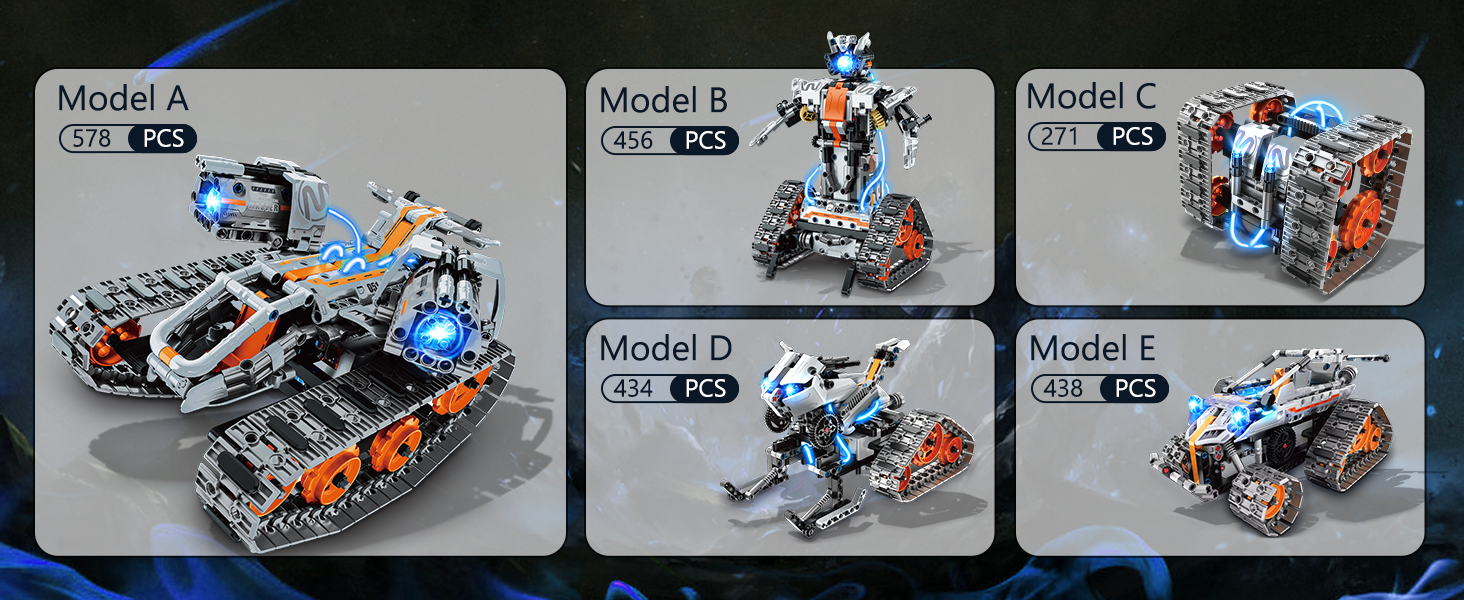
Image: Visual representation of the five distinct models, indicating the piece count for each build.
4.2 Charging the Battery
- Locate the charging port on the main control unit.
- Connect the provided USB charging cable to the control unit and a compatible USB power source (e.g., computer, wall adapter).
- The LED indicator on the control unit will show charging status (refer to the manual for specific light patterns).
- Allow the battery to fully charge before first use.
4.3 Remote Control Preparation
The remote control typically requires 2x AAA batteries (not included). Insert them according to the polarity markings inside the battery compartment.
4.4 App Installation and Connection
- Scan the QR code in the instruction manual or search for the 'HiWEEGO Robot' app in your device's app store.
- Install the application on your smartphone or tablet.
- Ensure Bluetooth is enabled on your device.
- Turn on the robot's main control unit.
- Open the app and follow the on-screen prompts to connect to your robot.
5. Operating Instructions
5.1 Power On/Off
Press and hold the power button on the main control unit to turn the robot on or off. The LED lights will illuminate upon activation.
5.2 Remote Control Operation
Use the 2.4 GHz remote control for basic movement and control. Refer to the remote control diagram in the manual for specific button functions (e.g., forward, backward, turn left, turn right, LED control).

Image: Demonstrates dual control options, with one user operating via a smartphone app and another with the physical remote control.
5.3 App Control Modes
The mobile application offers advanced control and programming features:
- Path Mode: Draw a path on your device screen, and the robot will follow it.
- Gyro Mode: Control the robot's movement by tilting your smartphone or tablet.
- Driving Mode: Use virtual joysticks on the app interface for precise control.
- Programming Mode: Drag and drop code blocks to create custom movement sequences and actions.

Image: The mobile application interface, illustrating Path Mode, Gyro Mode, and Driving Mode for interactive control.
5.4 LED Light Features
The robot is equipped with dynamic LED lights that change color (blue, green, purple) during movement, enhancing the play experience. These lights can often be controlled or toggled via the remote or app.

Image: Detailed view of the robot's features, highlighting the glowing eyes, dynamic LED lighting, and robust crawler tracks.
6. Maintenance
6.1 Cleaning
To clean the robot, gently wipe surfaces with a dry, soft cloth. Avoid using water or chemical cleaners, as these can damage electronic components.
6.2 Battery Care
- Recharge the battery regularly, even if the robot is not in frequent use, to maintain battery health.
- Do not overcharge the battery. Disconnect the charger once charging is complete.
- Store the robot and battery in a cool, dry place away from direct sunlight and extreme temperatures.
6.3 Storage
When not in use, disassemble the model if desired and store the building blocks and electronic components in their original packaging or a suitable container to prevent loss or damage.
7. Troubleshooting
- Robot Not Moving:
- Ensure the main control unit is powered on.
- Check if the battery is charged. Recharge if necessary.
- Verify that the remote control or app is properly connected and paired.
- Inspect all physical connections of the building blocks to ensure they are secure. - Remote Control Not Responding:
- Replace the batteries in the remote control.
- Ensure the remote control is within the operating range (up to 50 meters).
- Re-pair the remote control with the robot if connection is lost. - App Connection Issues:
- Ensure Bluetooth is enabled on your device.
- Restart the app and the robot.
- Check for app updates in your device's app store. - LED Lights Not Working:
- Ensure the robot is powered on.
- Check battery level.
- If specific LED control is available, verify settings in the app or remote. - Parts Missing or Damaged:
- Contact customer support for assistance.
8. Specifications
| Brand | HiWEEGO |
| Model Number | 8051 |
| Material | ABS Plastic |
| Number of Pieces | 604 |
| Battery Type | Rechargeable (Non-standard battery included) |
| Operating Voltage | 7.4 V |
| Motor Speed | Up to 680 RPM |
| Motor Torque | 2.5 kgf.cm |
| Remote Control Range | Up to 50 meters |
| Recommended Minimum Age | 6 years (72 months) |
| Special Features | LED Lights, Dual Control (App & Remote), 5-in-1 Build Options |
| Educational Objective | Programming introduction, creative thinking, problem-solving |
| Item Dimensions | 10 x 10 x 10 millimeters (Note: This appears to be a placeholder or incorrect dimension, actual assembled size will vary by model) |

Image: Performance comparison of the HiWEEGO robot with other models, detailing key specifications.
9. Warranty and Support
For warranty information, technical support, or to inquire about replacement parts, please refer to the contact details provided on the product packaging or the official HiWEEGO website. Keep your purchase receipt as proof of purchase for any warranty claims.