
Introduction
The OBDMATE OM707 is a professional diagnostic scan tool designed for Honda and Acura vehicles manufactured between 1996 and 2022. It also functions as a universal OBD2 code reader for other OBDII-compliant vehicles since 1996. This device provides full system diagnostics, 15 reset services, battery testing, and I/M readiness checks, offering a comprehensive solution for vehicle maintenance and troubleshooting.

Image: The OBDMATE OM707 scanner highlighting its capabilities for full system diagnosis, OBD2 functions, and over 15 reset services.
What's Included
The package for your OBDMATE OM707 Diagnostic Tool includes the following items:
- 1 x Hard Carrying Case
- 1 x OBDMATE OM707 Diagnostic Tool
- 1 x USB-Type C Cable
- 1 x User's Manual (this document)

Image: Contents of the OBDMATE OM707 package, showing the scanner, hard protective case, USB cable, and user manual.
Key Features
- Full-System Diagnostic: Accesses all available electronic control modules for Honda/Acura vehicles (1996-2022) to read and clear fault codes, view module information, and monitor real-time data streams.
- Universal OBD2 Code Reader: Identifies engine problems for all OBDII-compliant vehicles manufactured since 1996.
- 15 Advanced Reset Services: Includes Oil Reset, ABS Bleeding, Throttle Body Relearn, SRS Reset, EPB Reset, Clear PCM Adaptive Value, Injector Coding, DPF Regeneration, Transmission Fuel Pump Activation, Damper Stroke Calibration, and more. (Function availability varies by vehicle model and year).
- Lifetime Free Software Updates: Continuous software updates are provided without subscription fees.
- AutoVIN Scan: Automatically detects vehicle VIN and displays sensor data.
- Graphic Live Data Display: Monitors real-time performance data such as AT fluid temperature, coolant temperature, speed, and fuel levels.
- One-Click I/M Readiness Check: Quickly assesses the vehicle's emission status.
- Battery Cranking Test: Reads battery voltage and displays cranking test results graphically.
- DLC PIN Test: Reads voltage of each of the 16 pins to verify OBDII protocol communication.
Setup Guide
- Locate the OBD-II Port: The OBD-II port is typically located under the dashboard on the driver's side of the vehicle. Refer to your vehicle's owner's manual if you cannot locate it.
- Connect the Scanner: Plug the diagnostic cable from the OM707 scanner firmly into the vehicle's OBD-II port. The scanner will power on automatically.
- Initial Boot-up: The device will display the main menu after a brief boot-up sequence.
- Language Selection (if necessary): If the language is not set to English, navigate to the "Settings" menu and select "Language" to choose English.
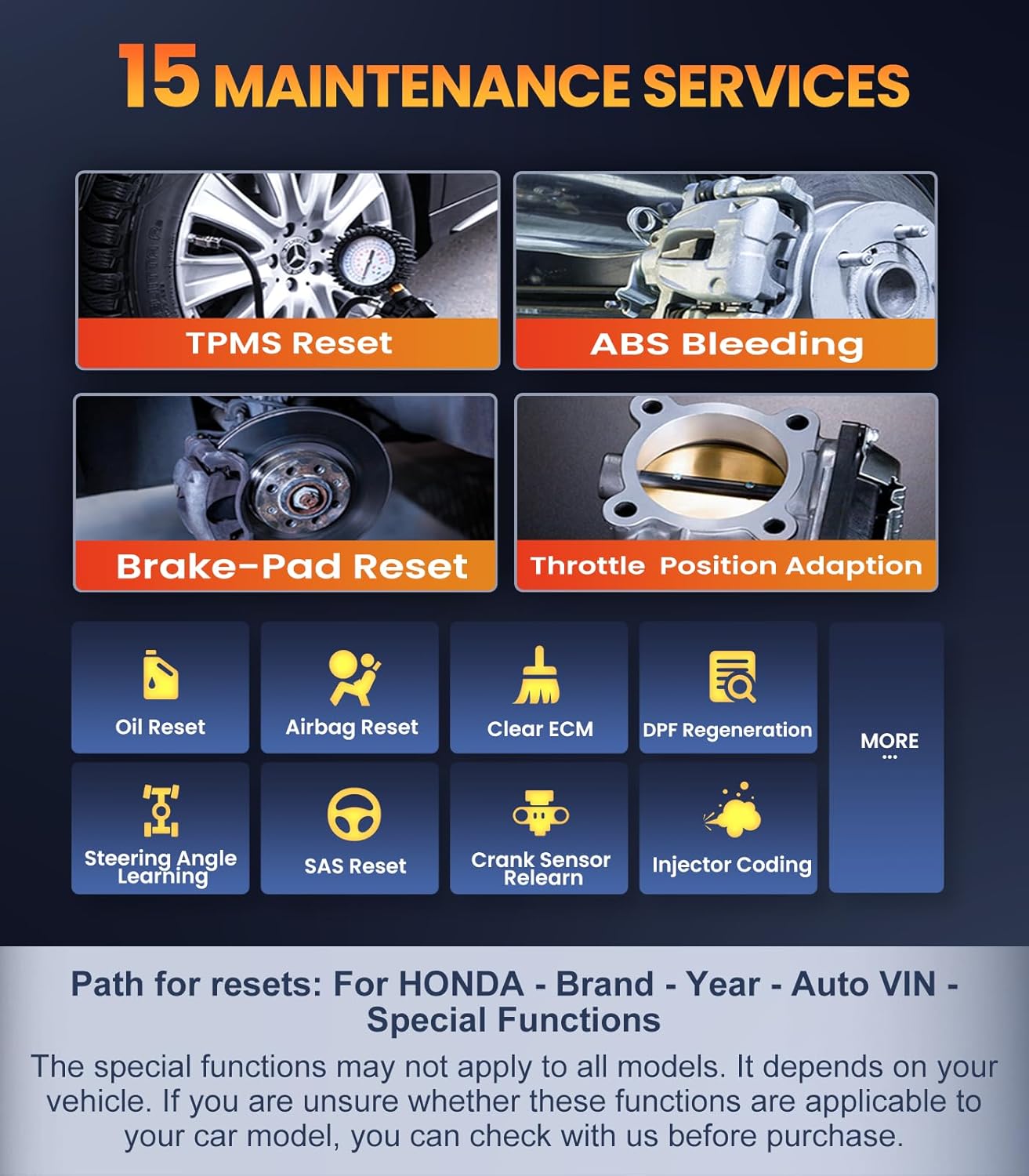
Image: The OBDMATE OM707 scanner connected to a vehicle, showing the device's display and connection point.
Operating Instructions
1. Full System Diagnostic (Honda/Acura)
- From the main menu, select "Diagnose" or "Honda/Acura".
- The scanner will automatically detect the vehicle's VIN. Confirm the vehicle information.
- Select "Full System Scan" to initiate a comprehensive diagnostic check of all available modules (Engine, ABS, SRS, Transmission, etc.).
- Review the displayed fault codes and data streams.

Image: The OM707 scanner interface displaying a full system diagnostic process for a Honda vehicle, with icons for Engine, ABS, TPMS, Transmission, and other systems.
2. Read & Erase Fault Codes
- To read codes, select the "Read Codes" option from the diagnostic menu. The scanner will display Diagnostic Trouble Codes (DTCs) and their descriptions.
- To erase codes, select "Clear Codes". Confirm the action when prompted. Note that permanent codes will only clear after the underlying issue is resolved and several driving cycles are completed.

Image: The OM707 scanner screen showing options for engine code reading, clearing, I/M readiness, data stream, and vehicle information.
3. 15 Advanced Reset Services
Access these functions via the "Special Functions" menu for Honda/Acura vehicles. Select the desired service and follow the on-screen prompts.
- Oil Reset: Resets the oil life reminder after an oil change.
- ABS Bleeding: Performs bleeding procedures for the Anti-lock Braking System.
- Throttle Body Relearn: Adapts the throttle body after cleaning or replacement.
- SRS Reset: Clears crash data from the Supplemental Restraint System module.
- EPB Reset: Resets the Electronic Parking Brake system.
- Injector Coding: Codes new injector values into the ECU.
- DPF Regeneration: Initiates Diesel Particulate Filter regeneration.
- TPMS Reset: Retrieves original tire sensor IDs and registers new ones. Note: This tool does not activate or relearn sensors directly. Record sensor IDs before tire changes.

Image: A visual representation of the 15 maintenance services offered by the OM707, such as TPMS Reset, ABS Bleeding, and Oil Reset.
4. AutoVIN Scan & Live Data
- The AutoVIN feature automatically identifies your vehicle.
- Select "Live Data" to view real-time sensor readings and parameters in a graphical format. This helps monitor vehicle performance and diagnose intermittent issues.
5. I/M Readiness Check
- Press the designated "I/M Readiness" shortcut key (often F1 or F2, configurable) or select it from the menu.
- The scanner will display the status of emission-related monitors, indicating whether they are "Complete" or "Not Complete".

Image: The OM707 scanner showing the I/M Readiness screen, indicating the status of various emission monitors with "complete" and "not complete" markers.
6. Battery Cranking Test
- With the scanner connected, select "Battery Test" from the main menu.
- Start the engine. The scanner will display the battery voltage and cranking test results graphically.

Image: The OM707 scanner displaying a graphical representation of battery voltage during a cranking test, indicating battery health.
7. DLC PIN Test
- Select "DLC PIN Test" from the main menu.
- The scanner will display the voltage for each pin on the OBD-II connector, helping to verify proper communication.

Image: A diagram illustrating the DLC PIN test function, showing voltage readings for each pin on the OBD-II connector.
Maintenance
- Cleaning: Use a soft, dry cloth to clean the scanner's screen and body. Avoid abrasive cleaners or solvents.
- Storage: Store the device in its hard carrying case when not in use to protect it from dust and physical damage. Keep it in a cool, dry place.
- Software Updates: Regularly check for and install software updates to ensure optimal performance and compatibility with the latest vehicle models and diagnostic protocols. Updates are performed via a Windows PC using the provided USB-Type C cable.

Image: The OM707 scanner, its protective case, and USB cable, emphasizing its robust design and update capability.
Troubleshooting
- Device Not Powering On: Ensure the OBD-II cable is securely connected to the vehicle's port. Check the vehicle's battery voltage.
- Communication Error: Verify the vehicle's ignition is on. Check the DLC PIN Test results to ensure proper communication lines. Ensure the vehicle is OBDII compliant.
- Codes Not Clearing: Temporary fault codes can be cleared directly. Hard codes (due to hardware issues) will reappear if the underlying problem is not fixed.
- Function Not Available: Some advanced reset services are vehicle-specific. Confirm compatibility for your exact make, model, and year.
- Slow Operation: Ensure the device has the latest software updates.
Specifications
| Feature | Detail |
|---|---|
| Model Number | OM707 |
| Product Dimensions | 16.5L x 8.9W x 2.7H centimetres |
| Weight | 739 g |
| Screen Size | 2.8 inches |
| Power Source | Corded Electric (via OBD-II port) |
| Operating System | Plug and play; Upgrade via Windows only |
| Supported Protocols | SAE J1850 PWM, SAE J1850 VPW, ISO9141-2, ISO14230-4 KWP (5 baud init, fast init), ISO15765-4 CAN (11bit ID, 29bit ID, 500 Kbaud, 250 Kbaud) |
| Supported Languages | English, French, Spanish, German |

Image: The OM707 scanner alongside a summary of its key features and specifications.
Compatibility
The OBDMATE OM707 is specifically designed for comprehensive diagnostics on most Honda and Acura models from 1996 to 2022. It also functions as a standard OBDII code reader for other vehicle brands manufactured since 1996 that comply with OBDII protocols.
- For Acura Series (1996-2022): Includes models such as CDX, CI, CSX, EL, ILX, MDX, NSX, RDX, RL, RLX, RSX, SLX, TL, TLX, TSX, ZDX, etc.
- For Honda Series (1996-2022): Includes models such as Acty, Airwave, Accord, Amaze, Avancier, BR-V, Breeze, Brio, Capa, Climio, CR-V, CR-X, CR-Z, City, Civic, Clarity, Crider, Crosstour, DOMANI, ENVIX, Element, Elysion, Eversus S1, FR-V, Fit, Freed, Gienia, Grace, Griez, HR-V, Insight, Inspire, Integra, Jade, Jazz, etc.
Important Note: Vehicle availability and specific function support vary by make, model, and year. OBD1 vehicles are not supported.

Image: A display of various Honda and Acura models, illustrating the broad compatibility of the OM707 scanner with these brands.
Warranty and Support
The OBDMATE OM707 Diagnostic Tool comes with a 3-year warranty period.
For technical support, inquiries, or assistance with software updates, please contact OBDMATE customer service at support@obdmate.com. Support is available 24/7.


