1. Introduction
Thank you for choosing the GarveeHome 9-Drawer Dresser with Built-in Charging Station. This multi-functional storage unit is designed to enhance your living space, offering versatile storage and convenient charging capabilities. This manual provides essential information for safe assembly, operation, and maintenance of your new dresser.
2. Safety Information
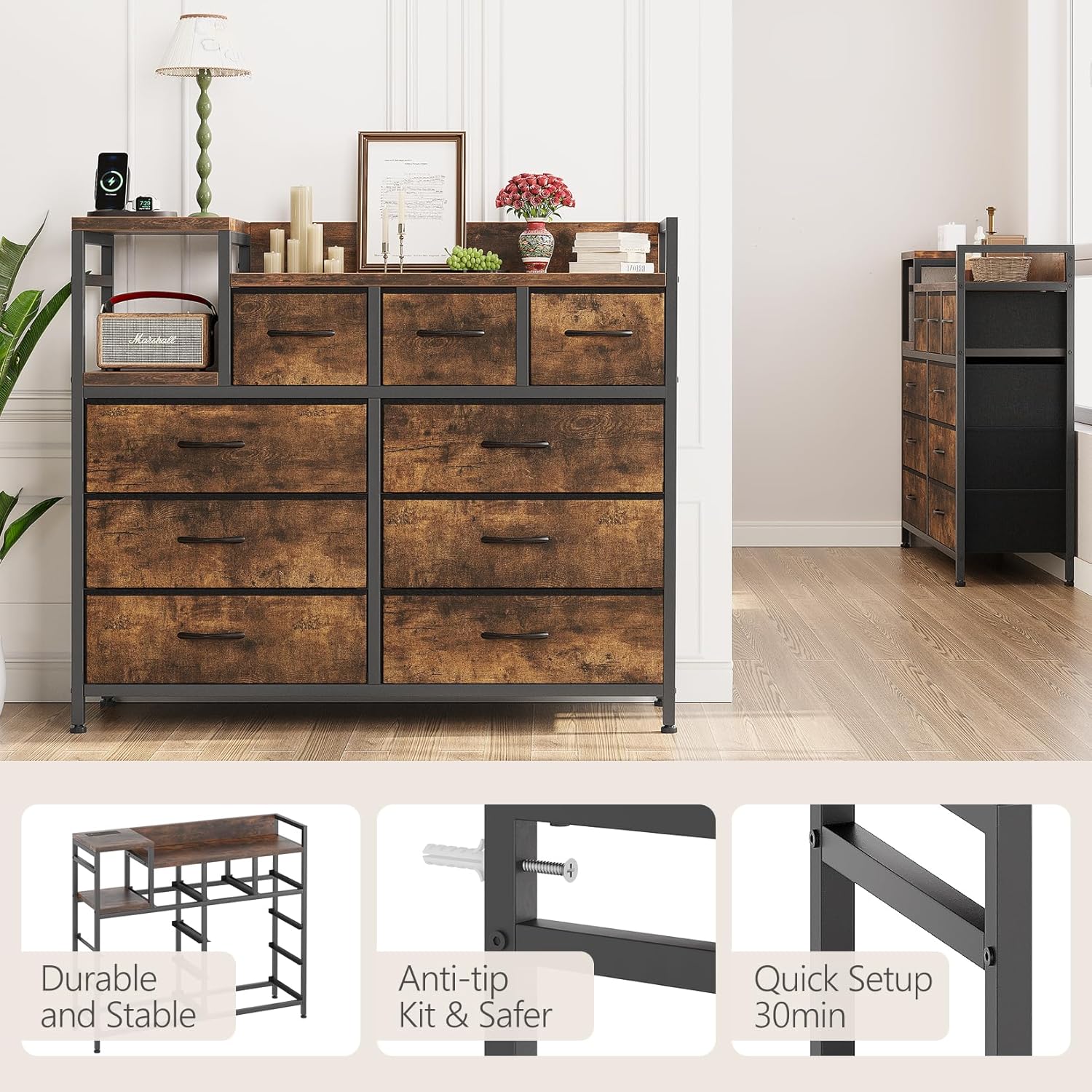
- Anti-Tip Kit: Always install the included anti-tip kit to prevent accidental tipping, especially in households with children or pets. Securely fasten the dresser to a wall stud according to the instructions.
- Weight Capacity: Do not exceed the maximum weight capacity of 100 lbs on the top surface. Distribute weight evenly within drawers.
- Electrical Safety: Ensure the charging station is connected to a properly grounded electrical outlet. Do not overload the outlets or USB ports. Keep liquids away from the charging station.
- Assembly: Assemble the unit on a soft, clean surface to prevent scratches. Ensure all screws and fasteners are tightened securely before use. Periodically check and re-tighten fasteners as needed.
- Placement: Place the dresser on a level surface. The adjustable feet can compensate for minor unevenness.

The anti-tip kit is a critical safety feature. Follow the installation instructions carefully to secure the dresser to the wall, preventing it from falling forward.
3. Package Contents
Before assembly, verify that all components are present and undamaged. If any parts are missing or damaged, please contact customer support.
- Steel Frame Components
- Fabric Drawers (9 total, various sizes)
- Wooden Top Board
- Wooden Shelf Boards
- Charging Station Unit with Power Cord
- Adjustable Feet
- Anti-Tip Kit
- Assembly Hardware (screws, wrench, etc.)
- Instruction Manual
4. Setup and Assembly
Assembly of the GarveeHome dresser is designed to be straightforward and tool-free for most steps, typically taking less than 20 minutes. Follow these general steps:
- Unpack Components: Carefully remove all parts from the packaging and lay them out on a soft, clean surface to prevent damage.
- Assemble Frame: Connect the steel frame components according to the diagrams provided in the separate assembly guide. Ensure all connections are secure.
- Install Wooden Boards: Place the wooden top board and shelf boards onto the designated frame sections.
- Insert Charging Station: Integrate the charging station unit into its designated slot on the top board. Route the power cord through the hidden cable ports.
- Prepare Drawers: Unfold the fabric drawers and insert the bottom support panels to give them shape.
- Insert Drawers: Slide the assembled fabric drawers into their respective compartments within the frame.
- Attach Adjustable Feet: Screw the adjustable feet into the bottom of the frame. Adjust them to ensure the dresser is stable and level on your floor.
- Install Anti-Tip Kit: Securely attach the anti-tip kit to the back of the dresser and to a wall stud using the provided hardware. This step is crucial for safety.


5. Operating Instructions
5.1 Storage and Organization
The GarveeHome dresser features 9 fabric drawers of three different sizes, providing versatile storage for various items. It functions effectively as both a bedroom dresser and a TV stand.
- Drawer Usage: Utilize the drawers to store clothing, accessories, electronics, toys, or other household items. The fabric construction is gentle on contents.
- Top Surface: The sturdy wooden top surface can accommodate a television, decorative items, or other personal belongings. Ensure the weight does not exceed 100 lbs.
- Integrated Holders: Use the dedicated holders on the top surface to organize remotes, controllers, or small table lamps, keeping your space tidy.
- Ventilated Compartments: The back panel includes ventilated compartments, ideal for discreetly storing bulky routers or game consoles, promoting air circulation.

5.2 Charging Station
The built-in charging station offers convenient power access for your electronic devices.
- Power Connection: Plug the dresser's power cord into a standard, grounded wall outlet.
- Charging Devices: Use the integrated outlets and USB-A ports to charge devices such as iPads, phones, or gaming consoles.
- Cable Management: Utilize the hidden cable ports to maintain a neat and organized appearance, preventing tangled wires.


6. Maintenance
- Cleaning: Wipe the wooden surfaces with a soft, damp cloth. For the fabric drawers, spot clean with a mild detergent and allow to air dry. Avoid harsh chemicals or abrasive cleaners.
- Dusting: Regularly dust all surfaces to prevent buildup.
- Inspection: Periodically check all fasteners and connections to ensure they remain tight. Re-tighten if necessary.
- Drawer Care: Avoid overfilling drawers to ensure smooth operation and prevent damage to the fabric.
7. Troubleshooting
- Dresser is Unstable: Ensure the dresser is on a level surface. Adjust the individual adjustable feet at the bottom of the frame until the dresser is stable and does not wobble. Verify all frame connections are securely tightened.
- Drawers Do Not Slide Smoothly: Check if the drawers are overfilled. Ensure the fabric drawers are fully unfolded and the bottom support panels are correctly inserted. Verify that the frame is not warped or damaged.
- Charging Station Not Working: Confirm the dresser's main power cord is securely plugged into a functional wall outlet. Check if the outlet itself is receiving power. Ensure devices are properly connected to the USB ports or outlets. Avoid overloading the charging station.
- Missing Parts / Damaged Components: If you encounter any missing parts or damaged components during assembly, do not proceed. Contact GarveeHome customer support immediately for assistance.
8. Specifications
| Brand | GarveeHome |
| Model Name | IM8_x7kRi3lOZPj_avSkLwWnqQE0W |
| Product Dimensions | 11.8"D x 39"W x 33.9"H |
| Number of Drawers | 9 |
| Color | Brown |
| Material | Alloy Steel (Frame), Cationic Fabric (Drawers), Wood (Top/Shelves) |
| Finish Type | Lacquered |
| Item Weight | 35.3 pounds |
| Assembly Required | Yes |
| UPC | 199414726641 |
9. Warranty and Support
GarveeHome is committed to providing quality products and customer satisfaction. While specific warranty details are not included in this manual, please retain your proof of purchase.
For any questions, concerns, or assistance with your GarveeHome 9-Drawer Dresser, please contact GarveeHome customer support. Our team is ready to help you with assembly, troubleshooting, or any other product-related inquiries.
Contact information can typically be found on the product packaging or the official GarveeHome website.
