
1. Introduction
The Qubo NEONW-BK 4G mobile phone is specifically designed for seniors, prioritizing simplicity, functionality, and safety. Its flip design protects the screen and prevents accidental calls. Key features include a clear menu, large buttons, FM radio, a basic camera, and an essential SOS button for emergencies. This manual will guide you through the phone's features and operations to ensure a comfortable and easy user experience.
2. Product Overview
2.1. Package Contents
- Qubo NEONW-BK 4G Mobile Phone
- Battery
- USB-C Charging Cable
- Power Adapter
- User Manual (this document)
2.2. Phone Components
The Qubo NEONW-BK 4G features a classic flip design with an external display for notifications and an internal main screen. It includes large, easy-to-press buttons for dialing and navigation, a dedicated SOS button, and a camera.
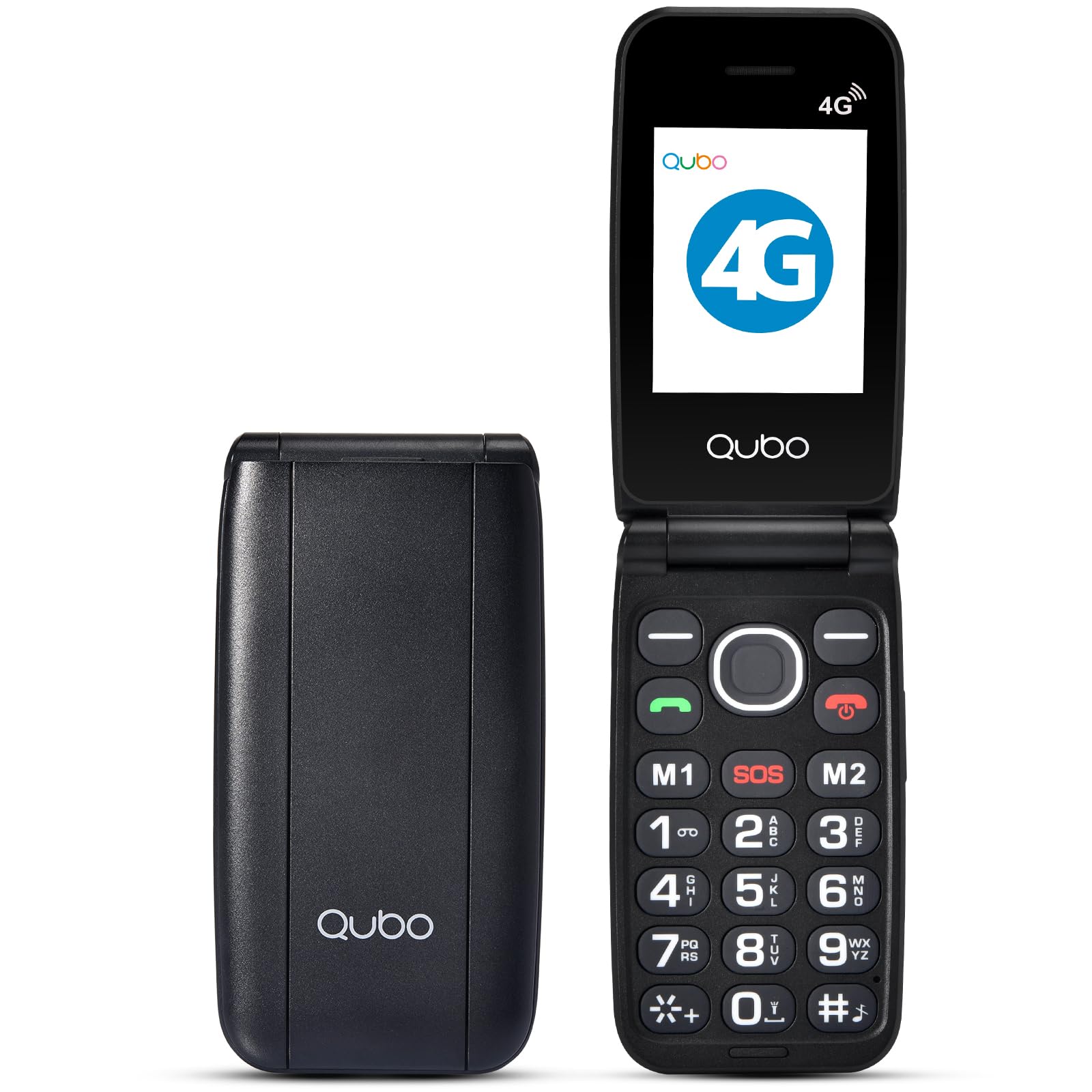
The image above shows the Qubo NEONW-BK 4G mobile phone in its open, ready-to-use state, highlighting its large keypad and clear display, designed for user convenience.
2.3. Accessories Overview
This video demonstrates the various accessories included with the phone, such as the charging cable and power adapter, ensuring you have everything needed for initial setup and daily use.
3. Setup
3.1. Battery Installation
- Gently remove the back cover of the phone.
- Align the battery contacts with the phone's terminals.
- Press the battery down firmly until it clicks into place.
- Replace the back cover.
3.2. SIM Card and Memory Card Installation
The Qubo NEONW-BK 4G supports Dual SIM (Standard SIM size) and a T-Flash memory card up to 32MB.
- With the back cover and battery removed, locate the SIM card slots (SIM1, SIM2) and the memory card slot.
- Carefully insert your Standard SIM card(s) into the designated slots, ensuring the gold contacts face downwards and the cut corner aligns correctly.
- Insert the T-Flash memory card into its slot until it is securely in place.
- Reinstall the battery and back cover.
This video provides a visual guide on how to quickly and correctly install the SIM card(s) into your Qubo NEONW-BK 4G phone.
3.3. Charging the Phone
Before first use, fully charge the phone's battery. Use the provided USB-C cable and power adapter.
- Connect the USB-C cable to the charging port on the phone.
- Plug the power adapter into a wall outlet.
- The charging indicator on the screen will show the charging status.
- Once fully charged (approximately 3 hours), disconnect the charger.
3.4. Power On/Off
- To power on: Press and hold the Power/End Call button (red button) until the screen lights up.
- To power off: Press and hold the Power/End Call button until the power-off options appear, then select 'Power off'.
4. Operating Instructions
4.1. Making and Receiving Calls
- Making a Call: Open the flip, dial the number using the large keypad, and press the Call button (green button).
- Receiving a Call: Open the flip to answer, or press the Call button. Close the flip or press the End Call button (red button) to end a call.
- Direct Memory Keys (M1, M2, M3): Press and hold M1, M2, or M3 to quickly dial pre-set contacts.
4.2. Messaging
To send or read text messages, navigate to the 'Messages' menu using the navigation keys and the 'OK' button.
4.3. SOS Function
The dedicated SOS button is located on the back of the phone for emergencies. When activated, it automatically calls pre-configured emergency contacts.
- Setting up SOS Contacts: Access the 'SOS Settings' in the phone's menu to add up to 5 emergency numbers.
- Using the SOS Button: In an emergency, press and hold the SOS button for a few seconds. The phone will automatically call the pre-set contacts in sequence until one answers.
4.4. FM Radio
The phone includes an FM radio. Navigate to the 'FM Radio' option in the menu to listen to your favorite stations without needing an internet connection.
4.5. Camera
The 0.3 MP camera allows you to capture simple photos. Access the 'Camera' option from the main menu to take pictures.
This video highlights various features of a senior-friendly mobile phone, including its ease of use, large buttons, and practical functionalities.
5. Maintenance
- Keep the phone dry. Moisture can damage electronic circuits.
- Do not use or store the phone in dusty, dirty areas.
- Do not store the phone in hot or cold temperatures.
- Do not drop, knock, or shake the phone. Rough handling can break internal circuit boards.
- Clean the phone with a soft, damp cloth. Do not use harsh chemicals or cleaning solvents.
- Only use original or approved accessories.
6. Troubleshooting
6.1. Phone Does Not Turn On
- Check if the battery is correctly installed.
- Ensure the battery is charged. Connect the charger and try again.
6.2. Cannot Make/Receive Calls
- Check if the SIM card is correctly inserted and activated.
- Ensure you have network signal.
- Verify that the phone is not in airplane mode.
6.3. Poor Sound Quality
- Adjust the call volume using the side buttons.
- Ensure the speaker and microphone are not obstructed.
- Move to an area with better network coverage.
6.4. Battery Drains Quickly
- Reduce screen brightness.
- Close unused applications.
- Limit background data usage.
- If the issue persists, the battery may need replacement.
7. Specifications
| Feature | Specification |
|---|---|
| Model Number | NEONWBK 4G |
| Display | TFT LCD 2.4" QVGA |
| Chipset | SCT107 |
| CPU | ARM7, 260 MHz |
| Memory (RAM + ROM) | 48MB RAM + 128MB ROM |
| Bluetooth | 5.0 |
| Battery Capacity | 800 mAh (Li-ion) |
| Connectivity | 2G GSM 850/900/1800/1900 (GSM/GPRS), 4G B1/3/7/8/20 |
| Camera | 0.3 MP |
| Radio | FM |
| SIM Type | Dual SIM (Standard) |
| Memory Card Support | T-Flash up to 32MB |
| Standby Duration | 100 hours (Dual SIM), 140 hours (Single SIM) |
| Talk Time | 3.5 hours |
| Functions | Calendar, Calculator, Multimedia Player (audio/video), Video Recorder, SOS Button |
| Connections | USB-C, 3.5 mm Jack |
| Dimensions | 10.5 x 5.3 x 1.7 cm |
| Weight | 200 g |
8. Warranty and Support
For warranty information, please refer to the warranty card included in your product packaging or contact your retailer. For technical support or further assistance, please reach out to Qubo customer service through their official website or the contact details provided with your purchase.