
Dubstep Pop 610
Dubstep Pop 610 Wireless Speaker User Manual
Model: Pop 610
1. Introduction
The Dubstep Pop 610 is a compact wireless speaker designed for portable audio. It features 52mm dynamic drivers, 6W sound output, and True Wireless Stereo (TWS) pairing capability for an enhanced audio experience. With up to 15 hours of playtime, it is suitable for various indoor and outdoor settings. This manual provides essential information for setting up, operating, and maintaining your speaker.

Figure 1: Dubstep Pop 610 Wireless Speaker
2. What's in the Box
Please check the package contents upon unboxing:
- Speaker (1 Unit)
- Charging Cable (1 Unit)
- Lanyard (1 Unit)

Figure 2: Contents of the Dubstep Pop 610 package
3. Product Overview
3.1 Controls and Ports
Familiarize yourself with the control buttons and ports on your Dubstep Pop 610 speaker.

Figure 3: Control buttons on the speaker's bottom panel
- Power Button: Press and hold to power on/off.
- Play/Pause Button: Press to play or pause audio.
- Previous Track Button: Press to go to the previous song.
- Next Track Button: Press to go to the next song.
- Answer/Hangup Button: Press to answer or end a call.

Figure 4: Type-C charging port
- Type-C Charging Port: Used for charging the speaker.
4. Setup
4.1 Charging the Speaker
- Connect the provided Type-C charging cable to the speaker's charging port.
- Connect the other end of the cable to a USB power adapter (not included) or a computer's USB port.
- The charging indicator light will illuminate. A full charge takes approximately 2 hours.
- Once fully charged, the indicator light will change or turn off, depending on the model.
A full charge provides up to 15 hours of playtime.
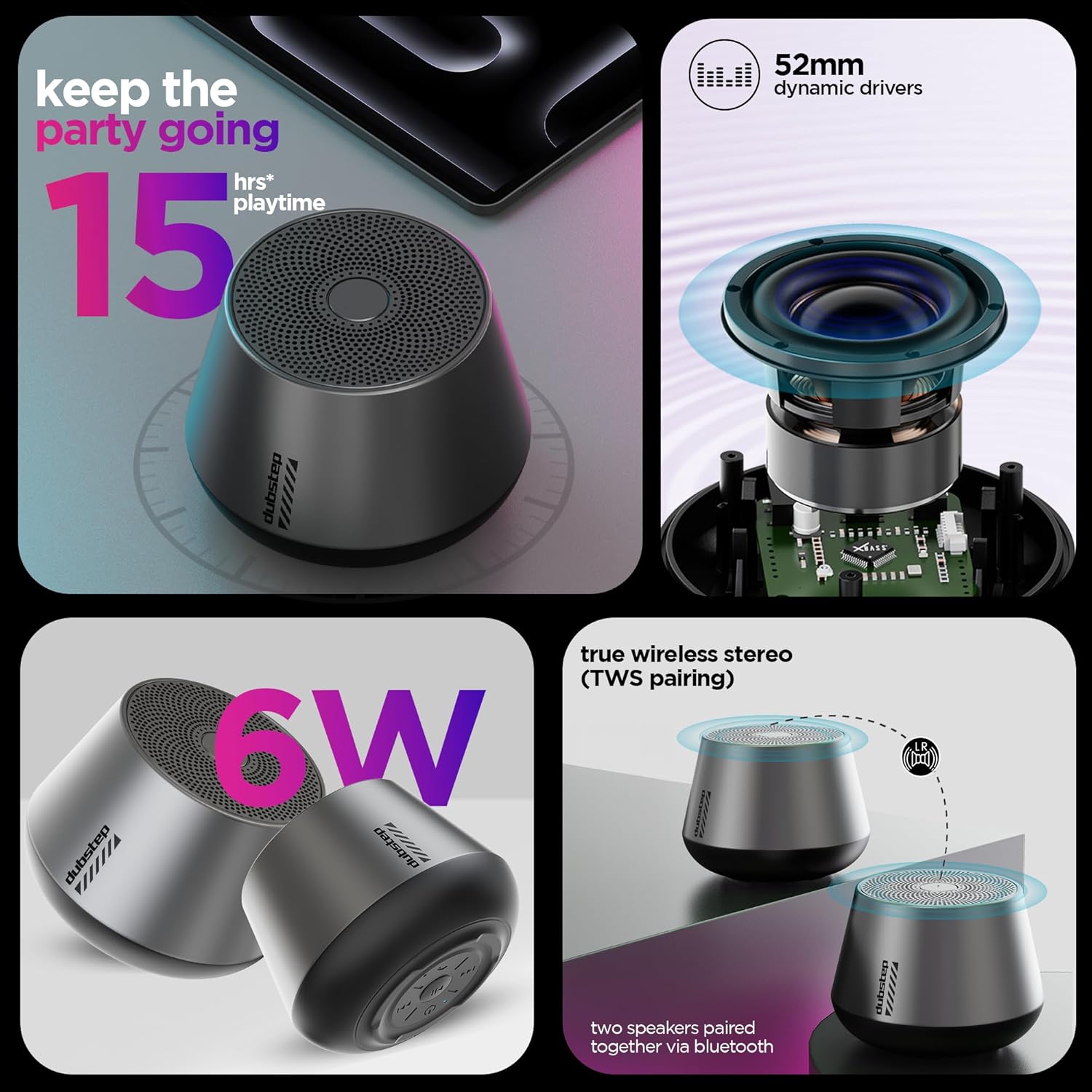
Figure 5: Visual representation of key features including 15 hours playtime
4.2 Powering On/Off
- To power on, press and hold the Power button until you hear an audible prompt or see the indicator light illuminate.
- To power off, press and hold the Power button again until the speaker shuts down.
5. Operating Instructions
5.1 Bluetooth Pairing
Connect your speaker to a Bluetooth-enabled device.
- Ensure the speaker is powered on and in pairing mode (indicator light will flash, usually blue).
- On your device (smartphone, tablet, etc.), go to Bluetooth settings and turn Bluetooth on.
- Search for available devices and select "Dubstep Pop 610" from the list.
- Once connected, the indicator light will become solid, and you will hear a confirmation sound.
The wireless connectivity range is approximately 10 meters.

Figure 6: Speaker connected wirelessly to a smartphone
5.2 True Wireless Stereo (TWS) Pairing
Pair two Dubstep Pop 610 speakers for an immersive stereo sound experience.
- Ensure both speakers are powered on and not connected to any other Bluetooth device.
- On one speaker (this will be the primary speaker), press and hold the TWS pairing button (refer to product diagram if available, otherwise assume a dedicated button or a combination).
- The primary speaker will search for the secondary speaker.
- Once paired, you will hear a confirmation sound, and the indicator lights on both speakers will synchronize.
- Now, connect your device to the primary speaker via Bluetooth as described in section 5.1. Audio will play through both speakers in stereo.

Figure 7: Two speakers demonstrating True Wireless Stereo (TWS) pairing
5.3 Audio Playback and Call Management
- Play/Pause: Press the Play/Pause button.
- Next Track: Press the Next Track button.
- Previous Track: Press the Previous Track button.
- Answer/End Call: Press the Answer/Hangup button during an incoming call or to end an ongoing call.
6. Maintenance
6.1 Cleaning
- Wipe the speaker with a soft, dry cloth.
- Do not use harsh chemicals, cleaning solvents, or strong detergents.
6.2 Storage
- Store the speaker in a cool, dry place away from extreme temperatures.
- Avoid prolonged exposure to direct sunlight or moisture.
6.3 Water Resistance
The Dubstep Pop 610 features sweat and splash resistance, making it suitable for light outdoor use or near water. However, it is NOT waterproof and should not be submerged in water.

Figure 8: Speaker shown with water droplets, illustrating sweat and splash resistance
7. Troubleshooting
| Problem | Possible Cause | Solution |
|---|---|---|
| Speaker does not power on. | Low battery. | Charge the speaker fully. |
| No sound. | Volume too low; Device not connected; Speaker paused. | Increase volume on speaker and device; Re-pair Bluetooth; Press Play/Pause. |
| Bluetooth pairing fails. | Speaker not in pairing mode; Device Bluetooth off; Too far from device. | Ensure speaker is in pairing mode; Turn on device Bluetooth; Move device closer (within 10m). |
| TWS pairing fails. | Speakers already connected to other devices; Not in TWS pairing mode. | Disconnect speakers from other devices; Ensure both speakers are in TWS pairing mode. |
8. Specifications
| Feature | Detail |
|---|---|
| Model | Pop 610 |
| Speaker Type | Bluetooth Speaker |
| Audio Driver Type | Dynamic Driver |
| Audio Driver Size | 52 mm |
| Speaker Output | 6 Watts (RMS) |
| Connectivity Technology | Bluetooth |
| Bluetooth Range | 10 Meters |
| Special Features | X-Bass Technology, TWS Pairing, Sweat & Splash Resistance |
| Battery Type | Lithium Ion |
| Battery Average Life | 15 Hours |
| Charging Time | 2 Hours |
| Item Weight | 210 Grams |
| Product Dimensions | 9D x 8W x 9H Centimeters |
| Material | Acrylonitrile Butadiene Styrene (ABS) |
| Country of Origin | China |
9. Warranty and Support
9.1 Warranty Information
The Dubstep Pop 610 Wireless Speaker comes with a 6-month warranty from the date of purchase, covering manufacturing defects.
9.2 Manufacturer Contact
For support, service, or warranty claims, please contact:
- Manufacturer: Nuworld Retail Private Limited
- Address: Plot No.17-18, Pole No.9, PO Dhoolsiras, Dwarka, Sector-28, New Delhi - 110077
- Email: hello@Dubstepworld.com
- Telephone: +91-8826257630
10. Product Video
Watch the official product video for a visual guide to the Dubstep Pop 610 Wireless Speaker.
Video: Official product video showcasing the features and design of the Dubstep Pop 610 Wireless Speaker.
Related documentsPop 610


Ask a question about this manual
Ask about setup, troubleshooting, compatibility, parts, safety, or missing instructions. Manuals+ will review the question and use this page’s manual context to help answer it.