
1. Important Safety Information
Please read all safety instructions before using your GDKLXL MS-368 Electric Shaver. Retain this manual for future reference.
- Always unplug the shaver before cleaning or when not in use.
- Keep the shaver away from water while charging to prevent electrical hazards.
- Exercise caution when using the shaver, especially around sensitive skin areas, to avoid cuts or irritation.
- Follow cleaning instructions diligently to prevent bacterial growth and ensure hygienic use.
- Do not disassemble or attempt to repair the shaver yourself. Contact customer support for assistance.
- This appliance is not intended for use by persons (including children) with reduced physical, sensory or mental capabilities, or lack of experience and knowledge, unless they have been given supervision or instruction concerning use of the appliance by a person responsible for their safety.
2. Product Overview
The GDKLXL MS-368 Electric Shaver is designed for a comfortable and efficient shaving experience. It features flexible shaving heads, a pop-up trimmer, and is suitable for both wet and dry use.
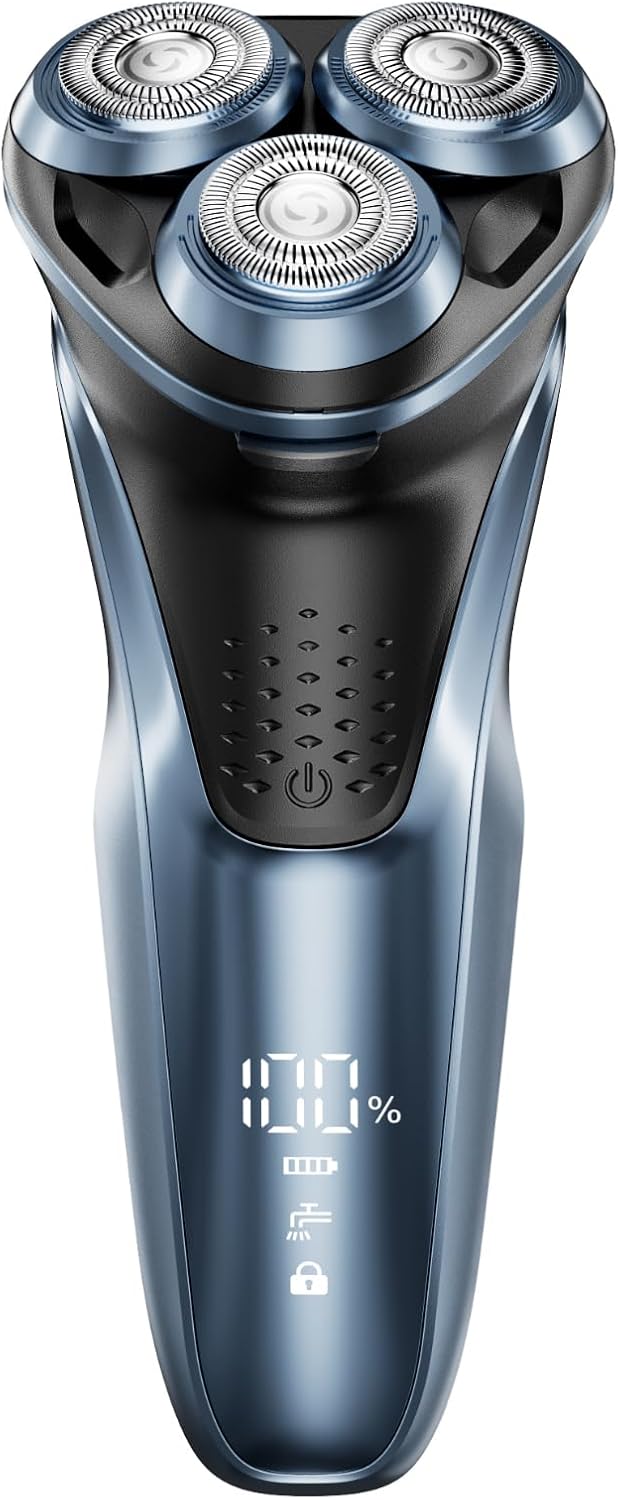
Image: Front view of the GDKLXL MS-368 Electric Shaver, displaying its three rotary shaving heads and digital battery percentage indicator.
3. Setup and Initial Use
3.1 Charging the Shaver
Before first use, fully charge the shaver. The shaver comes with a rechargeable Li-ion battery providing up to 60 minutes of cordless shaving.
- Connect the charging cable to the shaver and a suitable USB power adapter (not included).
- Plug the adapter into a power outlet.
- The digital display will show the charging progress. A full charge is indicated by 100%.
- Charging typically takes approximately 1 hour for a full charge.

Image: Illustrates connecting the charging cable to the shaver, highlighting the rechargeable power feature and battery life.
4. Operating Instructions
4.1 Powering On/Off
Press the power button located on the front of the shaver to turn it on or off.
4.2 Shaving Techniques
The GDKLXL MS-368 is designed with PowerCut Blades that adapt to facial contours for a close shave.

Image: Detailed view of the PowerCut Blades, emphasizing their contour-adapting design for an efficient shave.
Dry Shaving:
- Ensure your face is clean and dry.
- Move the shaver in small, circular motions against the direction of hair growth.
- Apply gentle pressure, allowing the flexible heads to follow your facial contours.
Wet Shaving:
This shaver is IPX7 waterproof, allowing for wet shaving with foam, gel, or even in the shower.
- Apply shaving foam or gel to your face.
- Move the shaver in small, circular motions.
- Rinse the shaving heads under running water during use to prevent clogging.

Image: Demonstrates the versatility of the shaver for both wet shaving with foam or gel, and dry shaving.
4.3 Using the Pop-Up Trimmer
The integrated pop-up trimmer is ideal for refining sideburns and mustaches.
- Push the trimmer release button (if applicable) to extend the trimmer.
- Use the trimmer to shape and define edges.
- Retract the trimmer after use.

Image: Shows the pop-up trimmer extended from the shaver body, illustrating its function for precise detailing.
5. Maintenance and Cleaning
Regular cleaning ensures optimal performance and hygiene of your shaver.
5.1 Daily Cleaning
- After each use, turn off and unplug the shaver.
- Press the release button to detach the shaving head unit.
- Rinse the shaving head unit thoroughly under warm running water.
- Shake off excess water and allow the head unit to air dry completely before reattaching or storing.

Image: The shaver head is shown detached and being rinsed under water, highlighting its IPX7 waterproof rating and ease of cleaning.
5.2 Deep Cleaning (Weekly/Bi-weekly)
- In addition to daily rinsing, you may periodically remove the individual blades and guards for a more thorough cleaning.
- Use the small cleaning brush (if included) to remove stubborn hair particles.
- Ensure all parts are completely dry before reassembling.
5.3 Battery Care
- To prolong battery life, avoid fully discharging the battery frequently.
- Store the shaver in a cool, dry place when not in use.
6. Troubleshooting
If you encounter issues with your shaver, refer to the following common solutions:
Shaver Not Turning On:
- Ensure the shaver is fully charged. Connect it to the charger and check the battery indicator.
- Verify the power button is pressed firmly.
Poor Shaving Performance:
- Clean the shaving heads thoroughly. Accumulated hair and debris can reduce efficiency.
- Ensure the shaver is fully charged. Low battery can affect motor speed.
- Replace shaving heads if they are dull or damaged (replacement parts sold separately).
Skin Irritation:
- Ensure your skin is clean before shaving.
- Try wet shaving with foam or gel for increased lubrication.
- Do not apply excessive pressure.
If the issue persists, please contact GDKLXL customer support.
7. Specifications
| Feature | Detail |
|---|---|
| Model Number | MS-368 |
| Power Source | Battery Powered |
| Battery Type | 1 AA Li-ion battery (included) |
| Battery Life | Up to 60 minutes cordless shaving |
| Waterproof Rating | IPX7 (fully washable) |
| Included Components | Shaver, Attachment (Pop-up Trimmer) |
| Package Dimensions | 7.2 x 3.39 x 3.27 inches |
| Item Weight | 9.14 ounces |
8. Warranty and Support
GDKLXL products are manufactured with quality and reliability in mind. This product comes with a 12-month guarantee.
For technical support, warranty claims, or general inquiries, please refer to the contact information provided with your purchase or visit the official GDKLXL store on Amazon: