
1. Introduction
This manual provides essential information for the setup, operation, and maintenance of your Hisense R632 3.1 Channel 380W Soundbar with Wireless Subwoofer and Dolby Atmos. Please read this manual thoroughly before using the product to ensure proper and safe operation.
2. Package Contents
Verify that all items listed below are included in your package. If any items are missing or damaged, please contact your retailer.
- Hisense R632 Soundbar Unit
- Wireless Subwoofer
- Remote Control (with batteries)
- Power Cable for Soundbar
- Power Cable for Subwoofer
- HDMI Cable
- Optical Cable

Image 2.1: Hisense R632 Soundbar and Wireless Subwoofer. The soundbar is a long, slender black unit, and the subwoofer is a compact black cube.
3. Key Features
- 3.1 Channel Surround Sound: Features 5 speakers built into the soundbar, including left and right front channels, a center channel, and left and right overhead surround channels. This configuration delivers room-filling 3D audio for an immersive experience.
- 380W Max Audio Power: The R632 delivers 380 watts of sound, ensuring powerful and clear audio output that fills your room.
- Dolby Atmos & DTS:X Support: Experience breakthrough spatial sound that draws you deeper into your entertainment. Dolby Atmos and DTS:X enhance movies, games, and music by providing multi-dimensional audio.
- Wireless Subwoofer: A dedicated wireless subwoofer provides robust, deep low-end frequencies, adding significant impact to your audio without the clutter of additional cables.
- Versatile Connectivity: Supports multiple connection options including Bluetooth, HDMI eARC, Optical, AUX, and USB for flexible integration with various devices.
- EzPlay (One Remote Control): Simplify your home entertainment setup by controlling the soundbar with your TV remote via HDMI eARC, or use the included dedicated remote.

Image 3.1: Visual representation of Hisense R632 key features, including 380W Max Audio Power, 3.1 Channel, Dolby Atmos, and DTS:X logos, with the soundbar and subwoofer below.

Image 3.2: A living room scene illustrating the immersive sound experience provided by Dolby Atmos and DTS:X, with sound waves emanating from the soundbar and subwoofer.
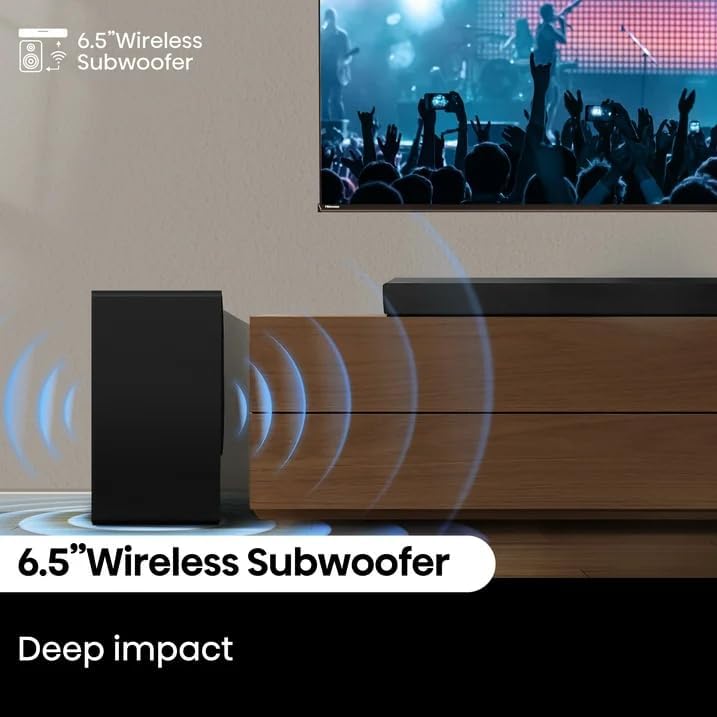
Image 3.3: Close-up of the 6.5-inch wireless subwoofer, highlighting its ability to deliver deep bass impact.
4. Setup Guide
4.1 Placement
- Soundbar: Place the soundbar directly in front of your TV, centered, on a stable, flat surface. Ensure no objects obstruct the front or top speakers.
- Wireless Subwoofer: Position the wireless subwoofer anywhere in the room, ideally within 30 feet of the soundbar. For optimal bass, experiment with different locations.
4.2 Connections
Choose one of the following connection methods to link your soundbar to your TV or other audio sources.
- HDMI eARC (Recommended):
- Connect one end of the HDMI cable to the HDMI eARC port on your soundbar.
- Connect the other end to the HDMI ARC/eARC port on your TV.
- Ensure HDMI CEC (Consumer Electronics Control) is enabled on your TV for integrated control.
- Optical:
- Connect one end of the optical cable to the OPTICAL IN port on your soundbar.
- Connect the other end to the Optical Digital Audio Out port on your TV or audio source.
- AUX:
- Connect a 3.5mm audio cable (not included) from the AUX IN port on your soundbar to the audio output of your device.
- USB:
- Insert a USB drive containing audio files into the USB port on the soundbar for direct playback.
- Bluetooth:
- Power on the soundbar.
- Press the Bluetooth button on the remote or soundbar to enter pairing mode. The indicator will flash.
- On your mobile device, search for and select "Hisense R632" from the Bluetooth device list to pair.

Image 4.1: Diagram showing the various connectivity options on the Hisense R632 soundbar, including Optical, AUX, USB, and HDMI eARC ports, along with Bluetooth pairing.
4.3 Power Connection
- Connect the power cable to the AC IN port on the soundbar and then to a power outlet.
- Connect the power cable to the AC IN port on the wireless subwoofer and then to a power outlet.
- The soundbar and subwoofer will automatically pair when powered on.
5. Operating Instructions
5.1 Remote Control Overview
The included remote control allows full command over your soundbar's functions.

Image 5.1: A hand holding the Hisense soundbar remote control, demonstrating its use to adjust sound settings on a TV screen, highlighting the EzPlay feature.
5.2 Basic Functions
- Power On/Off: Press the Power button on the remote or soundbar.
- Volume Control: Use the Volume Up (+) and Volume Down (-) buttons.
- Input Selection: Press the Input button to cycle through HDMI, Optical, AUX, USB, and Bluetooth inputs.
- Mute: Press the Mute button to temporarily silence the sound.
5.3 Sound Settings
- EQ Modes: Select from various preset equalization modes (e.g., Movie, Music, News) to optimize audio for different content types.
- Bass/Treble Level: Adjust the bass and treble levels to customize the sound to your preference.
- Surround Modes: Activate or deactivate surround sound processing for an immersive experience.
6. Maintenance and Care
- Cleaning: Use a soft, dry cloth to clean the surfaces of the soundbar and subwoofer. Do not use liquid cleaners or aerosols.
- Ventilation: Ensure proper ventilation around the units. Do not block any ventilation openings.
- Storage: If storing the unit for an extended period, disconnect it from the power outlet and store it in a cool, dry place.
- Avoid Moisture: Keep the soundbar and subwoofer away from water, moisture, and direct sunlight.
7. Troubleshooting
If you encounter issues with your Hisense R632 Soundbar, refer to the following common problems and solutions.
| Problem | Possible Cause | Solution |
|---|---|---|
| No power | Power cable not connected; Power outlet not active | Ensure power cables are securely connected to both the soundbar/subwoofer and a working power outlet. |
| No sound | Incorrect input selected; Volume too low; Mute activated; Incorrect audio output setting on TV | Select the correct input source. Increase volume. Deactivate mute. Check TV audio output settings (e.g., set to PCM for optical). |
| Subwoofer not connecting | Subwoofer not powered on; Out of range; Interference | Ensure subwoofer is powered on. Move subwoofer closer to the soundbar. Avoid placing near other wireless devices. |
| Distorted sound | Volume too high; Poor source quality; Loose cable connection | Reduce volume. Try a different audio source. Check all cable connections. |
| Remote control not working | Batteries depleted; Obstruction; Remote out of range | Replace batteries. Remove any obstructions between remote and soundbar. Ensure remote is within operating range. |
8. Technical Specifications
- Model Name: R632
- Brand: Hisense
- Speaker Configuration: 3.1 Channel
- Speaker Maximum Output Power: 380 Watts
- Product Dimensions (Soundbar): 36" (W) x 3.5" (H) x 2.4" (D)
- Connectivity Technology: Bluetooth, HDMI eARC, Optical, AUX, USB
- Mounting Type: Tabletop Mount
- UPC: 604467569829
9. Warranty and Support
For warranty information and technical support, please refer to the warranty card included with your product or visit the official Hisense support website. Keep your proof of purchase for warranty claims.
Online Support: www.hisense-usa.com/support