1. Introduction
The Soheryii Novastar A5S-Plus is a compact receiving card developed for LED display screens. It integrates advanced functionalities to significantly enhance display effects and user experience. This card is suitable for a wide range of applications, including indoor, outdoor, and rental LED displays, offering high stability and electromagnetic compatibility.
2. Key Features
- Color Management: Advanced color processing for accurate and vibrant display.
- 18bit+ Technology: Enhanced grayscale depth for smoother transitions.
- Pixel Level Brightness and Chroma Calibration: Fine-tuning at the pixel level for uniform display.
- Quick Adjustment of Dark or Bright Lines: Efficient correction of display imperfections.
- Multi-batch Adjustment: Streamlined calibration for multiple display units.
- Low Latency: Ensures minimal delay for real-time content display.
- 3D Support: Capability for three-dimensional display content.
- Individual Gamma Adjustment for RGB: Precise control over red, green, and blue color components.
- 90° Image Rotation: Flexible display orientation.
- High-Density Connectors: Designed for robust communication, reducing effects of dust and vibration.
- Data Group Support: Supports up to 32 groups of parallel RGB data or 64 groups of serial data (expandable to 128 groups).
- EMC Class B Compliant: Improved electromagnetic compatibility for various setups.
3. Package Contents
Verify that all items are present in the package:
- 1 x Novastar A5S-Plus Receive Card
4. Product Overview
This section provides a visual guide to the physical components and layout of the A5S-Plus receive card.
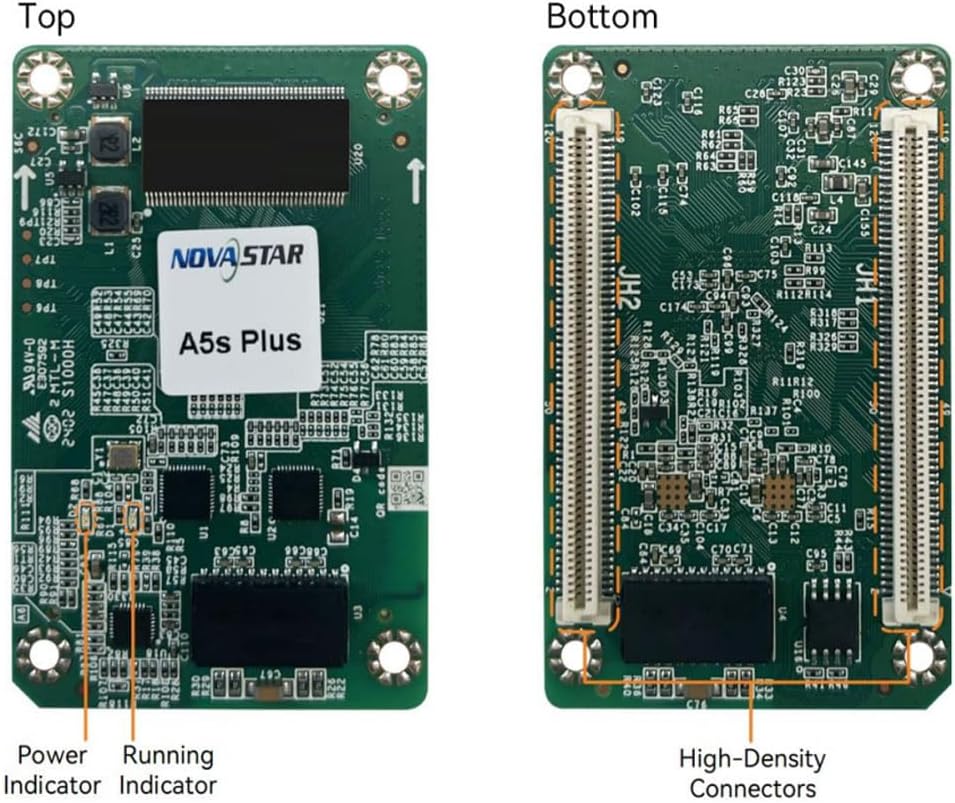
Image Description: The image displays the top and bottom sides of the Novastar A5S-Plus receive card. The top side shows the main Novastar chip, a power indicator, and a running indicator. The bottom side reveals the high-density connectors (JH1, JH2) and other circuit components, designed for stable communication.

Image Description: This technical drawing illustrates the physical dimensions of the Novastar A5S-Plus receive card. Key measurements include a length of 70.0 mm, a width of 45.0 mm, and a thickness of 8.3 mm. Mounting hole diameters are 3.2 mm.
5. Specifications
| Feature | Detail |
|---|---|
| Brand | Soheryii |
| Model | A5s Plus |
| Item Weight | 1.06 ounces (approx. 30 grams) |
| Product Dimensions | 4.6 x 4 x 0.5 inches (approx. 11.7 x 10.2 x 1.3 cm) |
| Connectivity Technology | Ethernet |
| Connector Type | RJ45 |
| Resolution Support | Up to 1080p (display control capability) |
| EMC Compliance | Class B |
| Data Group Support | Up to 32 groups parallel RGB data or 64 groups serial data (expandable to 128 groups) |
6. Setup Instructions
Follow these steps to properly set up your A5S-Plus receive card:
- Preparation: Gather all necessary components, including LED display modules, a compatible power supply, a Novastar sending card, and appropriate network cables. Ensure all components are compatible with the A5S-Plus.
- Installation: Carefully insert the A5S-Plus receive card into the designated slot on your LED display module or control box. Ensure it is securely seated and properly aligned with the connectors.
- Cabling: Connect a network cable from the output port of your Novastar sending card to the input port of the A5S-Plus. If you are daisy-chaining multiple receive cards, connect the output of the first card to the input of the next card in the chain.
- Power Connection: Connect the power supply to the LED display module, ensuring that the correct voltage and polarity are observed. Refer to your display module's documentation for specific power requirements.
- Software Configuration: Connect a computer with the Novastar control software (e.g., NovaLCT) installed to the sending card. Use the software to configure the display parameters, including screen resolution, module type, and any necessary calibration settings. Consult the software's user guide for detailed configuration procedures.
7. Operating the A5S-Plus
Once the A5S-Plus receive card is installed and configured, its operation is primarily managed through the Novastar sending card and associated control software.
- Power On: Apply power to the entire LED display system. The power indicator on the A5S-Plus should illuminate, indicating that the card is receiving power.
- Status Indicators: Observe the running indicator on the A5S-Plus. A steady or blinking light typically indicates normal operation and successful data reception. Refer to the Novastar software for more detailed status monitoring.
- Display Content: Use the Novastar control software to upload, manage, and schedule the content to be displayed on the LED screen.
- Advanced Features: Utilize the software interface to access and adjust advanced features such as Color Management, Pixel Level Calibration, and Gamma Adjustment to optimize the display quality according to your specific requirements.
8. Maintenance Guidelines
Proper maintenance ensures the longevity and optimal performance of your A5S-Plus receive card.
- Regular Inspection: Periodically inspect the receive card and all connected cables for any signs of physical damage, loose connections, or dust accumulation.
- Cleaning: If cleaning is necessary, gently use a soft, dry brush or compressed air to remove dust from the card's surface and connectors. Avoid using liquids, solvents, or abrasive materials, as these can damage the electronic components.
- Firmware Updates: Regularly check the official Novastar website for any available firmware updates for the A5S-Plus. Firmware updates can provide performance enhancements, bug fixes, and new features. Always follow the provided update instructions carefully.
- Environmental Conditions: Ensure the operating environment for the LED display system, including the receive card, adheres to the recommended temperature and humidity ranges specified by the manufacturer to prevent damage to the electronic components.
9. Troubleshooting Common Issues
This section addresses common issues you might encounter and provides potential solutions.
| Issue | Possible Cause | Solution |
|---|---|---|
| Display not showing content | No power to the system, loose network cable, incorrect software configuration | Check power supply to all components, ensure all network cables are securely connected, verify display settings (resolution, module type) in the Novastar software. |
| Partial display or flickering on screen | Faulty network cable, incorrect data mapping, damaged LED module | Replace the network cable, reconfigure the data mapping and connection order in the Novastar software, inspect individual LED modules for damage. |
| Power or Running indicators not lit | No power to the card, card not seated correctly, card malfunction | Verify power supply to the module, carefully re-seat the receive card in its slot, if issue persists, contact technical support. |
| Color inconsistencies or incorrect colors | Calibration issues, incorrect color management settings in software | Perform pixel-level brightness and chroma calibration using the Novastar software, adjust color management and gamma settings as needed. |
10. Warranty and Support Information
This product is covered by a standard manufacturer's warranty. For detailed information regarding the terms, conditions, and duration of your warranty, please refer to the warranty documentation included with your purchase or contact your authorized vendor.
For technical assistance, troubleshooting support beyond the scope of this manual, or service inquiries, please contact the product manufacturer or your authorized distributor. When contacting support, please have your purchase receipt, product model (A5s Plus), and any relevant serial numbers readily available to expedite the process.


