1. Introduction
The TELESIN Fun Shot Mastergrip Photography Kit transforms your Samsung Galaxy S25 Ultra into a versatile camera, enhancing your mobile photography and videography experience. This manual provides essential information for setting up, operating, and maintaining your kit.
2. Package Contents
Verify that all items listed below are included in your package:
- Mastergrip Shooting Grip x 1
- Dedicated Phone Case x 1 (for Samsung Galaxy S25 Ultra)
- 67mm VND Filter Lens x 1
- Handle Strap x 1
- Filter Adapter Ring x 1
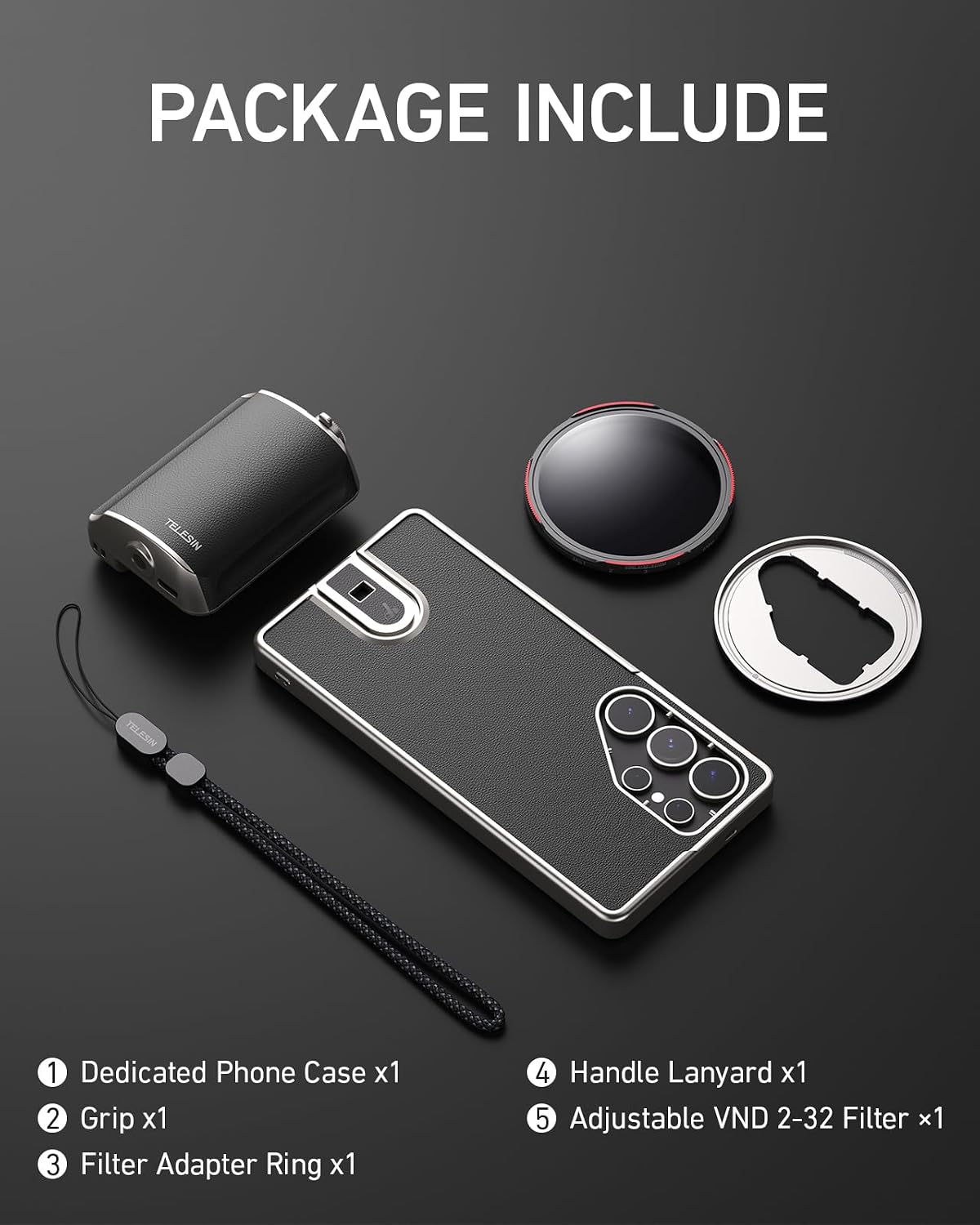
Figure 2.1: Complete package contents of the TELESIN Fun Shot Mastergrip Photography Kit.
3. Setup
3.1 Attaching the Phone Case
Carefully place your Samsung Galaxy S25 Ultra into the dedicated phone case provided. Ensure the phone is securely seated within the case, aligning all ports and buttons.
3.2 Attaching the Mastergrip
Slide the phone case, with your phone inside, into the quick-lock slide rail on the Mastergrip. Push until you hear a click, then flick the latch to secure the grip firmly to the case. The ergonomic design provides a comfortable and stable hold.
3.3 Attaching the 67mm VND Filter Lens
Attach the filter adapter ring to the lens area of the phone case. Then, screw the 67mm VND filter lens onto the threaded adapter ring. This allows for dynamic light control in various shooting conditions.

Figure 3.1: Steps for attaching the Mastergrip and filter lens.
3.4 Bluetooth Pairing
The Mastergrip features a detachable wireless remote. To pair, ensure the remote is charged. Press and hold the power button on the remote until the indicator light flashes, indicating it's in pairing mode. On your Samsung Galaxy S25 Ultra, go to Bluetooth settings and select the TELESIN Mastergrip to connect. Once paired, the indicator light will become solid.
4. Operating Instructions
4.1 Shutter Control
The Mastergrip features a dual-stage shutter button. Half-press to focus, and full-press to capture a photo or start/stop video recording.
4.2 Zoom Control
Use the dedicated quick zoom slider on the Mastergrip to smoothly adjust the zoom level of your camera.
4.3 Mode Switching
The mode switch button allows you to quickly toggle between photo, video, and burst modes.

Figure 4.1: Key control buttons on the Mastergrip.
4.4 Charging the Mastergrip
The Mastergrip has a built-in 300mAh battery. Connect a USB-C cable to the charging port on the grip to recharge. A full charge provides power for over 10,000 uses.
4.5 Tripod Mounting
The Mastergrip features a standard 1/4” tripod screw connector on the bottom, allowing you to attach it to tripods, monopods, or other compatible accessories for stable shooting.
5. Maintenance
- Keep the Mastergrip and its components clean by wiping with a soft, dry cloth.
- Avoid exposing the device to extreme temperatures or moisture.
- Store the kit in a protective case when not in use to prevent scratches and damage.
6. Troubleshooting
6.1 Bluetooth Pairing Issues
- Ensure the Mastergrip remote is fully charged.
- Verify Bluetooth is enabled on your Samsung Galaxy S25 Ultra.
- Try unpairing and re-pairing the device.
- Restart both your phone and the Mastergrip remote.
6.2 Battery Not Lasting
- Ensure the Mastergrip is fully charged using a compatible USB-C cable.
- Battery life can vary based on usage intensity and environmental factors.
7. Specifications
- Model Number: GPL-US-P1-TSS-002
- Compatible Devices: Samsung Galaxy S25 Ultra
- Package Dimensions: 8.07 x 7.99 x 2.6 inches
- Item Weight: 13 ounces
- Battery: 1 Lithium Polymer battery (included), 300mAh
- Connectivity: Bluetooth
- Tripod Mount: 1/4” screw thread
- Material: High-end environmentally friendly silicone leather, metal components
8. Warranty and Support
For warranty information or technical support, please refer to the contact details provided on the product packaging or visit the official TELESIN website. Keep your purchase receipt for warranty claims.


