
1. Introduction
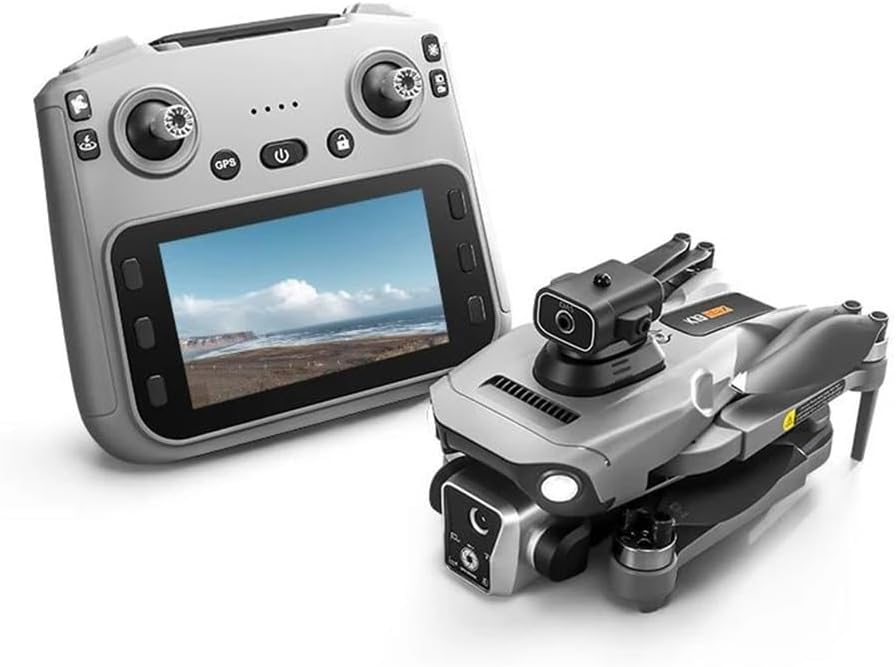
Thank you for choosing the FINOTI K19 MAX GPS Drone. This professional-grade drone features a 4K camera, GPS intelligent positioning, 360° laser obstacle avoidance, and a dedicated remote control with a 4.5-inch screen for an immersive flight experience. This manual provides essential information for safe operation, setup, maintenance, and troubleshooting to ensure optimal performance and longevity of your device.
2. Safety Guidelines
Read all safety warnings and instructions before use to avoid injury or damage.
- Flight Environment: Fly in open areas, away from people, buildings, trees, power lines, and water. Do not fly in strong winds (above 10km/h) or adverse weather conditions.
- Line of Sight: Always maintain visual line of sight with the drone during flight.
- Battery Safety: Use only the provided charger and batteries. Do not overcharge or puncture batteries. Discontinue use if batteries are damaged or swollen.
- Propeller Safety: Keep hands, face, and loose clothing away from rotating propellers. Ensure propellers are correctly installed before each flight.
- Obstacle Avoidance: While the drone features 360° laser obstacle avoidance, it is not foolproof. Always exercise caution and manual control.
- Legal Compliance: Be aware of and comply with local drone regulations, including registration, no-fly zones, and privacy laws.
- Age Recommendation: This product is not suitable for children under 14 years old.
3. Package Contents
Verify that all items are present in your package:
- 1 x K19 MAX Drone
- 1 x 4.5-inch Screen Remote Control
- 1 x Infrared Obstacle Avoidance Head
- 3 x Body Battery (Triple Battery variant)
- 1 x Storage Bag
- 1 x Color Box
- 1 x Memory Card
- 1 x Card Reader
- 2 x Instruction Manual (this document)
- 4 x Spare Fan Blades
- 2 x USB Charging Cable
- 1 x Screwdriver
4. Setup
4.1 Drone Assembly
The K19 MAX drone features a foldable design for portability. To prepare for flight:
- Unfold the drone arms carefully until they lock into position.
- Attach the infrared obstacle avoidance head to the designated slot on top of the drone.
- Ensure propellers are securely attached. If replacing, use the provided screwdriver and spare blades, matching the correct blade to each motor.
4.2 Battery Installation and Charging
The drone uses a 3.7V 2200mAh battery. The remote control also requires charging.
- Drone Battery: Insert the charged battery into the drone's battery compartment until it clicks into place. To charge, remove the battery and connect it to the USB charging cable. Charging time is approximately 60 minutes.
- Remote Control: The remote control has a built-in rechargeable battery. Connect it to a USB charging cable.
4.3 Remote Control Overview
The remote control features a 4.5-inch HD screen for real-time FPV (First Person View) and various control buttons.

Familiarize yourself with the following controls:
- Left Joystick: Throttle (up/down), Yaw (rotate left/right).
- Right Joystick: Pitch (forward/backward), Roll (left/right).
- Power Button: Turns the remote control on/off.
- GPS Switch: Activates/deactivates GPS positioning.
- One-Click Return: Initiates automatic return to home.
- Obstacle Avoidance Switch: Toggles the 360° laser obstacle avoidance feature.
- Speed Switching: Adjusts flight speed (three speed adjustments available).
- One-Click Airdrops: Activates the airdrop function.
- Photograph Button: Takes a still image.
- Video Button: Starts/stops video recording.
- Lens Adjustments: Controls camera angle.
5. Operating the Drone
5.1 Pre-Flight Checklist
- Ensure drone and remote control batteries are fully charged.
- Verify propellers are securely attached and undamaged.
- Choose an open, safe flying area.
- Power on the drone, then the remote control. Wait for GPS signal acquisition (indicated by solid GPS light on remote).
- Perform gyroscope and geomagnetic calibration as per remote control instructions.
5.2 Takeoff and Landing
- One-Key Takeoff: Press the designated takeoff button on the remote control. The drone will automatically ascend to a safe height and hover.
- Manual Takeoff: Push both joysticks to the bottom-outer corners to unlock the motors. Slowly push the left joystick up to ascend.
- One-Key Landing: Press the designated landing button. The drone will automatically descend and land.
- Manual Landing: Slowly pull the left joystick down to descend. Once landed, push both joysticks to the bottom-outer corners to lock the motors.
5.3 Flight Modes and Features
- GPS Intelligent Positioning: Provides stable hover and precise positioning, crucial for aerial photography and safe flight.
- Optical Flow Positioning: Assists with stable hovering in environments where GPS signal may be weak or unavailable.
- 360° Laser Obstacle Avoidance: The drone is equipped with sensors to detect and avoid obstacles in all directions, enhancing flight safety.
- Airdrop Mode: Allows for the remote release of small items. Maximum load capacity is 20 grams. Activate via the one-click airdrop button on the remote.
- Smart Follow Mode: The drone can automatically follow a designated subject, such as a person or vehicle, capturing dynamic footage.
- Surround Mode Flight: The drone can orbit a point of interest, capturing panoramic video or photos.
- One-Click GPS Intelligent Return: When activated, the drone will automatically return to its takeoff point. This feature also engages automatically in case of low battery or loss of signal.
- Three Speed Adjustments: Adjust the drone's flight speed to suit your skill level and flight conditions.
5.4 Camera Operation
The K19 MAX features a high-resolution camera system.

- Still Images: Capture photos with a resolution of up to 7680x4320 (8K). Press the 'Photograph' button on the remote.
- Video Recording: Record smooth 4K/1080p HD video at 60fps. Press the 'Video' button to start and stop recording.
- Camera Angle Adjustment: Use the lens adjustment scroll wheel on the remote control to change the camera's vertical angle (90° ESC camera).
- 50x Zoom: Utilize the digital zoom feature for closer shots.
- Storage: Photos and videos are stored on the included memory card. Use the card reader to transfer files to a computer.
5.5 Real-time FPV and Video Transmission

The remote control's 4.5-inch screen provides a live feed from the drone's camera via 5G high-definition image transmission, allowing for real-time FPV up to 3000M. This enables precise control and framing of your shots.
Video 5.5.2: An official product video demonstrating the FINOTI K19 MAX GPS Drone's features, including its HD remote control with screen, GPS intelligent positioning, airdrop mode, 90° ESC camera, three speed adjustments, omni-directional obstacle avoidance, smart follow mode, and one-click GPS intelligent return.
6. Maintenance
Regular maintenance ensures the longevity and performance of your K19 MAX drone.
- Cleaning: After each flight, gently wipe the drone body and camera lens with a soft, dry cloth. Avoid using harsh chemicals.
- Propellers: Inspect propellers for cracks, bends, or damage before and after each flight. Replace any damaged propellers immediately using the provided spare parts and screwdriver.
- Motors: Keep motors free from dust and debris. Do not attempt to lubricate the motors.
- Battery Care: Store batteries in a cool, dry place. Do not store fully charged or completely depleted for extended periods. Charge to about 50-60% for long-term storage.
- Storage: When not in use, fold the drone and store it in its protective storage bag to prevent damage.
7. Troubleshooting
If you encounter issues with your K19 MAX drone, refer to the following common problems and solutions:
| Problem | Possible Cause | Solution |
|---|---|---|
| Drone does not power on. | Low or uncharged battery; incorrectly installed battery. | Charge the drone battery fully. Ensure the battery is inserted correctly and securely. |
| Remote control does not connect to drone. | Remote control not powered on; pairing issue; interference. | Ensure remote is powered on. Re-pair the drone and remote according to the quick start guide. Move to an area with less interference. |
| Drone drifts during flight. | Improper calibration; strong winds. | Perform gyroscope and geomagnetic calibration. Avoid flying in windy conditions. |
| Poor image/video quality or no FPV feed. | Weak 5G signal; dirty camera lens; memory card issue. | Ensure drone is within range. Clean the camera lens. Check if the memory card is inserted correctly and has sufficient space. |
| Obstacle avoidance not working. | Feature is disabled; sensor obstruction. | Ensure the obstacle avoidance switch is ON. Clean the obstacle avoidance sensors. |
| Drone does not return to home. | Weak GPS signal; return point not set. | Ensure strong GPS signal before takeoff. The drone needs a clear GPS lock to record the home point. |
8. Specifications
| Feature | Specification |
|---|---|
| Brand | FINOTI |
| Model Name | K19 MAX |
| Folding Size | 17 x 10 x 9 CM |
| Expansion Size | 25 x 20 x 9 CM |
| Receiving Frequency | 5G |
| Receiving Channel | 4 channel 6 axis gyroscopes |
| Battery Capacity | 3.7V 2200mAh |
| Usage Time | 25 minutes |
| Charging Time | 60 minutes |
| Remote Control Distance | Height 500 meters / Distance 5000 meters (Note: 5G image transmission up to 3000M) |
| Return Distance | 2000 meters |
| Video Resolution | 1920Px1280P (4K/1080p HD at 60fps mentioned in feature bullets) |
| Image Resolution | 7680x4320 (8K) |
| Effective Still Resolution | 32 MP (from specifications, likely referring to a specific camera mode or sensor) |
| Motor Type | Brushless Motor |
| Obstacle Avoidance | 360° Laser Obstacle Avoidance |
| Airdrop Load Capacity | Max. 20 grams |
| Remote Control Screen | 4.5-inch HD screen |