
Introduction
Thank you for choosing the Gritin G1358 14.7-inch Under Cabinet Lighting. This product is designed to provide versatile and efficient illumination for various indoor spaces. Featuring 128 super bright LEDs, multiple lighting modes, adjustable color temperatures and brightness levels, and a convenient motion sensor, it offers a practical lighting solution. The magnetic attachment and USB-C rechargeable battery ensure ease of installation and long-lasting performance.
Package Contents
- 2 x Gritin 14.7-inch Cabinet Lights
- 2 x Type-C Charging Cables
- 1 x Instruction Manual
- Adhesive Iron Plates (for non-metallic surfaces)
Product Overview & Features

Figure 1: Gritin 14.7-inch Under Cabinet Lights (2-Pack)
The Gritin G1358 lights are constructed with durable aluminum alloy and ABS plastic, housing 128 super bright LEDs for optimal illumination.
Lighting Modes
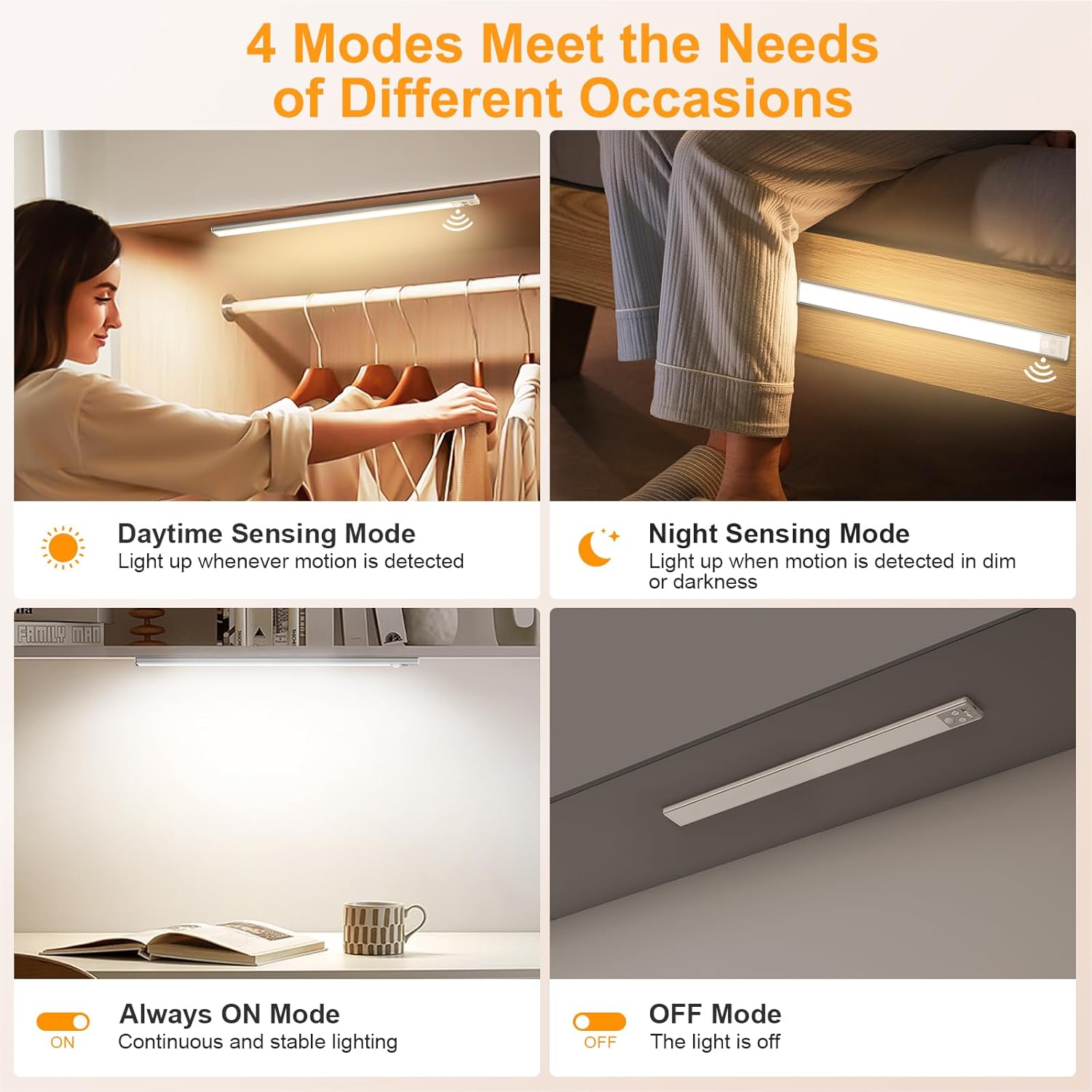
Figure 2: Available Lighting Modes
- OFF Mode: The light is turned off.
- Night Sensing Mode: Motion-activated only in dark environments. Ideal for saving battery life.
- Daytime Sensing Mode: Motion-activated at any time, regardless of ambient light conditions.
- Always On Mode: Provides continuous and stable lighting.
Color Temperature Adjustment

Figure 3: 3-Color Temperature Options
The lights offer 3 color temperatures to suit different preferences and needs:
- Warm Light (3000K): For cozy and inviting spaces.
- Natural Light (4500K): A balanced mix for versatile use.
- Cool Light (6000K): Ideal for task lighting and bright environments.
Adjust color temperature with the dedicated button on the light bar.
Brightness Levels & Stepless Dimming

Figure 4: Brightness Adjustment
Choose from 5 preset brightness levels:
- 10%
- 25%
- 50%
- 75%
- 100%
A long press on the brightness button activates stepless dimming, allowing for precise light intensity control.
Motion Sensor Functionality

Figure 5: Motion Sensor in Action
The integrated motion sensor features a 120° wide sensing angle and a detection distance of up to 3 meters (10 feet). The light automatically turns off after 20 seconds of no motion detected, conserving battery life.
USB-C Rechargeable Battery

Figure 6: USB-C Charging Port and Battery Details
Each light is equipped with a 2500mAh high-capacity lithium polymer battery. It can provide up to 8 hours of continuous light in high brightness mode and lasts between 7 to 45 days in sensor mode, depending on usage frequency. Recharge easily using the included Type-C cables.
Setup & Installation

Figure 7: Magnetic Installation
The Gritin G1358 lights are designed for simple, tool-free installation:
- For Iron Surfaces: The light bars have built-in strong magnets. Simply attach them directly to any iron surface.
- For Non-Metallic Surfaces: Use the included adhesive iron plates. Peel off the protective film from the adhesive side of the plate and firmly press it onto the desired clean, dry surface. Once the plate is securely attached, the light bar can be magnetically attached to it.
This magnetic attachment allows for easy removal for recharging or repositioning.
Operating Instructions
The control panel is located on one end of the light bar. It includes a power switch, a color temperature button, and a brightness adjustment button.
- Power Switch: Slide the switch to select between OFF, Night Sensing Mode (moon icon), Daytime Sensing Mode (sun icon), or Always On Mode (ON).
- Color Temperature Button: Short press this button to cycle through Warm (3000K), Natural (4500K), and Cool (6000K) light temperatures.
- Brightness Adjustment Button: Short press this button to cycle through the 5 preset brightness levels (10%, 25%, 50%, 75%, 100%). Long press the button to activate stepless dimming, allowing you to continuously adjust the brightness up or down.
Maintenance
Charging the Battery
When the battery is low, the light's performance may diminish. To recharge:
- Gently detach the light bar from its magnetic mounting.
- Connect one of the included Type-C charging cables to the USB-C port on the light bar and the other end to a compatible USB power source (e.g., phone charger, computer USB port).
- An indicator light will show red during charging and turn green when fully charged.
- Once fully charged, disconnect the cable and reattach the light bar to its mounting.
Specifications
| Attribute | Value |
|---|---|
| Brand | Gritin |
| Model Name | G1358 |
| Product Dimensions | 14.76"L x 1.57"W x 0.39"H |
| Item Weight | 11.8 ounces (334 Grams) |
| Material | Aluminum, Plastic |
| Light Source Type | LED (128 LEDs) |
| Color Temperature | 3000K, 4500K, 6000K |
| Power Source | Battery Powered (2 Lithium Polymer batteries included) |
| Battery Capacity | 2500mAh |
| Switch Type | Motion Sensor, Touch |
| Installation Type | Surface Mount (Magnetic) |
| Indoor/Outdoor Usage | Indoor |
Official Product Videos
Amazing! 100% Recommended
Video 1: A user demonstrates the Gritin under cabinet light, highlighting its ease of use and bright illumination in various settings. The video showcases the light's functionality and versatility.
Works as Advertised!
Video 2: This video illustrates the practical application of the Gritin under cabinet light, confirming its advertised features and performance in a real-world scenario.