1. Product Overview
The Cityflee Automatic Cat Feeder (Model XWSQ02) is designed to provide scheduled and controlled feeding for your pets. It features 5G/2.4G Wi-Fi connectivity for app control, dual power options, adjustable height, and a dual-bowl design for multiple pets.
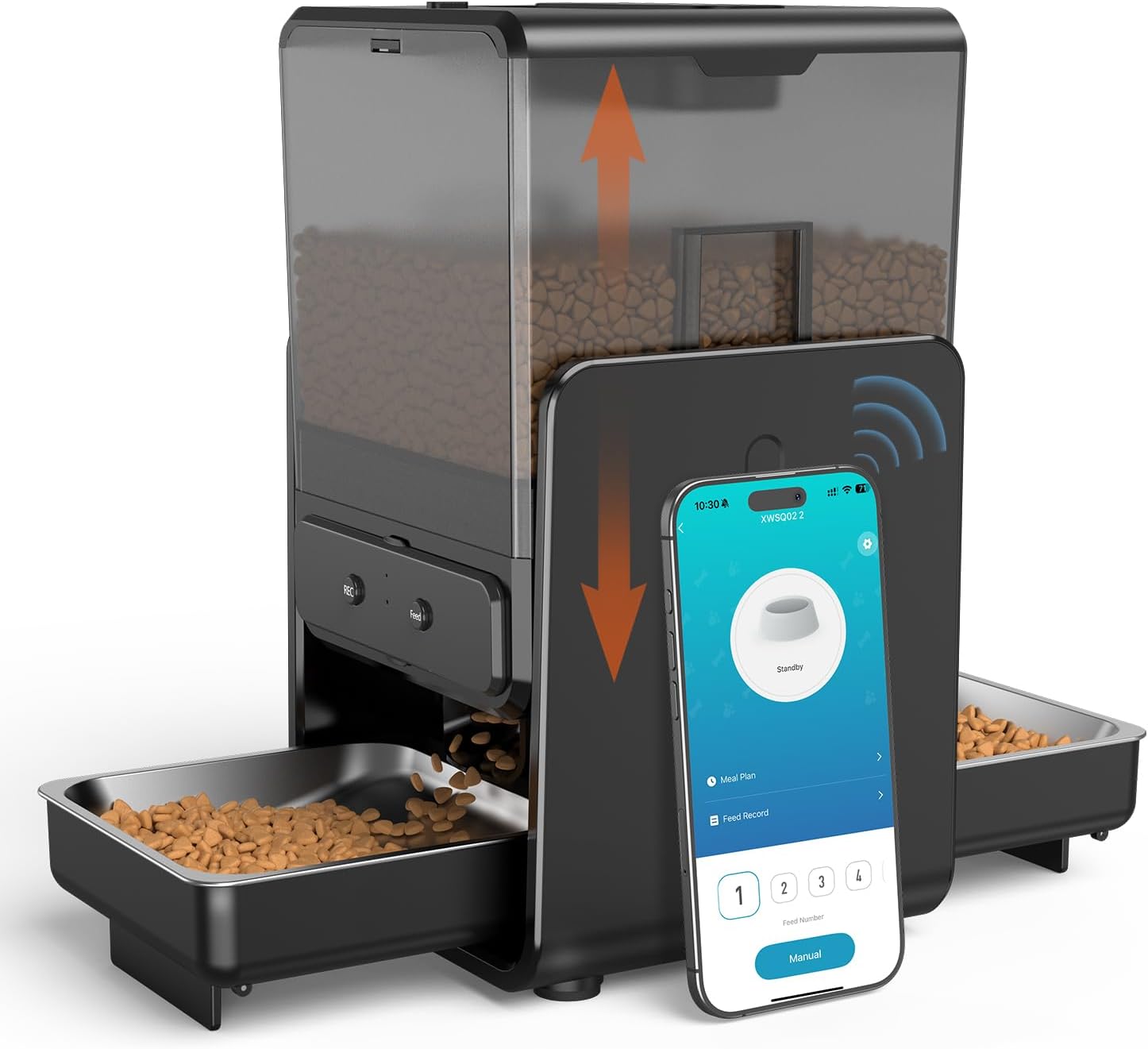
Image: The Cityflee Automatic Cat Feeder, showcasing its design and the accompanying mobile application interface.
2. Setup Instructions
2.1 Unboxing and Assembly
Carefully remove all components from the packaging. The feeder comes in several modular pieces for easy assembly. Ensure all parts are present before proceeding.
Video: An unboxing and initial assembly guide for the Cityflee Automatic Cat Feeder, demonstrating how to put the main components together.
2.2 Power Supply
The feeder supports dual power options:
- Adapter: Connect the provided power adapter to the feeder and a wall outlet.
- Batteries: For backup during power outages, insert 4 AA non-rechargeable batteries (not included) into the designated compartment. The feeder will automatically switch to battery power if the main power is interrupted.

Image: Illustration of the feeder's dual power system, showing connection to a power adapter and the option for battery backup.
2.3 App Installation and Wi-Fi Connection
To utilize the smart features, download the Smart Life App:
- Scan the QR code or visit smartapp.tuya.com/smartlife to download the Smart Life App.
- Register or log in to your account.
- Add the device by selecting the model XWSQ02.
- Connect the feeder to your home Wi-Fi network. The feeder supports both 2.4G and 5G Wi-Fi for a stable connection.

Image: Step-by-step visual guide for downloading the Smart Life App, adding the feeder, and completing the Wi-Fi setup.

Image: The feeder highlighting its compatibility with both 2.4G and 5G Wi-Fi networks for enhanced stability.
3. Operating Instructions
3.1 Setting a Feeding Schedule
Use the Smart Life App to customize your pet's feeding schedule:
- Schedule up to 6 meals per day.
- Adjust portion sizes from 1 to 24 portions per meal.
- Monitor feeding records directly from the app.

Image: The app's interface demonstrating the customizable feeding plan, allowing users to set multiple meals and precise portion sizes.
3.2 Voice Recording
Record a personalized 10-second voice message to call your pets for meals. This feature can help comfort your pets and reinforce feeding times.

Image: A cat interacting with the feeder, illustrating the voice recording feature that calls pets to eat.
3.3 Manual Feeding
A manual feed button is available on the control panel for immediate dispensing of food outside of the scheduled times.
3.4 Adjustable Height and Dual Bowls
The feeder offers two height options (2.36 inches and 3.54 inches) to accommodate pets of different sizes, promoting a healthy eating posture. The dual-bowl design with 12 inches of spacing allows two pets to eat simultaneously without conflict.

Image: Two cats using the feeder, demonstrating the adjustable height feature for improved spinal health and comfortable eating.

Image: The feeder's opposite bowl design with 12-inch spacing, ensuring each pet has its own meal space.
3.5 Food Compatibility
The feeder is compatible with dry food kibble sizes up to 0.5 inches in diameter. A built-in desiccant helps keep food fresh.

Image: Visual representation of different dry food types and kibble sizes that are suitable for the feeder.
3.6 Adjustable Slow Feed Mode
Set feeding intervals of 1-10 minutes per portion to slow down your pet's eating, promoting healthier digestion and preventing overeating.

Image: The app's feature for adjusting the slow feed mode, allowing users to set specific time intervals for food dispensing.
4. Maintenance
4.1 Cleaning
The Cityflee Automatic Cat Feeder is designed for easy cleaning. It includes 2 removable troughs and 2 stainless steel bowls. These components are BPA-free and can be easily detached for washing. Regular cleaning ensures hygienic feeding for your pets.

Image: Exploded view of the feeder's detachable parts, such as the food container and bowls, emphasizing ease of cleaning.
5. Troubleshooting
- Feeder not dispensing food: Check if the food hopper is empty. Ensure kibble size is within the recommended 0.5-inch diameter to prevent blockages. Verify the power supply (adapter or batteries).
- App connectivity issues: Ensure your Wi-Fi network is stable and the feeder is within range. Confirm you are connected to a 2.4G or 5G network. Try restarting the app and the feeder.
- Control panel not responding: Check if the control panel is securely attached. If using batteries, ensure they are correctly inserted and have sufficient charge.
- Voice recording not playing: Verify the recording was saved correctly. Check the volume settings in the app or on the device.
6. Specifications
| Feature | Specification |
|---|---|
| Model Number | XWSQ02 |
| Capacity | 5 Liters (approx. 20 cups) |
| Wi-Fi Connectivity | 2.4G / 5G |
| Power Source | 5V Power Adapter, 4x AA Batteries (backup, not included) |
| Adjustable Height | 2.36 inches / 3.54 inches |
| Bowl Spacing | 12 inches (for dual bowls) |
| Voice Recording | 10 seconds |
| Max Meals/Day | 6 |
| Portions/Meal | 1-24 |
| Kibble Size | Up to 0.5 inches |
| Item Dimensions (LxWxH) | 9.06 x 7.87 x 13.78 inches |
| Item Weight | 6.98 pounds (3.18 Kilograms) |

Image: The feeder with key dimensions such as height and width indicated.
7. Warranty and Support
Specific warranty details are not provided in the product information. For any product inquiries, technical assistance, or support, please refer to the contact information provided with your purchase or visit the official Cityflee website. Worry-free support is always available.
