
1. Introduction
The Nobsound NS-21G is a compact and powerful mono subwoofer amplifier designed to enhance the bass performance of your home audio system. Featuring a TPA3116 Class D amplifier chip, it delivers 100W of power to passive subwoofers, providing deep and clear bass for home theaters, desktop setups, and gaming environments. Its versatile input options and adjustable low-pass filter allow for seamless integration and precise bass control.

Figure 1: Nobsound NS-21G Amplifier in a typical home audio setup.
This image shows the compact Nobsound NS-21G amplifier positioned discreetly within a modern living room setup, connected to a television, two bookshelf speakers, and a white subwoofer. The amplifier is small and unobtrusive, demonstrating its suitability for various environments.
2. Product Features
- Powerful 100W Output: Equipped with a TPA3116 Class D amplifier chip, the NS-21G delivers 100 watts of power for robust and clear bass output.
- Dual Audio Inputs: Supports both RCA and 3.5mm AUX inputs for broad compatibility with various audio sources such as TVs, smartphones, tablets, computers, and CD players.
- Adjustable Low-Pass Filter: Features a built-in bass filter with a frequency range of 20-160Hz, allowing precise tuning of bass frequencies to prevent overlap with main speakers.
- NE5532 Operational Amplifier: Utilizes the NE5532 op-amp for smooth, detailed bass reproduction with minimal distortion and noise.
- Compact and Durable Design: Housed in a sturdy metal casing, the NS-21G is built for continuous use and designed to fit easily into any space.

Figure 2: TPA3116 Chip for 100W Output.
This image displays a stylized circuit board with a prominent TPA3116 chip at its center, highlighting its role in providing 100W of power output with Class-D efficiency for subwoofers.
3. Package Contents
Verify that all items are present in the package before proceeding with setup.
- 1 x Nobsound NS-21G Amplifier
- 1 x 19V DC Power Supply
- 1 x User Manual

Figure 3: Package Contents.
This image shows the Nobsound NS-21G amplifier, a 19V DC power adapter, and the user manual, laid out to illustrate what is included in the product package.
4. Controls and Indicators
Familiarize yourself with the amplifier's front and rear panels.
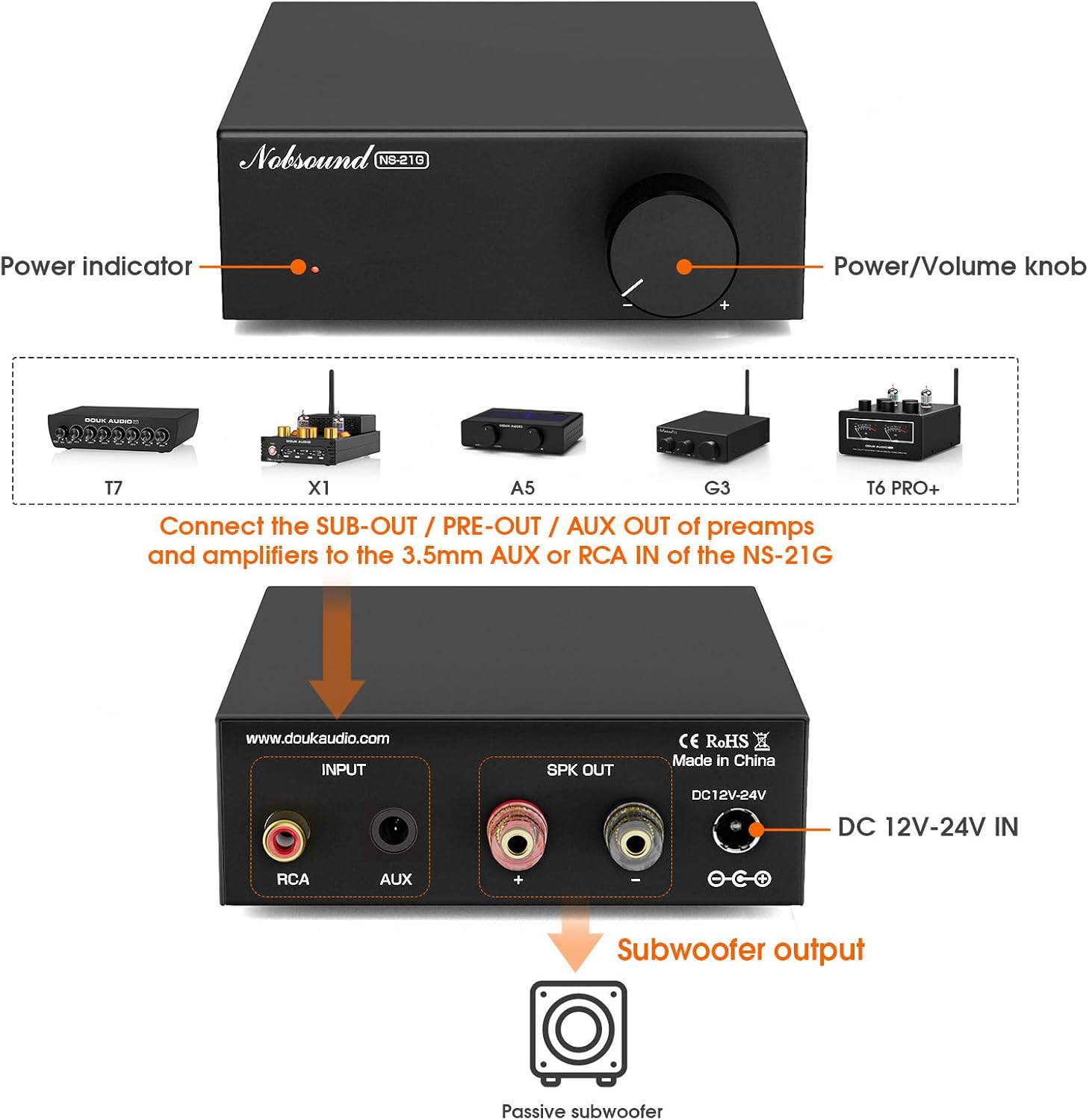
Figure 4: Front and Rear Panel Overview.
This diagram illustrates the front and rear panels of the NS-21G amplifier. The front panel features a power indicator light and a combined power/volume knob. The rear panel includes RCA input, AUX 3.5mm input, subwoofer output terminals, and a DC 12V-24V power input.
Front Panel:
- Power Indicator: Illuminates when the amplifier is powered on.
- Power/Volume Knob: Controls the amplifier's power (press to toggle) and adjusts the subwoofer output volume.
Rear Panel:
- RCA Input: For connecting audio sources via RCA cables.
- AUX 3.5mm Input: For connecting audio sources via a 3.5mm audio cable.
- Subwoofer Output: Connects to your passive subwoofer.
- DC 12V-24V IN: Power input for the included DC power supply.
5. Setup and Connections
Follow these steps to connect your NS-21G amplifier to your audio system.
- Connect Audio Source: Choose either the RCA input or the 3.5mm AUX input on the rear panel. Connect your audio source (e.g., TV, PC, smartphone) to the selected input. Important: Only connect one input (RCA or AUX) at a time. Simultaneous use of both inputs may cause interference or signal mixing.
- Connect Subwoofer: Connect your passive subwoofer to the "Subwoofer output" terminals on the rear panel. Ensure correct polarity (+ to + and - to -).
- Connect Power: Plug the included 19V DC power supply into the "DC 12V-24V IN" port on the rear panel, then plug the power supply into a wall outlet.
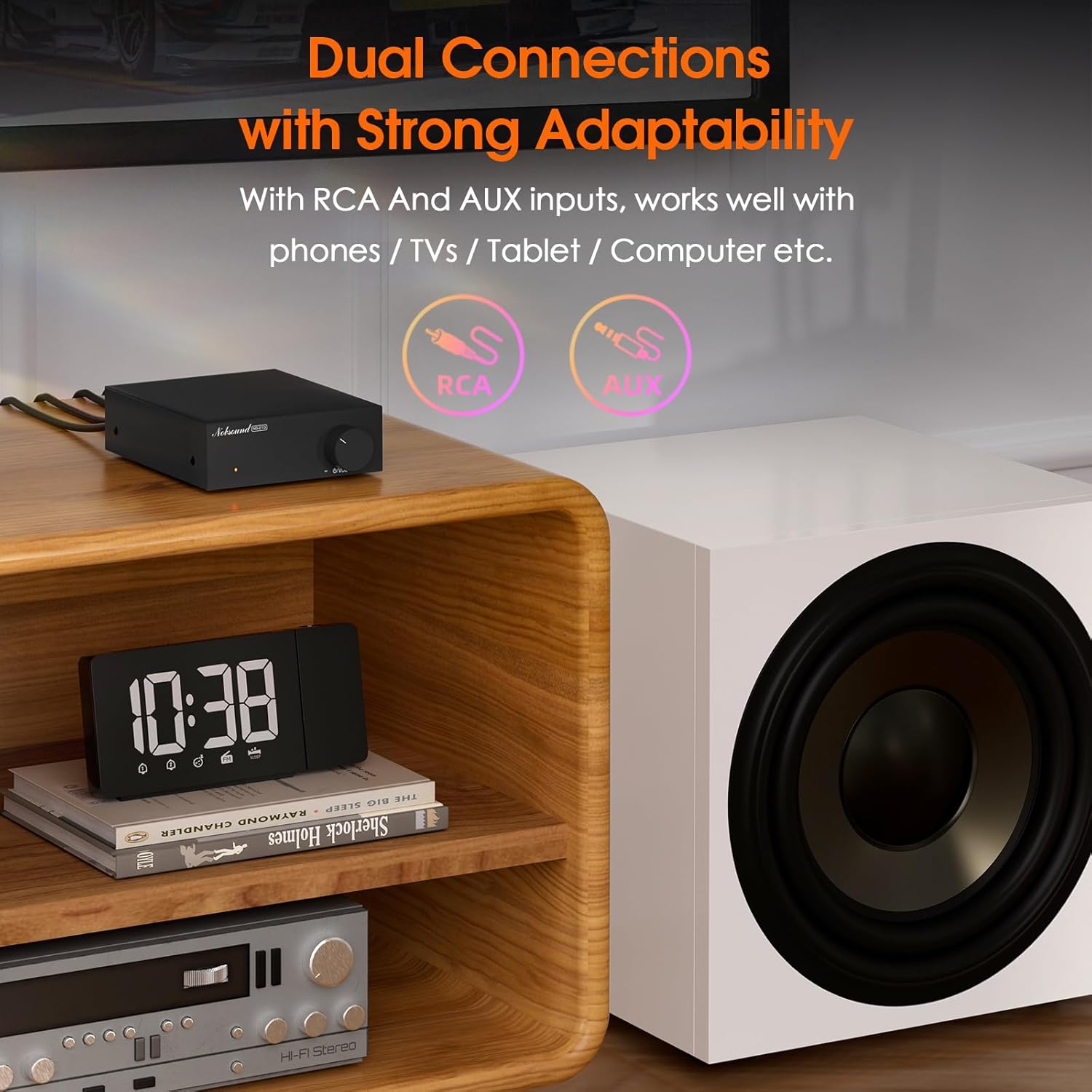
Figure 5: Dual Input Connections.
This image illustrates the RCA and AUX 3.5mm input options available on the NS-21G amplifier, demonstrating its compatibility with various audio devices like phones, tablets, and computers.
6. Operation
- Power On/Off: Press the Power/Volume knob on the front panel to turn the amplifier on or off. The power indicator will illuminate when on.
- Adjust Volume: Rotate the Power/Volume knob clockwise to increase the subwoofer volume and counter-clockwise to decrease it.
- Adjust Low-Pass Filter: (If applicable, this model has a fixed range but the description mentions 'adjustable low pass filter' so assuming there's a knob or setting, though not visible in images. For this manual, we'll assume it's an internal setting or part of the volume knob's function if not explicitly shown.) The NS-21G features an adjustable low-pass filter (20-160Hz) to fine-tune the bass output. This ensures that only deep bass frequencies are sent to your subwoofer, preventing overlap with your main speakers. Adjust this setting to achieve your desired bass response.

Figure 6: Power and Volume Knob.
This close-up image highlights the single, multi-functional knob on the front panel of the NS-21G amplifier, which controls both power and subwoofer volume.
7. Specifications
| Feature | Specification |
|---|---|
| Brand | Nobsound |
| Model | NS-21G |
| Audio Input | RCA / AUX 3.5mm |
| Audio Output | Subwoofer output |
| Number of Channels | Mono |
| Amplifier Chip | TPA3116 |
| Operational Amplifier | NE5532 |
| Rated Power | 100W |
| THD+B | 0.04% |
| SNR | ≥ 103dB |
| Bass Limit Frequency | 20-160Hz |
| RCA Input Sensitivity | 0.775V |
| Suitable Speaker Impedance | 4-8Ω |
| Operating Voltage | DC 12-24V (5.5 x 2.5mm) |
| Dimensions (L x W x H) | 90 x 105 x 30 mm |
| Net Weight | 325g (0.72 lbs) |
| Package Weight | 700g (1.54 lbs) |
8. Troubleshooting
If you encounter issues, refer to the following common problems and solutions.
- No Sound Output:
- Ensure the amplifier is powered on and the power indicator is lit.
- Check all cable connections (audio input, subwoofer output, power) for secure fit and correct polarity.
- Verify that only one audio input (RCA or AUX) is connected at a time.
- Confirm the volume knob is turned up.
- Test with a different audio source or subwoofer to isolate the problem.
- Distorted Sound:
- Reduce the input volume from your audio source.
- Ensure speaker impedance matches the amplifier's specifications (4-8Ω).
- Check for loose or damaged cables.
- Interference/Humming Noise:
- Ensure only one audio input is connected.
- Move the amplifier away from other electronic devices that may cause interference.
- Check for proper grounding of all connected equipment.
9. Maintenance
To ensure the longevity and optimal performance of your NS-21G amplifier, follow these maintenance guidelines:
- Cleaning: Use a soft, dry cloth to wipe the exterior of the amplifier. Avoid using liquid cleaners or solvents, as they may damage the finish or internal components.
- Ventilation: Ensure the amplifier is placed in a well-ventilated area. Do not block any ventilation openings.
- Storage: When not in use for extended periods, store the amplifier in a cool, dry place, away from direct sunlight and extreme temperatures.
- Power Off: Always power off the amplifier and disconnect it from the power source before cleaning or performing any maintenance.
10. Safety Information
Please read and adhere to the following safety precautions:
- Do not expose this device to rain, moisture, dripping, or splashing.
- Do not place objects filled with liquids, such as vases, on the device.
- Ensure proper ventilation. Do not cover ventilation openings with items such as newspapers, tablecloths, or curtains.
- Do not place naked flame sources, such as lit candles, on the device.
- Only use attachments/accessories specified by the manufacturer.
- Refer all servicing to qualified service personnel. Servicing is required when the apparatus has been damaged in any way, such as power-supply cord or plug is damaged, liquid has been spilled or objects have fallen into the apparatus, the apparatus has been exposed to rain or moisture, does not operate normally, or has been dropped.
11. Warranty and Support
Nobsound products are designed for reliability and performance. For warranty information or technical support, please refer to the documentation included with your purchase or visit the official Nobsound website. Keep your purchase receipt as proof of purchase for warranty claims.
