
1. Introduction
Thank you for choosing the FKPCAM HR13-32GB Solar Trail Camera. This camera is designed for outdoor use, offering high-resolution imaging and advanced features for wildlife monitoring, security surveillance, and property protection. It features 4K video recording, 64MP photo capabilities, solar charging, and IP67 waterproofing for reliable performance in various environments.
Please read this manual thoroughly before operating the device to ensure proper setup and functionality.

Figure 1: FKPCAM Trail Camera Overview with key features.
2. Package Contents
Verify that all items are present in your package:
- FKPCAM Trail Camera (HR13)
- Mounting Stand
- Mounting Screws
- User Manual (Japanese language)
- USB Type-C Cable
- Mounting Strap
- Memory Card (64GB, if included in your variant)

Figure 2: Package Contents.
3. Setup
3.1 Charging the Battery
The camera features a built-in 5000mAh rechargeable battery and a solar panel for continuous charging. For initial use or if the battery is low, connect the camera to a power source using the provided USB Type-C cable.

Figure 3: Charging the camera via USB.
3.2 Inserting the Memory Card
The camera supports SD cards up to 128GB. Insert the memory card into the designated slot. Ensure the card is formatted correctly (FAT32 or exFAT) for optimal performance. A 64GB memory card may be included depending on your purchase variant.
3.3 Mounting the Camera
Use the included mounting strap or stand and screws to secure the camera in your desired location. Ensure the solar panel is exposed to direct sunlight for efficient charging. Position the camera to capture the desired area, considering the 130-degree wide-angle lens.

Figure 4: Camera mounted on a tree.
3.4 Powering On and App Connection
Slide the power switch to the 'ON' position. The camera can be controlled via a smartphone app using Bluetooth. Note that the camera does not connect to home WiFi networks directly for remote viewing, but uses Bluetooth for local app control.
- Enable Bluetooth on your smartphone.
- Turn on the camera.
- Open the dedicated app and connect to the camera via Bluetooth.
- Adjust camera settings, preview images, and download files directly from the app.

Figure 5: Steps for smartphone app connection and control.
4. Operating Instructions
4.1 Recording Modes
The camera supports various recording modes:
- Photo Mode: Captures still images.
- Video Mode: Records video clips with audio.
- Photo + Video Mode: Captures a still image followed by a video clip.
4.2 Image and Video Quality
The camera records in 4K UHD video and captures 64MP ultra-high-definition photos, ensuring clear and detailed footage of wildlife or intruders.

Figure 6: High-resolution imaging capabilities.

Figure 7: Resolution comparison (4K vs 1080P, 64MP vs 48MP).
4.3 Motion Detection and Trigger Speed
Equipped with a highly sensitive PIR motion sensor, the camera boasts an ultra-fast 0.1-second trigger speed, capturing events almost instantly. The 130-degree wide-angle lens ensures a broad detection area.

Figure 8: 130-degree wide shooting angle.
4.4 Night Vision
The camera features automatic infrared (IR) LEDs (850nm) for clear night vision up to 10 meters. It automatically adjusts exposure for optimal brightness and minimal noise in low-light conditions.

Figure 9: Night vision performance.

Figure 10: Day and night vision comparison.
4.5 Advanced Features
The camera includes features such as time stamp, password lock, and loop recording, making it versatile for various applications including hunting, home security, farm monitoring, and wildlife observation.
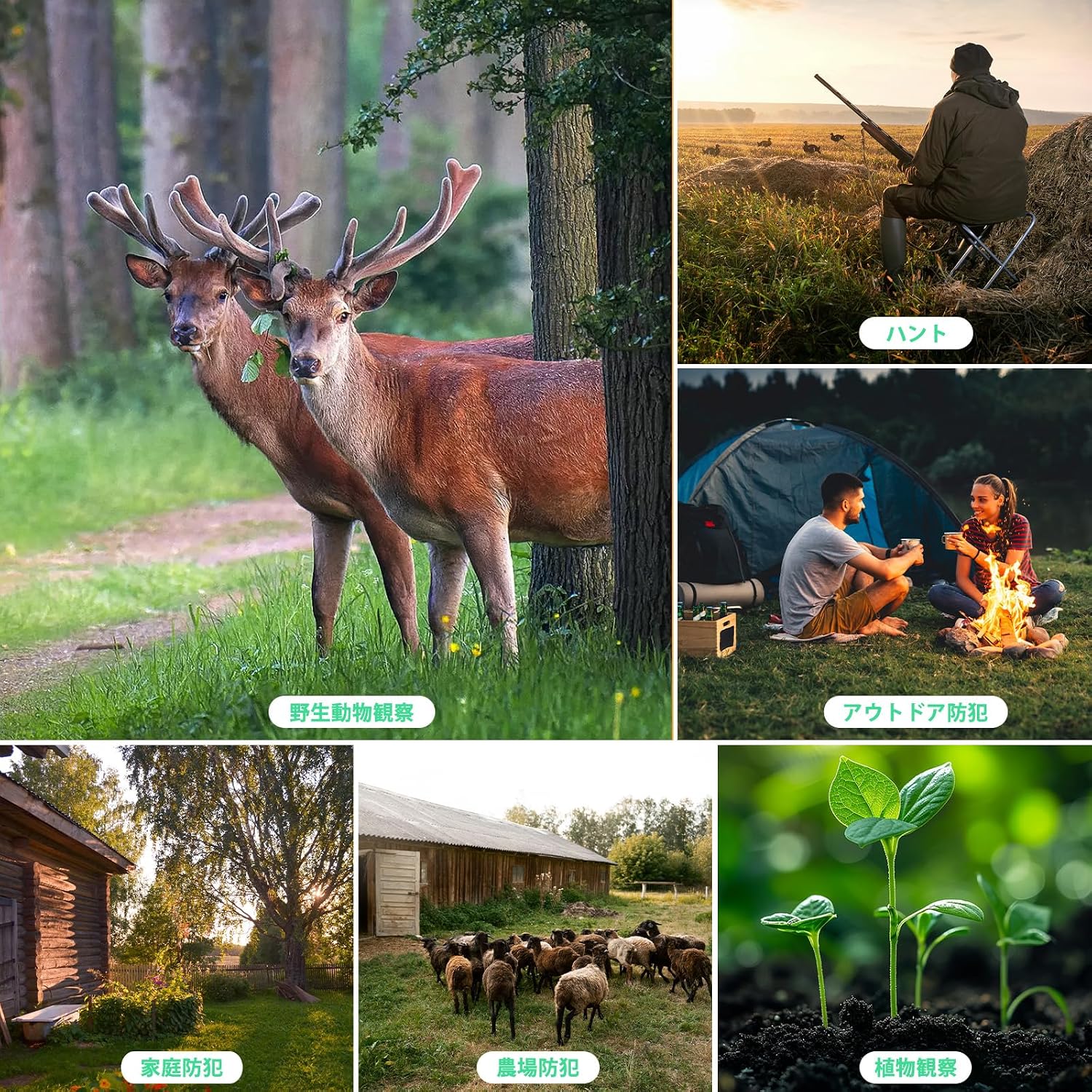
Figure 11: Diverse applications of the trail camera.
5. Maintenance
5.1 Cleaning
Regularly clean the camera lens and solar panel with a soft, dry cloth to ensure optimal performance and charging efficiency. Avoid using abrasive materials or harsh chemicals.
5.2 Battery Management
The integrated solar panel helps maintain battery charge. However, in prolonged periods of low sunlight, consider manually charging the camera via the USB-C port to ensure continuous operation.
5.3 SD Card Care
Periodically format the SD card using the camera's menu or a computer to prevent data corruption and ensure smooth recording. Back up important files before formatting.
5.4 Weather Resistance
The camera is IP67 waterproof, making it suitable for use in various weather conditions, including rain, snow, and wind. Ensure all ports are securely closed to maintain water resistance.

Figure 12: IP67 Waterproof and Weather Resistance.
6. Troubleshooting
- Camera not powering on: Ensure the battery is charged. Connect the camera to a power source using the USB-C cable. Check that the power switch is in the 'ON' position.
- Poor image/video quality: Ensure the lens is clean and free from obstructions. Check that the resolution settings are set to 4K for video and 64MP for photos. In certain bright conditions, overexposure might occur; adjust camera placement if necessary.
- SD card errors: Format the SD card in the camera's settings. Ensure the SD card is not full or damaged. Use a high-quality SD card (Class 10 or higher).
- App connection issues: Ensure Bluetooth is enabled on your smartphone and the camera. Make sure you are within Bluetooth range of the camera. Restart both the camera and the app if issues persist. Remember, the app connects via Bluetooth, not directly to your home WiFi.
- Motion sensor not triggering: Ensure the PIR sensitivity is set appropriately for your environment. Clear any obstacles in front of the sensor.
- Short battery life: Ensure the solar panel is receiving adequate direct sunlight. In shaded areas or during prolonged cloudy periods, manual charging may be required more frequently.
7. Specifications
| Brand | FKPCAM |
| Model Name | FK60 |
| Manufacturer Model Number | FK-HR13 |
| Video Resolution | 4K |
| Photo Resolution | 64MP |
| Trigger Speed | 0.1 seconds |
| Detection Angle | 130 degrees |
| Night Vision Range | Max 10m |
| Battery | 5000mAh rechargeable, Solar-powered |
| Connectivity | Bluetooth, Wireless (App Control) |
| Waterproof Rating | IP67 |
| Dimensions | 13 x 8 x 6 cm |
| Weight | 0.1 kg |
| Recommended Use | Wildlife monitoring, hunting, outdoor security |
| Included Accessories | Stand, Mounting Screws, User Manual, USB Type-C Cable, Mounting Strap |
8. Warranty and Support
This FKPCAM Trail Camera HR13-32GB comes with a 24-month warranty from the date of purchase. This warranty covers manufacturing defects and malfunctions under normal use.
For technical support, warranty claims, or any questions regarding your product, please contact our customer service team through the retailer where you purchased the product or visit the official FKPCAM website for contact information.
Please retain your proof of purchase for warranty service.