
1. Introduction
This manual provides essential instructions for the safe operation, maintenance, and troubleshooting of your Dreo DR-HSH025 Space Heater. Please read it thoroughly before use and retain it for future reference.
The Dreo DR-HSH025 is a 23-inch electric tower heater designed for indoor use in large rooms. It features PTC ceramic heating, 70° oscillation, a thermostat, remote control, quiet operation, and an 8-level safety protection system.
2. Important Safety Instructions
WARNING: To reduce the risk of fire, electric shock, or injury, observe the following:
- Always plug heaters directly into a wall outlet/receptacle. Never use with an extension cord or relocatable power tap (outlet/power strip).
- This heater is hot when in use. To avoid burns, do not let bare skin touch hot surfaces. Use handles when moving this heater.
- Keep combustible materials, such as furniture, pillows, bedding, papers, clothes, and curtains at least 3 feet (0.9 m) from the front of the heater and away from the sides and rear.
- Extreme caution is necessary when any heater is used by or near children or invalids and whenever the heater is left operating and unattended.
- Always unplug heater when not in use.
- Do not operate any heater with a damaged cord or plug or after the heater malfunctions, has been dropped or damaged in any manner. Discard heater, or return to authorized service facility for examination and/or repair.
- Do not use outdoors.
- This heater is not intended for use in bathrooms, laundry areas and similar indoor locations. Never locate heater where it may fall into a bathtub or other water container.
- Do not run cord under carpeting. Do not cover cord with throw rugs, runners, or similar coverings. Arrange cord away from traffic area and where it will not be tripped over.
- To disconnect heater, turn controls to off, then remove plug from outlet.
- Do not insert or allow foreign objects to enter any ventilation or exhaust opening as this may cause an electric shock or fire, or damage the heater.
- To prevent a possible fire, do not block air intakes or exhaust in any manner. Do not use on soft surfaces, like a bed, where openings may become blocked.
- A heater has hot and arcing or sparking parts inside. Do not use it in areas where gasoline, paint, or flammable vapors or liquids are used or stored.
- Use this heater only as described in this manual. Any other use not recommended by the manufacturer may cause fire, electric shock, or injury to persons.
- Always plug into a 15A 120V wall outlet only.
- Check the plug and outlet regularly and keep them clean. Most dust is flammable and dust buildup can cause a short circuit, fire, or electric shock.
- Any bent or damaged plug can cause a short circuit, fire, or electric shock.
- Loose outlets can disrupt currents and cause a short circuit, fire, or electric shock. Ask a qualified electrician to fix the outlet if it's loose.
3. Package Contents
- Dreo Space Heater DR-HSH025
- Remote Control
- User Manual / Quick Start Guide
4. Setup
4.1 Base Installation
The Dreo DR-HSH025 requires minimal assembly. The base needs to be attached to the main unit.
- Match the rectangle cutout with the rectangle support on the base.
- Press down on the edge until you hear a click to securely snap the two base halves together.
- Align the center column with the center hole on the base. Make sure it is placed on a protective cardboard on the ground.
- Attach the base to the heater bottom. Press the base until you hear a click to lock it in place.

Image: Diagram showing the step-by-step process of attaching the base to the Dreo Space Heater.
Note: Do not operate the heater if the base has not been installed.
5. Operating Instructions
5.1 Control Panel & LED Display Overview

Image: Close-up of the Dreo Space Heater's top control panel with touch buttons and the LED display showing temperature and mode indicators.
- Power (On/Off): Touch to turn the heater on/off.
- Mode (Power Heat / ECO / Fan Only): Touch to switch between modes. Long press to turn on/off button sounds.
- Heat Level / Temperature: In Power Heat mode, touch to adjust the heating level (H1/H2/H3). In ECO mode, touch to adjust the set temperature (41-95°F).
- Oscillation: Touch to turn on/off oscillation (70° wide).
- Timer: Touch to set a timer (0-12H).
- Child Lock: Long press
 for 3s to activate/deactivate the Child Lock function.
5.2 Remote Control
The included remote control allows you to operate all functions of the heater from a distance.
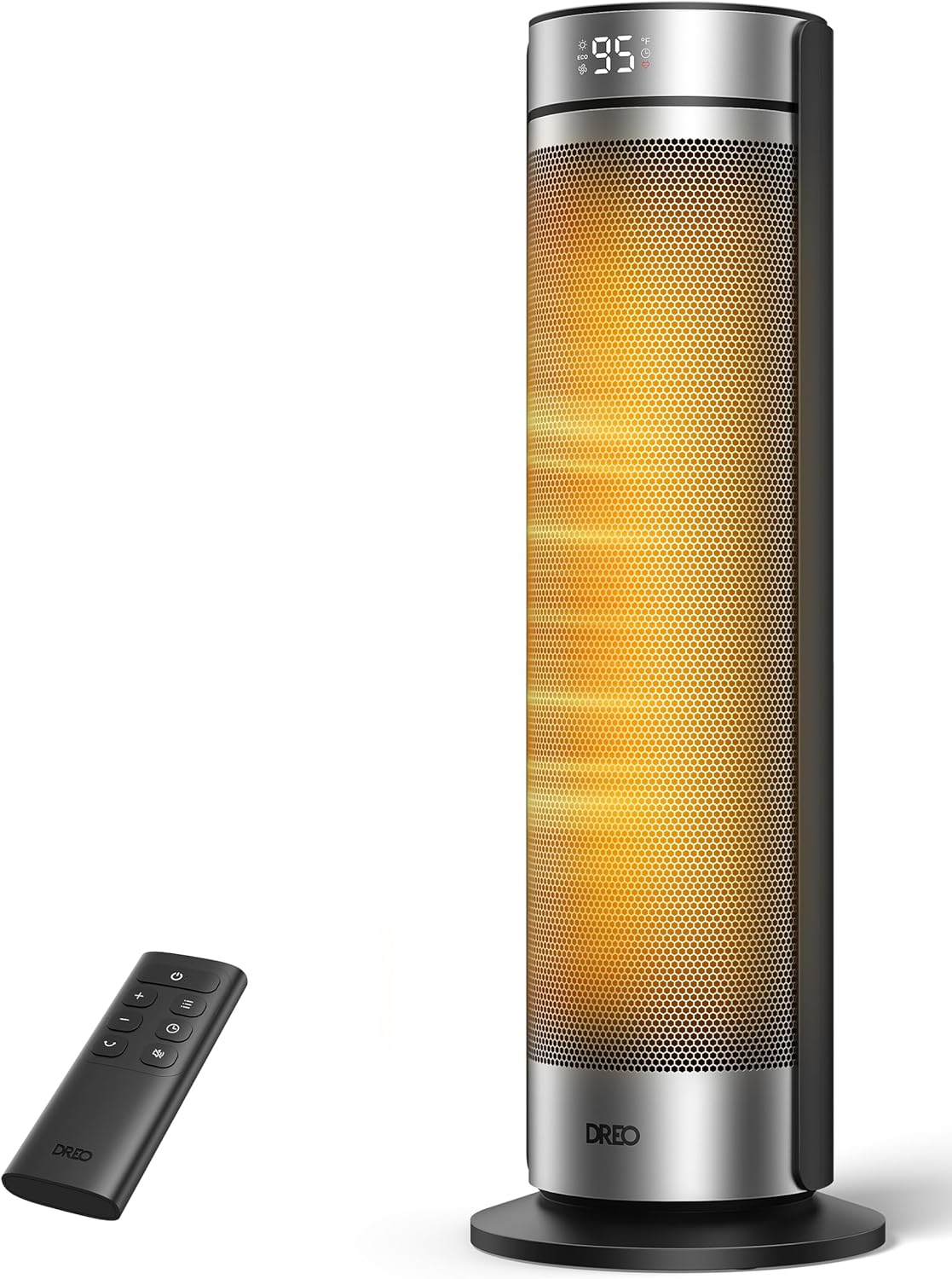
Image: The Dreo Space Heater shown with its remote control, highlighting the convenience of remote operation.
5.3 Power On/Off
Plug the heater into a suitable 15A 120V wall outlet. Press the Power button on the control panel or remote to turn the unit on. Press again to turn off.
Note: Once turned off, a 30-second countdown will show up on the display while the fan blows out the remaining heat.
5.4 Mode Selection
Cycle through Power Heat (H1/H2/H3), ECO Mode, and Fan Only mode using the Mode button on the control panel or remote.
5.5 Temperature Adjustment (ECO Mode)
In ECO Mode, use the '+' and '-' buttons to set your desired temperature between 41°F and 95°F. The heater will automatically adjust its operation to maintain this temperature, saving energy.

Image: The Dreo Space Heater displaying temperature settings in ECO mode, illustrating precise temperature control.
5.6 Oscillation
Press the Oscillation button to activate the 70° wide oscillation feature, distributing heat evenly across the room. Press again to stop oscillation.

Image: Icon representing the 70-degree oscillation feature of the heater.
5.7 Timer Function
Press the Timer button to set an auto-off timer from 0 to 12 hours. The heater will automatically turn off after the set time has elapsed.

Image: Icon representing the 12-hour timer function of the heater.
5.8 Child Lock
To prevent accidental changes to settings, long press the Child Lock button for 3 seconds to activate or deactivate this feature.
Image: Icon representing the child lock feature of the heater.
6. Maintenance
6.1 Cleaning
- Always unplug the heater and allow it to cool completely before cleaning.
- Use a soft, damp cloth to wipe the exterior surfaces of the heater.
- Do not use abrasive cleaners or solvents.
- Gently vacuum the air inlets and outlets to remove any dust or lint buildup.
6.2 Storage
- Store the heater in a cool, dry place when not in use.
- It is recommended to store the heater in its original packaging to protect it from dust and damage.
7. Troubleshooting
| Problem | Possible Cause | Solution |
|---|---|---|
| Heater does not turn on. | Not plugged in; Power outlet malfunction; Tip-over switch activated; Overheat protection activated. | Ensure plug is securely in a working outlet; Check circuit breaker; Place heater on a firm, level surface; Unplug and allow to cool for 30 minutes before restarting. |
| Heater stops unexpectedly. | Tip-over switch activated; Overheat protection activated; Timer function active. | Place heater on a firm, level surface; Unplug and allow to cool for 30 minutes before restarting; Check timer settings. |
| Weak airflow or insufficient heat. | Air inlets/outlets blocked; Dust buildup; Incorrect heat setting. | Ensure air inlets/outlets are clear; Clean dust from vents; Select a higher heat level (H2/H3) or adjust ECO temperature. |
| Display shows "P4" error. | Tip-over protection activated. | Place heater on a firm, level surface. The heater will resume operation once upright. |
For further assistance, please contact Dreo Customer Service.
8. Specifications
| Feature | Detail |
|---|---|
| Brand | Dreo |
| Model Number | DR-HSH025 |
| Color | Silver |
| Form Factor | Tower |
| Product Dimensions | 8.27"D x 8.27"W x 23.23"H |
| Item Weight | 5.19 pounds |
| Heating Coverage | 250 sq.ft. |
| Burner Type | PTC Ceramic |
| Heat Levels | 3 (900W, 1300W, 1500W) |
| Temperature Range | 41-95°F |
| Oscillation | 70° |
| Timer | 12-hour |
| Safety Features | Child Lock, Safety Plug, Overheat Protection, Tip-Over Protection, Cool-Touch Housing, V-0 Flame Retardant, Thermal Insulated, ETL Listed |
9. Warranty & Support
Dreo products come with a manufacturer's warranty. For detailed warranty information, product support, or to report any issues, please contact Dreo Customer Service:
- Email: support@dreo.com
- Phone: (888) 290-1688 (Mon-Fri, 9:00 am-5:00 pm PST/PDT)
- Website: www.dreo.com


