
1. Product Overview
The Generic Smart Alarm Clock for Kids is an interactive device designed to assist children with sleep, time management, and learning through an AI voice assistant. It features a digital display, sound machine functions, and music playback capabilities.

Image 1.1: Overview of the Smart Alarm Clock displaying its 8 primary function modes: Alarm, Settings, Themes, MP3, Pomodoro, Stopwatch, Timer, and AI Assistant. The clock measures 3.9 inches wide by 4.7 inches high.
2. Setup Guide
2.1 Initial Power-Up
- Connect Power: Plug the alarm clock into a power outlet using the provided adapter. While the device has a backup battery, continuous power is recommended for optimal performance and access to all smart features.
- First-Time Setup: Long-press the top knob on the device. Follow the on-screen guide to complete the initial setup process.
2.2 Wi-Fi Connectivity
For AI voice features and automatic time/date updates, the clock requires a 2.4G Wi-Fi connection.
- During initial setup or via the 'Settings' menu, select the Wi-Fi option.
- Choose your home's 2.4G Wi-Fi network from the list.
- Enter the Wi-Fi password.
- Confirm connection. A successful connection will enable AI voice assistant functions and ensure accurate time synchronization.
3. Operating Instructions
3.1 AI Voice Assistant
Activate the AI voice assistant by saying "Hello Timi." The AI can engage in chat, tell stories, report weather, and set alarms.
- Voice Commands: Use simple voice commands to interact with the clock.
- Weather Forecast: Ask for the weather, displayed in either Fahrenheit (°F) or Celsius (°C).
- Alarm Setting: Set alarms using voice commands, e.g., "Hello Timi, set the alarm for 7 o'clock every morning."

Image 3.1: Illustration of the AI alarm clock's interactive capabilities, showing a child setting an alarm and engaging in conversation with the AI assistant. It highlights the ability to display real-time temperature and contrasts with traditional alarm clocks lacking these features.
3.2 Sleep Aid and Sound Machine
The clock offers 12 white noise options and soothing melodies to create a calming sleep environment.
- White Noise Selection: Choose from sounds like rain, ocean, nature, raindrops, bird song, and more.
- Sleep Timer: Set a timer for 15, 30, 60, 90, or 120 minutes for the sound to play before automatically turning off.
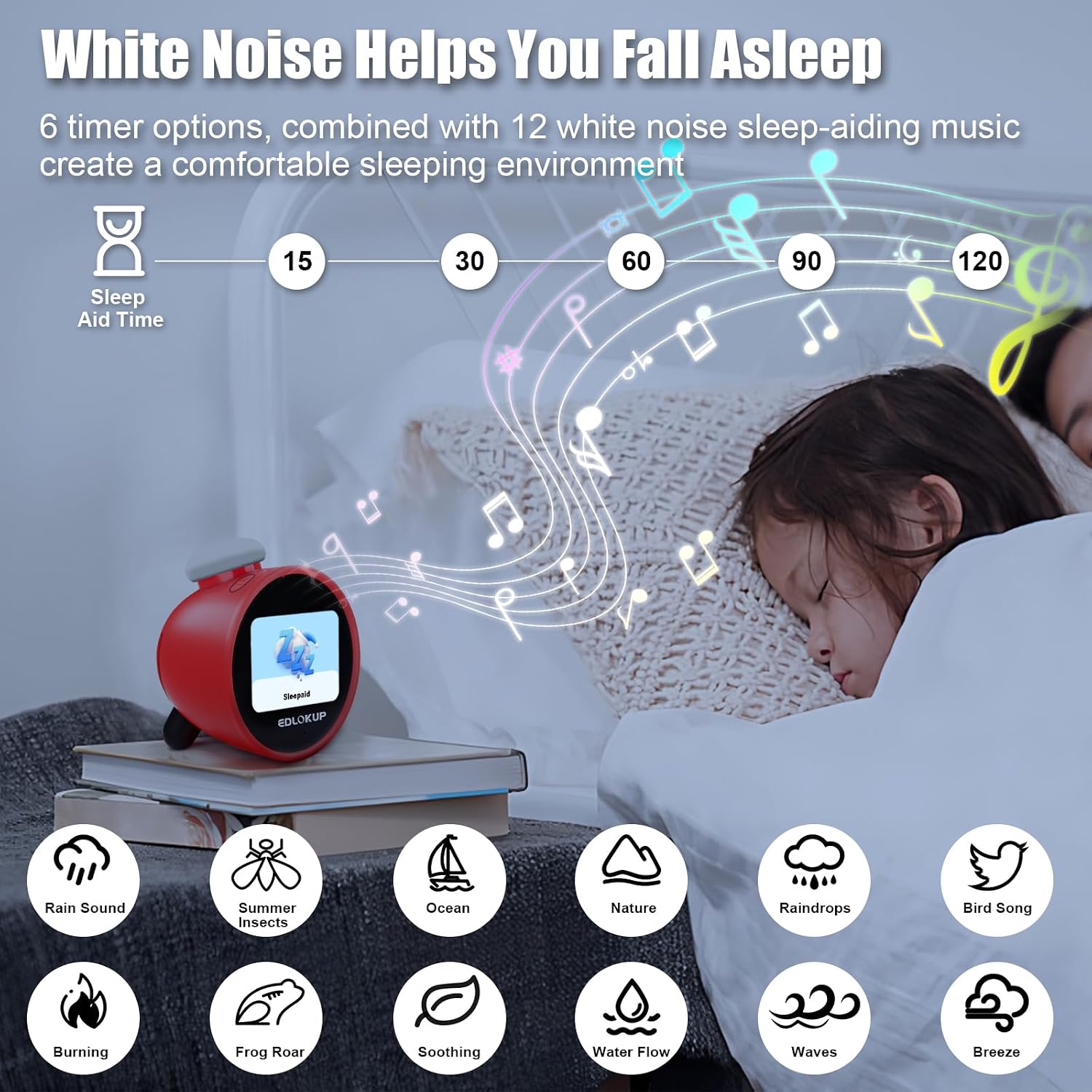
Image 3.2: Visual representation of the clock's white noise features, showing a child sleeping peacefully with various sound options like rain, ocean, and bird song, and timer settings from 15 to 120 minutes.
3.3 Time Management Tools
Utilize the Pomodoro timer, countdown, and count-up timers to help manage daily activities.
- Pomodoro Timer: Break down tasks into focused work periods with short breaks.
- Customizable Alarms: Set multiple alarms with 3 ringtones and 10 volume levels.
- Countdown/Up Timer: Use for various activities like homework, game time, or nap time.

Image 3.3: Depicts the time training timer in action, illustrating its use for game time, homework time, housework time, and nap time, promoting structured routines for children.
3.4 Music Player
The built-in TF/MP3 card slot allows for local music playback.
- Insert TF/SD Card: Load an SD or TF card with MP3 audio files into the designated slot.
- Playback: Navigate to the MP3 function mode to play stored audio, including songs, audiobooks, or educational content.

Image 3.4: Shows a child in bed with the alarm clock playing music from a TF card, illustrating the local music playback feature for bedtime stories or sleep music.
3.5 Temperature Display
The clock features a built-in smart temperature chip for real-time temperature display.
- Real-Time Display: View the current temperature directly on the clock screen.
- Unit Selection: Temperature can be displayed in Fahrenheit (°F) or Celsius (°C).

Image 3.5: Displays the clock's ability to show real-time temperature and weather forecasts, with options for Fahrenheit (US) and Celsius (CA) units, assisting with daily dressing choices.
3.6 Controls
The clock is designed with an intuitive interface for ease of use.
- Top Knob: Used for navigation and selection.
- Two-Button Interface: Additional buttons for specific functions.
4. Maintenance
4.1 Cleaning
- Wipe the exterior of the clock with a soft, dry cloth.
- Do not use liquid cleaners or abrasive materials.
4.2 Memory Function
The clock includes a memory function that preserves time and alarm settings even during a power outage, reducing the need for frequent re-configuration.
5. Troubleshooting
| Issue | Possible Cause | Solution |
|---|---|---|
| AI Voice Assistant not responding | No Wi-Fi connection or unstable 2.4G Wi-Fi. | Ensure the clock is connected to a stable 2.4G Wi-Fi network. Check Wi-Fi settings in the menu. |
| Alarm not sounding | Alarm not set, volume too low, or device not powered. | Verify alarm settings and ensure the volume is audible. Confirm the clock is plugged in or has sufficient battery. |
| Music not playing from TF/SD card | Card not inserted correctly, unsupported file format, or corrupted card. | Ensure the TF/SD card is fully inserted. Verify audio files are in MP3 format. Try a different card if issues persist. |
| Incorrect time/date | No Wi-Fi connection for automatic updates. | Connect the clock to a 2.4G Wi-Fi network to enable automatic time and date synchronization. |
6. Specifications
| Feature | Detail |
|---|---|
| Brand | Generic |
| Model Number | CLOCK-RED |
| Product Dimensions | 3.9"W x 4.7"H |
| Display Type | Digital |
| Power Source | Battery Powered (1 Nonstandard Battery included), recommended plugged-in for full functionality |
| Connectivity Technology | Wi-Fi (2.4G only) |
| Special Features | AI Voice Assistant, 12 White Noise Sounds, Sleep Trainer, Time Management Tools (Pomodoro, Countdown/Up), Music Player (TF/MP3 Card), Weather Forecast, Real-Time Temperature Display, Multiple Alarms (3 Ringtones, 10 Volume Levels) |
| Screen Size | 3.9 inches |
| Frame Material | Polypropylene (PP) |
| Room Type | Kid's Room |
7. Official Product Video
Video 7.1: An official product video showcasing the EDLOKUP Smart Alarm Clock for Kids, demonstrating its various features and functionalities.
8. Warranty and Support
Warranty information for this product is not provided in the available product data. For specific warranty details or technical support, please refer to the product packaging or contact the seller directly.


