
CLY CLY 100W LED Motion Sensor Floodlight
CLY 100W LED Outdoor Floodlight with Motion Sensor
Model: CLY 100W LED Motion Sensor Floodlight
Brand: CLY
1. Introduction
Thank you for choosing the CLY 100W LED Outdoor Floodlight with Motion Sensor. This product is designed to provide efficient and versatile outdoor lighting with advanced motion detection capabilities and remote control for ease of use. Please read this manual carefully before installation and operation to ensure proper function and safety.
2. Safety Instructions
- Ensure the power supply is disconnected before installation or maintenance.
- Installation should be performed by a qualified electrician or in accordance with local electrical codes.
- Do not look directly into the LED light when it is on, as it may cause eye strain.
- Keep the product away from flammable materials.
- Do not attempt to disassemble or modify the product, as this will void the warranty and may cause damage or injury.
- Ensure the mounting surface is stable and can support the weight of the fixture.
- This product is rated IP66 for outdoor use, but avoid submerging it in water.
3. Package Contents
Please check the package for the following items:
- 1x CLY 100W LED Outdoor Floodlight with Motion Sensor (and 1m cable)
- 1x Remote Control (with 2 AAA batteries included)
- 1x Set of Mounting Accessories (screws, wall plugs)

Image: Contents of the CLY 100W LED Floodlight package, including the light, remote, cable, and mounting accessories.
4. Product Specifications
| Brand | CLY |
| Model | CLY 100W LED Motion Sensor Floodlight |
| Power | 100 Watts |
| Luminous Flux | 9600 Lumens |
| Color Temperature | 6500 Kelvin (Cool White) |
| Voltage | 230 Volts |
| Material | Aluminum |
| Color | White |
| Waterproof Rating | IP66 |
| Beam Angle | Adjustable (up to 270° with 3 heads) |
| Motion Sensor Angle | 180° |
| Max Sensing Distance | 12 meters (39.37 feet) |
| Ideal Mounting Height | 6-8 meters (19.69-26.25 feet) |
| Control Method | Remote Control |
| Dimensions (L x W x H) | 22 x 15 x 18 cm |
| Weight | 1.47 kg |
| Special Features | Anti-rust, Dimmable, Shatterproof, Timer, Waterproof |
5. Installation Guide
The CLY 100W LED Floodlight is designed for easy wall or ceiling mounting. Ensure the power is off before beginning installation.
5.1 Mounting Location
- Choose a location that provides the desired illumination area and allows for optimal motion sensor detection.
- The ideal mounting height is between 6 to 8 meters (19.69 to 26.25 feet) for effective motion detection and light coverage.
- The three adjustable heads allow for a wide beam angle of up to 270°, making it suitable for corners and broad areas.

Image: Adjustable light heads and installation options (ceiling, wall).
5.2 Wiring Instructions
- Disconnect Power: Turn off the main power supply at the circuit breaker before starting any electrical work.
- Prepare Wires: The floodlight comes with a 1-meter cable. Connect the wires according to standard electrical practices:
- Brown wire: Live (L)
- Blue wire: Neutral (N)
- Yellow/Green wire: Earth (E)
- Secure Connections: Use appropriate wire connectors (not included) to ensure secure and insulated connections.
5.3 Mounting the Fixture
- Mark Holes: Use the mounting bracket as a template to mark the drilling points on the wall or ceiling.
- Drill Holes: Drill holes at the marked positions and insert the provided wall plugs.
- Attach Bracket: Secure the mounting bracket to the surface using the provided screws.
- Mount Light: Attach the floodlight fixture to the mounting bracket, ensuring it is firmly secured.
- Adjust Heads: Adjust the three light heads to direct illumination to your desired areas. The sensor can also be rotated for optimal detection.

Image: CLY LED floodlight installed, showing coverage and sensor range.
6. Operating Instructions
The CLY floodlight features multiple operating modes and is controlled via the included remote control.
6.1 Remote Control Functions
The remote control allows for convenient adjustment of modes, brightness, detection distance, and lighting duration without needing to access the physical unit.

Image: Remote control with various function buttons.
- ON/OFF: Power the light on or off.
- Mode Selection: Buttons for 24H Sensing, Night Sensing, Constant Light, and Timing modes.
- Brightness Adjustment: Increase or decrease light intensity (10%-100% stepless dimming).
- Sensing Distance: Adjust detection range (6M/9M/12M).
- Lighting Duration: Set how long the light stays on after motion detection (45S/90S/120S/5MIN/10MIN).
- Timer: Set the light to stay on for 1H/2H/3H.
- Memory Function: The light retains the last selected settings.
6.2 Operating Modes
The floodlight offers four intelligent operating modes:
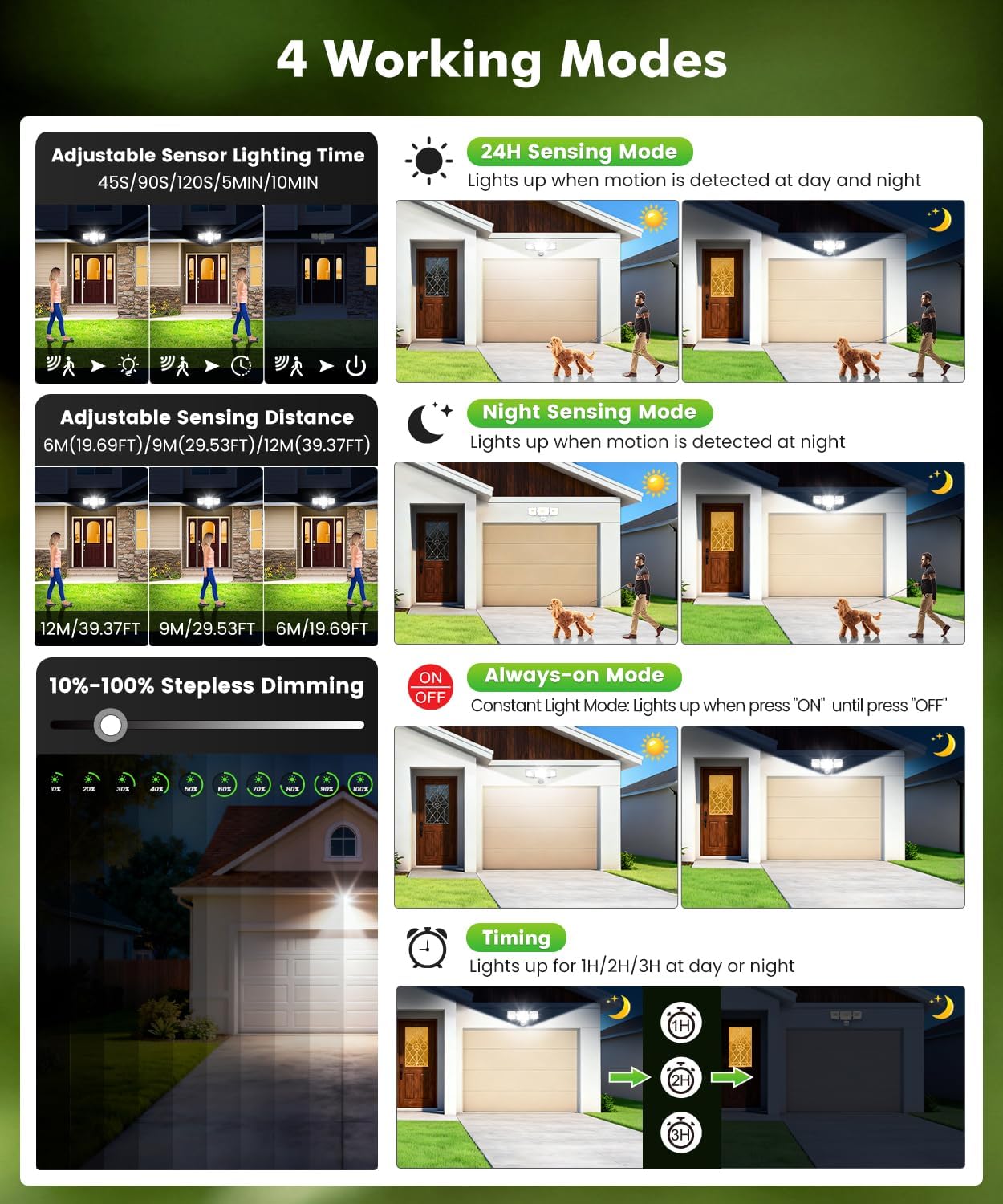
Image: Explanation of the 4 intelligent operating modes.
- 24H Sensing Mode: The light automatically turns on when motion is detected, both during the day and at night.
- Night Sensing Mode: The light automatically turns on only when motion is detected at night.
- Always-on Mode: The light remains continuously on until manually turned off.
- Timing Mode: The light turns on for a set duration (1H/2H/3H) regardless of motion, day or night.
Note: In 24H Sensing Mode and Night Sensing Mode, you can adjust the lighting duration (45S/90S/120S/5MIN/10MIN) and detection distance (6M/9M/12M) using the remote control. Brightness can be adjusted in all modes.
7. Maintenance
- Cleaning: Clean the surface of the floodlight and sensor regularly with a soft, damp cloth. Do not use abrasive cleaners or solvents.
- Inspection: Periodically check the mounting screws and wiring connections to ensure they are secure.
- Durability: The product is constructed from aluminum for good heat dissipation and corrosion resistance, ensuring a long lifespan of up to 50,000 hours. It is IP66 waterproof, resistant to heat and frost, suitable for extreme weather conditions.

Image: IP66 waterproof and durable design, resistant to heat and frost.

Image: Excellent heat dissipation and detailed view of the motion sensor features.
8. Troubleshooting
| Problem | Possible Cause | Solution |
|---|---|---|
| Light does not turn on. | No power supply. Incorrect wiring. Remote control batteries are dead. | Check circuit breaker and power connections. Verify wiring connections (Live, Neutral, Earth). Replace remote control batteries (2x AAA). |
| Motion sensor not detecting. | Sensor obstructed. Incorrect mode selected. Detection distance set too low. | Clear any obstructions in front of the sensor. Ensure 24H Sensing or Night Sensing mode is active. Increase detection distance using the remote control. |
| Light stays on continuously. | Constant Light Mode is active. Continuous motion detected. | Switch to a sensing mode using the remote control. Check for objects or activities that might be continuously triggering the sensor. |
| Remote control not working. | Batteries are dead or incorrectly inserted. Obstruction between remote and sensor. Remote control out of range. | Replace batteries (2x AAA) and ensure correct polarity. Ensure a clear line of sight to the sensor. Move closer to the floodlight (max 12m/39ft range). |
9. Warranty and Support
CLY products are manufactured to high-quality standards. For warranty information or technical support, please contact your retailer or CLY customer service.
Please retain your proof of purchase for any warranty claims.
Contact information for customer service may be found on the product packaging or the official CLY website.
Related documentsCLY 100W LED Motion Sensor Floodlight


Ask a question about this manual
Ask about setup, troubleshooting, compatibility, parts, safety, or missing instructions. Manuals+ will review the question and use this page’s manual context to help answer it.