1. Introduction
This manual provides essential information for setting up, operating, maintaining, and troubleshooting your new HP Laptop 15-fd0127dx. Please read this manual thoroughly before using your device to ensure optimal performance and longevity. Keep this manual for future reference.
2. What's in the Box
Carefully unpack your HP Laptop and verify that all items are present:
- HP Laptop 15-fd0127dx
- Power Adapter and Cable
- Windows 11 Pro Operating System (Pre-installed)
- Microsoft Office Professional Plus Lifetime License (Pre-installed)
- Wireless Silent Mouse
- Cleaning Brush
- 7-in-1 USB Hub
- 128GB USB Type-C Drive

Figure 2.1: Included Accessories
This image displays the HP Laptop 15-fd0127dx along with its accessories: a power adapter, a wireless silent mouse, a cleaning brush, a 7-in-1 USB hub, and a 128GB USB Type-C drive. The laptop is shown with Windows 11 Pro and Microsoft Office Professional Plus pre-installed.
3. Product Overview
The HP Laptop 15-fd0127dx is designed for productivity and entertainment, featuring a powerful Intel Core i7 processor, ample memory, and fast storage.
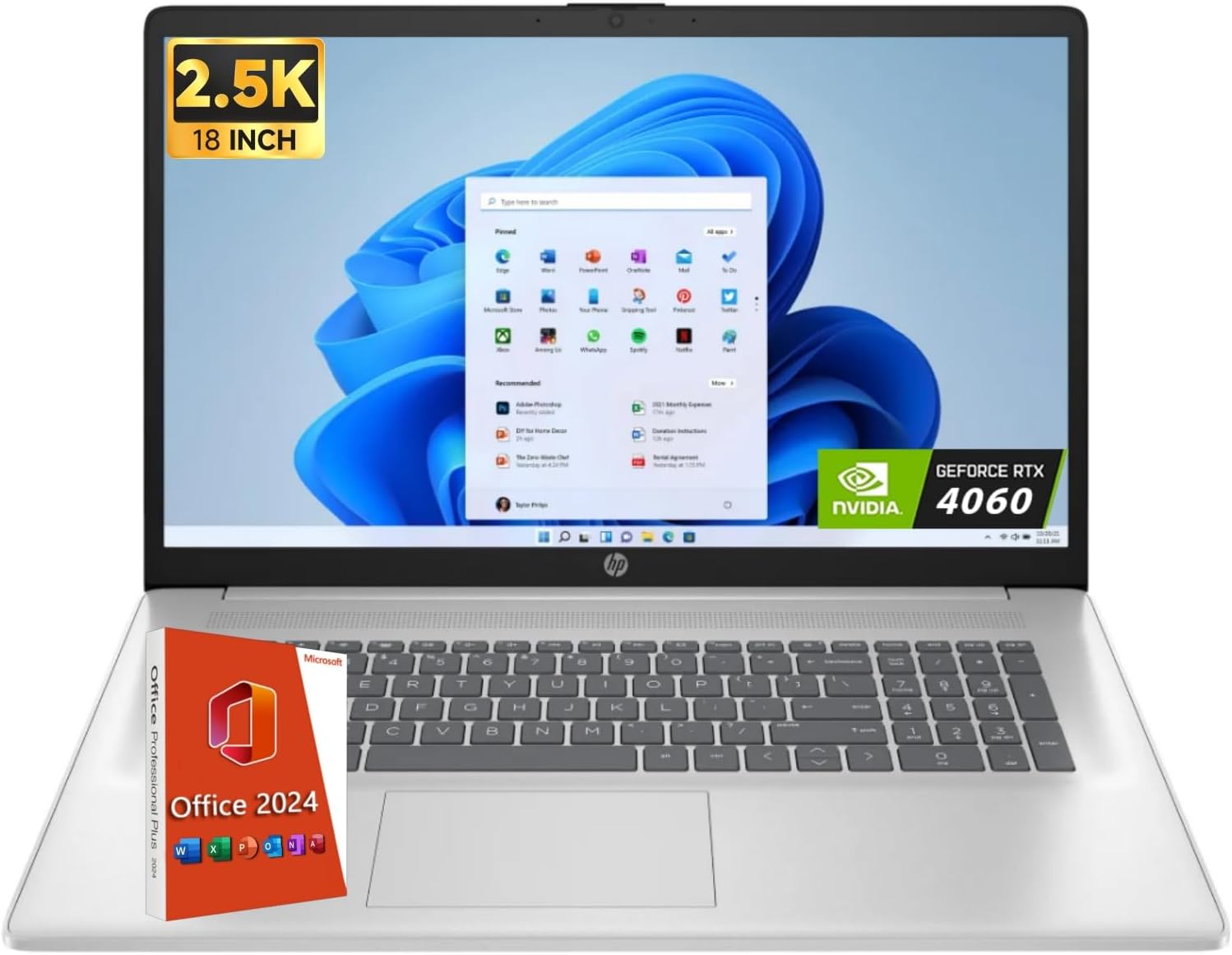
Figure 3.1: HP Laptop 15-fd0127dx Front View
This image shows the laptop from the front, open to reveal the screen displaying the Windows 11 operating system, the full-size keyboard, and the touchpad. An 'Office 2024' box and an 'NVIDIA GeForce RTX 4060' sticker are visible, indicating software and graphics capabilities.
Key Features:
- Display: 15.6-inch Full HD (1920 x 1080) Anti-Glare Touchscreen Display
- Processor: Intel Core i7 family, 3 GHz, 4 Cores
- Memory: 64 GB DDR4 RAM
- Storage: 2 TB Solid State Drive (SSD)
- Graphics: Integrated Intel Graphics
- Operating System: Windows 11 Pro
- Connectivity: Wi-Fi 6, Bluetooth 5.3
- Audio: Dual speaker setup
- Camera: HP True Vision HD camera with camera shutter

Figure 3.2: Display and Performance Features
This image emphasizes the laptop's 15.6-inch Full HD display, ample storage capacity (up to 4TB SSD, though this model has 2TB), HP Fast Charge capability (0-50% in 45 minutes, up to 7 hours battery life), and the Intel Processor (up to 5.0GHz, 10 Cores, 12 Threads).
Ports and Connectors:
Familiarize yourself with the various ports on your laptop for connecting peripherals and power.

Figure 3.3: Side Ports
This image displays the side profile of the HP Laptop, showcasing multiple USB ports, an HDMI port, and the power input jack. The design is sleek and functional for various connectivity needs.
4. Setup
4.1 Initial Power On
- Connect the power adapter to the laptop's power port and then to a wall outlet.
- Open the laptop lid. The laptop may power on automatically, or you may need to press the power button.
- Follow the on-screen instructions to complete the Windows 11 Pro setup, including language, region, network connection, and user account creation.
4.2 Connecting Peripherals
- Wireless Mouse: Insert the USB receiver for the wireless mouse into an available USB port on the laptop. The mouse should connect automatically.
- USB Hub: Connect the 7-in-1 USB Hub to a USB-C port on your laptop to expand connectivity options.
- External Display: Use an HDMI cable to connect your laptop to an external monitor or TV. Press Windows key + P to configure display settings.
5. Operating Instructions
5.1 Using Windows 11 Pro
Your laptop comes with Windows 11 Pro pre-installed. Explore the Start Menu, Taskbar, and Widgets for a personalized computing experience. Refer to Microsoft's official documentation for detailed Windows 11 usage guides.
5.2 Touchscreen Functionality
The 15.6-inch display supports touch input. Use gestures such as tap, swipe, pinch-to-zoom, and two-finger scroll for intuitive navigation.
5.3 Battery Management
- To maximize battery life, adjust screen brightness, close unused applications, and enable power-saving modes.
- The laptop supports HP Fast Charge, allowing you to charge from 0% to 50% in approximately 45 minutes when the system is off or in standby.
6. Maintenance
6.1 Cleaning Your Laptop
- Use the provided cleaning brush to gently remove dust from the keyboard and vents.
- For the screen, use a soft, lint-free cloth lightly dampened with a screen cleaner. Avoid harsh chemicals.
- Ensure the laptop is powered off and unplugged before cleaning.
6.2 Software Updates
Regularly check for and install updates for Windows 11 Pro and HP drivers to ensure security and optimal performance. Access Windows Update via Settings > Windows Update.
6.3 Storage Management
Periodically review your 2 TB SSD storage. Delete unnecessary files and uninstall unused applications to maintain performance. Utilize cloud storage for backups of important data.
7. Troubleshooting
This section addresses common issues you might encounter with your HP Laptop.
| Problem | Possible Solution |
|---|---|
| Laptop does not power on | Ensure the power adapter is securely connected to both the laptop and a working power outlet. Check if the power outlet is functional. Try a different outlet. |
| Screen is blank or black | Press the power button to wake the laptop. Check screen brightness settings. If connected to an external display, press Windows key + P to cycle display modes. |
| Wi-Fi connection issues | Ensure Wi-Fi is enabled in Windows settings. Restart your router and modem. Check for updated Wi-Fi drivers. |
| Slow performance | Close unnecessary applications. Check for background processes consuming resources. Ensure sufficient free space on the SSD. Run a system scan for malware. |
| Touchscreen unresponsive | Restart the laptop. Ensure the screen is clean and free of debris. Check for updated touchscreen drivers in Device Manager. |
If issues persist, refer to the HP support website or contact customer service.
8. Specifications
Detailed technical specifications for your HP Laptop 15-fd0127dx:

Figure 8.1: Laptop Dimensions and Connectivity
This image illustrates the physical dimensions of the laptop: 15.78 inches (W), 10.15 inches (D), and 0.81 inches (H), with a weight of 3.52 pounds. It also highlights key connectivity features such as Wi-Fi 6, Bluetooth 5.3, dual speaker setup, and AI Noise Removal technology.
| Feature | Specification |
|---|---|
| Model Number | 15-fd0127dx |
| Display | 15.6-inch Full HD (1920 x 1080) Anti-Glare Touchscreen |
| Processor | Intel Core i7 family, 3 GHz (up to 5.0GHz), 4 Cores |
| RAM | 64 GB DDR4 |
| Storage | 2 TB SSD (Solid State Drive) |
| Graphics | Integrated Intel Graphics |
| Operating System | Windows 11 Pro |
| Wireless Connectivity | Wi-Fi 6, Bluetooth 5.3 |
| Ports | USB 3.0 (x1), USB-C, HDMI, Audio Jack |
| Battery Life | Up to 7.75 hours (average) |
| Dimensions (WxDxH) | 15.78 x 10.15 x 0.81 inches |
| Weight | 3.52 pounds |
| Color | Natural Silver |
9. Warranty and Support
9.1 Product Warranty
Your HP Laptop 15-fd0127dx is covered by a standard manufacturer's warranty. Please refer to the warranty card included with your product or visit the official HP website for detailed warranty terms and conditions.
9.2 Customer Support
For technical assistance, product inquiries, or service requests, please contact HP Customer Support:
- HP Support Website: support.hp.com
- Phone Support: Refer to the HP support website for regional contact numbers.
When contacting support, please have your laptop's serial number and model number (15-fd0127dx) readily available.