
DATOUBOSS 3000W Hybrid Inverter 24V User Manual
Model: SP-24V-3000W
1. Introduction
This manual provides comprehensive instructions for the installation, operation, and maintenance of the DATOUBOSS 3000W Hybrid Inverter, model SP-24V-3000W. This device integrates a 3000W pure sine wave inverter, a 100A MPPT solar charge controller, and a battery charger into a single unit. It is designed to provide reliable power for various applications, supporting both 24V lead-acid and lithium battery systems.
2. Safety Instructions
Please read all instructions and warnings carefully before installation and operation. Failure to follow these instructions may result in electric shock, fire, or serious injury.
- Qualified Personnel: Installation and maintenance must be performed by qualified personnel.
- Battery Safety: Always connect batteries with correct polarity. Ensure proper ventilation when working with lead-acid batteries.
- Grounding: The inverter must be properly grounded to prevent electric shock.
- Ventilation: Ensure adequate airflow around the inverter to prevent overheating. Do not block ventilation openings.
- Environment: Install the inverter in a dry, cool, and well-ventilated area, away from flammable materials, corrosive gases, and excessive dust.
- Disconnect Power: Before performing any wiring or maintenance, ensure all power sources (AC, DC, PV) are disconnected.
- Overload Protection: Do not exceed the inverter's rated power output to avoid damage.
3. Product Overview
3.1 Appearance Description

The image above illustrates the various components and interfaces of the DATOUBOSS 3000W Hybrid Inverter. Key features include the LCD display for real-time system data, status indicators (AC/INV, CHG, FAULT), control buttons (ESC, UP, DOWN, ENTER), communication ports (RS232, BMS/RS485), a power ON/OFF switch, AC input/output terminals, PV input, and battery input terminals. Cooling fans are located on the rear for thermal management.
3.2 Key Features
- 3000W Pure Sine Wave Output: Provides stable and high-quality AC power (230V AC) from a 24V DC source.
- Integrated MPPT Solar Charge Controller: Features a 100A MPPT controller with a maximum PV open-circuit voltage of 450Vdc and a maximum PV power of 3000W.
- LCD Display: Real-time monitoring of system data and operational status for intuitive use.
- Comprehensive Protection: Includes short-circuit, overcurrent, overvoltage, undervoltage, overheating, and overload protection.
- Wide Application Range: Suitable for RVs, camping boats, home backup power, and various electrical loads.
3.3 Detailed Parameters

The image displays the product label with detailed technical specifications. For example, the model is DT2430, capacity is 3000VA/3000W, operating temperature range is -10 to 50°C, and protection degree is IP21. The serial number for this unit is 20240909 0120.
4. Installation
4.1 Wiring Diagram
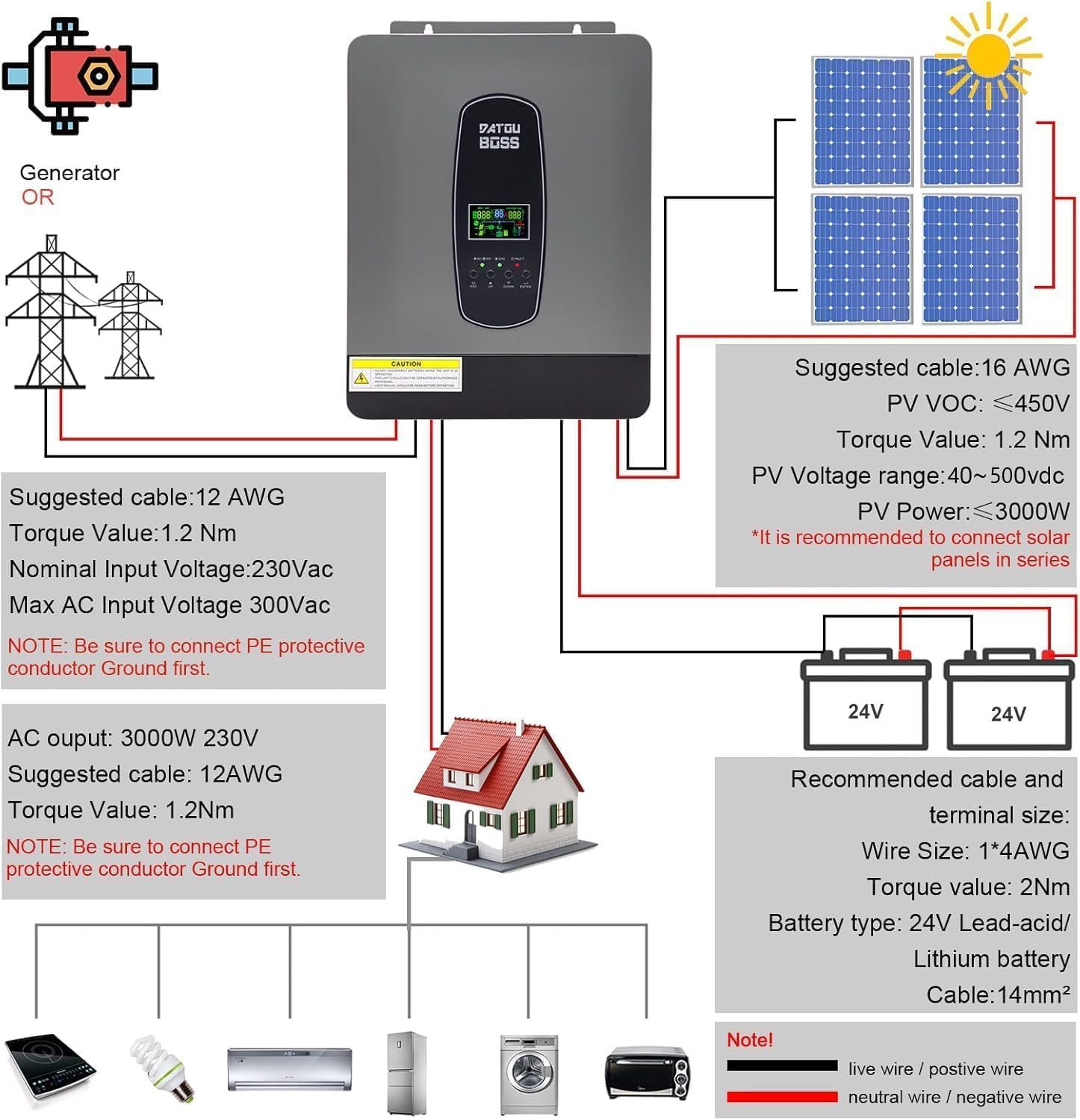
This diagram illustrates the recommended wiring connections for the hybrid inverter, including connections to a generator or utility grid, solar panels, battery bank, and AC loads. Always ensure proper cable sizing and torque values for secure and safe connections.
- PV Input: Suggested cable 16 AWG, PV VOC ≤ 450V, PV Voltage range 40~500Vdc, PV Power ≤ 3000W. It is recommended to connect solar panels in series.
- Battery Connection: Recommended cable and terminal size: Wire Size 1*4AWG, Torque value 2Nm. Battery type: 24V Lead-acid/Lithium battery, Cable: 14mm².
- AC Output: 3000W 230V. Suggested cable 12AWG, Torque value 1.2Nm.
- AC Input (Generator/Grid): Suggested cable 12 AWG, Torque value 1.2Nm. Nominal Input Voltage: 230Vac, Max AC Input Voltage 300Vac.
- Grounding: NOTE: Be sure to connect the PE protective conductor Ground first for both AC input and AC output.
4.2 Independent Photovoltaic Power Generation System Overview

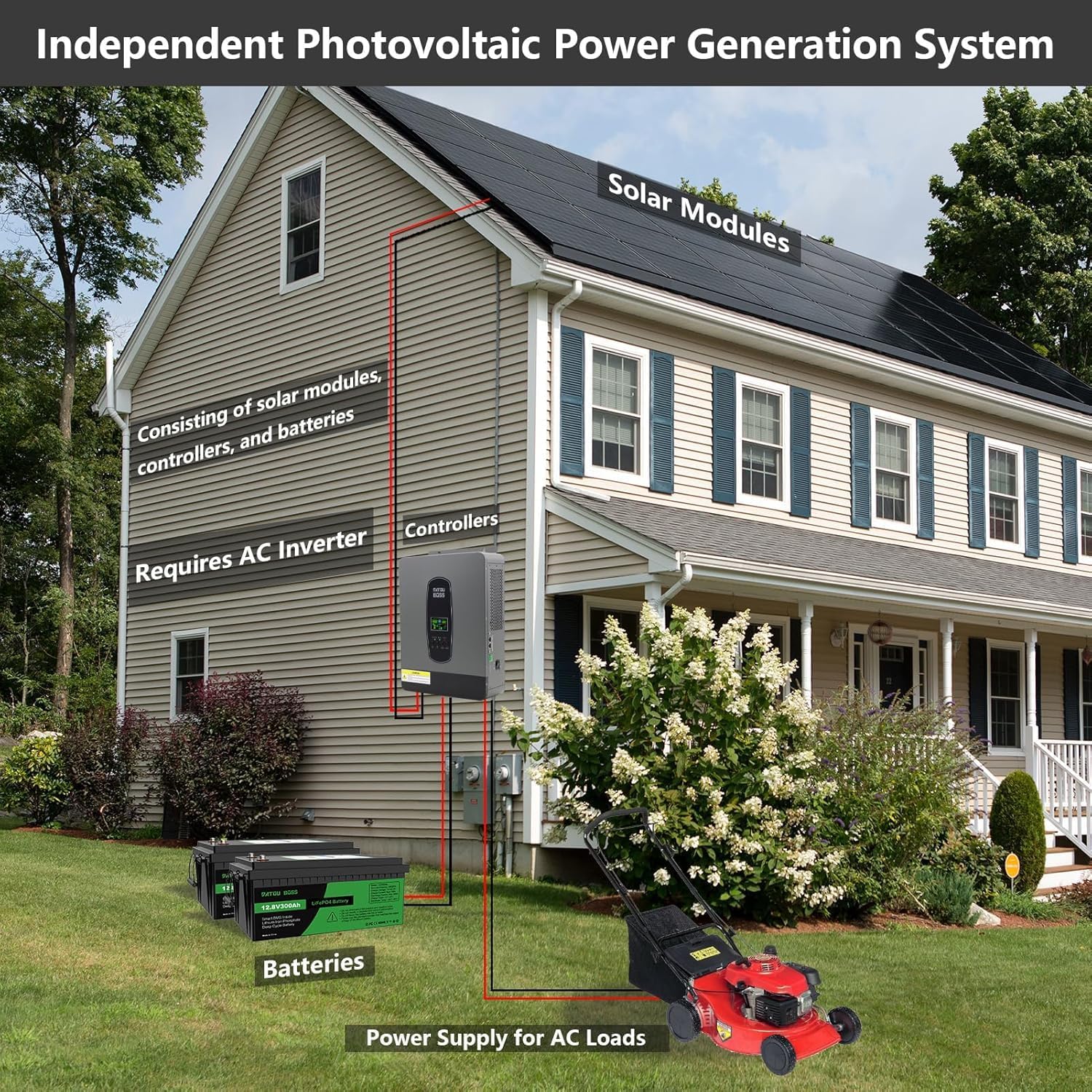
This diagram illustrates how the DATOUBOSS hybrid inverter integrates into an independent photovoltaic power generation system for a household. It shows solar modules connected to the inverter, which then charges batteries and supplies power to AC loads within the home.
4.3 Connection Steps
- Mounting: Securely mount the inverter in a suitable location as per safety guidelines.
- Grounding: Connect the protective earth (PE) ground wire to the inverter's ground terminal and to a reliable ground point.
- Battery Connection: Connect the battery cables to the inverter's DC input terminals, ensuring correct polarity (+ to + and - to -).
- PV Connection: Connect the solar panel array to the PV input terminals, observing correct polarity and voltage limits.
- AC Input Connection (Optional): If connecting to a generator or utility grid, connect the AC input cable to the designated AC input terminals.
- AC Output Connection: Connect your AC loads or distribution panel to the AC output terminals.
- Power On: After verifying all connections are secure and correct, switch on the battery breaker, then the PV breaker, and finally the inverter's power switch.
5. Operation
5.1 LCD Display and Control Buttons
The inverter features an LCD display that provides real-time information about the system's status, including input/output voltage, battery charge level, load percentage, and operational modes. The control buttons (ESC, UP, DOWN, ENTER) allow navigation through menus and adjustment of settings.
5.2 Charging and Load Output Modes
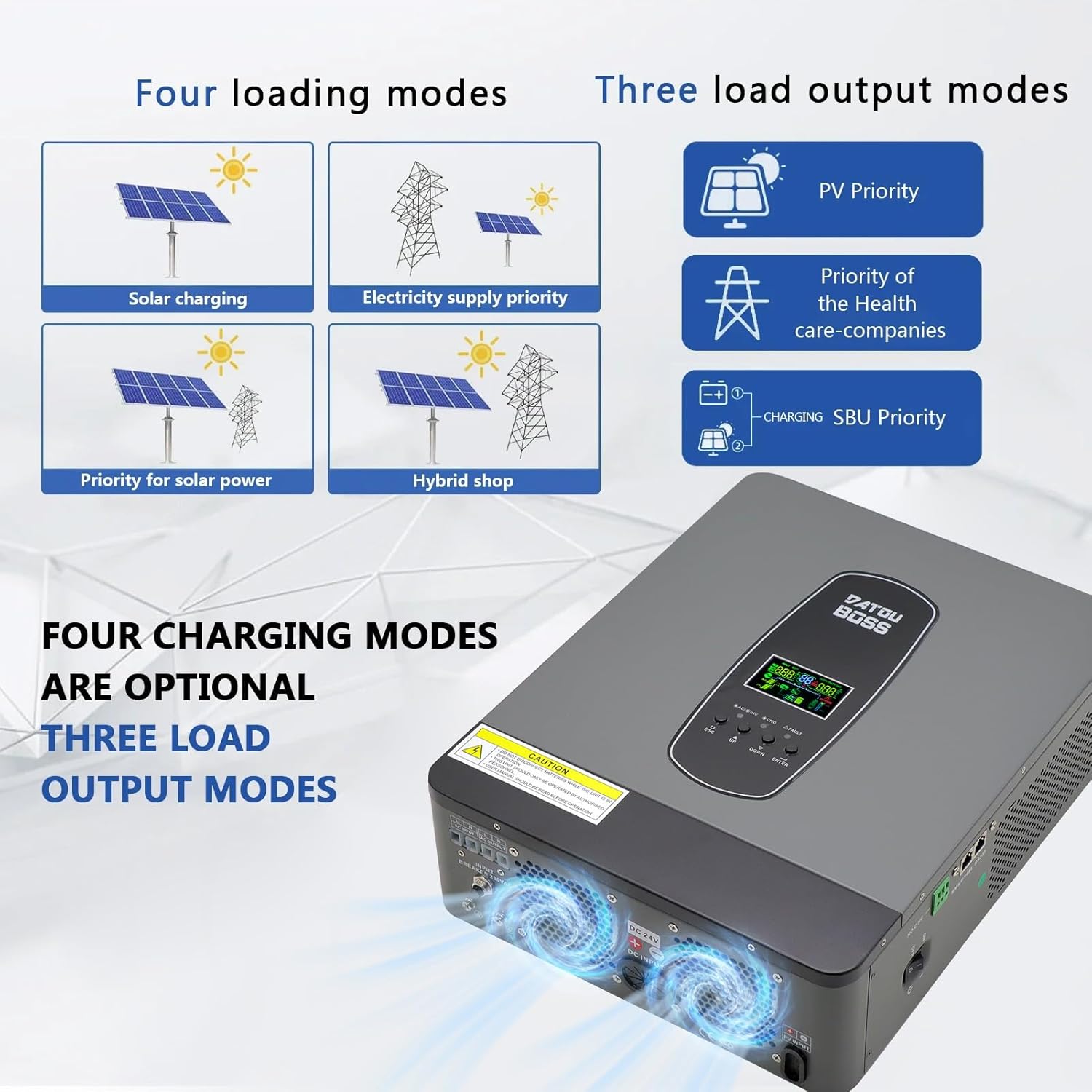
The inverter offers flexible operational modes to suit various energy management needs:
Four Charging Modes (Optional):
- Solar Charging: Prioritizes solar power for battery charging.
- Electricity Supply Priority: Prioritizes grid power for charging.
- Priority for Solar Power: Solar power is the primary source for charging.
- Hybrid Shop: A combination mode utilizing both solar and grid power for charging.
Three Load Output Modes:
- PV Priority: Solar power is the primary source for loads.
- SBU Priority: Solar → Battery → Utility (Grid) priority for loads.
- Utility Priority: Grid power is the primary source for loads.
5.3 Pure Sine Wave Output

The DATOUBOSS hybrid inverter produces a pure sine wave AC output, which is identical to utility grid power. This ensures compatibility with all types of electrical appliances, including sensitive electronics, providing stable and clean power without risk of damage. This feature makes it suitable for a wide range of family uses.
5.4 Supported Loads
This solar inverter can power a variety of electrical devices in your home or office. Examples include kettles, televisions, refrigerators, air conditioners, stoves, rice cookers, lamps, fans, and other common household appliances.
6. Communication Interface
6.1 RS232 and RS485 Ports

The inverter is equipped with RS232 and BMS/RS485 communication ports for monitoring and data exchange.
- RS232 Port: Can be connected to a WiFi module to enable wireless communication and remote monitoring of inverter data. Note: A WiFi module provides remote viewing of inverter data but does not support remote modification of inverter parameters or remote control.
- RS485 Interface: Facilitates communication with compatible batteries. The RS485 pins correspond to: 1 for 485B, 2 for 485A. Ensure to connect the communication pins of the battery (485A and 485B) to the corresponding pins on the hybrid inverter for successful communication. Pins 3/4/5/6/7/8 are typically not connected (NC).
7. Maintenance
Regular maintenance ensures optimal performance and longevity of your inverter.
- Cleaning: Periodically clean the inverter's exterior and ventilation openings to prevent dust accumulation. Use a dry, soft cloth.
- Connections Check: Regularly inspect all electrical connections (PV, battery, AC input/output) for tightness and signs of corrosion.
- Battery Inspection: Check battery terminals for corrosion and ensure they are clean and tight. Monitor battery voltage and health as per battery manufacturer guidelines.
- Environment: Ensure the installation environment remains within specified temperature and humidity ranges.
- Firmware Updates: Check the manufacturer's website for any available firmware updates.
8. Troubleshooting
If the inverter is not functioning as expected, refer to the following general troubleshooting steps. For specific error codes displayed on the LCD, consult the full product manual or contact technical support.
- No Power: Check all power connections (battery, PV, AC input). Ensure the inverter's power switch is ON. Verify battery voltage is within the operating range.
- No AC Output: Check AC output connections and ensure loads are not exceeding the inverter's capacity. Check for overload or short-circuit protection activation.
- Charging Issues: Verify PV panel connections and voltage. Check if the MPPT controller is active. Ensure battery parameters are correctly set.
- Fault Indicator: If the FAULT indicator is lit, note any error codes on the LCD and refer to the detailed troubleshooting guide in the comprehensive manual.
- Overheating: Ensure adequate ventilation around the inverter. Clear any obstructions from the cooling fans. Reduce load if operating in high ambient temperatures.
9. Specifications
| Feature | Specification |
|---|---|
| Brand | DATOUBOSS |
| Item Model Number | SP-24V-3000W |
| Model Name | SP |
| Recommended Uses for Product | Home |
| Power Source | Solar Powered and Battery Powered |
| Power | 3000 Watt-hours |
| Input Voltage | 24 Volts (DC) |
| Output Power | 3000 Watts |
| Item Weight | 6.5 Kilograms |
| Efficiency | A+ |
| Output Voltage | 230 Volts (AC) |
| Manufacturer | DATOUBOSS |
| Date First Available on Amazon.com.be | July 13, 2023 |
| Spare Parts Availability | Information not available |
| Guaranteed Software Updates Until | Information not available |
10. Warranty and Support
Official warranty information for the DATOUBOSS 3000W Hybrid Inverter is not explicitly provided in the product specifications. For detailed warranty terms, technical support, or service inquiries, please contact DATOUBOSS customer service directly or refer to the documentation included with your purchase.


