
Introduction
This manual provides essential instructions for the safe and effective operation, maintenance, and troubleshooting of your HTVRONT 15x15 Heat Press Machine. Please read this manual thoroughly before using the machine to ensure proper function and to prevent injury or damage. The machine features a sleek design and is suitable for various heat transfer projects.

Image: The HTVRONT 15x15 Heat Press Machine, accompanied by three Teflon sheets and a 47-pack of HTV vinyl sheets.
Safety Precautions
Always observe the following safety guidelines when operating the heat press machine:
- Ensure the machine is placed on a stable, heat-resistant surface.
- Keep hands and fingers clear of the heating plate during operation to prevent burns.
- Do not touch the heating plate immediately after use; allow it to cool down.
- Use the dependent display control pad to adjust settings, keeping hands away from the hot plate.
- Unplug the machine from the power outlet when not in use or before cleaning.
- Do not operate the machine with a damaged power cord or plug.
- Keep children and pets away from the machine during operation.
- The machine features an auto-shut off function after 15 minutes of inactivity for enhanced safety.
- The machine's case is made of special plastic to prevent overheating of the surface.
Product Components
Your HTVRONT Heat Press Machine includes the following key components:
- Heating Plate: The upper plate that heats up to transfer designs.
- Lower Platen: The base plate where items are placed for pressing.
- Pressure Knob: Allows adjustment of pressure for different material thicknesses.
- Control Panel: External unit with display for setting temperature and time, connected by a 1m cable.
- Handle: For lowering and raising the heating plate.
- Teflon Sheets: Non-stick sheets to protect your designs and heating plate.

Image: A multi-panel image highlighting key features: a safer swivel top for material changes, a 15x15 inch large heat plate, a flexible pressure regulator, and the auto shut-off function after 15 minutes of inactivity.
Setup Instructions
- Unpacking: Carefully remove all components from the packaging. Retain packaging for future storage or transport.
- Placement: Place the heat press machine on a flat, stable, and heat-resistant surface. Ensure there is adequate space around the machine for safe operation and ventilation.
- Power Connection: Connect the power cord to the machine and then plug it into a grounded electrical outlet.
- Control Panel: Ensure the external control panel is connected to the main unit. The 1-meter cable allows for safe distance from the heating plate.
- Initial Power On: Turn on the machine using the power button on the control panel.
Operating Instructions
Follow these steps for successful heat transfer:
- Prepare Your Design: Create and cut your design using HTV vinyl. Weed excess vinyl, leaving only the desired design on the carrier sheet.
- Set Temperature and Time: Use the control panel to set the desired temperature (104-410 °F / 40-210 °C) and time according to your material and vinyl specifications. The machine heats up quickly (approximately 0.5℃/S) due to NTC thermistor technology and a dual-tube heating engine.
- Pre-Press (Optional): Place your garment or item on the lower platen. Close the heat press for 5-10 seconds to remove moisture and wrinkles. Open the press.
- Position Design: Carefully place your weeded HTV design onto the garment, ensuring it is correctly oriented.
- Apply Teflon Sheet: Place a Teflon sheet over your design to protect both the heating plate and your material.
- Adjust Pressure: Use the pressure knob to adjust the pressure. Turn clockwise for more pressure, counter-clockwise for less. Ensure even pressure across the entire design. The 180° swing-away heat plate allows for easy material placement and reduces burn risks.
- Press the Item: Close the heat press handle firmly. The timer will begin counting down.
- Open and Remove: Once the timer alerts, open the heat press. Carefully remove the Teflon sheet.
- Peel Carrier Sheet: Allow the design to cool slightly (if cold peel) or peel immediately (if hot peel), following your vinyl manufacturer's instructions.

Image: A user demonstrating the "Set - Press - Done" process with the HTVRONT heat press, showing the machine in action applying a design to a textile item.
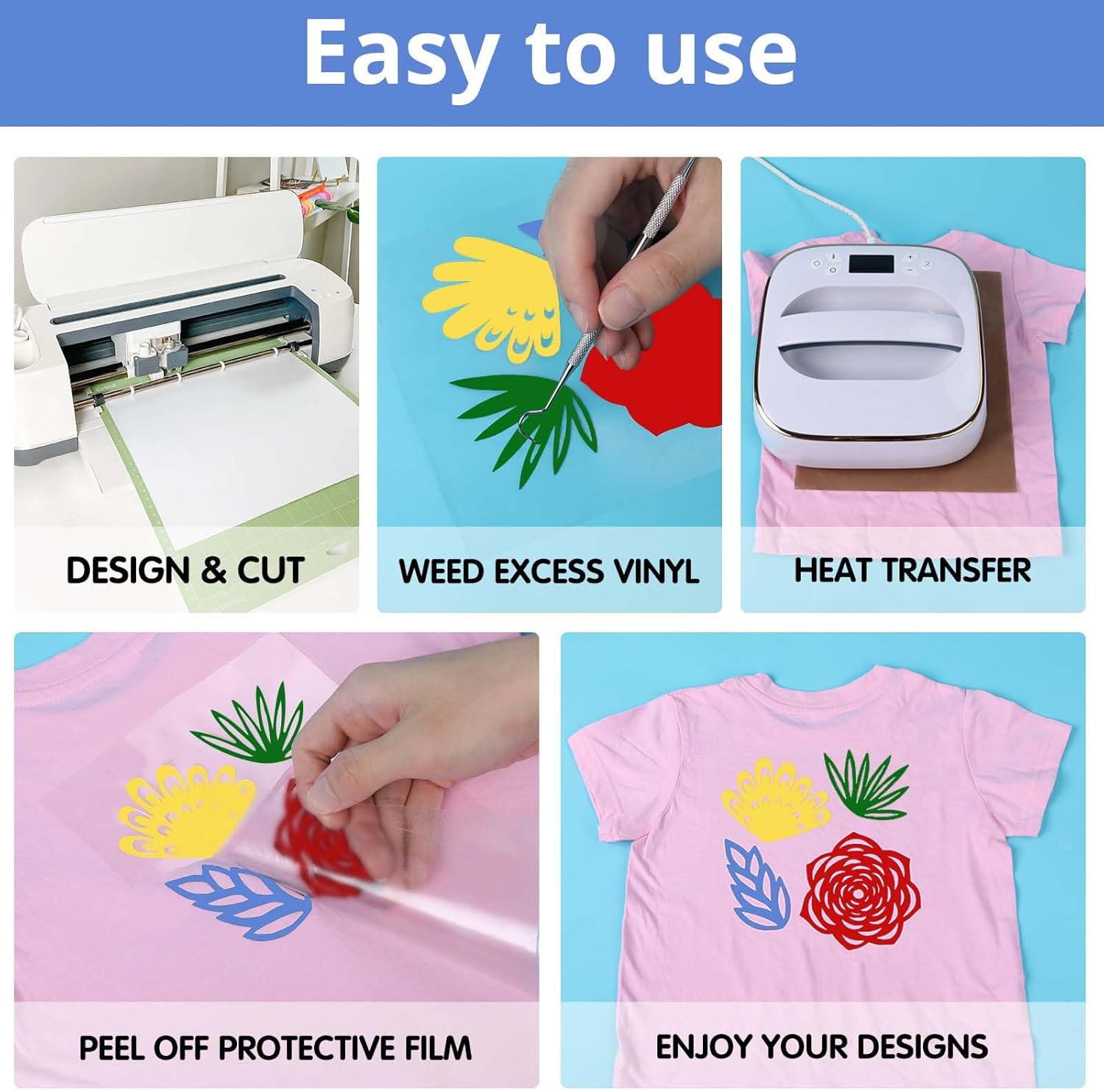
Image: A visual guide illustrating the five steps for heat transfer vinyl application: designing and cutting, weeding excess vinyl, performing the heat transfer, peeling off the protective film, and enjoying the finished design.

Image: A detailed guide for creating with heat transfer vinyl, including recommended cutting settings for Cricut (Blade: Standard, Setting: Iron on+) and heating settings for Silhouette Cameo 3 (Blade: 10, Force: 5, Speed: 5, Passes: 2, Material: Smooth).
Maintenance
Regular maintenance ensures the longevity and optimal performance of your heat press machine:
- Cleaning the Heating Plate: Allow the machine to cool completely. Use a soft, damp cloth to wipe the heating plate. For stubborn residue, a specialized heat press cleaner can be used sparingly. Do not use abrasive cleaners or sharp objects.
- Cleaning the Lower Platen: Wipe the lower platen with a damp cloth. Ensure it is dry before next use.
- Teflon Sheet Care: The included Teflon sheets are reusable and washable. Clean them with mild soap and water if they accumulate residue.
- Storage: Store the machine in a dry, dust-free environment when not in use.

Image: A close-up of a non-stick Teflon sheet, detailing its 16x20 inch size, ease of cleaning, washability, and adjustability for various uses.

Image: A person using a household iron with a Teflon sheet placed over clothing, illustrating the sheet's function as an iron clothes protector.
Troubleshooting
| Problem | Possible Cause | Solution |
|---|---|---|
| Machine does not power on. | Power cord not properly connected; electrical outlet issue. | Check power cord connection. Try a different electrical outlet. Ensure the control panel is securely connected. |
| Uneven heat transfer. | Uneven pressure; moisture in garment. | Adjust the pressure knob to ensure even contact. Pre-press garment to remove moisture. |
| Design not adhering properly. | Incorrect temperature or time; insufficient pressure; incorrect peel method for vinyl. | Verify temperature and time settings with vinyl manufacturer's recommendations. Increase pressure. Ensure correct hot/cold peel method is applied. |
| Machine auto-shuts off unexpectedly. | Inactivity for 15 minutes. | This is a built-in safety feature. Simply power the machine back on to resume operation. |
Specifications
- Model: 15x15 Heat Press Machine
- Brand: HTVRONT
- Heating Plate Size: 15 x 15 inches
- Power: 1500W
- Temperature Range: 104-410 °F (40-210 °C)
- Heating Technology: NTC thermistor, Dual-tube heating engine
- Heating Speed: Approximately 0.5℃/S
- Materials: Ceramic, Metal, Plastic
- Safety Features: 180° Swing-away plate, Adjustable Pressure, Auto-shut off (15 min inactivity), FCC-certified.
- Recommended Uses: T-shirts, totes, apparel, bags, bottles, caps, mugs, pillows, plates, shoes, wood signs.
Customer Support
For any issues or inquiries regarding your HTVRONT 15x15 Heat Press Machine, please contact HTVRONT customer service. We are committed to providing support and assistance.
You can visit the official HTVRONT store on Amazon for more information and contact options: HTVRONT Amazon Store


