1. Introduction
Thank you for choosing the Cerycose Cordless 1/2-inch Impact Wrench. This manual provides essential information for the safe operation, maintenance, and troubleshooting of your tool. Please read this manual thoroughly before use and retain it for future reference.

Figure 1: Cerycose Cordless 1/2-inch Impact Wrench with included accessories. This image displays the Cerycose Cordless 1/2-inch Impact Wrench, its protective carrying case, and the included set of six universal sockets.
2. Safety Information
Always observe basic safety precautions to reduce the risk of fire, electric shock, and personal injury when operating power tools.
- Work Area Safety: Keep your work area clean and well-lit. Cluttered or dark areas invite accidents. Do not operate power tools in explosive atmospheres, such as in the presence of flammable liquids, gases, or dust.
- Electrical Safety: This tool is designed for use with compatible 20V batteries (sold separately). Ensure the battery is correctly installed and removed. Avoid body contact with earthed or grounded surfaces.
- Personal Safety: Always wear eye protection. Use hearing protection when operating the tool for extended periods. Dress properly; avoid loose clothing or jewelry that can get caught in moving parts.
- Tool Use and Care: Do not force the power tool. Use the correct tool for your application. Disconnect the battery pack from the tool before making any adjustments, changing accessories, or storing power tools.
- Maintenance: Maintain power tools. Check for misalignment or binding of moving parts, breakage of parts, and any other condition that may affect the power tool’s operation.
3. Package Contents
Verify that all items are present upon unpacking:
- Cerycose Cordless 1/2-inch Impact Wrench (Bare Tool)
- Protective Carrying Case
- 6 Universal Sockets (22mm, 21mm, 19mm, 18mm, 14mm, 17mm)
- User Manual
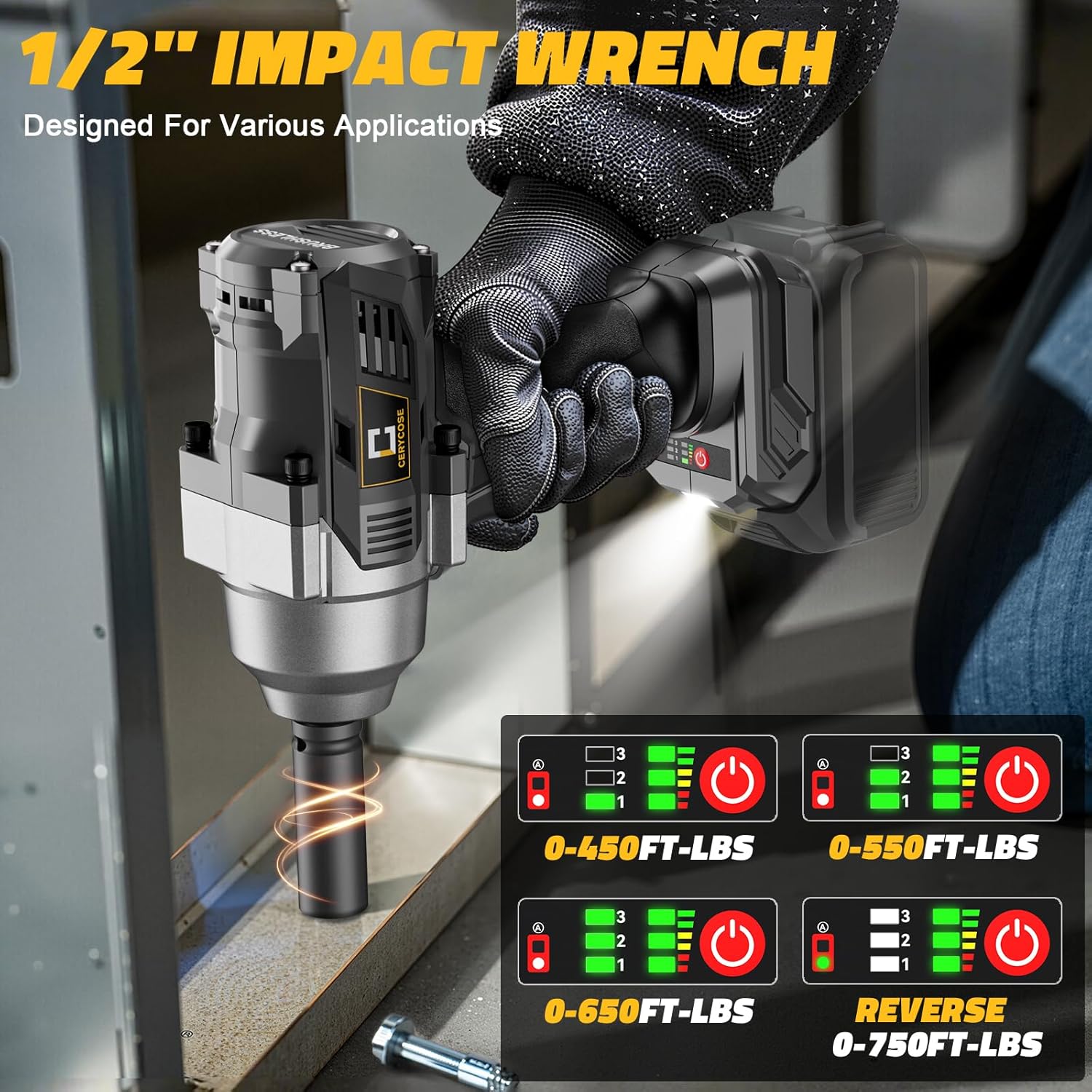
Figure 2: Included Sockets and Carrying Case. The image highlights the comprehensive set of accessories, including the impact wrench, its carrying case, and six universal sockets in sizes: 22mm, 21mm, 19mm, 18mm, 14mm, and 17mm.
4. Product Overview
Familiarize yourself with the components of your Cerycose Impact Wrench.

Figure 3: Impact Wrench Part Description. An annotated diagram highlighting the key components of the impact wrench: the 1/2-inch square drive, speed adjustable trigger, integrated LED light, forward/reverse selector button, speed gear display, and the speed control button.
- 1/2" Square Drive: For attaching sockets.
- Speed Adjustable Trigger: Controls the rotation speed based on pressure.
- LED Light: Illuminates the work area.
- Forward/Reverse Button: Selects the direction of rotation.
- Speed Gear Display: Indicates the current speed setting.
- Speed Control Button: Adjusts the speed mode.
5. Setup
Prepare your impact wrench for operation.
5.1 Battery Installation (Battery Sold Separately)
- Ensure the impact wrench is turned off.
- Align the compatible Dewalt 20V battery (e.g., DCB203, DCB204, DCB205, DCB206) with the battery port on the tool's base.
- Slide the battery into the port until it clicks securely into place.
- To remove, press the battery release button and slide the battery out.

Figure 4: Dewalt Battery Compatibility. This image illustrates the Cerycose impact wrench being used, emphasizing its compatibility with Dewalt 20V batteries. Specific compatible models like DCB203, DCB204, DCB205, and DCB206 are shown.
5.2 Socket Attachment
- Select the appropriate 1/2-inch drive socket for your application.
- Push the socket firmly onto the 1/2" square drive until it locks into place.
- To remove, pull the socket off the drive.
6. Operating Instructions
Understand how to control your impact wrench for various tasks.
6.1 Powering On/Off and Direction Selection
- To Power On: Press the speed adjustable trigger. The LED light will illuminate.
- To Power Off: Release the speed adjustable trigger.
- Forward Rotation: Push the Forward/Reverse button to the left for tightening applications.
- Reverse Rotation: Push the Forward/Reverse button to the right for loosening applications.
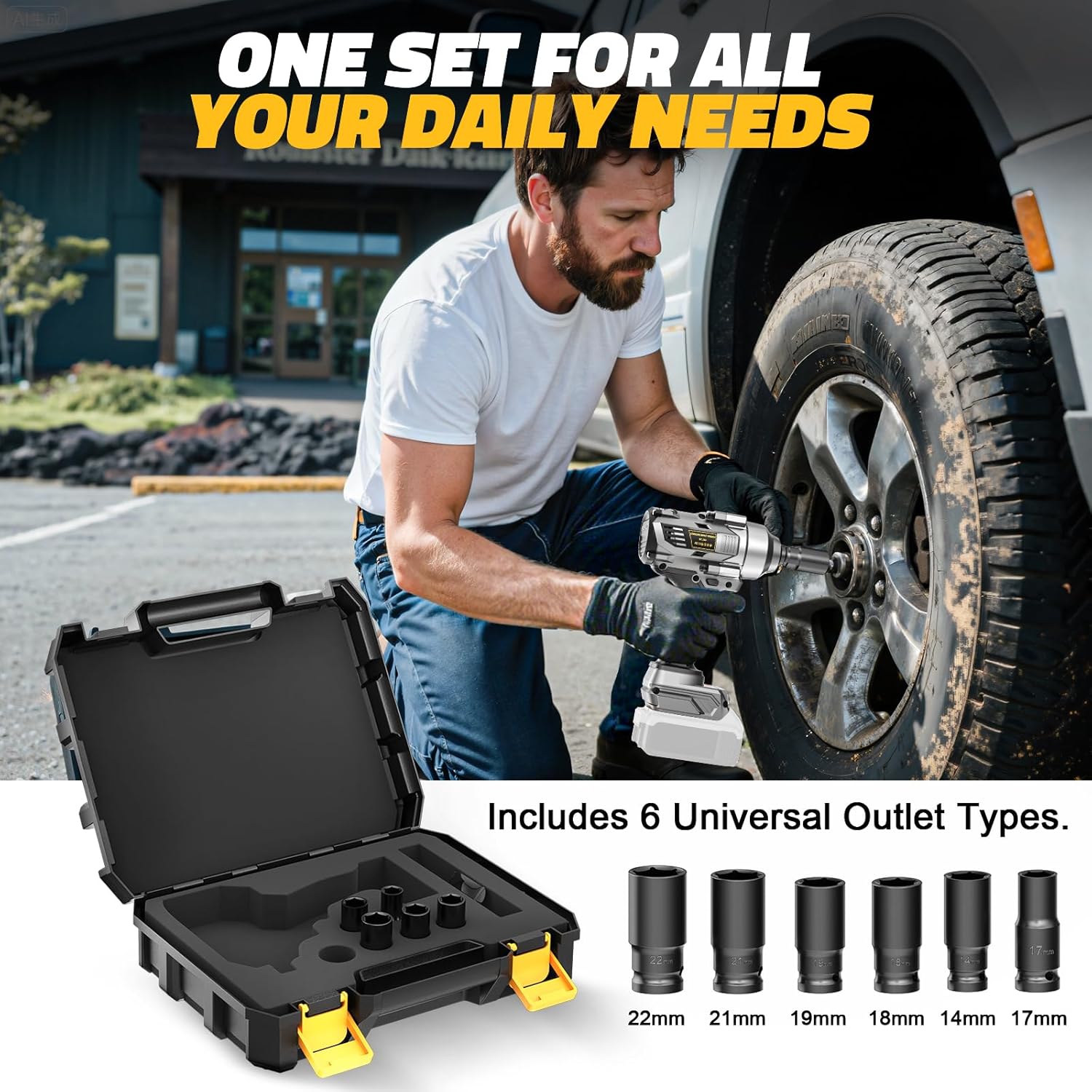
Figure 5: Forward & Reverse Operating Modes. A visual guide detailing the operational modes: forward (fast, medium, slow), reverse, and reverse self-stop. It shows how button combinations control the tool's direction and speed, including a feature to prevent bolts from falling.
6.2 Speed and Torque Adjustment
The impact wrench features multiple speed modes and torque settings for versatile use.
- Press the Speed Control Button to cycle through available speed modes (indicated on the Speed Gear Display).
- The tool offers up to 2300 RPM and a maximum tightening torque of 750 FT-LBS (1000 N.m).
- In reverse, the tool can provide up to 750 FT-LBS of removing torque.

Figure 6: Torque Settings and Applications. This image demonstrates the impact wrench's adjustable torque settings, indicating ranges for different applications: 0-450 FT-LBS, 0-550 FT-LBS, 0-650 FT-LBS, and 0-750 FT-LBS for reverse operations.
6.3 Applications
This impact wrench is suitable for a variety of tasks, including:
- Automotive repairs (e.g., tire removal, lug nut fastening)
- Construction projects
- Heavy-duty fastening and loosening tasks

Figure 7: Wide Range of Applications. This image shows the impact wrench in action, effectively removing lug nuts from a car wheel, demonstrating its suitability for automotive repairs and other heavy-duty applications.
7. Maintenance
Regular maintenance ensures optimal performance and extends the life of your tool.
- Cleaning: Keep the tool's ventilation openings clean and free of debris. Use a soft, damp cloth to clean the exterior. Do not use harsh chemicals or abrasive cleaners.
- Storage: Store the tool and accessories in the provided carrying case in a dry, secure location, away from direct sunlight and extreme temperatures.
- Battery Care: Always remove the battery when the tool is not in use. Store batteries in a cool, dry place.
- Inspection: Periodically inspect the tool for any signs of damage, loose fasteners, or worn parts. Do not operate a damaged tool.
8. Troubleshooting
Refer to this section for common issues and their solutions.
| Problem | Possible Cause | Solution |
|---|---|---|
| Tool does not start | Battery not installed correctly or discharged. | Ensure battery is fully charged and properly seated. |
| Reduced power/torque | Low battery charge; incorrect speed mode selected. | Charge battery; select a higher speed/torque mode. |
| Socket does not attach securely | Debris in square drive; incorrect socket size. | Clean square drive; use a 1/2-inch drive socket. |
| LED light not working | Faulty LED or electrical connection. | Contact customer support if other functions work. |
9. Specifications
| Feature | Detail |
|---|---|
| Brand | Cerycose |
| Model Number | Super Heavy 950ft-lbs Wrench |
| Drive Size | 1/2 inch Square Drive |
| Max Tightening Torque | 750 FT-LBS (1000 N.m) |
| Max Removing Torque | 750 FT-LBS |
| Motor Type | Brushless |
| Voltage | 20 Volts (Compatible with Dewalt 20V batteries) |
| Speed Modes | 3 Speed Modes, up to 2300 RPM |
| Weight | 4 pounds (Tool only) |
| Included Components | Impact Wrench, 6 Sockets, Carrying Case |
| Batteries Included? | No |
| Material | Metal |
10. Warranty and Support
For warranty information and customer support, please refer to the documentation provided at the time of purchase or contact the seller directly. Keep your purchase receipt as proof of purchase.


