1. Introduction
Thank you for choosing the DUMOS Home Office Desk Chair with Footrest. This manual provides essential information for the proper assembly, operation, and maintenance of your new chair. Please read it thoroughly before use and retain it for future reference.
2. Safety Information
- Maximum Weight Capacity: Do not exceed 275 lbs (125 kg).
- Assembly: Assembly is required. Follow all instructions carefully. Ensure all screws and bolts are tightened securely before use.
- Stability: Always ensure the chair is stable before sitting. Avoid standing on the chair or using it as a step stool.
- Movement: Use caution when moving the chair, especially on uneven surfaces.
- Children: Keep children away from moving parts during assembly and adjustment.
- Maintenance: Regularly check all components for wear and tear. Tighten loose fasteners as needed.
- Footrest: Ensure the footrest is fully extended and locked, or fully retracted, before applying weight.
3. Package Contents
Verify that all components are present before beginning assembly.
- 1 x DUMOS Home Office Desk Chair (Model C-3509-W-BU)
- 1 x Installation Manual
- Necessary Assembly Tools (Allen wrench, etc.)
- All required screws, bolts, and washers
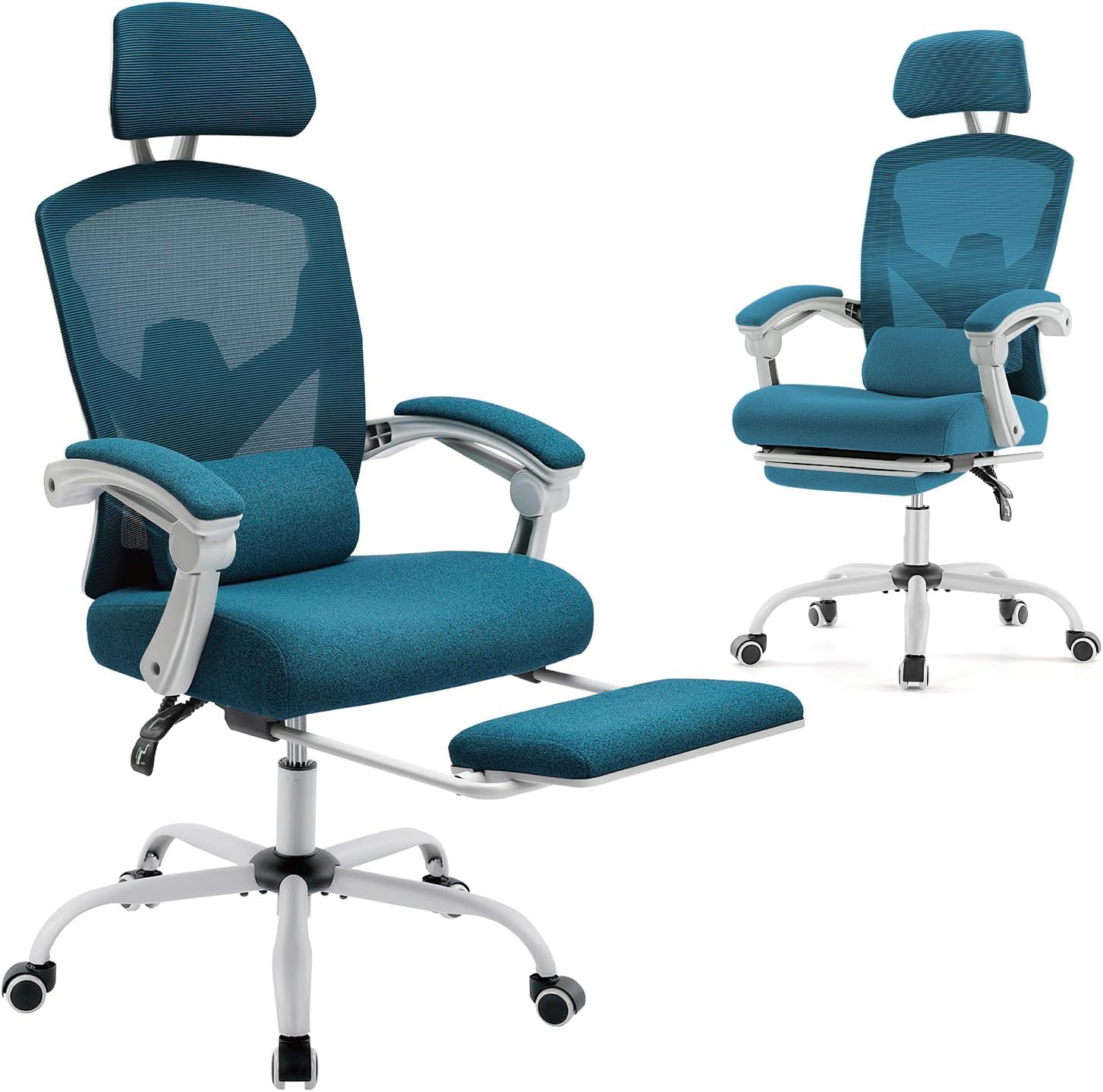
Image: The DUMOS Home Office Desk Chair, showing its main components and overall design.
4. Assembly Instructions
Please refer to the included installation manual for detailed, step-by-step assembly instructions. Ensure you have ample space and all tools before starting.
- Unpack all components and verify against the package contents list.
- Attach the wheels to the chair base.
- Insert the gas lift cylinder into the center of the base.
- Assemble the seat and backrest according to the diagrams in the manual.
- Attach the armrests and footrest mechanism.
- Place the assembled seat onto the gas lift cylinder.
- Ensure all connections are tight and secure.

Image: Exploded view or components of the DUMOS chair, illustrating parts for assembly.
5. Operating Instructions
5.1 Height Adjustment
To adjust the chair height, locate the lever on the right side beneath the seat. While seated, pull the lever up to lower the chair. To raise the chair, stand up slightly and pull the lever up. Release the lever at the desired height.
5.2 Reclining Function
The chair offers a 90-135 degree tilt range. To recline, pull the lever on the left side (or the same lever as height adjustment, depending on model) up to unlock the backrest. Lean back to your desired angle and push the lever down to lock it in place. To return to an upright position, pull the lever up, lean forward, and then push the lever down.

Image: Side view of the DUMOS chair, highlighting the reclining function and levers.

Image: The DUMOS chair in a reclined position with the footrest extended, demonstrating its full relaxation capabilities.
5.3 Headrest Adjustment
The headrest can be adjusted both vertically (up and down) and for its angle (back and forth) to provide optimal neck support. Gently push or pull the headrest to find your preferred position.

Image: Close-up of the DUMOS chair's headrest, illustrating its adjustable features.
5.4 Footrest Operation
To extend the footrest, pull it out from underneath the seat. To retract, push it back until it is fully stored beneath the seat. Ensure it is securely in place when not in use to avoid obstruction.
6. Maintenance
- Cleaning: Wipe mesh and fabric surfaces with a damp cloth and mild detergent. Avoid harsh chemicals.
- Fasteners: Periodically check and tighten all screws and bolts to ensure the chair remains stable and safe.
- Wheels: Clean wheels regularly to prevent debris buildup, which can affect smooth rolling.
- Gas Lift: Do not attempt to disassemble the gas lift cylinder. Contact support if it malfunctions.
7. Troubleshooting
| Problem | Possible Cause | Solution |
|---|---|---|
| Chair wobbles or feels unstable. | Loose fasteners. | Check and tighten all screws and bolts. |
| Chair does not adjust height. | Gas lift malfunction or lever not engaged. | Ensure the lever is fully engaged. If issue persists, contact customer support. |
| Backrest does not recline or lock. | Recline mechanism locked or damaged. | Ensure the recline lever is pulled up to unlock. If still an issue, inspect mechanism for damage. |
| Wheels do not roll smoothly. | Debris in wheels or damaged casters. | Clean wheels of any hair or debris. Replace casters if damaged. |
8. Specifications
- Brand: DUMOS
- Model: C-3509-W-BU
- Color: Elegant Blue
- Product Dimensions: 23"D x 20"W x 50.75"H
- Maximum Weight Capacity: 275 lbs
- Material: Mesh, Stainless Steel, Sponge (fill)
- Back Style: High Back
- Reclining Position Count: 3 (90-135 degrees)
- Included Components: 1*Office Chair
- Assembly Required: Yes
- Item Weight: 34.4 pounds
- UPC: 792138519515
9. Warranty and Support
For warranty information or technical support, please refer to the contact details provided with your purchase documentation or visit the official DUMOS website. If you have any questions regarding assembly or operation, please contact us.
Protection Plans: Additional protection plans may be available for purchase. Please check with your retailer for details.


