
Introduction
Thank you for choosing the YOLOEMOT T13 Portable Bluetooth Speaker. This manual provides essential information for setting up, operating, and maintaining your speaker. Please read it thoroughly before use to ensure optimal performance and longevity of your device.
What's in the Box
Carefully unpack your YOLOEMOT T13 speaker and ensure all items are present:
- YOLOEMOT T13 Portable Bluetooth Speaker
- USB Charging Cable
- User Manual
- Carrying Strap
- AUX Audio Cable

Product Features
The YOLOEMOT T13 Portable Bluetooth Speaker is designed for a superior audio experience with robust features:
- 24W Immersive Stereo & Deep Bass: Dual-channel dynamic drivers deliver crisp treble, rich midrange, and enhanced bass. Custom bass boost technology fills rooms and outdoor spaces with Hi-Fi sound.
- IPX7 Fully Waterproof & Dust-Resistant: Sealed design withstands splashes, rain, and full immersion up to 1 meter for 30 minutes.
- Bluetooth 5.3 Stable Connection: Ensures fast pairing and stable transmission up to 33 feet (10 meters) with minimal dropouts.
- Multi-Playback Options: Supports Bluetooth, TF card, and AUX-in for versatile audio sources.
- 12-Hour Long Battery Life: Built-in 3600mAh rechargeable battery provides extended playback at 50% volume.
- HD Hands-Free Calls: Integrated microphone allows for clear hands-free communication.
- Dynamic RGB Light Show: Features 3 unique lighting effects that synchronize with music beats.
- Dual EQ Modes: Easily switch between Bass mode and Vocal mode to suit different music genres.


Setup Guide
1. Charging the Speaker
Before first use, fully charge the speaker. Connect the provided USB charging cable to the speaker's DC 5V charging port and a USB power adapter (not included). The charging indicator light will show charging status and turn off when fully charged.
2. Power On/Off
- Power On: Press and hold the power button (O) for 2-3 seconds until you hear an audible prompt and the RGB lights illuminate.
- Power Off: Press and hold the power button (O) for 2-3 seconds until the lights turn off and you hear an audible prompt.
3. Bluetooth Pairing
- Ensure the speaker is powered on and in Bluetooth pairing mode (indicated by a flashing blue light).
- On your device (smartphone, tablet, laptop), enable Bluetooth and search for available devices.
- Select "YOLOEMOT T13" from the list of devices.
- Once connected, the speaker will provide an audible confirmation, and the blue light will become solid.
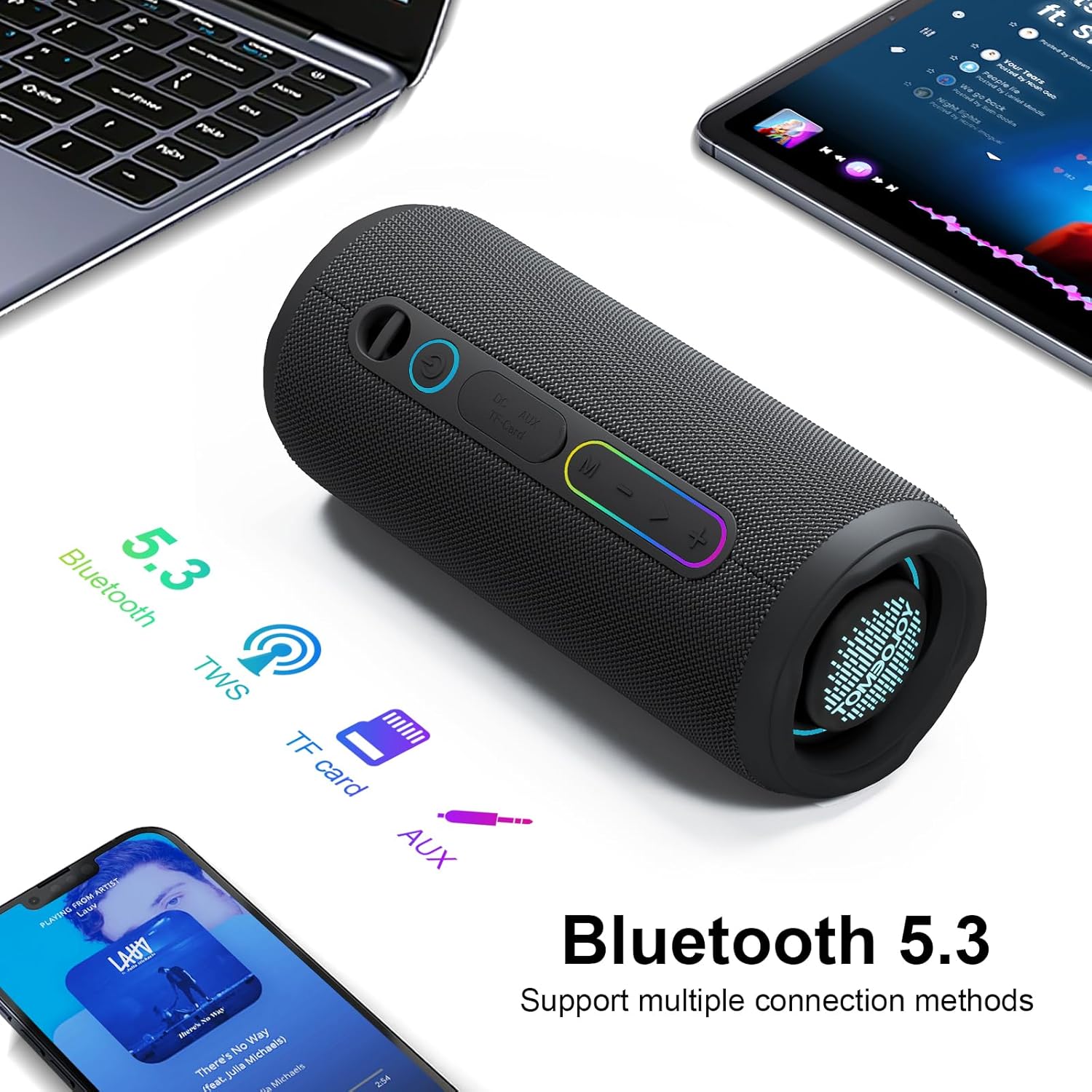
4. TWS (True Wireless Stereo) Pairing
To achieve 360° surround sound, you can pair two YOLOEMOT T13 speakers together:
- Ensure both T13 speakers are powered on and not connected to any Bluetooth device.
- On one speaker, double-press the TWS button (often indicated by a chain link icon or similar). This speaker will become the primary unit.
- The primary speaker will search for the secondary speaker. Once connected, both speakers will emit an audible confirmation.
- Now, connect your device to the primary speaker via Bluetooth as described in step 3. Audio will play through both speakers in stereo.

Operating Instructions
1. Basic Controls
- Play/Pause: Short press the Play/Pause button (►▮▮).
- Volume Up: Short press the "+" button.
- Volume Down: Short press the "-" button.
- Next Track: Long press the "+" button.
- Previous Track: Long press the "-" button.
2. EQ Modes
The T13 speaker offers two equalization modes:
- Bass Mode: Enhances low-frequency sounds for a deeper, punchier bass.
- Vocal Mode: Optimizes mid-range frequencies for clearer vocals.
To switch between modes, double-click the power button (O).
3. RGB Lighting
The speaker features dynamic RGB lights that sync with your music. To cycle through the 3 unique lighting effects, short press the power button (O). A third tap will turn off the lights.
4. Hands-Free Calls
When connected via Bluetooth, you can manage calls directly from the speaker:
- Answer Call: Short press the Play/Pause button (►▮▮).
- End Call: Short press the Play/Pause button (►▮▮).
- Reject Call: Long press the Play/Pause button (►▮▮).
5. AUX and TF Card Playback
- AUX-in: Connect an audio device using the provided 3.5mm AUX cable to the speaker's AUX port. The speaker will automatically switch to AUX mode.
- TF Card: Insert a TF (microSD) card with MP3 audio files into the TF card slot. The speaker will automatically switch to TF card playback mode.
Maintenance
To ensure the longevity and optimal performance of your YOLOEMOT T13 speaker, follow these maintenance guidelines:
- Cleaning: Use a soft, damp cloth to wipe the speaker's surface. Do not use harsh chemicals or abrasive cleaners.
- Water Exposure: While IPX7 waterproof, ensure the charging port and other covers are securely closed before exposing to water. After exposure to saltwater or chlorinated water, rinse with fresh water and dry thoroughly.
- Storage: Store the speaker in a cool, dry place away from direct sunlight and extreme temperatures.
- Battery Care: To preserve battery life, charge the speaker regularly, even if not in frequent use. Avoid fully discharging the battery for extended periods.
Troubleshooting
If you encounter issues with your YOLOEMOT T13 speaker, refer to the following common problems and solutions:
| Problem | Possible Cause | Solution |
|---|---|---|
| Speaker won't turn on | Low battery; Power button not pressed long enough | Charge the speaker; Press and hold the power button for 2-3 seconds. |
| No sound | Volume too low; Device not connected; Incorrect input mode | Increase volume on speaker and device; Re-pair Bluetooth; Check AUX/TF card connection. |
| Bluetooth connection unstable | Distance too far; Obstructions; Interference | Move speaker closer to device (within 33ft); Remove obstructions; Avoid strong electromagnetic fields. |
| TWS pairing fails | Speakers already connected to other devices; Incorrect pairing steps | Ensure both speakers are disconnected from other devices; Follow TWS pairing steps carefully. |
| RGB lights not working | Lights turned off; Malfunction | Short press the power button to cycle through light modes; Contact support if issue persists. |
Specifications
Detailed technical specifications for the YOLOEMOT T13 Portable Bluetooth Speaker:
- Brand: YOLOEMOT
- Model Number: T13
- Speaker Maximum Output Power: 30 Watts (Peak)
- Audio Output Mode: Stereo
- Connectivity Technology: Bluetooth 5.3, Auxiliary (AUX), TF Card
- Wireless Range: Up to 33 feet (10 meters)
- Water Resistance: IPX7 (Waterproof)
- Battery Capacity: 3600 mAh
- Battery Average Life: Up to 12 Hours (at 50% volume)
- Charging Input: 5 Volts
- Speaker Size: 7.01 Inches (length)
- Item Dimensions (D x W x H): 2.95" x 2.95" x 7"
- Item Weight: 12 Ounces (approximately 340 grams)
- Enclosure Material: Mesh Fabric, Silicone
- Additional Features: Built-in Microphone, Portable Design, RGB Lights, TWS Pairing, Dual EQ Modes
- Compatible Devices: MP3 Player, Smartphone, Tablet, Television
Safety Information
Please observe the following safety precautions:
- Do not disassemble, repair, or modify the speaker. This may cause damage, electric shock, or fire, and will void the warranty.
- Keep the speaker away from extreme temperatures, direct sunlight, and open flames.
- Do not expose the speaker to corrosive liquids.
- Keep out of reach of children.
- Use only the provided charging cable or a certified equivalent.
- Avoid listening at high volumes for extended periods to prevent hearing damage.
Warranty and Support
The YOLOEMOT T13 Portable Bluetooth Speaker comes with a 1-year limited warranty from the date of purchase. This warranty covers manufacturing defects and workmanship under normal use. It does not cover damage caused by misuse, accidents, unauthorized modifications, or normal wear and tear.
For warranty claims, technical support, or any questions regarding your product, please contact YOLOEMOT customer service through the retailer where you purchased the product or visit the official YOLOEMOT website for contact information.
Product Videos
Video: Demonstrates the IPX7 waterproof capabilities of the YOLOEMOT T13 Bluetooth Speaker.
Video: Overview of the YOLOEMOT T13 Portable Bluetooth Speaker's features and design.
Video: Highlights the features of the YOLOEMOT T13 Red Bluetooth Speaker, applicable to all colors.