
1. Product Overview
The Meowant GPS Wireless Dog Fence System Collar provides a comprehensive solution for containing and training your dog outdoors. This system eliminates the need for buried wires, allowing you to create custom virtual fences using a free mobile application. It integrates a training remote for behavior correction and an LCD collar that monitors your dog's activity and health.
- Custom GPS Fence: Create circular or polygonal boundaries from 0.48 to 3,534 acres via the free app. A single collar can also set a round fence.
- 2-in-1 Functionality: Combines a wireless fence system with a remote training collar.
- Early Warning System: Provides a gradual vibration warning 5 meters before the boundary, reducing dog confusion.
- Multiple Correction Modes: Offers beep, vibration, beep + vibration, and customizable static stimulation (5 intensity levels for fence, 99 for training).
- Health Tracking: The collar's LCD screen displays fence data, activity, and health metrics.
- Adjustable Fit: Suitable for dogs weighing 10-120 lbs with neck sizes from 8 to 25 inches.
2. Initial Setup
2.1 Charging the Devices
Before first use, fully charge both the collar and the remote control. Use the provided Type-C dual-ended cable. A full charge typically takes 2-3 hours. Ensure the devices are powered off during charging.
2.2 App Installation and Pairing
- Download the free Meowant app from your smartphone's app store.
- Open the app and follow the on-screen instructions to create an account or log in.
- Power on the collar and the remote.
- Within the app, select "Add Device" and follow the prompts to pair your collar and remote via Bluetooth. Ensure your phone's Bluetooth is enabled and you are within 98 feet of the collar for app connection.
2.3 Collar Fitting
Proper collar fit is crucial for effective operation and your dog's comfort. The collar should be snug enough for the contact points to touch the skin, but not so tight as to cause discomfort or restrict breathing. You should be able to fit one or two fingers comfortably between the collar and your dog's neck. The collar is adjustable for neck sizes from 8 to 25 inches and is suitable for dogs 10-120 lbs.

Image: The Meowant GPS Wireless Dog Fence Collar is adjustable to fit dogs from 10 to 120 lbs, with neck sizes ranging from 8 to 25 inches. This image illustrates the collar's adjustability and suitability for various dog breeds.
2.4 Setting Up the GPS Fence
The GPS fence requires an open outdoor area with a strong GPS signal for accurate boundary definition. Walls and roofs can weaken the GPS signal, so indoor use is not recommended for fence functionality.
- Ensure the collar has a clear view of the sky to acquire a strong GPS signal. This may take a few minutes, especially after being indoors.
- Open the Meowant app and navigate to the "Fence" section.
- Choose to create a round or polygonal fence. For a round fence, you can set it directly from the collar or the app. For polygonal shapes, use the app to draw the desired boundary.
- Define the fence area. The system supports areas from 0.48 to 3,534 acres, with a radius range from 82 feet to 7000 feet for circular fences.
- Confirm the boundary settings in the app. The system will then activate the virtual fence.
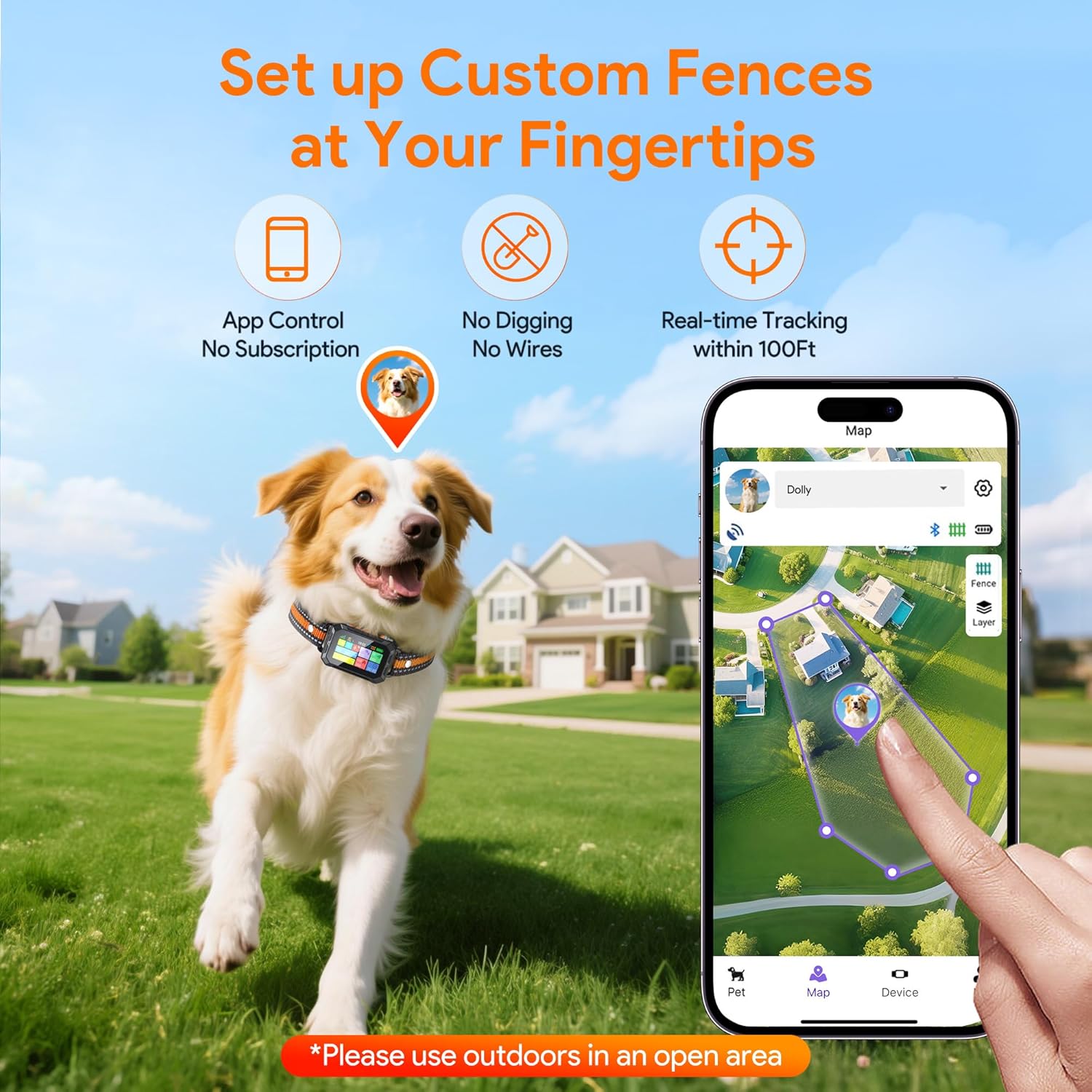
Image: The Meowant app allows users to easily set up custom GPS fences, either circular or polygonal, directly from their smartphone. This image shows the app interface for fence creation and a dog wearing the collar in an open area.

Image: This diagram illustrates the flexible range of the Meowant GPS Wireless Fence, which can be set from a minimum radius of 82 feet up to 7000 feet, providing a large containment area for dogs in outdoor environments. It also notes that walls and roofs weaken the GPS signal.
3. Operating Instructions
3.1 Remote Training
The included remote trainer allows you to manage your dog's behavior from a distance. In open areas, the remote has a range of up to 1,640 feet. When connected via the app, the control range is approximately 100 feet.
- Beep Mode: Provides an audible warning (1-9 levels).
- Vibration Mode: Delivers a tactile vibration (1-9 levels).
- Static Stimulation Mode: Applies a static correction (1-99 levels). Use this mode cautiously and at the lowest effective level.
To use the remote, select the desired mode and intensity level, then press the corresponding button to activate the correction on the collar.

Image: This image shows the 2-in-1 functionality of the Meowant system, combining a wireless fence with a remote trainer. A dog is seen on a beach while a person holds the remote, indicating its use for training in open environments.
3.2 App Control
The Meowant app provides additional control and monitoring features:
- Fence Management: Create, modify, or delete virtual fences.
- Real-time Tracking: Track your dog's location within Bluetooth range (up to 98 feet).
- Training Mode Control: Adjust beep, vibration, and static stimulation levels directly from the app.
- Activity and Health Data: View your dog's steps, distance, calories burned, and active time.
4. Safety Features and Correction Modes
4.1 Early Warning Band
To minimize confusion and anxiety for your dog, the system incorporates an innovative early warning band. Approximately 5 meters (16 feet) before your dog reaches the defined fence boundary, the collar will emit a vibration warning that gradually increases in intensity. This serves as a gentle reminder to stay within the safe zone.

Image: This diagram illustrates the "How It Works" principle, showing a dog receiving a weak to strong vibration in the early warning zone (16ft from boundary), followed by a beep/correction if crossing the fence boundary. It also shows that warning modes pause when the dog returns to the safe zone.

Image: This image details the Early Warning Band Function, showing a 5-meter pre-boundary alert with vibration that increases from weak to strong. It also displays the four adjustable alert modes available when the dog goes out of bounds: Beep, Vibration, Beep+Vibration, and Beep+Vibration+Electric, each with 1-5 intensity levels.
4.2 Boundary Correction Modes
If your dog crosses the virtual fence boundary after the early warning, the system will activate a chosen correction mode. You can select from four warning modes, each with 5 intensity levels:
- Beep: An audible tone.
- Vibration: A tactile vibration.
- Beep + Vibration: A combination of both.
- Customizable Static Stimulation: An electric correction. If this mode is chosen, the system includes a protection mode: after 5 consecutive static stimulations, the collar will pause for 1 minute to prevent over-correction.
The warning modes will pause automatically once your dog returns within the defined boundary.
5. Health and Activity Monitoring
The Meowant GPS collar features an LCD screen that displays not only fence-related data but also tracks your dog's activity and health metrics. This allows you to stay informed about your pet's well-being and habits.
- Steps: Counts the number of steps your dog takes.
- Distance: Measures the total distance covered.
- Calories: Estimates calories burned based on activity.
- Active Time: Records the duration of your dog's activity.
This data is accessible directly on the collar's LCD screen and through the Meowant mobile application, providing a comprehensive overview of your dog's daily routine.

Image: This image shows the Meowant app's interface for Activity and Health Data Monitoring, where users can keep track of their dog's steps, distance, calories, and active time, providing insights into their pet's well-being.
6. Product Components
The Meowant GPS Wireless Dog Fence System Collar package includes the following items:
- GPS Wireless Dog Fence Collar with shock head
- Remote Control
- Bracelet pull strap
- User Manual
- Long shock head (1 pair)
- Conductive silicone sleeve (2 pairs)
- Shock test light
- Type-C dual-ended cable (charger head not included)
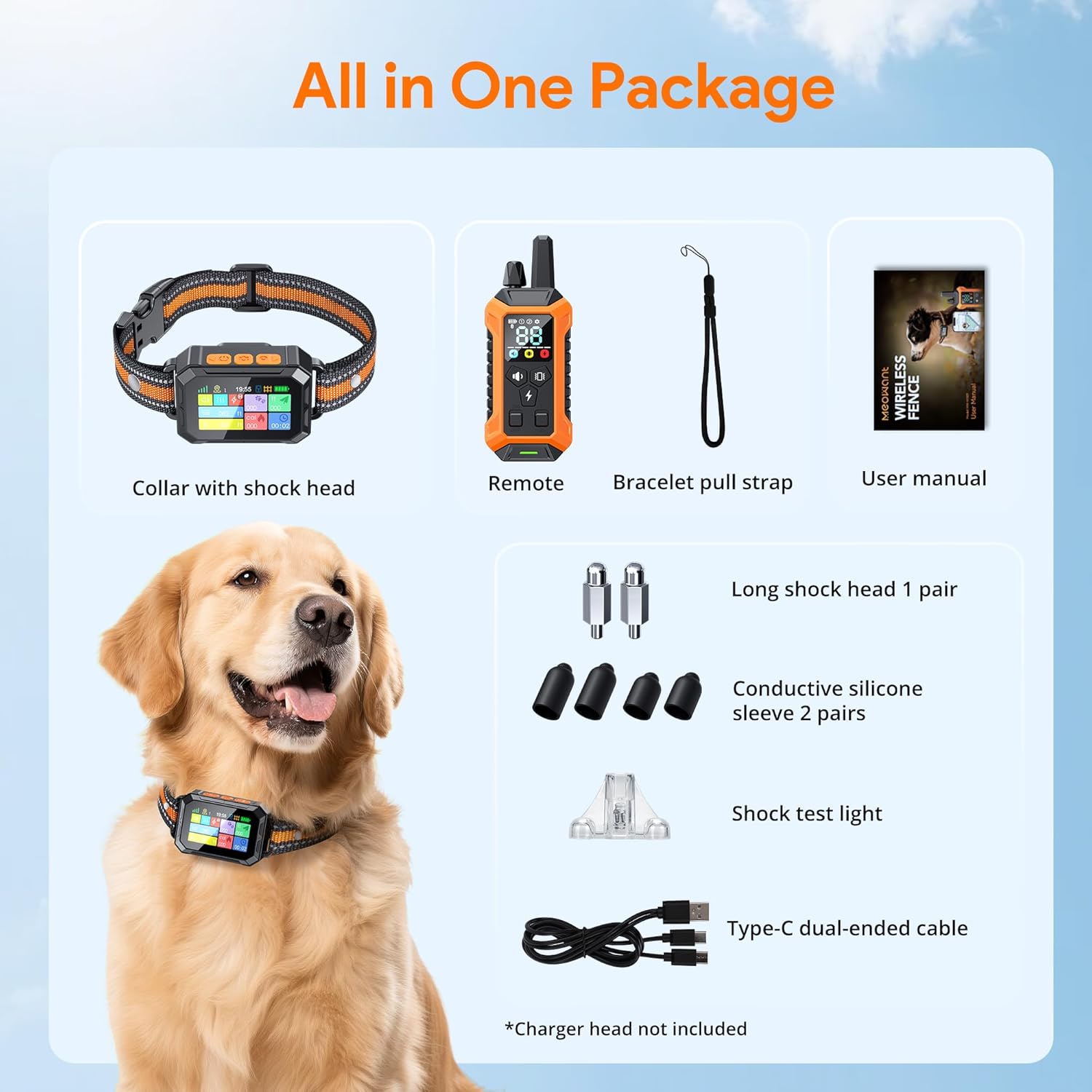
Image: This image displays all items included in the Meowant GPS Wireless Dog Fence System package, such as the collar, remote, various contact points, charging cable, and user manual.
7. Technical Specifications
| Feature | Specification |
|---|---|
| Model Number | MW-WR01 |
| Brand | Meowant |
| Collar Material | Silicone |
| Collar Color | Orange |
| Collar Closure Type | Buckle |
| Adjustable Neck Size | 8 to 25 inches |
| Recommended Dog Weight | 10-120 lbs |
| GPS Fence Area | 0.48 to 3,534 acres |
| GPS Fence Radius Range | 82 to 7000 feet (for round fences) |
| Remote Control Range | Up to 1,640 feet (open areas) |
| App Control Range | Up to 98 feet (Bluetooth) |
| Training Modes | Beep (1-9 levels), Vibration (1-9 levels), Static Stimulation (1-99 levels) |
| Fence Warning Modes | Beep, Vibration, Beep+Vibration, Static Stimulation (each 5 levels) |
| Early Warning Band | 5 meters (approx. 16 feet) pre-boundary vibration |
| Waterproof | Yes (LCD Collar) |
| Power Source | Rechargeable (Type-C cable included) |
| Package Dimensions | 6.69 x 4.76 x 1.89 inches |
| Item Weight | 11.53 ounces |
8. Care and Maintenance
- Charging: Regularly charge the collar and remote. Battery life can vary, with some users reporting a need to charge the collar every 1-2 days. It is recommended to charge the collar nightly or every other night, especially if used frequently.
- Cleaning: Clean the collar and contact points regularly with a damp cloth to prevent skin irritation and ensure proper conductivity. Ensure the collar is dry before charging.
- Storage: Store the device in a cool, dry place when not in use.
- Contact Points: Periodically check the contact points for wear or damage. Replace silicone sleeves as needed.
9. Troubleshooting
9.1 Collar Not Responding to Fence Boundary
- GPS Signal: Ensure the collar has a strong GPS signal. The system requires an open outdoor area. If the dog has been indoors, it may take several minutes for the collar to re-acquire a strong GPS signal once outside. Allow sufficient time for signal acquisition before expecting the fence to function.
- Boundary Definition: Verify the fence boundary settings in the app. Ensure the boundary is correctly defined and activated.
- Battery Level: Check the collar's battery level. A low battery can affect GPS performance and correction delivery.
9.2 Inconsistent or Random Corrections
- Indoor Use: The GPS fence system is designed for outdoor use. Using the collar indoors can lead to random corrections due to poor or lost GPS signal. Remove the collar when your dog is inside the house if this is a concern.
- Environmental Factors: Dense tree cover or tall buildings can interfere with GPS signal accuracy, potentially causing inconsistent boundary detection.
9.3 App Connection Issues
- Bluetooth Range: Ensure your smartphone is within Bluetooth range (approx. 98 feet) of the collar.
- Bluetooth Enabled: Verify that Bluetooth is enabled on your smartphone.
- App Restart: Close and restart the Meowant app.
- Device Restart: Power off and then power on both the collar and your smartphone.
9.4 Collar Not Holding Charge
- Charging Cable/Port: Ensure the Type-C cable is securely connected to both the collar and a working power source. Check for any damage to the cable or charging port.
- Charging Cycle: Battery life naturally degrades over time. If the collar is old, reduced battery capacity may be normal.
10. Warranty and Customer Support
For warranty information, technical assistance, or any questions regarding your Meowant GPS Wireless Dog Fence System Collar, please refer to the contact details provided in the packaging or visit the official Meowant website. Keep your purchase receipt for warranty claims.