
1. Product Overview
This manual provides essential instructions for the proper installation, operation, and maintenance of your SEEIRIR TP.HV352T.PB753(N) TV Motherboard. This motherboard is designed as a replacement component for televisions, offering precise adaptation and stable performance.
Key Features:
- Precise Adaptation: Engineered for perfect replacement of original TV motherboards.
- Fault Repair: Capable of resolving common display issues such as black screen, blurred screen, or no signal.
- Stable and Durable: Constructed with industrial-grade PCB materials to withstand high temperatures and moisture, ensuring long-term reliability.
- Easy Installation: Features clear interface identification and includes a comprehensive installation guide.
- Basic Functions: Provides all necessary functions for daily television use.
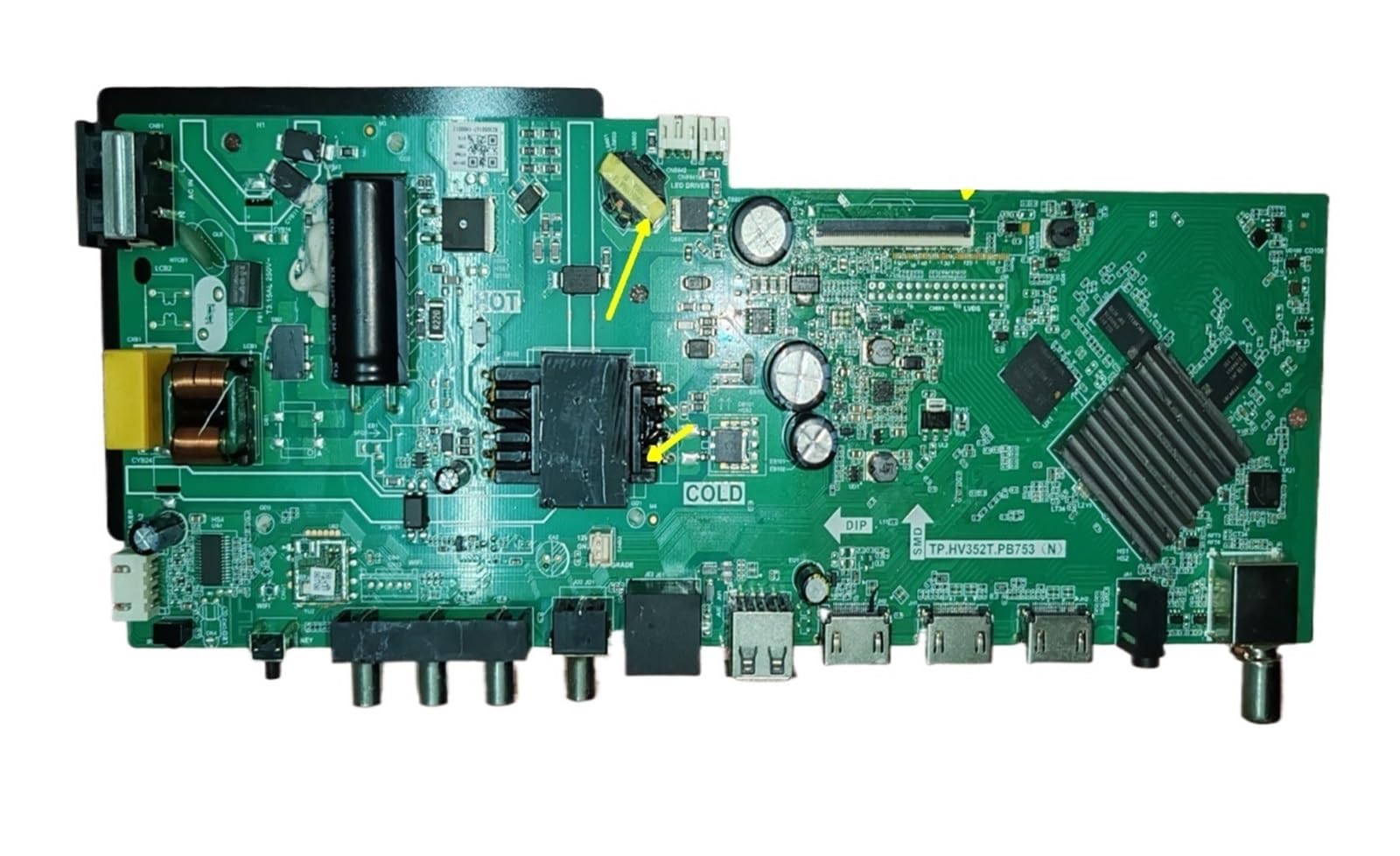
Figure 1: Front view of the SEEIRIR TP.HV352T.PB753(N) TV Motherboard, showing various ports and components.
2. Safety Information
Please read and understand all safety instructions before attempting to install or operate this product. Failure to follow these instructions may result in electric shock, fire, or damage to the product or other equipment.
- Power Disconnection: Always disconnect the television from the main power supply before beginning any installation or maintenance work.
- Static Electricity: Electronic components are sensitive to static electricity. Use appropriate anti-static precautions (e.g., anti-static wrist strap) when handling the motherboard.
- Professional Installation: If you are not confident in your ability to perform the installation, seek assistance from a qualified technician.
- Ventilation: Ensure adequate ventilation around the television after installation to prevent overheating of components.
- Liquid Exposure: Keep the motherboard and television away from liquids and excessive moisture.
- Component Handling: Handle the motherboard by its edges to avoid touching sensitive components.
3. Setup & Installation
This section provides general guidelines for installing the TP.HV352T.PB753(N) TV Motherboard. Refer to the detailed installation guide included with your product for specific steps and diagrams.
- Prepare the TV:
- Unplug the TV from the power outlet.
- Place the TV face down on a soft, clean surface to protect the screen.
- Remove the back cover of the TV to access the internal components.
- Remove the Old Motherboard:
- Carefully disconnect all cables connected to the existing motherboard (e.g., power, LVDS, backlight, speaker, input ports). Note their positions or take photos for reference.
- Unscrew the mounting screws holding the old motherboard in place.
- Gently lift and remove the old motherboard.
- Install the New Motherboard:
- Align the new SEEIRIR TP.HV352T.PB753(N) motherboard with the mounting holes in the TV chassis.
- Secure the motherboard with the appropriate screws. Do not overtighten.
- Reconnect all cables to their corresponding ports on the new motherboard. Ensure all connections are firm and correctly oriented. Pay special attention to the LVDS cable and power connections (35-110V, 600mA, FCP 75W).
- Initial Power-Up:
- Before replacing the back cover, plug the TV into a power outlet.
- Power on the TV and check for basic functionality (e.g., power indicator, screen display, sound).
- If issues arise, refer to the Troubleshooting section.
- Final Assembly:
- Once basic functionality is confirmed, unplug the TV again.
- Replace the TV's back cover and secure it with screws.
- Reconnect all external peripherals and power up the TV for full testing.
Note: The motherboard features clear interface identification to assist with correct cable connections. Always double-check connections before powering on.
4. Operation
Once the SEEIRIR TP.HV352T.PB753(N) TV Motherboard is correctly installed, the television should function as expected. The motherboard manages all core TV operations.
- Power On/Off: Use the TV's remote control or physical power button to turn the television on or off.
- Input Selection: Select desired input sources (HDMI, AV, USB, etc.) using the TV remote.
- Channel Tuning: If applicable, perform channel scanning for over-the-air or cable channels.
- Menu Navigation: Access and navigate the TV's on-screen display (OSD) menu for settings adjustments (picture, sound, network, etc.).
Refer to your television's original user manual for detailed instructions on specific TV functions and menu navigation.
5. Maintenance
The SEEIRIR TP.HV352T.PB753(N) TV Motherboard is designed for durability with industrial-grade PCB. Minimal maintenance is required, but following these guidelines can extend its lifespan and ensure optimal performance:
- Dust Removal: Periodically clean the interior of the TV (with power disconnected) using compressed air to remove dust buildup, which can impede cooling and cause component failure.
- Ventilation: Ensure the TV's ventilation openings are not blocked. Proper airflow is crucial to prevent overheating of the motherboard and other internal components.
- Environmental Conditions: Operate the TV in a stable environment, avoiding extreme temperatures, high humidity, and direct sunlight.
- Power Surges: Consider using a surge protector to safeguard the TV and its internal components, including the motherboard, from electrical spikes.
6. Troubleshooting
This section addresses common issues you might encounter after installing the SEEIRIR TP.HV352T.PB753(N) TV Motherboard. If problems persist, consult a qualified technician.
| Problem | Possible Cause | Solution |
|---|---|---|
| No Power / TV Does Not Turn On |
|
|
| Black Screen / No Display |
|
|
| Blurred Screen / Distorted Image |
|
|
| No Signal |
|
|
7. Specifications
| Feature | Detail |
|---|---|
| Model Number | TP.HV352T.PB753(N) |
| Brand | SEEIRIR |
| Compatible & Video Equipment Style | Display Equipment |
| Input Voltage Range | 35-110V |
| Current Output | 600mA |
| Power Output (Variant) | FCP 75W |
| Item Weight | 500 Grams |
| ASIN | B0FF41WYG7 |
8. Warranty & Customer Support
Warranty Information:
Specific warranty terms for the SEEIRIR TP.HV352T.PB753(N) TV Motherboard are typically provided by the seller at the time of purchase. Please refer to your purchase documentation or contact the seller directly for details regarding warranty coverage, duration, and claims procedures. Standard return policies may apply as per the retailer's terms.
Customer Support:
For technical assistance, installation queries, or troubleshooting beyond the scope of this manual, please contact the seller or manufacturer directly. You can typically find their contact information on your purchase invoice or the product packaging.
Seller: taizhoushidimaimaoyistore