1. Introduction
This manual provides essential information for the proper use and maintenance of your uaue T70-AI AI Smart Watch. Please read it thoroughly before operating the device to ensure optimal performance and longevity. This smartwatch integrates advanced features including a ChatGPT AI assistant, comprehensive health monitoring, and various sports modes, designed to support your daily activities and wellness goals.

Image 1.1: The uaue T70-AI AI Smart Watch displaying its main interface with activity metrics and time.
2. Product Overview
2.1. Package Contents
- Smartwatch
- Charging Cable
- User Manual
2.2. Key Features
- 1.91-inch TFT HD Display (320*380 resolution)
- Built-in ChatGPT AI Assistant
- Bluetooth Calling Functionality
- 110+ Sports Modes
- Continuous Heart Rate, Blood Oxygen (SpO2), and Sleep Monitoring
- IP68 Waterproof Rating
- Magnetic Charging with Long Battery Life
- Customizable AI Watch Faces

Image 2.1: Overview of the smartwatch dimensions and included accessories.

Image 2.2: The 1.91-inch HD display of the smartwatch.
3. Setup
3.1. Initial Charging
Before first use, fully charge your smartwatch. Connect the magnetic charging cable to the charging points on the back of the watch and plug the USB end into a compatible power source. A full charge typically takes approximately 2 hours.

Image 3.1: Magnetic charging of the smartwatch.
3.2. App Installation and Pairing
- Enable Bluetooth on your smartphone.
- Scan the QR code displayed on the watch screen or in the manual, or search for the "GloryFit" app in your smartphone's app store (compatible with Android and iOS).
- Install and open the "GloryFit" app.
- Follow the in-app instructions to add your device. Select "T70" or "T70-AI" from the list of available devices.
- Confirm the Bluetooth pairing request on both your phone and the smartwatch.
- Allow the smartwatch to display notifications from your phone as prompted.
For AI features, ensure the "GloryFit" app remains active and connected via Bluetooth.

Image 3.2: Visual guide for app installation and device pairing.
4. Operating
4.1. Basic Navigation
- Swipe Up/Down: Access quick settings or notifications.
- Swipe Left/Right: Navigate through main features like activity data, heart rate, weather, etc.
- Press Side Button: Wake the screen, return to the home screen, or access the app menu.
4.2. Bluetooth Calling
With the built-in speaker and microphone, you can manage calls directly from your wrist:
- Answer, reject, or dial calls.
- Sync contacts from your phone.
- View recent call history.

Image 4.1: Bluetooth calling and smart notification features.

Image 4.2: Interface for answering and making calls on the smartwatch.
Video 4.1: Demonstration of the uaue AI Smart Watch with ChatGPT capabilities.
4.3. Smart Notifications
Receive real-time alerts for messages and app notifications directly on your 1.91-inch screen. Supported apps include SMS, WhatsApp, Facebook, Instagram, Twitter, and more. (Note: Replying to messages directly from the watch is not supported).

Image 4.3: Smart notifications from various applications.
4.4. AI Assistant (ChatGPT)
The smartwatch features a built-in ChatGPT AI assistant. Access it for instant answers, translation, or wellness support using voice or text input. Ensure the "GloryFit" app is active and connected for AI functionality.

Image 4.4: Interacting with the ChatGPT AI assistant on the smartwatch.
4.5. Other Functions
The smartwatch includes additional features such as:
- Alarm Clock
- Music Control
- Remote Camera Control
- Weather Forecast
- Stopwatch and Timer
- Sedentary Reminder
- Find Phone function
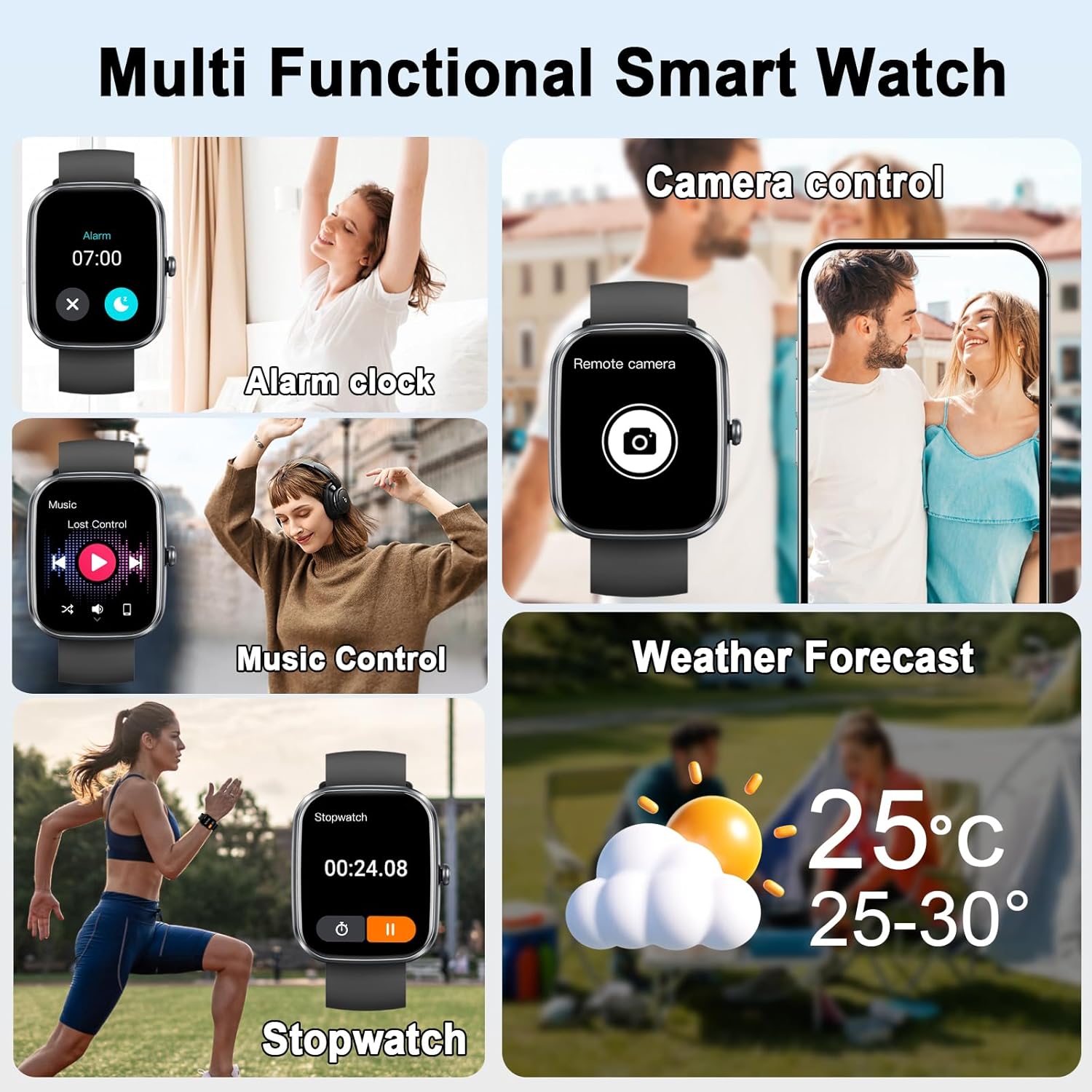
Image 4.5: Various multi-functional features of the smartwatch.

Image 4.6: Additional smartwatch functions in various scenarios.
5. Health Monitoring
The smartwatch provides continuous health monitoring and AI-generated reports to help you understand your body and improve your lifestyle.
5.1. Heart Rate Monitoring
The device continuously monitors your heart rate, providing real-time data and historical trends.

Image 5.1: Heart rate monitoring during activity.
5.2. Blood Oxygen (SpO2) Monitoring
Monitor your blood oxygen levels in real-time to assess your oxygen balance and respiratory health.

Image 5.2: Blood oxygen monitoring feature.
5.3. Sleep Monitoring
The smartwatch tracks your sleep quality, including light, deep, and REM sleep stages, providing insights into your sleep patterns.

Image 5.3: Sleep tracking and analysis.
5.4. Activity Tracking & AI Health Reports
The watch records daily activity metrics such as steps, calories burned, and distance. The AI-powered health report analyzes your data and offers personalized wellness suggestions.
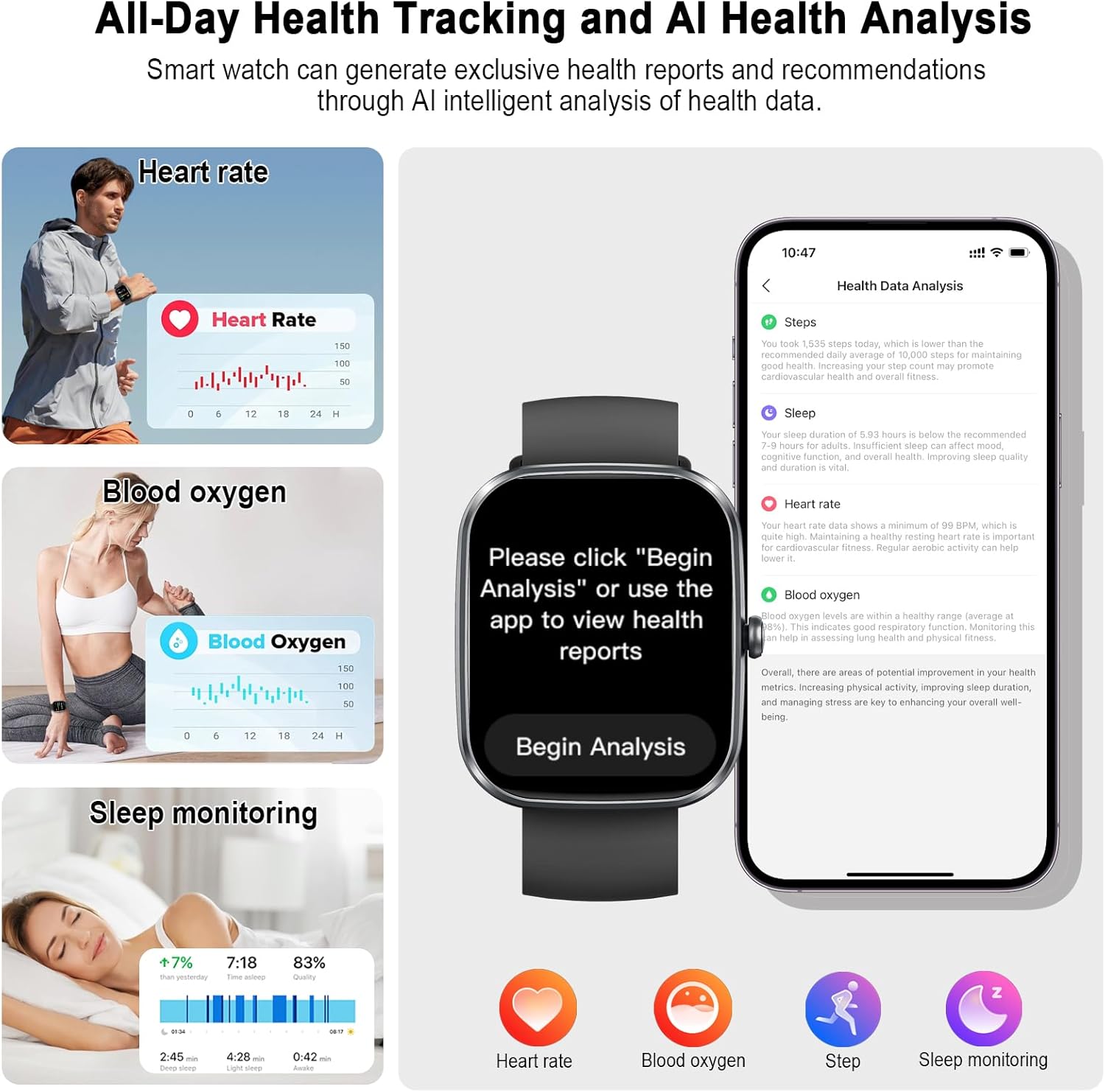
Image 5.4: All-day health tracking and AI health analysis features.

Image 5.5: AI-generated health reports and recommendations.
5.5. Women's Health Tracking
The smartwatch assists in tracking menstrual cycles, providing predictions for menstruation and ovulation.

Image 5.6: Women's health tracking feature.
6. Sports Modes
The smartwatch supports over 110 sports modes, accurately tracking your workout metrics in real-time. This includes activities like walking, running, cycling, basketball, jump rope, and hiking.

Image 6.1: 110+ sports modes and activity tracking.

Image 6.2: Diverse sports modes for different activities.
6.1. IP68 Waterproof Rating
The smartwatch has an IP68 waterproof rating, making it suitable for use during sweating or in light rain. It is not recommended for hot showers or swimming.

Image 6.3: IP68 waterproof capabilities.

Image 6.4: IP68 waterproof design for daily use.
Video 6.1: Overview of T80 Smart Watch features, including sports modes and water resistance.
7. Customization
7.1. Watch Faces
Personalize your smartwatch with over 100 watch faces available through the "GloryFit" app. You can also use the built-in AI to create unique, personalized watch faces by describing your preferences.
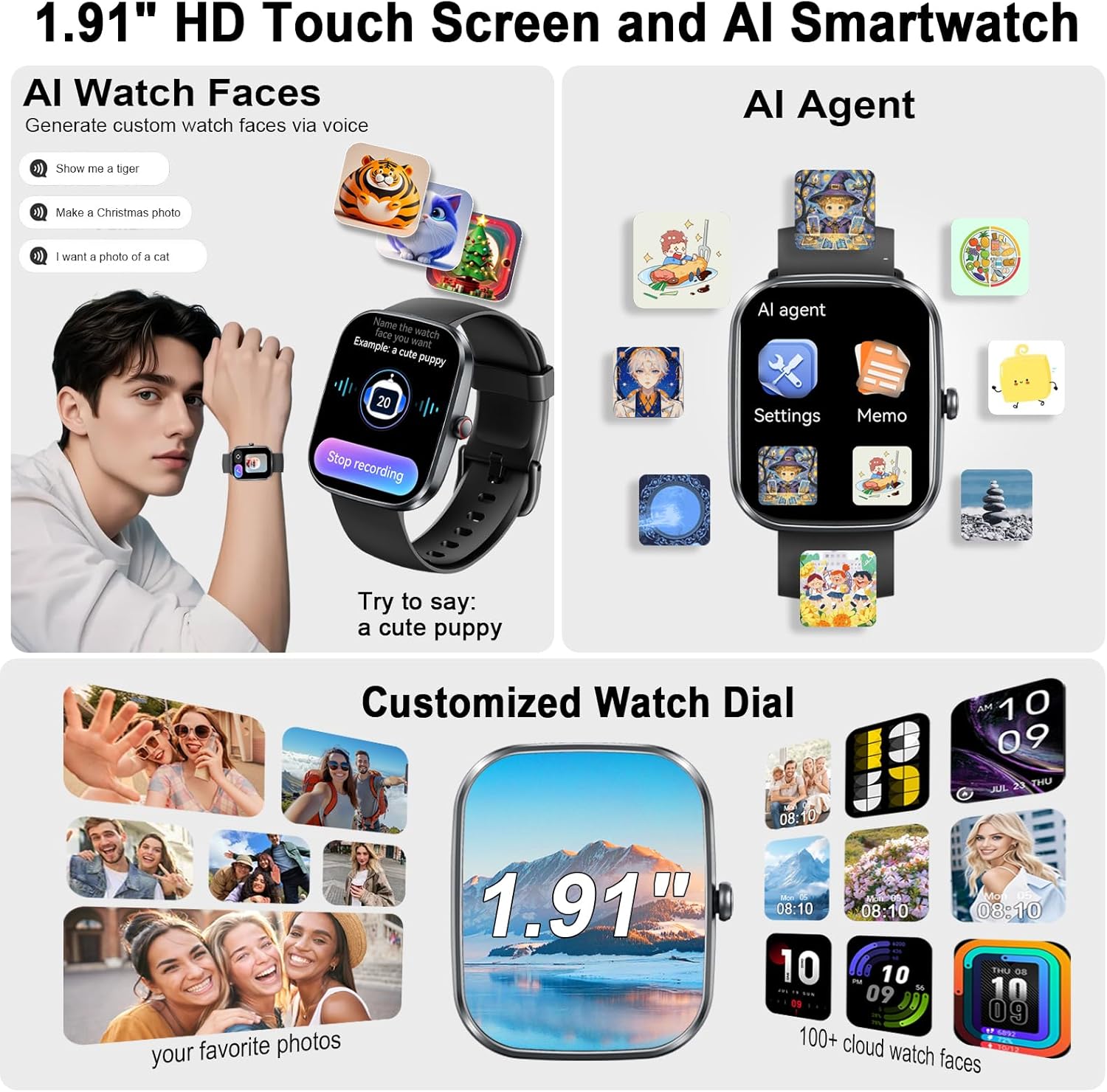
Image 7.1: AI-generated watch faces and customization options.

Image 7.2: Smart AI watch face customization.

Image 7.3: Selection of 100+ watch faces.
8. Maintenance
8.1. Cleaning
Regularly clean your smartwatch and strap with a soft, damp cloth. Avoid using harsh chemicals or abrasive materials that could damage the device. Ensure the charging contacts are clean and dry before charging.
8.2. Storage
When not in use for extended periods, store the smartwatch in a cool, dry place away from direct sunlight and extreme temperatures. It is recommended to charge the device periodically to maintain battery health.
9. Troubleshooting
9.1. Connectivity Issues
- Ensure Bluetooth is enabled on your smartphone and the smartwatch.
- Verify the "GloryFit" app is running in the background and connected to the watch.
- Restart both your smartphone and the smartwatch.
- If issues persist, unpair the device from your phone's Bluetooth settings and re-pair through the "GloryFit" app.
9.2. Battery Life Concerns
- Ensure the watch is fully charged using the provided magnetic cable.
- Reduce screen brightness or set a shorter screen-on time.
- Disable continuous heart rate or SpO2 monitoring if not needed constantly.
- Close unnecessary background apps on your smartphone that might be draining watch battery through constant synchronization.
9.3. Inaccurate Tracking
- Ensure the watch is worn snugly on your wrist, about one finger's width above the wrist bone.
- Calibrate step tracking in the "GloryFit" app if available.
- For sleep tracking, ensure you wear the watch throughout the night.
10. Specifications
| Feature | Specification |
|---|---|
| Model Number | T70-AI |
| Display Size | 1.91 Inches |
| Item Weight | 40 Grams (1.41 ounces) |
| Battery Capacity | 0.3 Amp Hours |
| Battery Life (Typical Use) | Up to 7 days |
| Battery Life (Standby) | Up to 30 days |
| Charging Time | Approx. 2 hours |
| Waterproof Rating | IP68 |
| Connectivity | Bluetooth |
| Operating System | Android Wear 1.0 (Compatible with Android & iOS) |
| Memory Storage Capacity | 1 GB |
11. Warranty and Support
For warranty information, technical support, or service inquiries, please refer to the documentation included in your product packaging or contact uaue customer service directly. Keep your purchase receipt as proof of purchase for warranty claims.