1. Introduction
The ULANZI T100 Uka Quick Release Tripod Ball Head is a versatile and robust accessory designed for photographers and videographers. It provides stable support and flexible positioning for various camera setups, including DSLRs, mirrorless cameras, telephoto lenses, and compact cinema rigs. Its quick-release system, 360° panoramic rotation, and integrated cold shoe mount enhance efficiency and creative control.
2. Key Features
- Universal 1/4" & 3/8" Screw + 360° Cold Shoe: Equipped with a 1/4" to 3/8" adapter for broad compatibility with tripods, monopods, sliders, and gimbals. The 360° rotatable cold shoe allows attachment of microphones or LED lights without hindering ball head movement.
- 360° Panoramic, 90° Tilt Ball Head and U-Groove: Offers full 360° horizontal panning, 90° tilt, and U-shaped slots for flexible horizontal, vertical, and side adjustments. Ensures smooth camera positioning for various shots.
- Premium CNC Aluminum Alloy Construction: Constructed from high-grade CNC aluminum alloy, providing stable support for equipment up to 6kg (13.2 lbs). Lightweight at 0.42 lbs, making it suitable for travel.
- Secure Quick-Release System with Uka Plate & Slide-Lock: Features a Uka quick-release plate for fast, one-handed camera mounting and dismounting. A built-in safety lock prevents accidental slips.
- Anti-Slip Silicone Pads & Gasket: Large anti-slip silicone pads prevent scratches and reduce vibrations. A silicone gasket keeps screws tight for shake-free shots.
- Uka Quick Release Plate - Universal Compatibility: Compatible with all Uka-series gear, eliminating the need for multiple plates.
3. What's in the Box

Image: ULANZI T100 Ball Head and its included accessories.
- Ball Head x 1
- 1/4" to 3/8" Adapter x 1
- Flat Wrench x 1
- Hex Wrench x 1
4. Setup Instructions
4.1 Attaching the Ball Head to a Tripod/Monopod
- Locate the 3/8" threaded hole at the base of the ULANZI T100 Ball Head.
- If your tripod or monopod has a 1/4" screw, use the included 1/4" to 3/8" adapter. Insert the adapter into the ball head's threaded hole.
- Screw the ball head (or ball head with adapter) onto your tripod or monopod until securely tightened. Use the provided flat wrench if necessary for a firm connection.

Image: ULANZI T100 Ball Head securely attached to a tripod.
4.2 Attaching Your Camera to the Quick Release Plate
- Identify the Uka quick-release plate. It has a 1/4" screw on top.
- Screw the quick-release plate onto the 1/4" tripod socket of your camera. Ensure it is tightened firmly using a coin or the provided hex wrench.

Image: The Uka quick-release plate with its 1/4" screw and slide-lock mechanism.
4.3 Mounting the Camera to the Ball Head
- Ensure the safety lock on the ball head's quick-release base is in the 'unlocked' position (slide right to release).
- Align the quick-release plate (attached to your camera) with the receiver on the ball head.
- Press the camera down firmly until you hear a click, indicating it's securely seated.
- Slide the safety lock to the 'locked' position (slide left to lock) to prevent accidental release.

Image: Demonstrating the quick-release plate insertion and locking mechanism.
5. Operating Instructions
5.1 Adjusting the Ball Head Angle
- Loosen the main locking knob on the side of the ball head. This will allow the ball to move freely.
- Adjust your camera to the desired angle (360° panoramic rotation, 90° tilt, or use the U-groove for vertical/side adjustments).
- Once the desired position is achieved, tighten the main locking knob firmly to secure the camera in place.

Image: The ball head allows for 360° panoramic rotation.
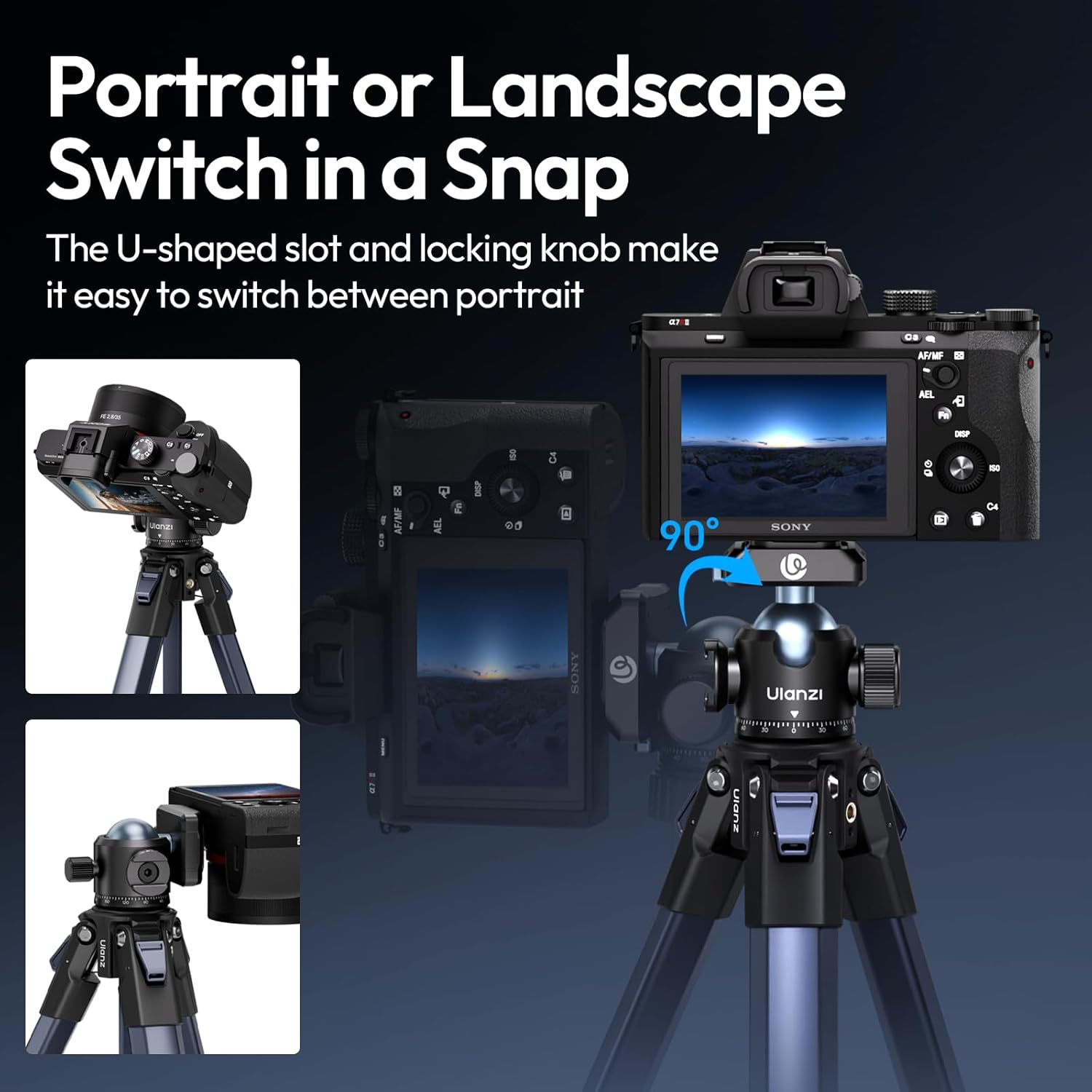
Image: The U-shaped groove enables quick switching between horizontal and vertical orientations.
5.2 Using the 360° Rotatable Cold Shoe Mount
- Locate the cold shoe mount on the side of the ball head.
- Slide your accessory (e.g., microphone, LED light) into the cold shoe mount.
- Tighten the locking ring on the cold shoe mount to secure the accessory. The cold shoe can be rotated 360° for optimal positioning.

Image: The 360° rotatable cold shoe mount for attaching accessories.
5.3 Quick Release System Demonstration
Video: Official ULANZI demonstration of the T100 Tripod Ball Head's quick release system, 360° rotation, and cold shoe mount. This video illustrates the ease of mounting and adjusting the ball head for various camera setups.
6. Maintenance
- Regularly inspect all screws and connections to ensure they are tight. Use the provided wrenches for tightening if necessary.
- Clean the ball head with a soft, dry cloth. Avoid using harsh chemicals or abrasive materials.
- Store the ball head in a dry, dust-free environment when not in use.
- The anti-slip silicone pads and gasket are designed to maintain grip and reduce vibrations. Ensure they are free from dirt or damage.
7. Troubleshooting
- Camera not securely mounted: Ensure the quick-release plate is firmly attached to your camera and the safety lock on the ball head is engaged after mounting.
- Ball head movement is stiff: Check if the main locking knob is fully loosened. If the issue persists, ensure no debris is obstructing the ball mechanism.
- Ball head slips after tightening: Verify that the main locking knob is tightened sufficiently. Ensure the load capacity (max 6kg/13.2 lbs) is not exceeded.
- Accessories not fitting cold shoe: Confirm the accessory has a standard cold shoe mount. Ensure the cold shoe locking ring is fully loosened before insertion.
8. Specifications
| Feature | Detail |
|---|---|
| Brand | ULANZI |
| Model | T100 |
| Material | CNC Aluminum Alloy |
| Max Load Capacity | 6 kg (13.2 lbs) |
| Item Weight | 8.8 ounces (approx. 250g) |
| Product Dimensions | 2.71 x 2.95 x 2.36 inches (6.9 x 7.5 x 6.0 cm) |
| Mounting Screw | 1/4" & 3/8" (with adapter) |
| Cold Shoe | 360° Rotatable |
9. Warranty and Support
For warranty information, technical support, or any inquiries regarding your ULANZI T100 Ball Head, please refer to the official ULANZI website or contact their customer service directly. Keep your purchase receipt for warranty claims.
Official ULANZI Store: ULANZI Official US Store


