
1. Introduction
This manual provides detailed instructions for the setup, operation, and maintenance of your KUIIYER Wireless Barcode Scanner. Please read this manual thoroughly before using the device to ensure proper functionality and to maximize its lifespan. Keep this manual for future reference.
2. Product Overview
The KUIIYER Wireless Barcode Scanner is a versatile device designed for efficient 1D and 2D barcode scanning. It features an 800 x 600 pixel CMOS image sensor, a built-in auxiliary light, and supports both wireless and wired connections.
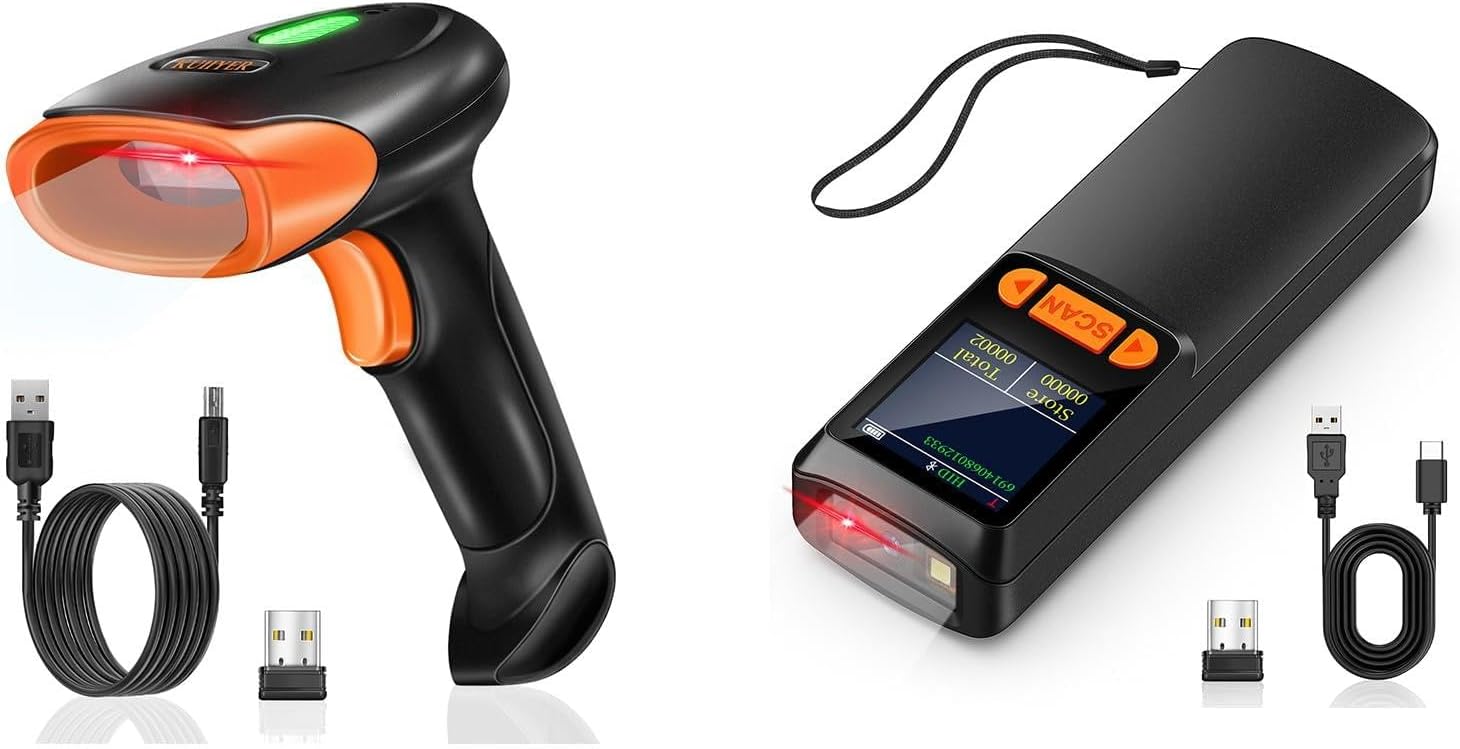
Image 2.1: The KUIIYER Wireless Barcode Scanner (pistol-grip model) shown with its USB cable and 2.4GHz wireless dongle. A compact scanner model is also visible, indicating product variations.
2.1 Components and Features

Image 2.2: Detailed view of the pistol-grip scanner, highlighting its 800 x 600 Pixel CMOS Scanning Window with built-in auxiliary light, Indicator Light, Scan Button, USB Charging Port, and 2000 mAh Large Capacity Battery.
Key features include:
- 800 x 600 Pixel CMOS Scanning Technology: For accurate and fast reading of 1D, 2D, and QR codes.
- Built-in Auxiliary Light: Enhances scanning performance in various lighting conditions.
- 2000mAh Large Capacity Battery: Provides extended operational time.
- Indicator Light and Buzzer: Provide feedback on scanning status.
- USB Charging Port: For convenient charging and wired connection.

Image 2.3: Detailed view of the compact scanner, highlighting its CMOS Scanning Window, LCD Color Screen, Setting Keypad, AI Voice, 2000mAh Larger Capacity Battery, Charging Indicator, and USB Charging Port. Dimensions are 11.9cm (4.7inch) length and 2.2cm (0.9inch) width.
For models equipped with an LCD display, the 1.44-inch screen provides access to a customizable menu for various settings.
3. Setup
3.1 Charging the Battery
Before first use, fully charge the scanner's internal 2000mAh battery. Connect the scanner to a power source using the provided USB cable. The charging indicator will show the charging status.
3.2 Connection Modes
The KUIIYER Barcode Scanner supports two primary connection modes: 2.4GHz Wireless and USB Wired.
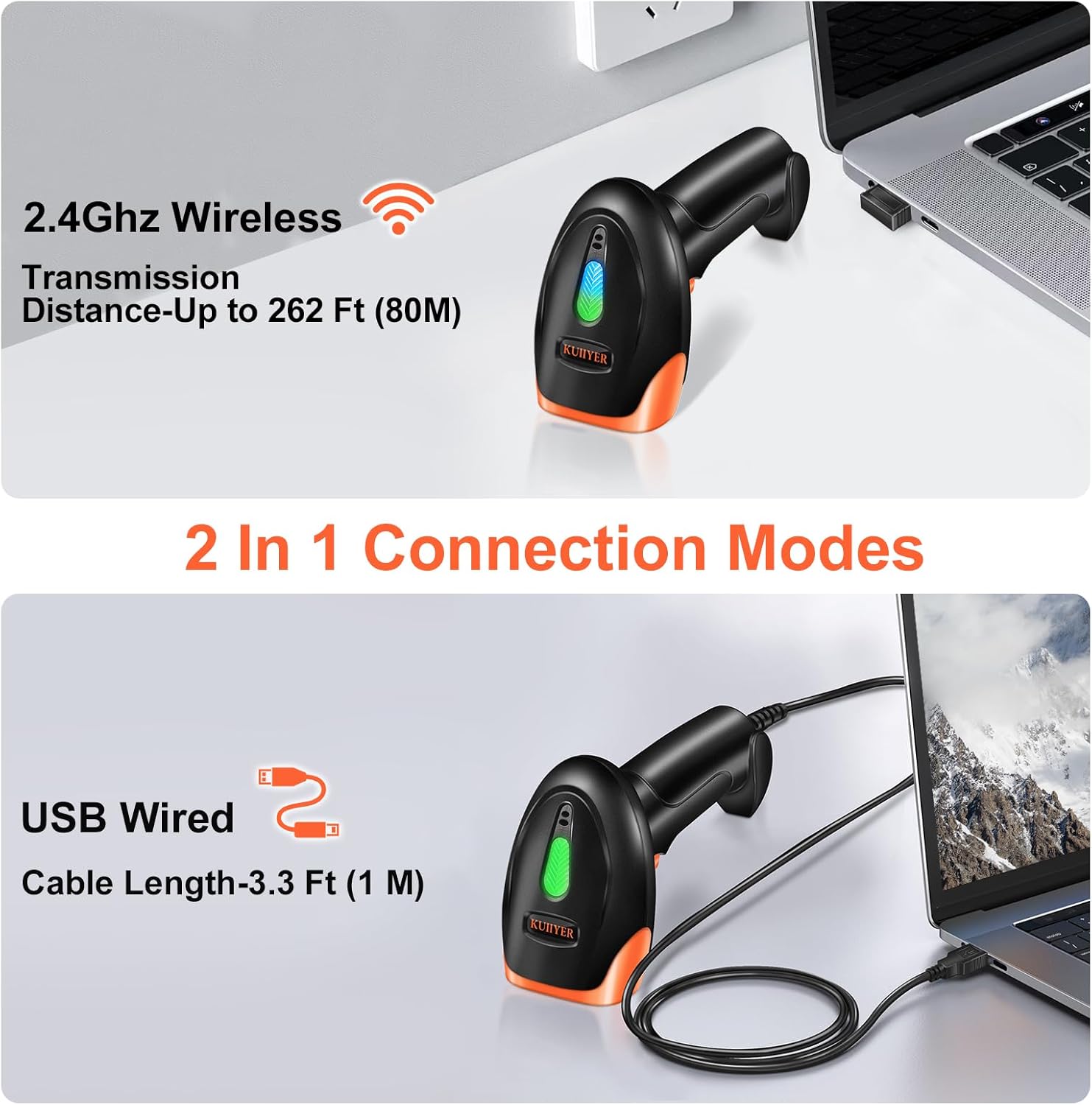
Image 3.1: Illustration of the 2.4GHz Wireless connection via USB dongle (up to 262 ft / 80m transmission distance) and USB Wired connection via cable (3.3 ft / 1m cable length).
3.2.1 2.4GHz Wireless Connection
- Insert the 2.4GHz USB dongle into an available USB port on your computer (PC, Laptop, Desktop) or POS system.
- The scanner will automatically pair with the dongle. No additional drivers or software are typically required.
- A successful connection is usually indicated by an audible beep and/or a change in the scanner's indicator light.
3.2.2 USB Wired Connection
- Connect one end of the provided USB cable to the scanner's USB charging port.
- Connect the other end of the USB cable to an available USB port on your computer or POS system.
- The scanner will function as a wired device. No additional drivers or software are typically required.
The scanner is compatible with Windows, macOS, Linux, and universal POS systems, and works with common software like Word and Excel.
4. Operating Instructions
4.1 Scanning Modes
The scanner offers three distinct scanning modes to suit various operational needs. These modes can be configured via the user manual's specific barcode settings or through the device's menu for models with an LCD screen.

Image 4.1: Visual representation of the three scanning modes: Manual Trigger Mode (scan on button press), Auto-sensing Scan Mode (scan when barcode is presented), and Continuous Scan Mode (scans continuously).
- Manual Trigger Mode: The scanner activates its beam and attempts to read a barcode only when the scan button is pressed. This is suitable for precise, on-demand scanning.
- Auto-sensing Scan Mode: The scanner automatically detects a barcode within its field of view and scans it without requiring a button press. Ideal for hands-free operation.
- Continuous Scan Mode: The scanner's beam remains active and continuously scans for barcodes. Useful for high-volume scanning environments.
4.2 Barcode Compatibility
The KUIIYER scanner is designed to read a wide range of barcode types, including standard 1D and 2D codes, as well as more challenging formats.
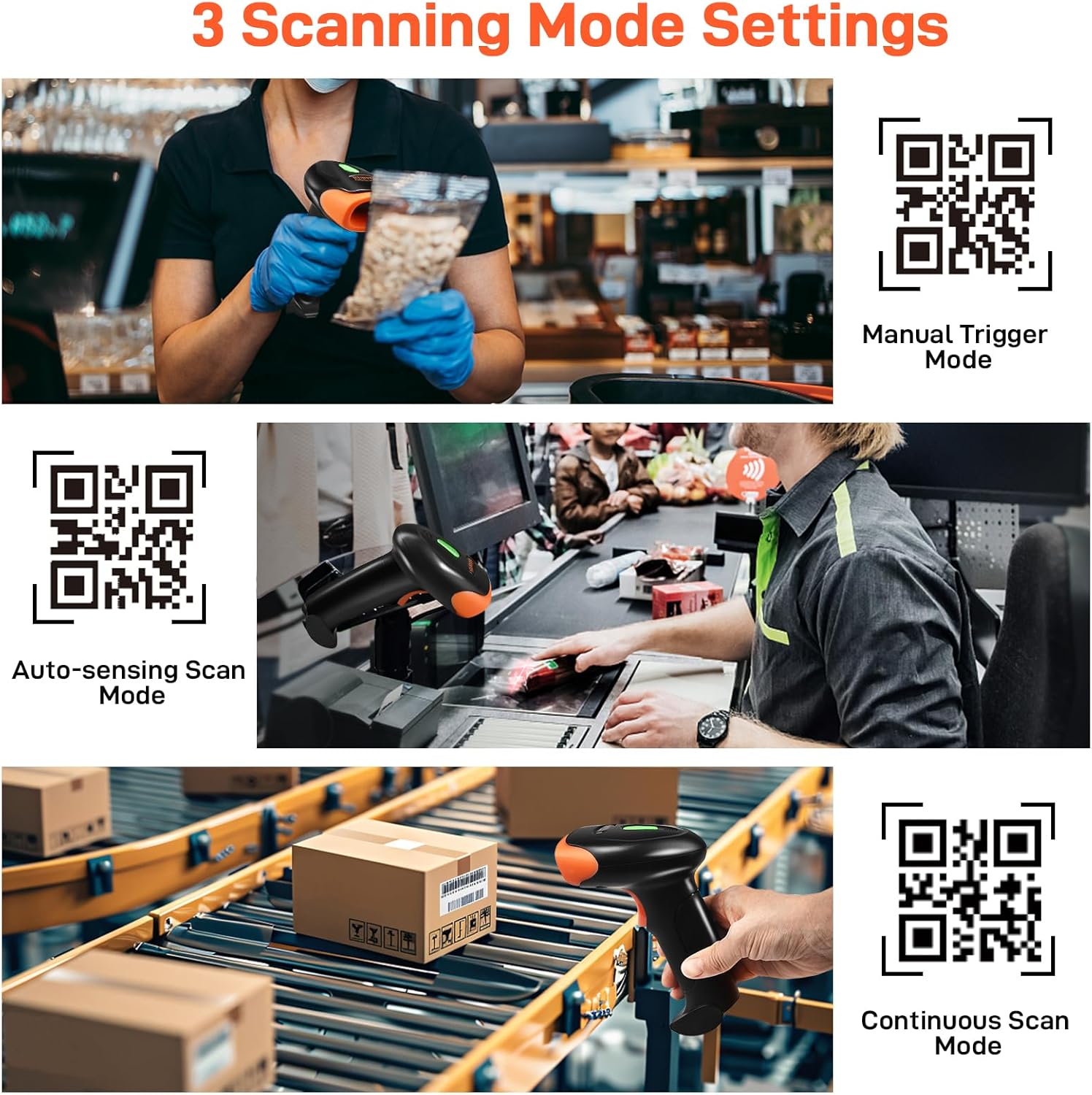
Image 4.2: Examples of supported barcode types including UPC/EAN, Code-128, QR, Data Matrix, and the ability to read wider ranges, fuzzy, damaged, curved, screen, and colorful codes.
Supported barcode types include:
- 1D Codes: UPC/EAN, Code-128, Code-39, Code-93, Code-11, Interleaved 2 of 5, Industrial 2 of 5, Matrix 2 of 5, Standard 2 of 5, Codabar, MSI, GS1 DataBar, etc.
- 2D Codes: QR Code, Data Matrix, PDF417, Aztec Code, Maxicode, etc.
- Complex Barcodes: The advanced CMOS sensor allows reading of fuzzy, damaged, curved, screen-displayed, and colorful barcodes.
4.3 Data Uploading Modes
The scanner offers flexibility in how scanned data is transmitted to your connected device.
- Instant Upload Mode: Barcodes are transmitted to the connected device immediately after scanning.
- Storage Upload Mode: The scanner can store over 50,000 barcodes internally. This data can be uploaded to the connected device at a later time, which is useful for inventory management or when out of range.
4.4 Customizable Menu (for LCD models)
For scanner models equipped with a 1.44-inch LCD display, various settings can be adjusted directly on the device.
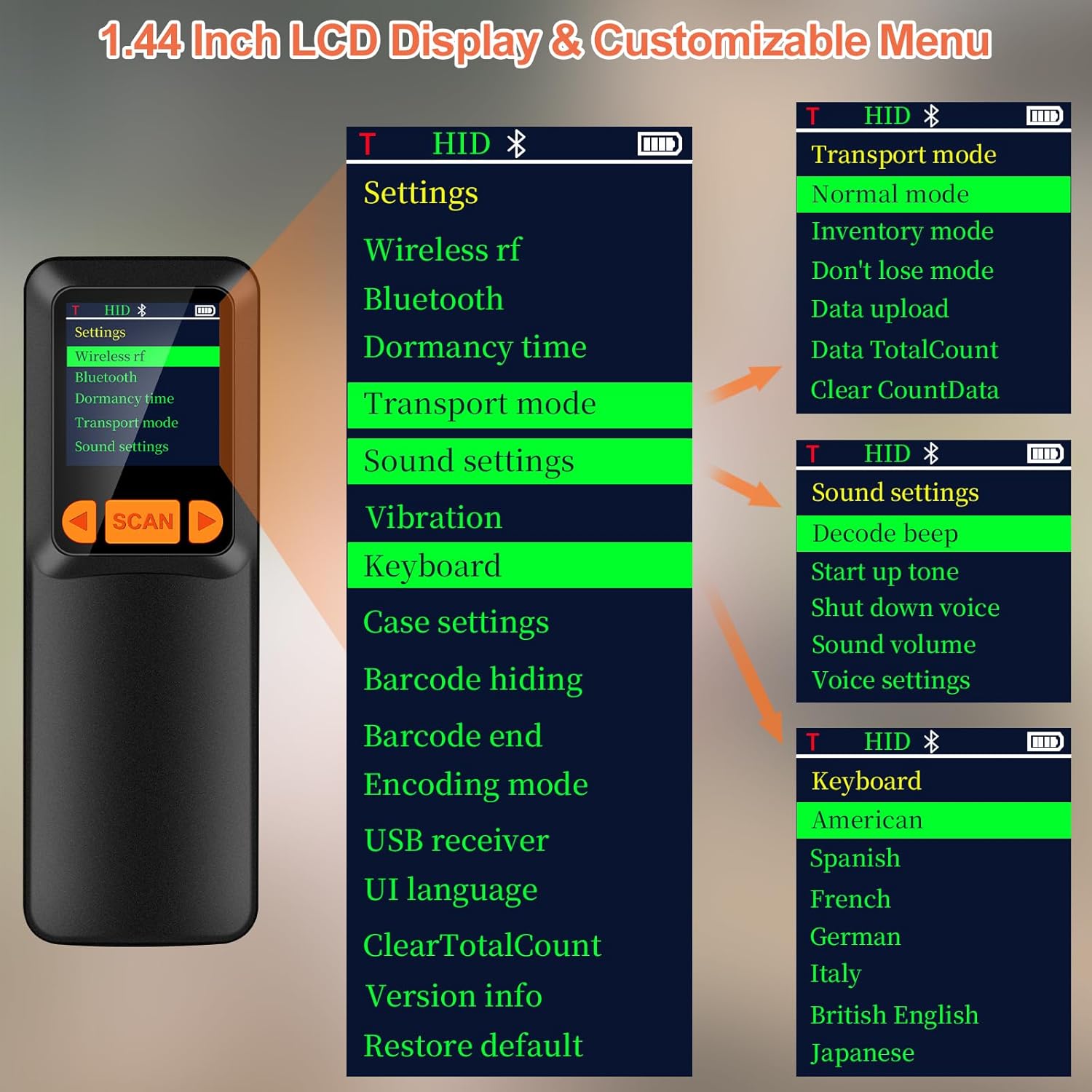
Image 4.3: The 1.44-inch LCD display showing menu options such as Wireless RF, Bluetooth, Dormancy time, Transport mode (Normal, Inventory, Don't lose mode, Data upload, Data TotalCount, Clear CountData), Sound settings (Decode beep, Start up tone, Shut down voice, Sound volume, Voice settings), and Keyboard language (American, Spanish, French, German, Italy, British English, Japanese).
The menu allows configuration of:
- Transport Mode: Select between normal, inventory, or data upload modes.
- Sound Settings: Adjust decode beep, startup tone, volume, and voice settings.
- Keyboard Language: Choose from multiple language layouts.
- Other Settings: Including wireless RF, Bluetooth, dormancy time, vibration, barcode hiding, encoding mode, and more.
5. Maintenance
5.1 Durability and Protection
The KUIIYER Barcode Scanner features an IP54 dust and waterproof rating and is constructed with high-strength ABS+PC material. This design allows it to sustain drops from up to 1.5 meters (5 feet), providing shockproof and drop-proof performance.

Image 5.1: Illustration of the scanner's durability against drops and its support for multiple languages including English, Spanish, German, Japanese, French, Italian, and Polish.
5.2 Cleaning
To maintain optimal performance, keep the scanner's scanning window clean. Use a soft, dry, lint-free cloth to gently wipe the surface. Avoid using abrasive cleaners or solvents that could damage the device.
6. Troubleshooting
If you encounter issues with your KUIIYER Barcode Scanner, consider the following common solutions:
- Scanner Not Connecting: Ensure the USB dongle is securely inserted or the USB cable is properly connected. Verify that the scanner is powered on and charged.
- Barcodes Not Reading: Check if the barcode is damaged, smudged, or poorly printed. Ensure the scanning window is clean. Adjust the distance and angle of the scanner to the barcode. Confirm the correct scanning mode is selected.
- No Data Transmission: For wireless mode, ensure the scanner is within range of the USB dongle. For storage mode, ensure you have initiated the data upload process.
- Incorrect Data Output: Verify the keyboard language settings on the scanner (for LCD models) and your computer match.
- Battery Drains Quickly: Ensure the scanner is fully charged before use. Reduce screen brightness or set a shorter dormancy time if applicable.
If problems persist, refer to the full product manual or contact customer support.
7. Specifications
| Feature | Description |
|---|---|
| Brand | KUIIYER |
| ASIN | B0FF3LJFXV |
| Scanning Technology | 800 x 600 Pixel CMOS Image Sensor |
| Connectivity | 2.4GHz Wireless USB, USB Cable |
| Battery Capacity | 2000mAh |
| Scanning Modes | Manual Trigger, Auto-sensing, Continuous |
| Data Upload Modes | Instant Upload, Storage Mode (up to 50,000 barcodes) |
| Barcode Support | 1D (UPC/EAN, Code-128, etc.), 2D (QR, Data Matrix, etc.), complex barcodes |
| Durability | IP54 Dust and Waterproof, 1.5m/5ft Drop Resistance |
| Compatible Devices | Desktop, Laptop, POS systems |
| Operating Systems | Windows, macOS, Linux |
| Languages Supported | 30 multi-languages (e.g., English, Spanish, German, Japanese, French, Italian, Polish) |
8. Warranty and Support
KUIIYER offers a 90-DAYS Unconditional Return policy and a 24-Month Promise for any quality-related issues with your barcode scanner. For technical assistance, warranty claims, or any questions not covered in this manual, please contact KUIIYER customer support through your purchase platform or the official KUIIYER website.


