
MiLESEEY TNV10-256x192
Contents
MiLESEEY Thermal Monocular T-Recon Scout User Manual
Model: TNV10-256x192
Brand: MiLESEEY
1. Introduction and Overview
The MiLESEEY T-Recon Scout is a high-performance thermal monocular designed for detailed thermal imaging in various conditions. It is built with an aircraft-grade Mg-Al alloy housing, ensuring durability and resistance to harsh outdoor environments. This device is ideal for hunting, tracking, security, and general observation in low-light or no-light conditions.

Figure 1: MiLESEEY T-Recon Scout Thermal Monocular. This image shows the compact and ergonomic design of the thermal monocular.
2. Product Features
- Mind-Blowing Image Resolution: Equipped with an ultra-sharp 11mm Germanium lens and a 256x192 IR resolution, this monocular provides unmatched thermal detail. It can detect subjects at distances up to 580 yards.
- Enhanced Viewing Experience: Offers a detection range reaching 600 yards for spotting 6-foot objects. Features 4x digital zoom with a 720x576 LCOS HD display and a 14.5° x 11° field of view for sharp focus on distant thermal targets.
- Robust and Shockproof Design: The lightweight magnesium aluminum alloy housing meets aerospace standards for strength and durability. With IP65 waterproof sealing, it is designed to withstand heavy use, drops, dunks, dust, rain, snow, and dirt, ensuring reliable performance in tough outdoor conditions.
- Tailor-Made Setup: The T-Recon Scout Thermal Vision can be personalized with a wide variety of modules and add-ons, including an external screen and a laser rangefinder, expanding its application possibilities.
- Versatile Color Palettes: Offers 5 distinct display modes—white hot, black hot, red hot, green hot, and iron oxide hot—allowing for customized display and enhanced imaging effects in various scenarios.
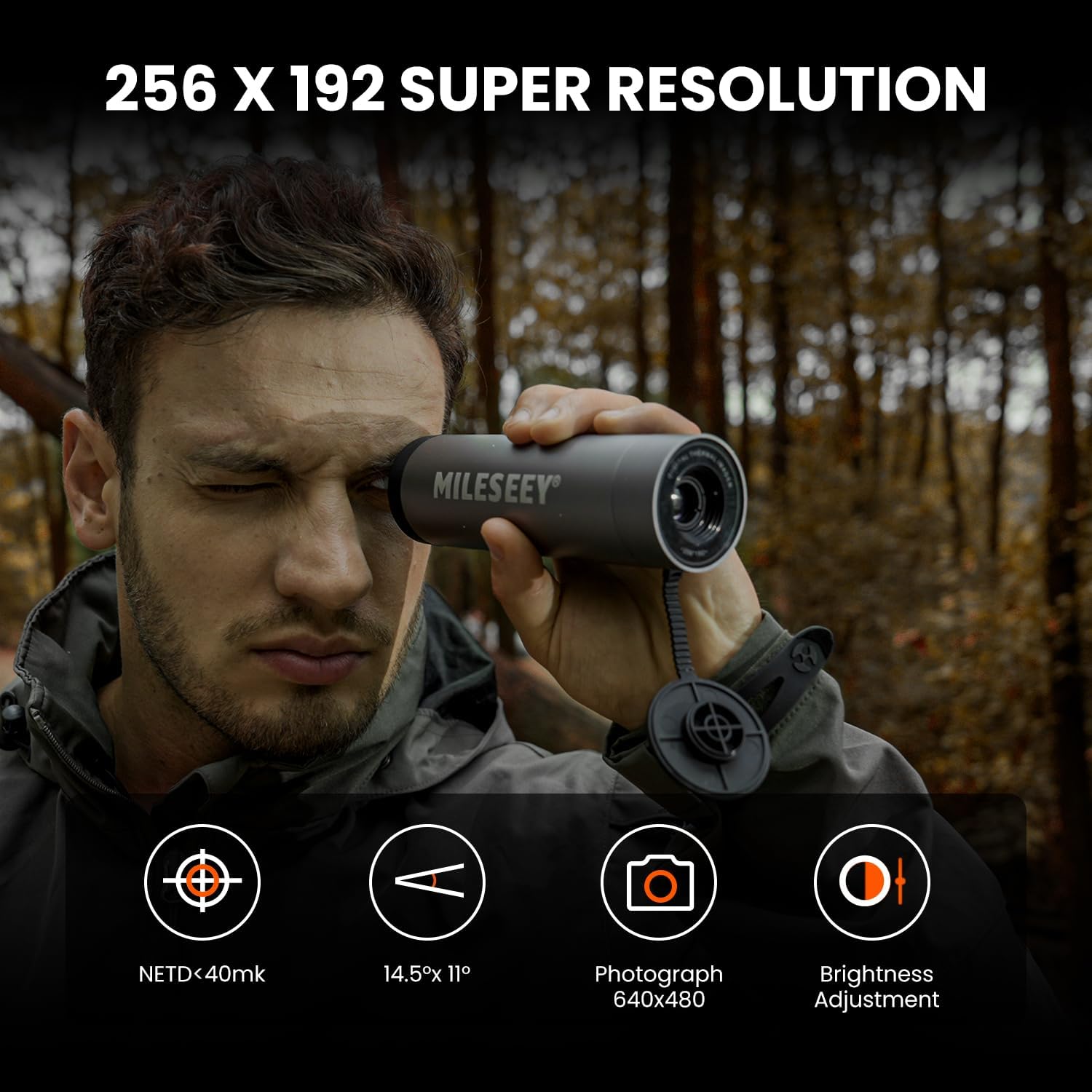
Figure 2: High Resolution Imaging. This image highlights the 256x192 super resolution, NETD, field of view, photograph capability, and brightness adjustment.
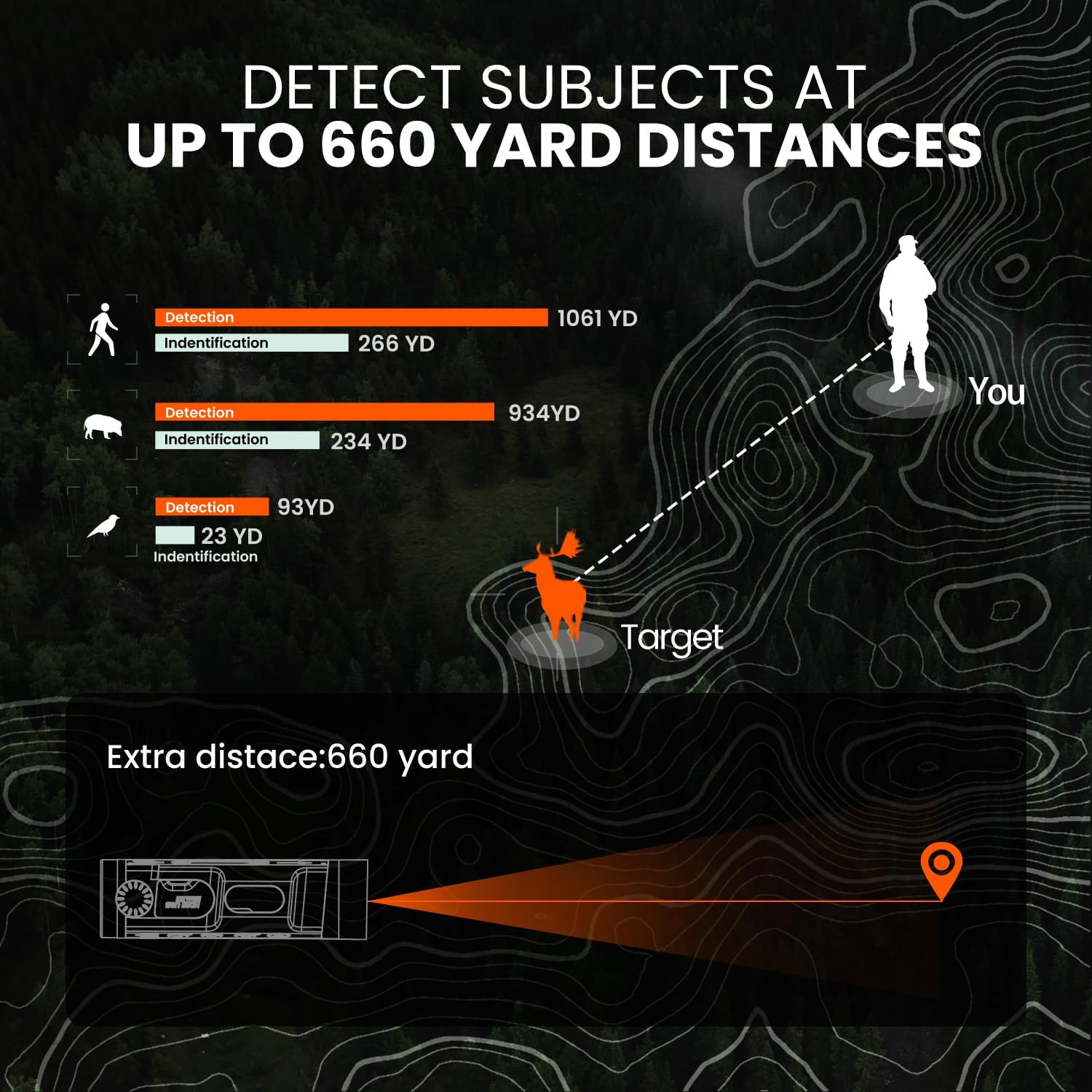
Figure 3: Detection Capabilities. This diagram illustrates the detection and identification distances for various subjects, including humans, wild boars, and birds.
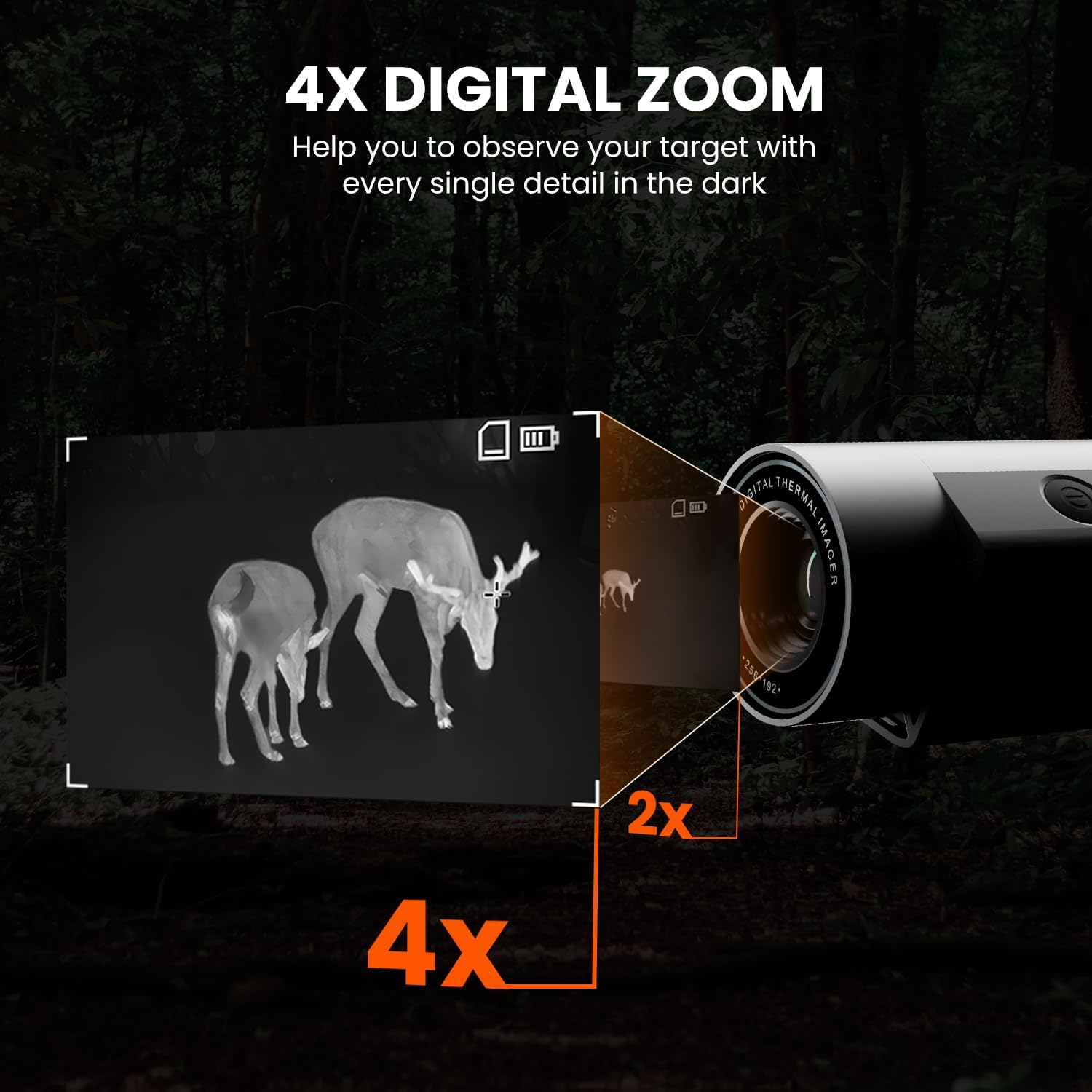
Figure 4: Digital Zoom Functionality. This image demonstrates the 4x digital zoom feature, allowing users to observe targets with enhanced detail in dark environments.

Figure 5: Multiple Color Palettes. This image displays the five available color modes: white-hot, black-hot, green-hot, red-hot, and iron-red, offering diverse viewing options.
3. Package Contents
The standard package for the MiLESEEY T-Recon Scout Thermal Monocular typically includes:
- MiLESEEY T-Recon Scout Thermal Monocular
- USB-C Cable
- User Manual
- Protective Pouch/Case
- Wrist Strap
- Cleaning Cloth
Note: Additional accessories such as an external screen, grip, connecting cables, screws, and screwdriver may be included depending on the specific product variant or bundle purchased. Please refer to your product packaging for a complete and accurate list of contents.
4. Setup
Attaching Optional External Screen (if applicable)
If your package includes an external screen accessory, follow these steps for attachment:
- Locate the mounting points on the side of the thermal monocular.
- Align the external screen attachment bracket with these mounting points.
- Secure the bracket to the monocular using the provided screws and screwdriver. Ensure they are tightened firmly but do not overtighten.
- Attach the external screen to the bracket.
- Connect the monocular to the external screen using the provided HDMI cable. Ensure both ends are securely plugged into their respective ports.
Video 1: External Screen Attachment. This video demonstrates the step-by-step process of attaching an external screen to the thermal monocular, including securing the bracket and connecting the HDMI cable.
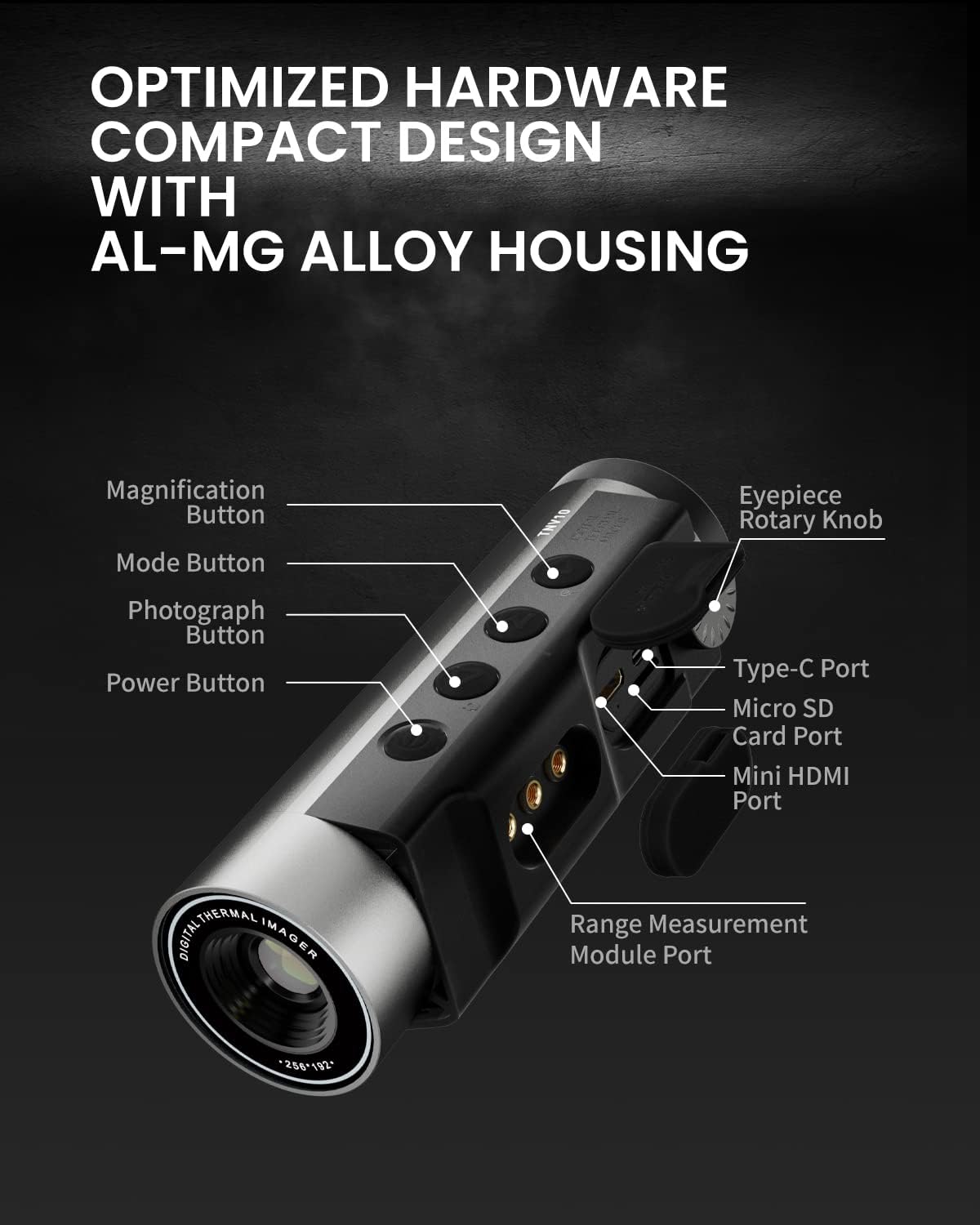
Figure 6: Device Components. This diagram labels the various buttons and ports on the thermal monocular, including the Power Button, Mode Button, Photograph Button, Magnification Button, Eyepiece Rotary Knob, Type-C Port, Micro SD Card Port, Mini HDMI Port, and Range Measurement Module Port.

Figure 7: Expansion Ports. This image illustrates the powerful expansion capabilities of the monocular, showing the USB-C Port for a Laser Rangefinder (LK01) and the Mini HDMI Port for an External Display.
5. Operating Instructions
Basic Operation
- Power On/Off: Press and hold the Power Button (refer to Figure 6) to turn the device on or off.
- Changing Display Modes: Press the Mode Button (refer to Figure 6) to cycle through the 5 available display modes: white hot, black hot, red hot, green hot, and iron oxide hot.
- Digital Zoom: Use the Magnification Button (refer to Figure 6) to adjust the digital zoom level, up to 4x.
- Focus Adjustment: Rotate the Eyepiece Rotary Knob (refer to Figure 6) to achieve a sharp and clear thermal image.
- Taking Photographs: Press the Photograph Button (refer to Figure 6) to capture still images.

Figure 8: Key Features Overview. This graphic summarizes the thermal resolution, digital zoom, detection distance, battery life, color palettes, and functional temperature range of the TNV10 monocular.
6. Maintenance
- Cleaning: Use a soft, lint-free cloth to gently clean the lens and the body of the monocular. Avoid using abrasive materials, solvents, or harsh chemicals, as these can damage the optics or the device's finish.
- Storage: When not in use for extended periods, store the monocular in its protective case in a cool, dry place, away from direct sunlight and extreme temperatures.
- Battery Care: The device features an extended 15-hour battery life. For optimal battery longevity, it is recommended to fully charge the battery before each extended use and avoid frequent complete discharges. If storing for a long time, charge the battery to about 50% every few months.
- Water and Dust Resistance: The monocular has an IP65 waterproof rating, meaning it is protected against dust ingress and low-pressure water jets from any direction. While durable, avoid submerging the device in water.

Figure 9: Extended Battery Life. This image highlights the 15-hour battery runtime and 4500 mAh battery capacity, along with a 30-minute auto power-off feature.

Figure 10: Durability Features. This image visually represents the dustproof and water-resistant capabilities of the monocular, indicating its suitability for various harsh environments.
7. Troubleshooting
| Problem | Possible Cause | Solution |
|---|---|---|
| No image on screen | Device is off or battery is low. External screen not connected properly (if used). | Ensure the device is powered on. Recharge the battery if necessary. Check all cable connections for the external screen. |
| Blurry or unclear image | Improper focus adjustment. Lens is dirty. | Rotate the Eyepiece Rotary Knob to adjust focus. Gently clean the lens with a soft, lint-free cloth. |
| Device not responding to button presses | Temporary software glitch. Battery completely drained. | Perform a soft reset by turning the device off and then on again. Connect to power source and allow battery to charge. |
| Short battery life | Battery not fully charged. Operating in extreme cold. | Ensure the device is fully charged before use. Battery performance can decrease in very cold temperatures; this is normal. |
If you encounter issues not listed here or if the problem persists after attempting the suggested solutions, please contact MiLESEEY customer support for further assistance.
8. Specifications
| Feature | Detail |
|---|---|
| Model Name | TNV10-256x192 |
| Thermal Resolution | 256x192 (25 Hz) |
| Lens | 11mm Germanium |
| Digital Zoom | 4x |
| Display | 720x576 LCOS HD |
| Field of View | 14.5° x 11° |
| Detection Range (6-foot object) | Up to 600 yards |
| Battery Life | Up to 15 hours |
| Color Palettes | 5 (White Hot, Black Hot, Red Hot, Green Hot, Iron Oxide Hot) |
| Housing Material | Aircraft Mg-Al Alloy |
| Waterproof Rating | IP65 |
| Item Weight | 0.6 Kilograms |
| Item Dimensions (LxWxH) | 0.39 x 1.97 x 3.15 inches |
| Date First Available | July 31, 2023 |
9. Warranty and Support
For detailed warranty information, product registration, and technical support, please visit the official MiLESEEY website or contact their customer service department. It is recommended to retain your purchase receipt as proof of purchase for any warranty claims.
You can find more information and contact details on the MiLESEEY Store Page.
Ask a question about this manual
Ask about setup, troubleshooting, compatibility, parts, safety, or missing instructions. Manuals+ will review the question and use this page’s manual context to help answer it.