
Introduction
Thank you for choosing the TWOMEOW KM802-BU Single Serve Coffee Maker. This appliance is designed to provide convenient and versatile coffee brewing, supporting K-cups, ground coffee, and tea, with options for both hot and iced beverages. Please read this manual thoroughly before first use to ensure proper operation and maintenance.
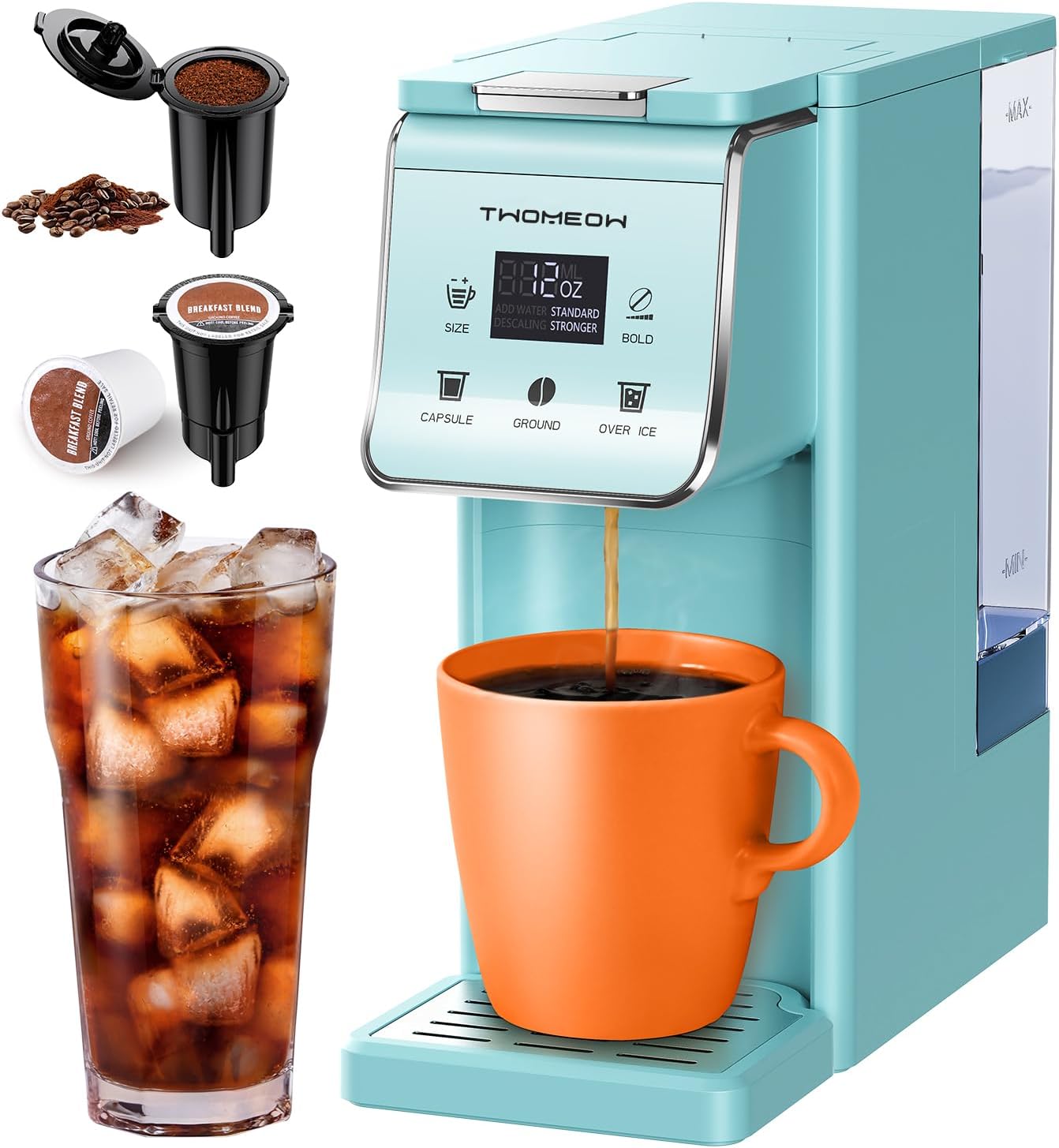
Image: The TWOMEOW KM802-BU coffee maker, showcasing its compatibility with K-cups and ground coffee, and its ability to brew both hot and iced beverages.
Important Safety Instructions
Always follow basic safety precautions when using electrical appliances to reduce the risk of fire, electric shock, and/or injury to persons:
- Read all instructions.
- Do not touch hot surfaces. Use handles or knobs.
- To protect against fire, electric shock, and injury to persons, do not immerse cord, plugs, or appliance in water or other liquid.
- Close supervision is necessary when any appliance is used by or near children.
- Unplug from outlet when not in use and before cleaning. Allow to cool before putting on or taking off parts, and before cleaning the appliance.
- Do not operate any appliance with a damaged cord or plug or after the appliance malfunctions, or has been damaged in any manner. Return appliance to the nearest authorized service facility for examination, repair, or adjustment.
- The use of accessory attachments not recommended by the appliance manufacturer may result in fire, electric shock, or injury to persons.
- Do not use outdoors.
- Do not let cord hang over edge of table or counter, or touch hot surfaces.
- Do not place on or near a hot gas or electric burner, or in a heated oven.
- Always attach plug to appliance first, then plug cord into the wall outlet. To disconnect, turn any control to "off", then remove plug from wall outlet.
- Do not use appliance for other than intended use.
Product Components
Familiarize yourself with the parts of your TWOMEOW KM802-BU coffee maker:
- Main Unit with Control Panel
- 52oz Removable Water Tank
- K-Cup Holder
- Ground Coffee Holder (Reusable Filter)
- Removable Drip Tray
- Power Cord

Image: A detailed view of the 52oz removable water tank, highlighting its capacity and ease of removal for refilling and cleaning.
Setup and First Use
- Unpack: Carefully remove all packaging materials and place the coffee maker on a stable, flat surface.
- Clean: Wash the removable water tank, K-cup holder, ground coffee holder, and drip tray with warm, soapy water. Rinse thoroughly and dry.
- Fill Water Tank: Fill the 52oz removable water tank with fresh, filtered water up to the MAX line. Ensure the tank is securely placed back into the unit.
- Initial Rinse: Before brewing coffee, perform a cleansing cycle.
- Ensure no K-cup or ground coffee is in the holder.
- Place a large mug on the drip tray.
- Select the largest brew size (e.g., 14oz) and press the brew button.
- Discard the hot water. Repeat this process 2-3 times.
- Power Connection: Plug the power cord into a grounded electrical outlet.
Operating Instructions
Brewing Hot Coffee
- Fill Water Tank: Ensure the 52oz water tank contains sufficient water for your desired brew size.
- Insert Coffee:
- For K-cups: Lift the handle, insert a K-cup into the K-cup holder, and close the handle firmly.
- For Ground Coffee/Tea: Lift the handle, place the ground coffee holder (with reusable filter) into the unit, add your desired amount of ground coffee or loose tea, and close the handle firmly.
- Place Mug: Position your coffee mug on the removable drip tray. If using a taller travel mug (up to 6.8 inches), remove the drip tray.

Image: The coffee maker demonstrating the removable drip tray feature, allowing for taller cups or travel mugs up to 6.8 inches in height.
- Select Brew Size: Use the "SIZE" button on the control panel to select your desired brew volume (6oz, 8oz, 10oz, 12oz, or 14oz).

Image: The control panel of the coffee maker, illustrating the selection of brew sizes from 6oz to 14oz.
- Choose Brew Strength (Bold Setting): Press the "BOLD" button to toggle between Standard and Stronger brew options. The Stronger setting enhances flavor for both hot and iced coffee.

Image: A visual comparison of coffee brewed with the Standard setting versus the Stronger (Bold) setting, highlighting the difference in concentration.
- Start Brewing: Press the brew button (often indicated by a coffee cup icon or "START"). The machine will begin brewing.
- Enjoy: Your coffee will be ready in approximately one minute.
Brewing Iced Coffee
For iced coffee, it is recommended to use the "Stronger" (Bold) setting and a smaller brew size (e.g., 6oz or 8oz) to prevent dilution from ice.
- Prepare Ice: Fill your cup with ice cubes.
- Follow Steps 1-3 for Hot Coffee: Ensure water tank is filled and coffee/tea is inserted.
- Select Brew Size: Choose a smaller brew size (e.g., 6oz or 8oz).
- Choose Brew Strength: Select the "Stronger" (Bold) setting.
- Start Brewing: Press the brew button. The coffee will brew directly over the ice.
- Enjoy: Stir and enjoy your iced coffee.

Image: The coffee maker illustrating its capability to brew both hot (high-temp) and iced (lower-temp) beverages, with recommended water volumes.
3-in-1 Compatibility
Your TWOMEOW coffee maker is versatile, accommodating various coffee and tea types:
- K-pods: Use pre-packaged K-cup pods for convenience.
- Ground Coffee: Utilize the included reusable filter for your favorite ground coffee.
- Tea: The reusable filter can also be used for loose leaf tea.

Image: A visual guide to the 3-in-1 compatibility, showing a K-pod, the ground coffee holder with ground coffee, and loose tea, along with their respective holders.
Energy Saving Feature
The coffee maker features an automatic shut-off function. It will power off 5 minutes after the last brew to conserve energy.
Care and Maintenance
Regular cleaning and maintenance will ensure the longevity and optimal performance of your coffee maker.
Daily Cleaning
- Water Tank: Empty any remaining water from the tank after each use. Rinse and refill with fresh water for the next use.
- K-cup/Ground Coffee Holder: Remove and rinse the K-cup holder or ground coffee holder after each brew. These parts are removable and dishwasher safe.
- Drip Tray: Empty and rinse the drip tray as needed. It is also dishwasher safe.
- Exterior: Wipe the exterior of the coffee maker with a damp cloth. Do not use abrasive cleaners or immerse the unit in water.
Descaling
Mineral deposits (scale) can build up in your coffee maker over time, affecting performance and taste. The "DESCALING" indicator light will flash when descaling is recommended.
- Prepare Descaling Solution: Mix 10 oz of white vinegar with 10 oz of water.
- Fill Water Tank: Pour the descaling solution into the water tank.
- Run Descaling Cycle: Place a large mug on the drip tray. Run a brew cycle without any coffee. Repeat this process until the water tank is empty.
- Rinse Cycles: Fill the water tank with fresh water and run 2-3 full brew cycles to rinse out any remaining vinegar solution.
- Clean Components: Wash the water tank, K-cup/ground coffee holder, and drip tray thoroughly.

Image: The coffee maker's control panel displaying the flashing "DESCALING" indicator light, signaling that a descaling cycle is required.
Troubleshooting Guide
If you encounter issues with your coffee maker, refer to the following table for common problems and solutions:
| Problem | Possible Cause | Solution |
|---|---|---|
| Coffee maker does not turn on. | Not plugged in; power outlet issue; auto-off engaged. | Ensure the power cord is securely plugged into a working outlet. Press the power button. |
| Coffee does not brew or brews slowly. | Insufficient water in tank; K-cup/filter clogged; machine needs descaling. | Fill water tank to appropriate level. Check K-cup or clean reusable filter. Perform descaling if the indicator light is flashing. |
| Coffee tastes weak. | Incorrect brew size for coffee amount; no "Bold" setting selected; machine needs descaling. | Select a smaller brew size or use the "Stronger" (Bold) setting. Ensure proper coffee-to-water ratio for ground coffee. Descale the machine. |
| Water leaks from the machine. | Water tank not seated correctly; drip tray overflowing; K-cup not properly punctured. | Ensure the water tank is firmly in place. Empty the drip tray. Check K-cup for proper placement and puncture. |
| "DESCALING" light is flashing. | Mineral buildup in the machine. | Perform a descaling cycle as described in the Maintenance section. |
Product Specifications
| Feature | Detail |
|---|---|
| Brand | TWOMEOW |
| Model Name | KM802-BU |
| Color | Blue |
| Product Dimensions | 1"D x 1"W x 1"H |
| Special Features | 3-in-1 Compatibility (K-pods, Ground Coffee, Tea), Removable 52oz Water Tank, Bold Setting, Auto-off |
| Coffee Maker Type | Single-Serve Drip Coffee Machine |
| Specific Uses | Hot and Iced Coffee |
| Included Components | Capsule holder, Pod holder (Reusable Filter) |
| Operation Mode | Fully Automatic |
| Voltage | 120 Volts |
| Brew Sizes | 6oz, 8oz, 10oz, 12oz, 14oz |
| Item Weight | 3.3 pounds |
Warranty and Support
For warranty information or technical support regarding your TWOMEOW KM802-BU Single Serve Coffee Maker, please refer to the warranty card included with your purchase or contact TWOMEOW customer service directly. Contact details can typically be found on the manufacturer's official website or on the product packaging.
Please retain your proof of purchase for any warranty claims.