1. Introduction
Thank you for choosing the Lifelong Eden Primiera Digital Coffee Machine. This appliance is designed to provide a versatile coffee experience, allowing you to prepare a variety of beverages including Espresso, Americano, Cold Brew, Latte, and Cappuccino with ease. Please read this manual thoroughly before first use to ensure safe operation and optimal performance.
2. Important Safety Instructions
When using electrical appliances, basic safety precautions should always be followed to reduce the risk of fire, electric shock, and injury to persons. Read all instructions.
- Do not touch hot surfaces. Use handles or knobs.
- To protect against fire, electric shock, and injury to persons, do not immerse cord, plugs, or appliance in water or other liquid.
- Close supervision is necessary when any appliance is used by or near children.
- Unplug from outlet when not in use and before cleaning. Allow to cool before putting on or taking off parts, and before cleaning the appliance.
- Do not operate any appliance with a damaged cord or plug or after the appliance malfunctions, or has been damaged in any manner.
- The use of accessory attachments not recommended by the appliance manufacturer may result in fire, electric shock, or injury to persons.
- Do not use outdoors.
- Do not let cord hang over edge of table or counter, or touch hot surfaces.
- Do not place on or near a hot gas or electric burner, or in a heated oven.
- Always attach plug to appliance first, then plug cord into the wall outlet. To disconnect, turn any control to “off”, then remove plug from wall outlet.
- Do not use appliance for other than intended use.
- Scalding may occur if the water tank lid is removed during the brewing cycle.
3. Product Components
The Lifelong Eden Primiera Digital Coffee Machine comes with the following components:
- 1 N Coffee Maker Machine (Main Unit)
- 1 N Portafilter
- 1 N Tamper & Spoon Combination Tool
- Built-in Milk Tank
- Detachable Drip Tray
- Removable Water Tank (1.2L capacity)

Image: The main unit of the Lifelong Eden Primiera Digital Coffee Machine, showcasing its stainless steel finish and touchscreen display.

Image: The coffee machine in operation, highlighting the 5-in-1 coffee options available on the digital display.
4. Setup
- Unpacking: Carefully remove all packaging materials. Ensure all components listed in Section 3 are present.
- Initial Cleaning: Before first use, wash the water tank, milk tank, portafilter, and drip tray with warm, soapy water. Rinse thoroughly and dry. Wipe the exterior of the machine with a damp cloth.
- Positioning: Place the coffee machine on a stable, flat, heat-resistant surface, away from water sources and heat. Ensure adequate ventilation around the unit.
- Fill Water Tank: Remove the 1.2L water tank from the back of the machine. Fill it with fresh, cold water up to the MAX level indicator. Reinsert the water tank securely.
- Attach Milk Tank: If preparing milk-based beverages, fill the built-in milk tank with desired milk. Attach it to the designated slot on the machine.
- Power Connection: Plug the power cord into a grounded electrical outlet.
- First Use / Priming:
- Turn on the machine using the power button on the touchscreen.
- Allow the machine to heat up (indicator light will change).
- Run a cycle without coffee or milk to flush the system. Place a cup under the coffee spout and select a single espresso cycle. Repeat for the milk frother by selecting a milk frothing cycle with water in the milk tank.

Image: Illustration of the detachable drip tray and the removable 1-liter milk tank, demonstrating ease of cleaning and refilling.
5. Operating Instructions
The Lifelong Eden Primiera features a digital touchscreen for intuitive operation.

Image: A close-up view of the digital touchscreen display, showing various coffee selection icons.
5.1 Preparing Espresso
- Ensure the water tank is filled.
- Add ground coffee to the portafilter. Use the tamper to press the coffee evenly.
- Insert the portafilter into the brewing head and lock it into place. The lock-unlock indicator ensures proper assembly.
- Place a cup under the portafilter spouts.
- On the touchscreen, select either Single Espresso or Double Espresso. The machine will automatically brew.

Image: Demonstrates the simple locking mechanism for the portafilter and the process of espresso extraction into a cup.
5.2 Preparing Milk-Based Beverages (Latte, Cappuccino)
- Fill the built-in milk tank with cold milk.
- Prepare your espresso shot as described in Section 5.1, brewing it directly into your serving cup.
- Position your cup under the milk frothing spout.
- On the touchscreen, select Latte or Cappuccino. The machine will automatically froth and dispense milk into your cup.

Image: The built-in automatic milk frother dispensing frothed milk into a cup, illustrating its integrated design.
5.3 Other Coffee Modes
- Americano: Brew an espresso shot, then select the Americano option for hot water to be added.
- Espresso Cool (Cold Brew): This mode prepares a cold coffee concentrate. Follow the on-screen instructions after selecting this option.
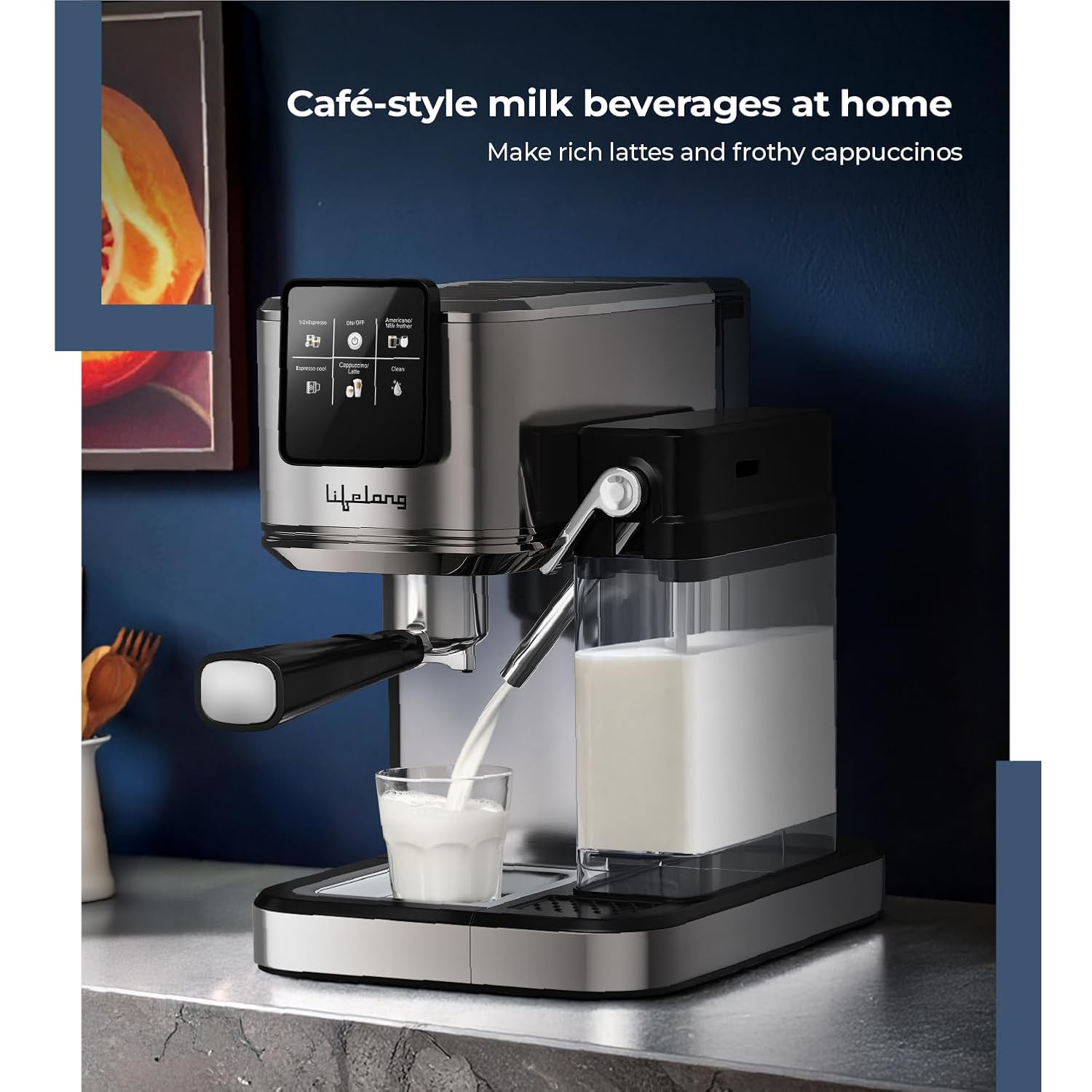
Image: The coffee machine dispensing milk into a glass, demonstrating its capability to create café-style milk beverages.
6. Maintenance
Regular cleaning and maintenance ensure the longevity and optimal performance of your coffee machine.
6.1 Daily Cleaning
- Drip Tray: Empty and clean the detachable drip tray after each use or when the indicator shows it is full.
- Portafilter: Remove spent coffee grounds and rinse the portafilter under running water.
- Milk Tank: After each use, empty any remaining milk and rinse the milk tank and frothing spout thoroughly. The machine has a dedicated 'Clean' function on the touchscreen for the milk system.
- Exterior: Wipe the exterior of the machine with a soft, damp cloth. Do not use abrasive cleaners or scourers.
6.2 Descaling
Over time, mineral deposits (limescale) can build up in the machine, affecting performance. Descale your machine every 2-3 months, or more frequently if you have hard water.
- Empty the water tank and fill it with a descaling solution mixed according to the manufacturer's instructions, or a solution of white vinegar and water (1:1 ratio).
- Place a large container under the coffee spout and milk frothing spout.
- Run several brewing cycles without coffee until the water tank is empty.
- Rinse the water tank thoroughly and fill it with fresh water.
- Run several cycles with fresh water to flush out any remaining descaling solution.
7. Troubleshooting
| Problem | Possible Cause | Solution |
|---|---|---|
| No coffee dispenses | Water tank empty; machine not primed; clogged portafilter. | Fill water tank; perform priming cycle; clean portafilter. |
| Coffee is too weak | Insufficient coffee grounds; coarse grind; machine needs descaling. | Increase coffee amount; use finer grind; descale machine. |
| Milk not frothing properly | Milk tank empty; frothing spout clogged; milk not cold enough. | Fill milk tank; clean frothing spout; use cold milk. |
| Machine leaks water | Water tank not seated correctly; drip tray full; internal seal issue. | Ensure water tank is secure; empty drip tray; contact customer support if issue persists. |
| Touchscreen unresponsive | Temporary software glitch; power issue. | Unplug the machine for 30 seconds, then plug back in and restart. |
8. Specifications
| Feature | Detail |
|---|---|
| Brand | Lifelong |
| Model Number | LLCMK921 |
| Power Source | AC adapter |
| Wattage | 1350W (Implied from product title, not explicitly in specs but common for such machines) |
| Pressure Pump | 20 Bar |
| Water Tank Capacity | 1.2 Liters |
| Milk Tank Capacity | 1 Liter (from image description) |
| Product Dimensions (D x W x H) | 32D x 21.5W x 31.5H Centimeters |
| Item Weight | 3.68 kg |
| Material | Stainless Steel |
| Special Features | Digital Touchscreen, Built-in Milk Tank, 5 Smart Coffee Modes, 20-Bar High Pressure Pump |
| Coffee Input Type | Ground Coffee, Coffee Pods |

Image: Visual representation of the coffee machine's dimensions: 32 cm (depth), 21.5 cm (width), and 31.7 cm (height).
9. Warranty and Support
Your Lifelong Eden Primiera Digital Coffee Machine is covered by a manufacturer's warranty. Please refer to the warranty card included with your product for specific terms and conditions.
For technical support, service, or warranty claims, please contact Lifelong customer care:
- Telephone: +91 9711558877
- Email: customercare@lifelongonline.com
- Address: 5th Floor, Unit No. 508, DLF South Court, Saket District Center, Saket New Delhi, India - 110017
Please have your model number (LLCMK921) and purchase details ready when contacting support.


