
1. Introduction
Thank you for choosing the MINISO MS201 AI Translation Earbuds. These earbuds are designed to facilitate real-time communication across 135 languages, making them ideal for travel, business, and learning. This manual provides detailed instructions on how to set up, operate, and maintain your device to ensure optimal performance.

Image 1.1: The MINISO MS201 AI Translation Earbuds and their charging case, featuring an LCD touchscreen.
2. What's in the Box
Please check the contents of your package. If any items are missing or damaged, contact customer support.
- Open Ear Earbuds x 1 pair
- Charging Case x 1
- User Manual x 1
- Type-C Charging Cable x 1

Image 2.1: Illustration of the package contents, including earbuds, charging case, user manual, and Type-C charging cable.
3. Setup
3.1 Charging the Device
Before first use, fully charge the earbuds and the charging case. Use the provided Type-C charging cable.
- Connect the Type-C cable to the charging port on the case and a power source.
- The LCD screen on the case will indicate charging status.
- A full charge provides up to 6 hours of continuous use for the earbuds, extendable to 60 hours with the charging case.

Image 3.1: The earbuds and charging case being charged via a Type-C cable, highlighting the 6-hour single charge and 60-hour total playtime.
3.2 App Installation and Pairing
The translation function requires the 'SayMi' application. No subscription is needed.
- Download the App: Scan the QR code in the user manual (or search 'SayMi' in your device's app store) to download the application.
- Enable Bluetooth: Turn on Bluetooth on your mobile phone.
- Connect Earbuds: Open the SayMi app. On the homepage, click "Connect" and select the MS201 headset from the available devices.
- Start Translation: Once connected, you can choose your desired translation mode within the app.
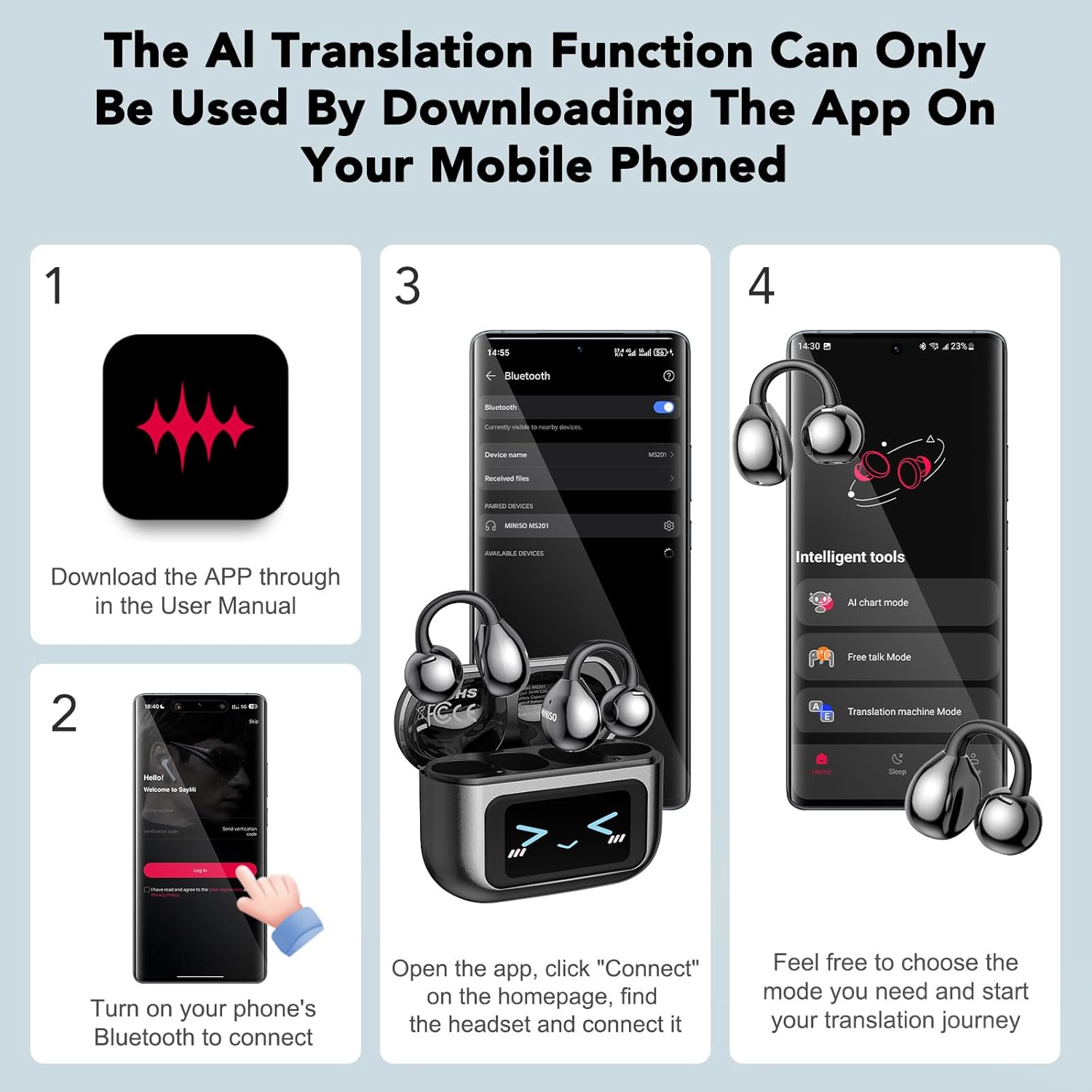
Image 3.2: A visual guide demonstrating the four steps to download the SayMi app, enable Bluetooth, connect the earbuds, and select a translation mode.
4. Operating Instructions
The MINISO MS201 offers multiple translation modes and features for diverse communication needs.
4.1 Translation Modes
The earbuds support 5 distinct translation modes, accessible via the SayMi app:
- AI Dialogue Mode: For real-time voice dialogue where the app responds through voice.
- Free Talk Mode: Automatically recognizes, segments, and translates sentences.
- Translation Machine Mode: Functions as a dedicated translation device.
- Headphones+Phone Mode: One person wears the headphones, and the translated language is played through the mobile phone for the other party.
- Photo Translation: Recognizes text from images and translates it.

Image 4.1: Visual representation of the AI Dialogue, Free Talk, Translation Machine, Headphones+Phone, and Photo Translation modes in use.
4.2 Specific Mode Usage
AI Dialogue Mode
Engage in conversational translation. Click the button in the app to speak, and SayMi will provide a voice response.

Image 4.2: A person using the AI Dialogue Mode on their phone, with the earbuds visible, demonstrating real-time conversational translation.
Headphones+Phone Mode (Face-to-Face Translation)
For direct conversations, one person wears an earbud, and the translated speech is played through the phone's speaker for the other person.

Image 4.3: Two individuals engaged in a conversation, with one wearing an earbud, illustrating the Headphones+Phone mode for two-way translation.
Photo Translation
Translate text from images. This mode supports both real-time photo translation and importing existing photos for translation.

Image 4.4: Examples of users utilizing the photo translation feature, capturing text from signs and documents for instant translation.
Voice Note Mode
Transcribe voices in real-time. Click the 'Recording' button, select the recording language, and confirm to start recording.

Image 4.5: A person using the Voice Note Mode on the SayMi app, showing the recording interface and transcription feature.
4.3 LCD Full-Color Touchscreen
The charging case features an LCD touchscreen for direct control over various functions without needing your phone.
- Music Playback: Control play/pause, skip tracks.
- Volume Adjustment: Modify audio levels.
- AI Assistant Activation: Access your phone's AI assistant.
- Equalizer Modes: Select from 5 professional EQ modes (Pop, Jazz, Rock, Classical, Country) for music listening.

Image 4.6: The LCD touchscreen on the charging case showing different interface options for music control, settings, and equalizer modes.
4.4 Call Management
The earbuds incorporate C-shaped dual-flow wind noise reduction technology for clear calls, regardless of which earbud is worn.
5. Maintenance
Proper maintenance ensures the longevity and performance of your MINISO MS201 earbuds.
- Cleaning: Use a soft, dry cloth to clean the earbuds and charging case. Avoid using liquids or abrasive cleaners.
- Storage: Store the earbuds in their charging case when not in use to protect them from dust and damage. Keep the device in a cool, dry place, away from direct sunlight and extreme temperatures.
- Battery Care: To preserve battery life, avoid fully discharging the device frequently. Charge regularly, even if not in constant use.
6. Troubleshooting
If you encounter issues with your MINISO MS201 earbuds, refer to the following common problems and solutions:
| Problem | Possible Solution |
|---|---|
| Earbuds not pairing with phone/app |
|
| Translation accuracy issues |
|
| No sound from earbuds |
|
| Charging case LCD not responding |
|
If the problem persists, please contact MINISO customer support for further assistance.
7. Specifications
| Feature | Detail |
|---|---|
| Model Number | MS201 |
| Translation Languages | 135 languages (via SayMi App) |
| Bluetooth Version | V6.0 |
| Earbud Battery Life | Up to 6 hours (single charge) |
| Total Playtime (with case) | Up to 60 hours |
| Charging Port | Type-C |
| Earbud Weight | 4.1g (per earbud) |
| Special Features | LCD Full-Color Touchscreen, C-shaped dual-flow wind noise reduction |
8. Warranty and Support
MINISO products are manufactured to high-quality standards. For warranty information, please refer to the warranty card included in your product packaging or visit the official MINISO website. If you have any issues or require technical support, please contact MINISO customer service. Remember, the translation feature requires the SayMi App, and no subscription is needed for its use.