
Lamicall VHEP03-EU-B
Lamicall Electric Air Pump (Model VHEP03-EU-B) User Manual
Model: VHEP03-EU-B | Brand: Lamicall
1. Introduction
This manual provides detailed instructions for the safe and efficient use of your Lamicall Electric Air Pump. Please read this manual thoroughly before operating the device and retain it for future reference. This portable air pump is designed for inflating tires on cars, motorcycles, bicycles, and various sports balls, featuring a digital display, automatic shut-off, and an integrated LED light.
2. Safety Information
Always observe the following safety precautions to prevent injury or damage to the device:
- Do not leave the air pump unattended during operation.
- Keep out of reach of children.
- Avoid prolonged continuous operation to prevent overheating. Allow the device to cool down if it becomes excessively warm.
- Ensure the correct pressure setting for the item being inflated to prevent over-inflation and potential bursting.
- Do not expose the device to rain or moisture.
- Use only the provided accessories and charging cable.
3. Product Components
The Lamicall Electric Air Pump package includes the following items:
- 1x Lamicall Electric Air Pump
- 1x Inflation Hose (threaded, 30 cm)
- 1x Presta Valve Adapter
- 1x Ball Needle
- 1x USB-C Charging Cable
- 1x Storage Bag
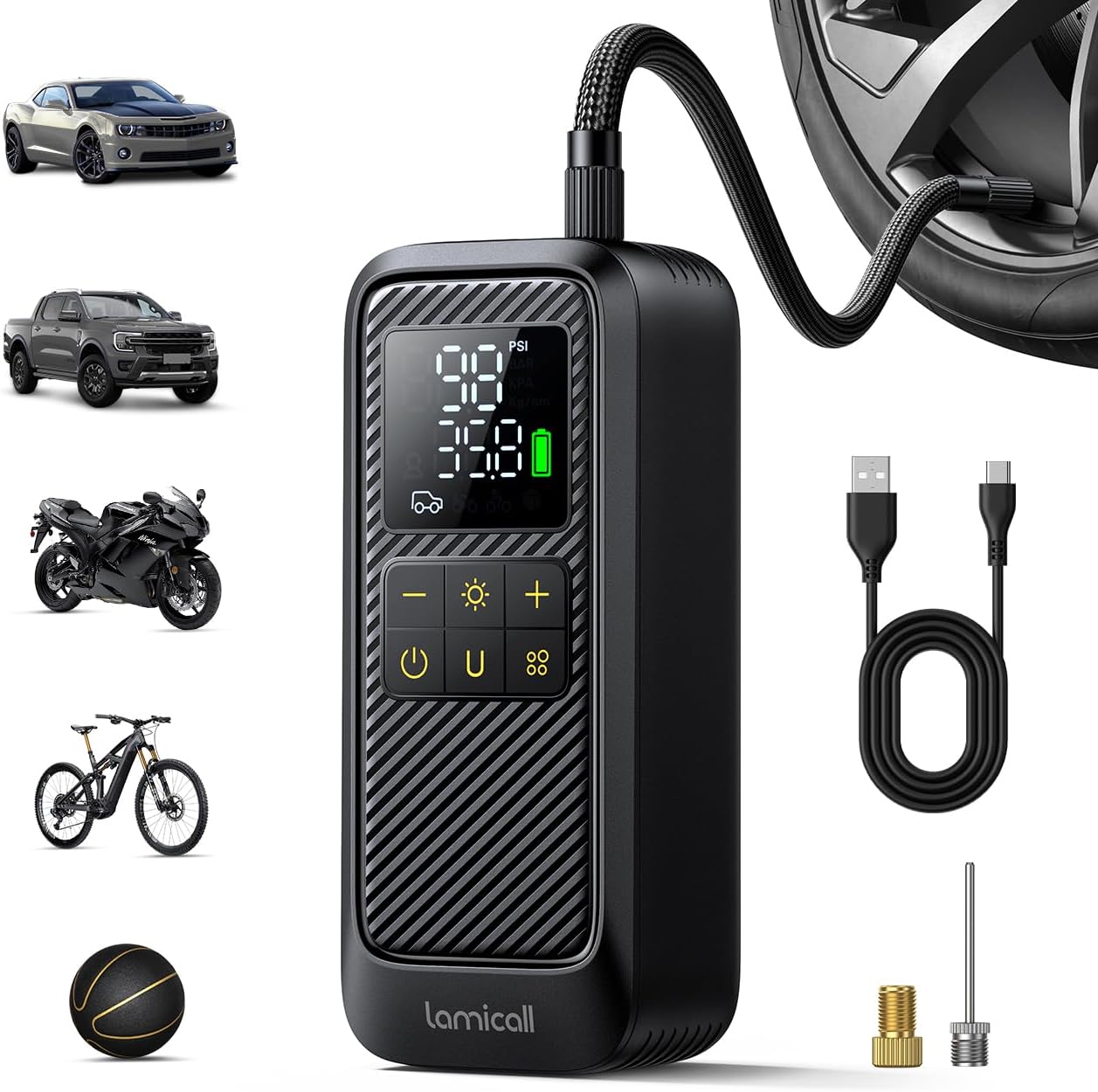
Image 3.1: The Lamicall Electric Air Pump shown with its included accessories, including the inflation hose, various adapters, and charging cable.
4. Setup
4.1 Initial Charging
Before first use, fully charge the air pump. Connect the provided USB-C charging cable to the pump's USB-C input port and a compatible 5V/2A USB power adapter (not included). The digital display will indicate charging status. A full charge allows for approximately 25 minutes of continuous operation.
4.2 Attaching the Inflation Hose
Screw the threaded inflation hose securely onto the air pump's output port. The hose features a 360° rotary valve for easy connection at various angles.
5. Operating Instructions
5.1 Power On/Off
Press and hold the power button (U) to turn the device on or off.
5.2 Mode Selection
Press the function button (often labeled with a symbol like a car or mode icon) to cycle through the five preset inflation modes:
- Car Mode: For automobile tires.
- Motorcycle Mode: For motorcycle tires.
- Bicycle Mode: For bicycle tires.
- Ball Mode: For sports balls.
- Custom Mode: Allows manual pressure setting.

Image 5.1: The digital LED display of the air pump, illustrating the various inflation modes and pressure units available for selection.
5.3 Unit Selection
Press the 'U' button to switch between four pressure units: PSI, BAR, KPA, and KG/CM².
5.4 Setting Target Pressure
Once a mode is selected, use the '+' and '-' buttons to adjust the desired target pressure. The device features a memory function, retaining the last set pressure for each mode.
5.5 Inflation Process
- Connect the inflation hose to the valve of the item you wish to inflate. Ensure a secure connection.
- The digital display will show the current pressure.
- Select the appropriate mode and set the target pressure.
- Press the power button to start inflation. The pump will automatically stop once the target pressure is reached.
- Disconnect the hose from the valve.

Image 5.2: Illustration of the air pump's real-time pressure detection and automatic shut-off feature, ensuring safe and accurate inflation.
5.6 Emergency LED Light
The top of the air pump is equipped with an LED light. Press the light button (often symbolized by a light bulb) to cycle through three modes:
- Normal Lighting: For general illumination.
- Flashing Light: For signaling or increased visibility.
- SOS Mode: Emits an SOS signal for emergency situations.

Image 5.3: The air pump's integrated LED light functioning as an emergency flashlight, providing illumination in dark environments.
5.7 Power Bank Function
The air pump can also function as a power bank. Connect your device to the USB-A output port (5V/2A) to charge it.
6. Maintenance
- Cleaning: Wipe the exterior of the pump with a soft, dry cloth. Do not use harsh chemicals or abrasive cleaners.
- Storage: Store the pump and its accessories in the provided storage bag in a cool, dry place, away from direct sunlight and extreme temperatures.
- Battery Care: To prolong battery life, charge the device regularly, even if not in frequent use. Avoid fully discharging the battery for extended periods.
7. Troubleshooting
If you encounter issues with your Lamicall Electric Air Pump, refer to the following common problems and solutions:
| Problem | Possible Cause | Solution |
|---|---|---|
| Pump does not turn on | Low battery or no charge | Charge the pump fully using the USB-C cable. |
| Pump inflates slowly or not at all | Hose not securely connected; incorrect adapter; blockage in hose/nozzle | Ensure hose is tightly screwed on. Check that the correct adapter is used and securely attached. Inspect hose and nozzle for obstructions. |
| Inaccurate pressure reading | Loose connection; sensor issue | Ensure the hose is firmly connected to the valve. If the issue persists, contact customer support. |
| Pump overheats and shuts off | Prolonged continuous use | Allow the pump to cool down for at least 15-20 minutes before resuming operation. |
8. Specifications
| Feature | Specification |
|---|---|
| Model Number | VHEP03-EU-B |
| Dimensions (L x W x H) | 160 x 46 x 68 mm |
| Weight | 452 Grams |
| Maximum Pressure | 150 PSI |
| Airflow Rate | 20 L/min |
| Battery Capacity | 4000 mAh |
| Continuous Operation Time | Up to 25 minutes (on full charge) |
| Charging Input | USB-C 5V/2A |
| Power Bank Output | USB-A 5V/2A |
| Pressure Detection Accuracy | ±0.1 PSI |
| LED Light Modes | Normal, Flashing, SOS |
| Special Features | 5x Faster Inflation, Automatic Shut-off, Digital Display, Power Bank Function, Emergency Light |
9. Warranty and Support
Warranty information for the Lamicall Electric Air Pump is not detailed within this manual. For specific warranty terms, conditions, or to inquire about spare parts availability, please refer to the product packaging or contact Lamicall customer support directly through their official website or the retailer where the product was purchased.
For technical assistance or further questions, please visit the Lamicall support page or contact their customer service team.
Ask a question about this manual
Ask about setup, troubleshooting, compatibility, parts, safety, or missing instructions. Manuals+ will review the question and use this page’s manual context to help answer it.