1. Product Overview
The PLDIAGBP RP5-VW-001 Canbus Box and 16-Pin Harness is designed to integrate aftermarket Android car radio multimedia systems with compatible Volkswagen vehicles. This system provides essential power, ground, and data communication (CAN bus) connections, enabling features such as steering wheel control integration, ignition sensing, and reverse gear detection for the new head unit.
Key Features:
- Compact and Lightweight Design: Optimized wiring layout for reduced volume and weight, improving space utilization.
- Strong Insulation: High-quality PVC and rubber insulation prevent leakage and short-circuit risks.
- Stable Signal Transmission: Shielded design ensures anti-interference ability for reliable data transfer.
- Bending Fatigue Resistance: Reinforced braided layers and flexible materials for durability in areas subject to bending.
2. Safety Information
Read all instructions carefully before installation. Improper installation can lead to damage to the product, vehicle electronics, or personal injury. Professional installation is recommended.
- Disconnect the vehicle's battery before beginning any electrical work.
- Ensure all connections are secure and properly insulated to prevent short circuits.
- Do not modify the wiring harness or Canbus box.
- Consult your vehicle's service manual for specific wiring diagrams if needed.
3. Package Contents
Verify that all components are present before proceeding with installation.
- RP5-VW-001 Canbus Box
- 16-Pin Power Harness with Vehicle-Specific Connector
- RCA Audio/Video Cables (if applicable)
- Antenna Adapter (if applicable)

Figure 1: Overview of the PLDIAGBP RP5-VW-001 Canbus Box and associated wiring harness. This image displays the main Canbus box, the multi-pin power harness with various colored wires, RCA connectors (red and white), and an antenna adapter cable, illustrating the complete set of components included.
4. Setup and Installation
This section outlines the general steps for installing the Canbus box and harness. Specific vehicle disassembly instructions are not included and should be referenced from your vehicle's service manual or an automotive professional.
- Prepare the Vehicle:
- Park the vehicle on a level surface and engage the parking brake.
- Turn off the ignition and remove the key.
- Disconnect the negative terminal of the vehicle's battery to prevent electrical shorts.
- Remove Existing Head Unit:
- Carefully remove the trim panels surrounding the factory radio.
- Unscrew and remove the factory radio from the dashboard.
- Disconnect all existing wiring harnesses and antenna cables from the factory radio.
- Connect the Canbus Harness:
- Connect the vehicle-specific connector of the 16-pin power harness to the corresponding port in your vehicle's dashboard wiring.
- Connect the other end of the 16-pin power harness to the PLDIAGBP RP5-VW-001 Canbus Box.
- Connect the output side of the Canbus box harness to the 16-pin power input of your new Android car radio multimedia system.
- Connect Additional Cables:
- Connect any RCA audio/video cables from the harness to the corresponding inputs/outputs on your Android head unit.
- Attach the antenna adapter cable to the vehicle's antenna lead and then to the antenna input on the Android head unit.
- Ensure all other necessary connections (e.g., USB, GPS antenna, microphone) for your Android head unit are made according to its specific instructions.
- Test Connections:
- Before fully reassembling, temporarily reconnect the vehicle's battery.
- Turn on the ignition and power on the Android head unit.
- Verify that the head unit powers on, audio functions, steering wheel controls (if applicable) respond, and other integrated features work correctly.
- Reassemble:
- Once all functions are verified, disconnect the battery again.
- Securely mount the Android head unit and carefully tuck away all wiring, ensuring no wires are pinched.
- Reinstall the trim panels and reconnect the battery.
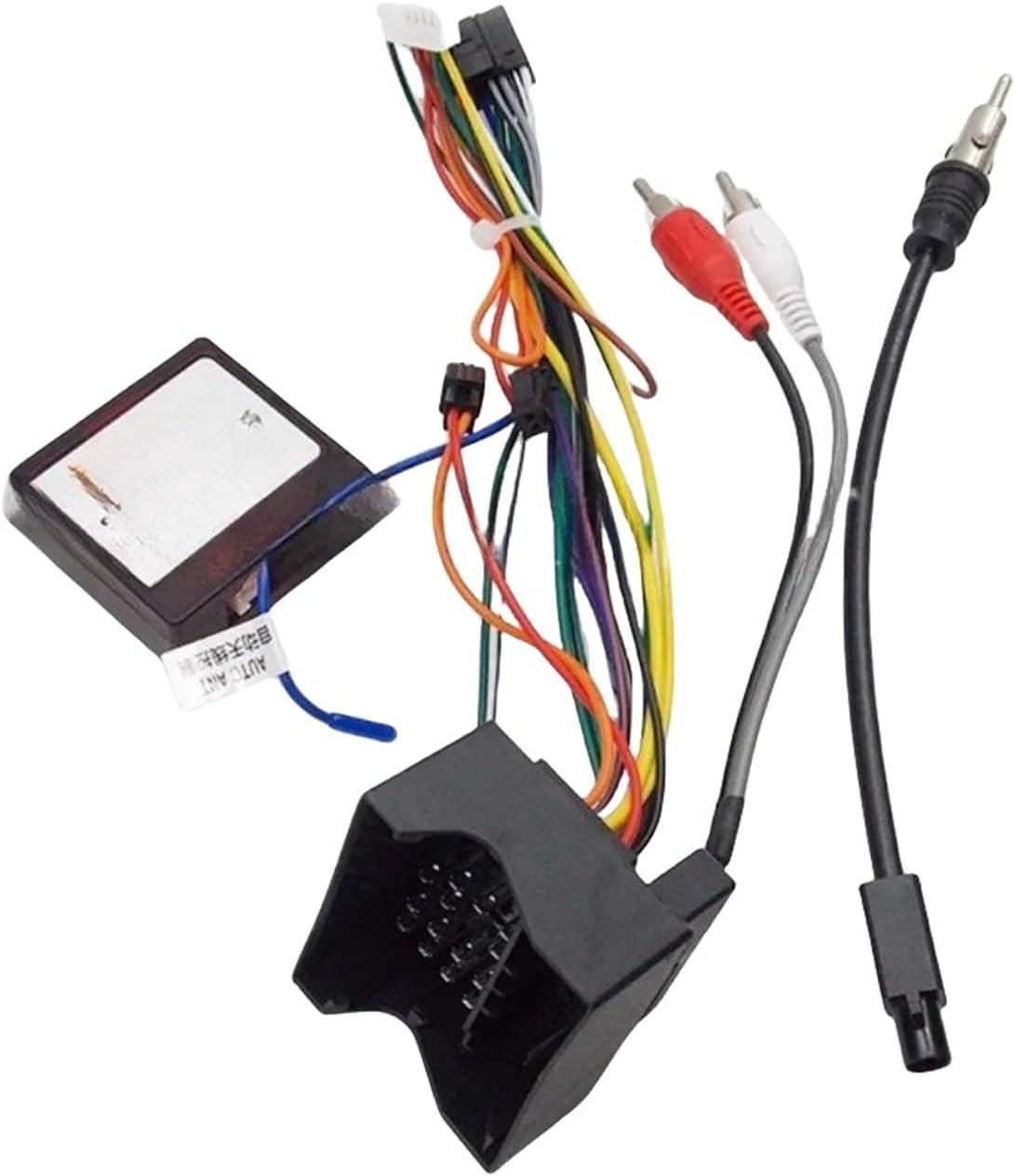
Figure 2: Close-up view of the PLDIAGBP RP5-VW-001 Canbus Box with the main 16-pin harness connected. This image highlights the primary connection point for the vehicle's wiring and the interface with the Canbus module, showing the compact design and integrated wiring.
5. Operating Instructions
The PLDIAGBP RP5-VW-001 Canbus Box operates automatically once correctly installed. It translates vehicle data (e.g., ignition status, speed pulse, reverse signal, steering wheel controls) into a format compatible with your Android car radio multimedia system.
- Power On/Off: The Android head unit will power on and off with the vehicle's ignition.
- Steering Wheel Controls: If your Android head unit supports CAN bus steering wheel control integration, the Canbus box will enable these functions. Configuration may be required within the Android head unit's settings.
- Reverse Gear Detection: The Canbus box provides a reverse signal to the Android head unit, typically used for automatic camera display.
6. Maintenance
The PLDIAGBP RP5-VW-001 Canbus Box and harness are designed for maintenance-free operation. No user-serviceable parts are inside the Canbus box.
- Keep the connections clean and free from moisture.
- Ensure the harness is not exposed to excessive heat or sharp edges that could damage the insulation.
- Avoid pulling or straining the wires.
7. Troubleshooting
If you encounter issues after installation, refer to the following common troubleshooting steps:
| Problem | Possible Cause | Solution |
|---|---|---|
| Android head unit does not power on. |
|
|
| Steering wheel controls do not work. |
|
|
| No reverse camera signal. |
|
|
If problems persist, contact customer support or consult a qualified automotive electronics technician.
8. Specifications
- Model: RP5-VW-001
- Compatibility: VW Golf 5/6, Polo, Passat, Jetta, Tiguan (for Android Car Radio Multimedia systems)
- Connector Type: 16-Pin Harness
- Function: CAN Bus data interpretation, power supply, accessory signal provision
- Material: PVC, Rubber, Electronic Components
- Item Weight: Approximately 50 g
- Dimensions: (Refer to product images for visual scale, specific dimensions not provided)
9. Warranty and Support
For warranty information and technical support, please refer to the retailer or manufacturer's official website. Keep your purchase receipt as proof of purchase.
Manufacturer: PLDIAGBP
Model: RP5-VW-001
Contact: Refer to your point of purchase for customer service contact details.


