
1. Introduction
Thank you for choosing the Lgnitek S1 Smartwatch. This manual provides essential information for setting up, operating, and maintaining your device. Please read it carefully to ensure optimal performance and longevity of your smartwatch. The Lgnitek S1 features a 1.43-inch AMOLED display, Bluetooth calling, over 120 sports modes, and comprehensive health monitoring capabilities.
2. Package Contents
- Lgnitek S1 Smartwatch (with strap)
- Charging Cable
- User Manual
3. Device Overview
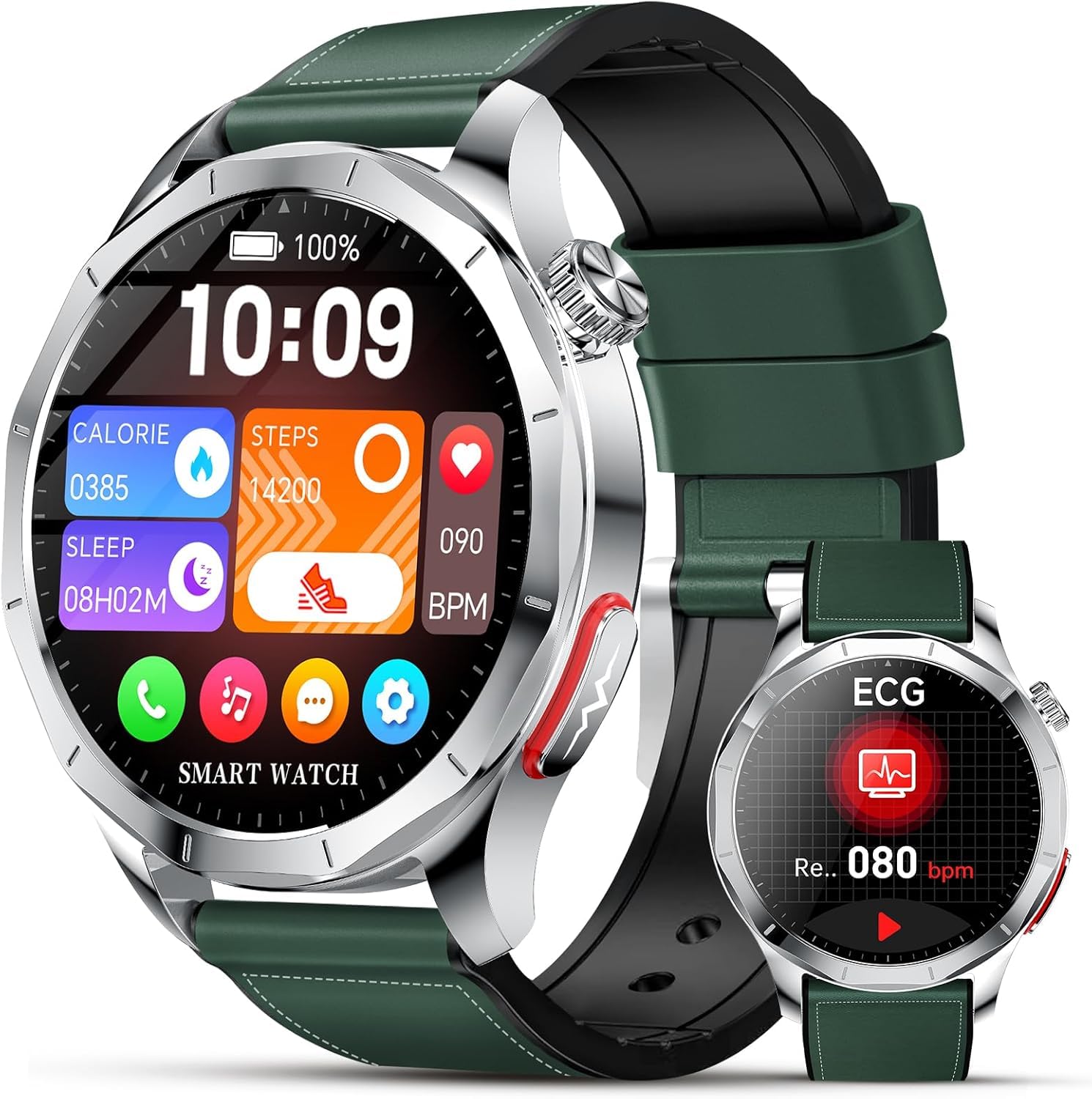
Figure 3.1: Lgnitek S1 Smartwatch. The watch features a round AMOLED display, a durable casing, and a comfortable strap. Buttons are typically located on the side for navigation and function access.
The Lgnitek S1 Smartwatch is equipped with a 1.43-inch AMOLED touchscreen display for clear visuals and intuitive interaction. It includes physical buttons on the side for power, menu access, and quick functions. The rear of the watch houses the charging contacts and health sensors for accurate data collection.
4. Setup
4.1 Charging the Smartwatch
- Connect the charging cable to a USB power adapter (not included) or a computer's USB port.
- Align the magnetic end of the charging cable with the charging contacts on the back of the smartwatch. The cable will snap into place.
- Ensure the watch screen indicates charging. A full charge typically takes approximately 2 hours.
4.2 App Installation and Pairing
- Scan the QR code provided in the manual or on the watch packaging, or search for the companion app (e.g., 'FitCloudPro' or similar, refer to packaging for exact name) in your smartphone's app store (iOS or Android).
- Install and open the app on your smartphone.
- Ensure Bluetooth is enabled on your smartphone.
- In the app, navigate to 'Device' or 'Add Device' and select your Lgnitek S1 Smartwatch from the list of available devices.
- Confirm the pairing request on both your smartphone and the smartwatch.
4.3 Initial Setup
After successful pairing, the app will guide you through setting up personal information such as age, height, weight, and gender. This data is crucial for accurate health and fitness tracking. You can also customize watch faces and notification preferences within the app.
5. Operating Instructions
5.1 Basic Navigation
- Swipe Up/Down: Access quick settings or notifications.
- Swipe Left/Right: Navigate through widgets like activity tracking, heart rate, weather, etc.
- Tap: Select an item or open an application.
- Press Side Button: Return to the home screen or access the app menu.
5.2 Making and Receiving Calls
Once connected via Bluetooth to your smartphone, the Lgnitek S1 allows you to make and receive calls directly from your wrist. Ensure the Bluetooth call function is enabled in the watch settings and the companion app.
- To Make a Call: Access the dial pad or contacts list on the watch, select a contact, or dial a number.
- To Receive a Call: When a call comes in, the watch will display the caller ID. Tap the green icon to answer or the red icon to reject.
5.3 Sports Modes
The smartwatch supports over 120 professional sports modes, including running, cycling, swimming, ball sports, and gym workouts. To start a workout:
- Navigate to the 'Workout' or 'Sports' app on your watch.
- Select your desired activity.
- Tap 'Start' to begin tracking. The watch will record duration, calories burned, heart rate, and other relevant metrics.
5.4 Health Monitoring
The Lgnitek S1 provides 24/7 monitoring for various health metrics:
- Heart Rate: Continuous heart rate tracking.
- Blood Oxygen Saturation (SpO2): Measures oxygen levels in your blood.
- Sleep Monitoring: Tracks sleep stages and quality.
- Stress Measurement: Monitors stress levels throughout the day.
- Body Temperature: Provides real-time temperature readings.
- ECG + HRV: Electrocardiogram and Heart Rate Variability measurements for advanced heart health insights.
- BMI: Body Mass Index analysis (requires manual input of height/weight in the app).
- Uric Acid and Blood Lipids: Advanced monitoring features (consult app for specific usage).
Note: This device is not a medical device. Health data is for reference only and should not be used for medical diagnosis or treatment.
5.5 Smart Notifications
Receive notifications for calls, messages, and app alerts directly on your wrist. Ensure notification permissions are granted in both your smartphone settings and the companion app.
5.6 AI Voice Assistant
Activate the intelligent voice assistant (AI) on your watch to perform tasks, ask questions, or control smart home devices (if compatible) using voice commands. Refer to the app for setup and compatible voice assistants.
5.7 SOS Emergency Call
The smartwatch includes a one-touch SOS emergency call feature. Configure emergency contacts in the companion app. In an emergency, pressing and holding a designated button (refer to app settings for configuration) will initiate a call or send an alert to your pre-set contacts.
6. Maintenance
6.1 Cleaning
Regularly clean your smartwatch and strap to prevent skin irritation and maintain device hygiene. Use a soft, lint-free cloth. If necessary, slightly dampen the cloth with water. Avoid using harsh chemicals or abrasive materials.
6.2 Water Resistance
The Lgnitek S1 Smartwatch is rated IP68 for water resistance. This means it is protected against dust ingress and can withstand immersion in water up to 1.5 meters for 30 minutes. It is suitable for daily use, hand washing, and light rain. However, it is not recommended for hot showers, saunas, or diving, as steam and high water pressure can compromise the seals.
6.3 Battery Care
To maximize battery life and performance:
- Avoid fully discharging the battery frequently.
- Charge the watch using the provided cable and a standard 5V/1A charger.
- Store the watch in a cool, dry place if not used for extended periods.
7. Troubleshooting
- Watch not turning on: Ensure the watch is fully charged. Connect it to the charger for at least 30 minutes.
- Unable to pair with smartphone: Make sure Bluetooth is enabled on your phone and the watch. Restart both devices and try pairing again. Ensure the companion app is installed and running.
- Inaccurate health data: Ensure the watch is worn snugly on your wrist, not too tight or too loose. Clean the sensors regularly.
- Notifications not received: Check notification permissions in your phone's settings for the companion app. Ensure the app is running in the background.
- Short battery life: Reduce screen brightness, disable unnecessary features like 'Always-On Display', and limit continuous health monitoring if not needed.
8. Specifications
| Feature | Specification |
|---|---|
| Model | S1 |
| Display Type | 1.43 Inches AMOLED |
| Resolution | 466 x 466 |
| Operating System | Android 5.0 (compatible) |
| Memory Storage Capacity | 128 MB |
| Connectivity | Bluetooth |
| Battery Capacity | 400 Milliamp Hours |
| Battery Average Life | 6 days (typical use) |
| Water Resistance | IP68 |
| Compatible Devices | Smartphone (iOS & Android) |
| Special Features | Bluetooth Calls, 120+ Sports Modes, 24/7 Health Monitoring (HR, SpO2, Sleep, Stress, Temp, ECG, HRV, BMI, Uric Acid, Blood Lipids), AI Voice Assistant, SOS Emergency Call, Always-On Display (AOD) |
9. Warranty and Support
Your Lgnitek S1 Smartwatch comes with a standard manufacturer's warranty. Please refer to the warranty card included in your package or visit the official Lgnitek website for detailed warranty terms and conditions. For technical support, troubleshooting assistance, or service inquiries, please contact Lgnitek customer support through the contact information provided on their official website or within the companion app.

