1. Product Overview
The Hagibis MC650 Mac mini M4 Hub is a versatile docking station designed to expand the connectivity and storage capabilities of your Mac mini M4 or M4 Pro. It integrates a 40Gbps M.2 SSD enclosure, multiple USB-C and USB-A ports, and SD/Micro SD card slots, all within a compact and dustproof design.
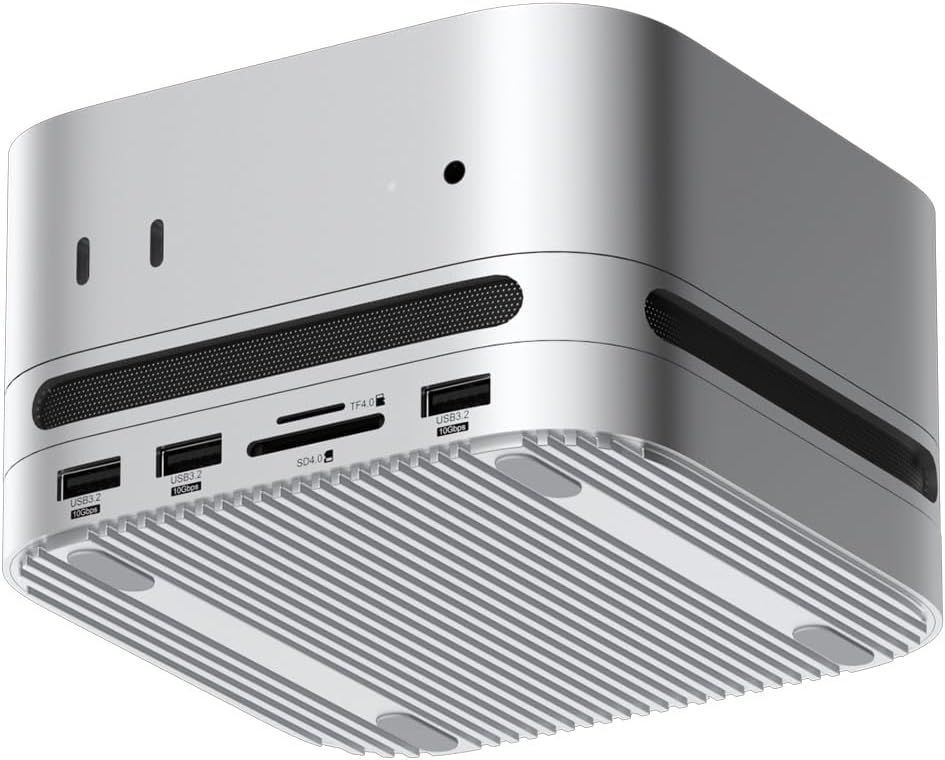
Figure 1: Hagibis MC650 Mac mini Hub, front-bottom view showing various ports and ventilation grilles.
2. Package Contents
Verify that all items listed below are included in your package. If any items are missing or damaged, please contact customer support.

Figure 2: Package Contents of the Hagibis MC650 Hub.
- Hagibis USB-C Docking Station (MC650)
- USB-C to USB-C Cables (x2)
- Screwdriver
- Screws
- Thermal Grease Pads (x2)
- User Manual (this document)
3. Setup Guide
3.1. SSD Installation
The Hagibis MC650 features an M.2 NVMe SSD enclosure for expanded storage. Follow these steps to install an SSD:
- Carefully remove the bottom cover of the docking station.
- Insert your M.2 NVMe SSD (compatible with 2230/2242/2260/2280 sizes and M/B&M Key types) into the designated slot.
- Secure the SSD with the provided screw.
- Apply the thermal grease pad onto the SSD for optimal heat dissipation.
- Reattach the bottom cover securely.

Figure 3: M.2 NVMe SSD Installation Steps and Compatibility.
Note: SSD is not included with the product. Ensure the SSD is correctly aligned before applying force.
3.2. Connecting to Mac mini
To utilize all features of the Hagibis MC650, connect both 'HOST SSD' and 'HOST HUB' ports to your Mac mini's Thunderbolt ports using the provided USB-C cables.
- Connect one USB-C cable from the 'HOST SSD' port on the rear of the docking station to a Thunderbolt port on your Mac mini. This enables the 40Gbps M.2 SSD enclosure.
- Connect the second USB-C cable from the 'HOST HUB' port on the rear of the docking station to another Thunderbolt port on your Mac mini. This activates the front USB3.2 ports and SD/TF card reader.
- Place your Mac mini directly on top of the Hagibis MC650 Hub for a seamless and integrated setup.
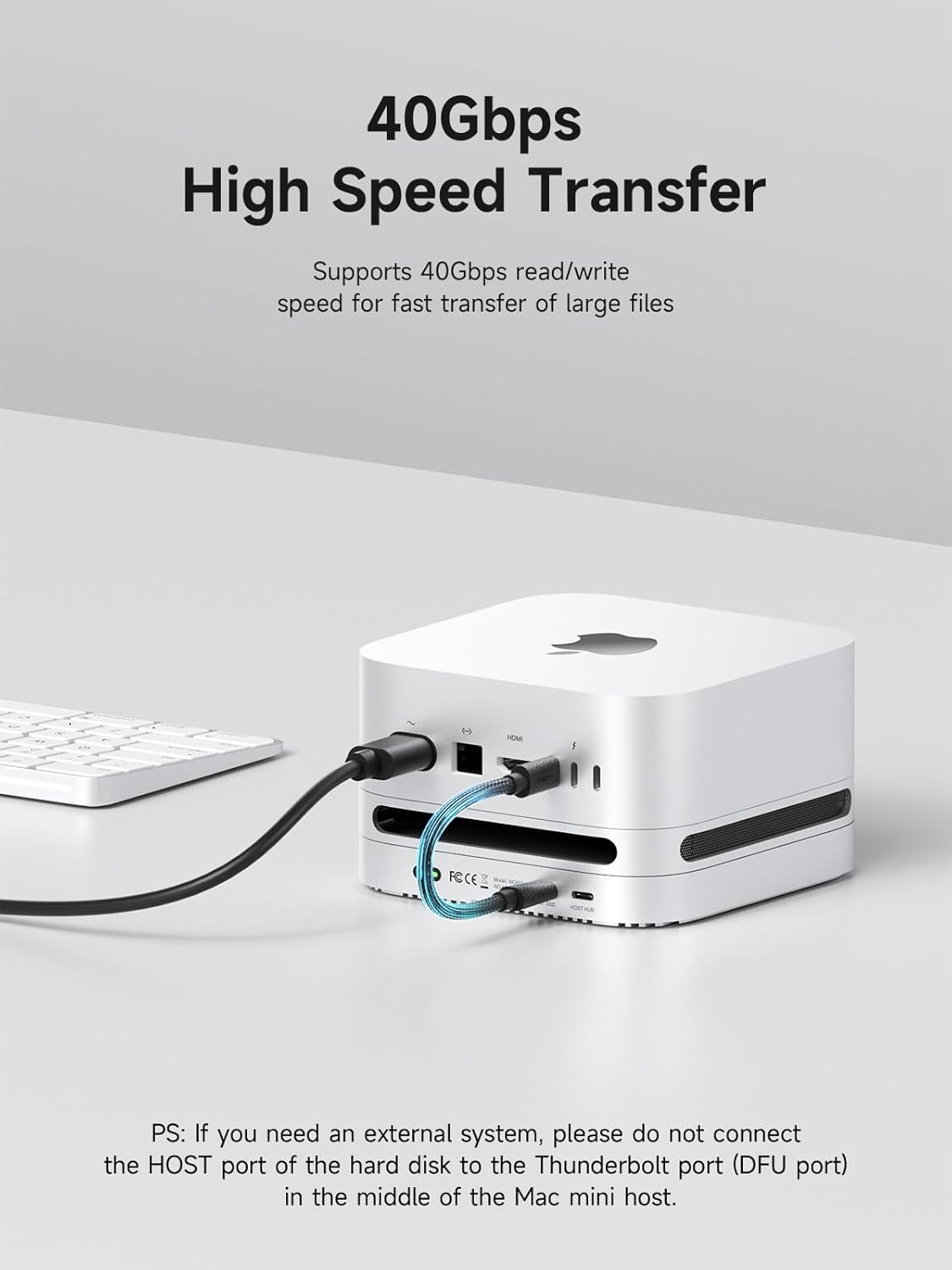
Figure 4: Connecting the Hagibis MC650 to your Mac mini.
Important: The two HOST functions operate independently. To access all ports and the SSD enclosure, both HOST ports must be connected to the Mac mini simultaneously.
3.3. Visual Setup Guide (Video)
For a visual demonstration of the unboxing, SSD installation, and connection process, please refer to the video below:
Video 1: Unboxing, SSD Installation, and Connection Guide for Hagibis MC650.
This video demonstrates the physical setup of the Hagibis MC650 Mac mini Hub, including opening the package, installing an M.2 SSD, and connecting the hub to a Mac mini.
4. Operating Instructions
4.1. Interface Overview and Indicator Lights
The Hagibis MC650 provides a range of ports for various peripherals and data transfer needs. The indicator light on the rear panel provides status information:
- White Light: Indicates operation in USB2 / USB3 mode.
- Green Light: Indicates operation in USB4 / Thunderbolt 3/4/5 mode.

Figure 5: Front and Rear Interfaces with Indicator Light Guide.
4.2. USB 3.2 Gen2 Ports (10Gbps)
The hub features two USB3.2 Gen2 ports on the front, offering data transfer speeds of up to 10Gbps. These ports are suitable for connecting high-speed peripherals such as external hard drives, SSDs, or other devices requiring fast data exchange.

Figure 6: Utilizing the USB 3.2 Gen2 10Gbps Ports.
4.3. SD/TF 4.0 Card Reader
The integrated SD4.0 and Micro SD4.0 card slots support UHS-II, providing theoretical transmission speeds of up to 312MB/s. This allows for rapid transfer of photos and videos from memory cards, ideal for photographers and videographers.

Figure 7: Using the SD/TF 4.0 Card Reader.
5. Maintenance
5.1. Dust Protection and Heat Dissipation
The Hagibis MC650 is designed with a dustproof filter net on the rear vent and a 0.8mm aperture dust filter at the air inlet to prevent dust accumulation inside the Mac mini. Silicone air strips are also installed in the air inlet and outlet areas to prevent hot air from flowing back, ensuring optimal cooling performance.

Figure 8: Dust Protection and Airflow Management.
5.2. Enhanced Heat Dissipation for SSD
The aluminum alloy body and finned heat dissipation plate (fins cover) are engineered to keep the installed M.2 SSD operating at low temperatures, reducing noise and ensuring stable performance even under heavy loads.

Figure 9: Fins Cover for SSD Heat Dissipation.
5.3. Anti-slip Stability
The bottom of the hub is equipped with silicone pads to provide anti-slip stability, protecting both the device and your desktop surface from scratches and accidental movement.

Figure 10: Silicone Bottom Pad for Stability.
5.4. Cleaning
To maintain optimal performance and appearance, regularly clean the exterior of the hub with a soft, dry cloth. For dust filters, gently brush away accumulated dust. Avoid using liquid cleaners or abrasive materials.
6. Troubleshooting
- SSD Not Recognized:
- Ensure the M.2 NVMe SSD is correctly seated and secured with the screw.
- Verify that the 'HOST SSD' USB-C cable is securely connected to both the hub and a Thunderbolt port on your Mac mini.
- Check if the SSD is properly formatted for macOS. You may need to use Disk Utility to initialize and format a new SSD.
- Front Ports (USB/SD) Not Functioning:
- Confirm that the 'HOST HUB' USB-C cable is securely connected to both the hub and a Thunderbolt port on your Mac mini.
- Try connecting the peripheral directly to your Mac mini to rule out device issues.
- Slow Data Transfer Speeds:
- Ensure you are using the provided high-speed USB-C cables.
- Verify that both 'HOST SSD' and 'HOST HUB' connections are made to Thunderbolt ports on your Mac mini for optimal performance.
- For SSD, ensure the Mac mini's Thunderbolt port supports the required bandwidth (40Gbps).
- General Connectivity Issues:
- Restart your Mac mini.
- Disconnect and reconnect all cables.
- Important Note: If you require an external system, avoid connecting the HOST port of the hard disk to the Thunderbolt port (DFU port) located in the middle of the Mac mini host. This specific port is intended for device firmware updates and may not function as a standard data port for external storage in all configurations.
7. Specifications
| Brand | Hagibis |
| Model Number | MC650 |
| Product Dimensions | 5 x 5 x 0.6 inches (127 x 127 x 15 mm) |
| Item Weight | 1.07 pounds (17.1 ounces) |
| Color | Silver |
| Hardware Interface | PCIE x 4 (for SSD) |
| Compatible Devices | Mac mini M4, Mac mini M4 Pro |
| Total USB Ports | 3 (2x USB3.2 Gen2 10Gbps, 1x USB2.0 480Mbps) |
| Number of Ports (Total) | 6 (2x USB3.2 Gen2, 1x USB2.0, 1x SD4.0, 1x Micro SD4.0, 1x 5V/3A Power) |
| SSD Compatibility | 2230/2242/2260/2280 M.2 NVMe SSD (up to 8TB) |
| SSD Speed | Up to 40Gbps |
| Card Reader Speed | SD4.0/Micro SD4.0 (UHS-II, up to 312MB/s) |
| Power Supply Port | 5V/3A |
| Manufacturer | Shanghai Xinxie Industrial Co., Ltd. |
8. Warranty and Support
For detailed warranty information, please refer to the official Hagibis website or contact your retailer. Hagibis offers various protection plans for extended coverage, which can be found on the product's purchase page.
For technical support, product inquiries, or further assistance, please visit the official Hagibis store or contact their customer service:
- Brand: Hagibis
- Online Store: Hagibis Amazon Store


