
1. Introduction
Thank you for choosing the ANRAN Q04 Solar Security Camera and ANRAN F2M3 Solar Door Light Security Camera. This manual provides detailed instructions for the setup, operation, and maintenance of your new security devices. Please read this manual thoroughly before installation and retain it for future reference.
These devices are designed to provide reliable outdoor surveillance with the convenience of solar power and wireless connectivity.
2. Product Overview
The ANRAN Q04 and F2M3 are advanced solar-powered security solutions. The Q04 is a pan-tilt camera, while the F2M3 integrates a security camera with a motion-activated light.

Image 2.1: ANRAN Q04 Solar Security Camera (left) and ANRAN F2M3 Solar Door Light Security Camera (right).
2.1 Key Features
- Solar Power: Both cameras feature integrated solar panels for continuous charging. The F2M3 includes a 3W solar panel and a 5000 mAh battery.
- Wireless Connectivity: Connects to 2.4GHz WiFi for remote access and control.
- 2K Resolution: Provides clear 3MP video footage day and night.
- Two-Way Audio: Built-in microphone and speaker for real-time communication.
- ANRAN Q04 Specifics:
- 355° Pan & 90° Tilt for wide area surveillance.
- Three Night Vision Modes: Smart, Color, and Infrared.
- ANRAN F2M3 Specifics:
- Integrated Wall Light: 200-lumen brightness.
- PIR Detection & Motion Activated Light: Light turns on when motion is detected.
- 70db Siren for deterrence.
3. Setup and Installation
Both ANRAN cameras are designed for simple and easy installation.

Image 3.1: The ANRAN Q04 camera features simple installation, requiring no separate solar panel setup.

Image 3.2: The ANRAN F2M3 camera is easily mounted to an exterior wall.
3.1 Mounting Location
- Choose a location with ample direct sunlight exposure for optimal solar charging.
- Ensure the camera is within range of your 2.4GHz WiFi network. Note: 5GHz WiFi is not supported.
- Mount the camera at a height that provides the desired viewing angle and security coverage.
3.2 Installation Steps
- Charge the Battery: Before initial use, fully charge the camera's internal battery using a USB power adapter (not included) for several hours.
- Download the ANRAN App: Search for "ANRAN" in your mobile app store (iOS or Android) and download the application.
- Create an Account: Open the ANRAN app and follow the on-screen instructions to create a new user account.
- Add Device: In the app, tap the "+" icon to add a new device. Select your camera model (Q04 or F2M3) and follow the in-app pairing instructions. This typically involves scanning a QR code on the camera or connecting to a temporary WiFi hotspot created by the camera.
- Mount the Camera: Use the provided mounting bracket and screws to securely attach the camera to your chosen outdoor location. Ensure the solar panel is positioned to receive maximum sunlight.
4. Operating Instructions
Control and monitor your ANRAN cameras using the ANRAN mobile application.
4.1 Live View and Recording
- Open the ANRAN app and select your camera to view the live feed.
- Record video or capture screenshots directly from the live view interface.
4.2 Pan and Tilt (ANRAN Q04 Only)

Image 4.1: The ANRAN Q04 camera offers 355° pan and 90° tilt for comprehensive area coverage.
From the live view of your Q04 camera, use the on-screen controls to remotely adjust the camera's viewing angle (355° horizontal pan, 90° vertical tilt).
4.3 Night Vision Modes
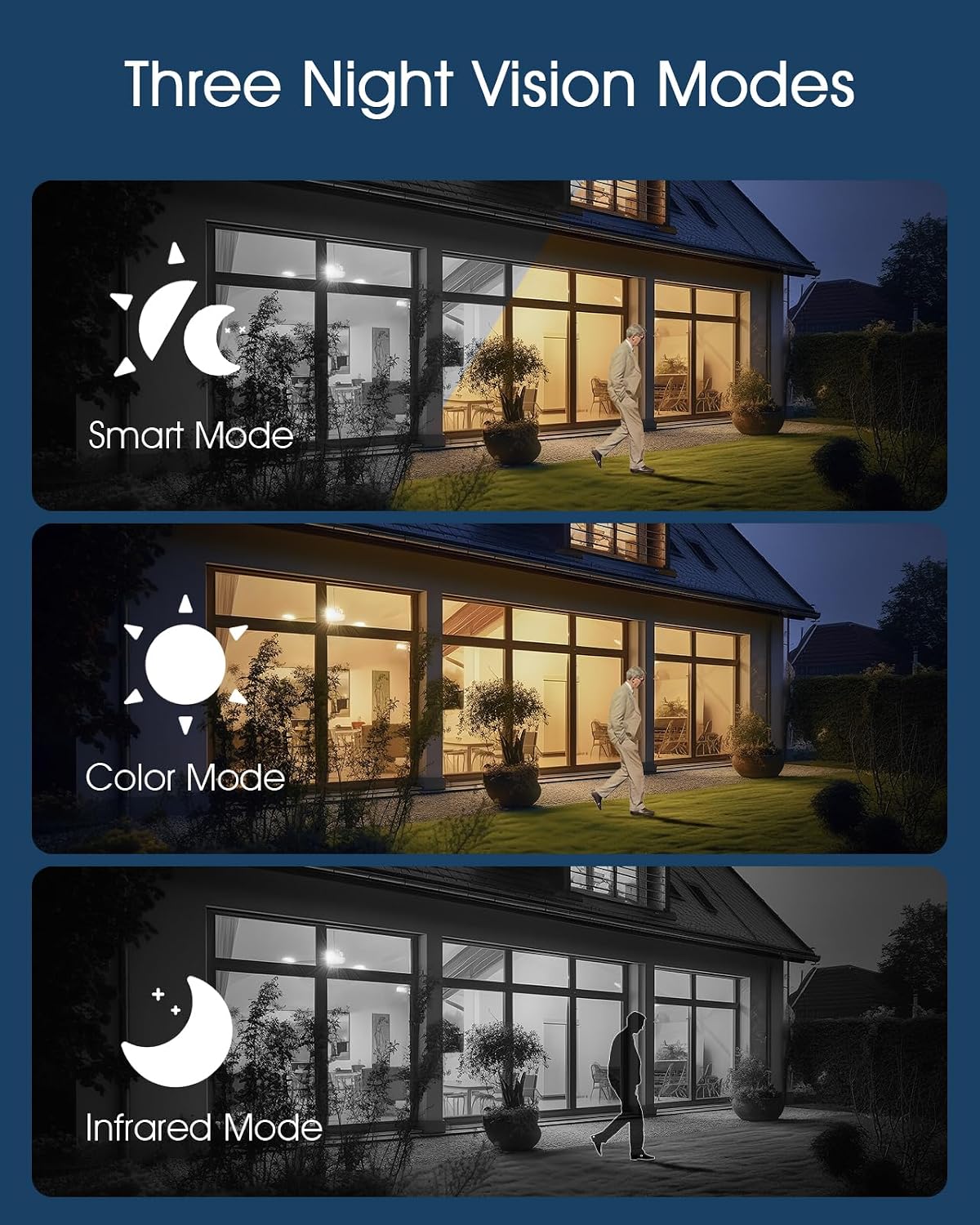
Image 4.2: The camera supports Smart, Color, and Infrared night vision modes for various low-light conditions.
The ANRAN Q04 camera offers three night vision modes, configurable in the app settings:
- Smart Mode: Automatically switches between infrared and color night vision based on detected motion or light conditions.
- Color Mode: Utilizes built-in spotlights to provide full-color video in low-light environments.
- Infrared Mode: Uses infrared LEDs for black and white video in complete darkness.
4.4 Two-Way Audio

Image 4.3: Engage in real-time two-way audio communication through the ANRAN app.
Use the microphone icon in the app to speak through the camera's speaker, and listen to audio from the camera's microphone.
4.5 Motion Detection and Alerts

Image 4.4: The F2M3 camera features PIR detection, motion-activated light, siren, and sends notifications.
Both cameras feature motion detection. The F2M3 camera also includes a PIR sensor for more accurate human detection and a motion-activated light and siren.
- Configure motion detection sensitivity and alert preferences in the ANRAN app.
- Receive push notifications on your smartphone when motion is detected.
- For the F2M3, the integrated light will activate upon motion detection, and the siren can be triggered manually or automatically via app settings.
5. Maintenance
Proper maintenance ensures optimal performance and longevity of your ANRAN security cameras.
5.1 Solar Panel Efficiency

Image 5.1: Advanced solar technology ensures efficient charging for continuous security.
- Regularly inspect the solar panel for dirt, dust, or debris.
- Clean the solar panel surface gently with a soft, damp cloth to ensure maximum sunlight absorption. Avoid abrasive cleaners.
- Ensure no obstructions (e.g., tree branches, leaves) are blocking sunlight from reaching the panel.
5.2 Battery Management
- The cameras are designed for continuous operation through solar charging. However, in prolonged periods of low sunlight, the battery level may decrease.
- Monitor the battery status via the ANRAN app. If the battery level is consistently low, consider temporarily repositioning the camera to a sunnier spot or manually charging it via USB.
6. Troubleshooting
If you encounter issues with your ANRAN cameras, refer to the following common solutions:
- Camera Not Connecting to WiFi:
- Ensure your WiFi network is 2.4GHz.
- Check that the camera is within range of your WiFi router.
- Verify the WiFi password entered in the app is correct.
- Restart your router and the camera.
- Poor Video Quality:
- Check your internet connection speed.
- Ensure the camera lens is clean and free from smudges or dirt.
- Battery Not Charging:
- Verify the solar panel is receiving direct sunlight for several hours daily.
- Clean the solar panel surface.
- Ensure the ambient temperature is within the operating range for battery charging.
- Motion Detection Not Working:
- Check motion detection settings in the ANRAN app (sensitivity, detection zones).
- Ensure there are no physical obstructions blocking the camera's view or the PIR sensor (F2M3).
7. Specifications
| Feature | Specification |
|---|---|
| Model | ANRAN Q04, ANRAN F2M3 |
| Resolution | 2K (3MP) |
| Connectivity | 2.4GHz WiFi (IEEE 802.11b/g/n) |
| Power Source | Integrated Solar Panel, Rechargeable Battery |
| F2M3 Solar Panel | 3W |
| F2M3 Battery Capacity | 5000 mAh |
| Q04 Pan/Tilt Range | 355° Pan, 90° Tilt |
| Night Vision | Infrared, Color, Smart Modes |
| Audio | Two-Way Audio |
| F2M3 Light Brightness | 200 Lumens |
| F2M3 Siren | 70db |
| ASIN | B0FDW9C9CK |
| Date First Available | April 11, 2025 |
8. Warranty and Support
ANRAN products are designed for reliability and performance. For warranty information, please refer to the specific terms provided at the time of purchase or visit the official ANRAN website.
For technical support, troubleshooting assistance, or any questions regarding your ANRAN Q04 or F2M3 cameras, please contact ANRAN customer service through the ANRAN app or the official ANRAN support channels. You can often find contact information on the ANRAN website or within the app's 'Help' or 'About Us' sections.
Please have your product model and purchase details ready when contacting support.